Jetpack: Post count discrepancy for a Business WordPress.com site
The number of posts in /wp-admin and in wordpress.com/posts is not the same.
Ticket: 697875-zen
Site: 122212242
Previously posted in 1033-gh-jpop-issues
 davoraltman
All 17 comments
Tested and confirmed using the following steps:
- Go to https://wordpress.com/ and select a Jetpack Site.
- Note the number of drafts.
- Click the Add button next to Blog Posts.
- Add a title and some body text and save changes.
- Click the back arrow at top left.
- Check the count next to Drafts to see if the number incremented by one.
Result: the count does not update after adding a new draft.
Video: 2m17s
Tested with WPDesktop 3.1.0-beta2 and WordPress.com Business Plan with plugins enabled and WordPress.com for a Jetpack site only hosted at WP Engine running WP 5.0-alpha-42199 and Jetpack 5.6-beta-16346-b0f1aa8-master and PHP 5.6.31-4.
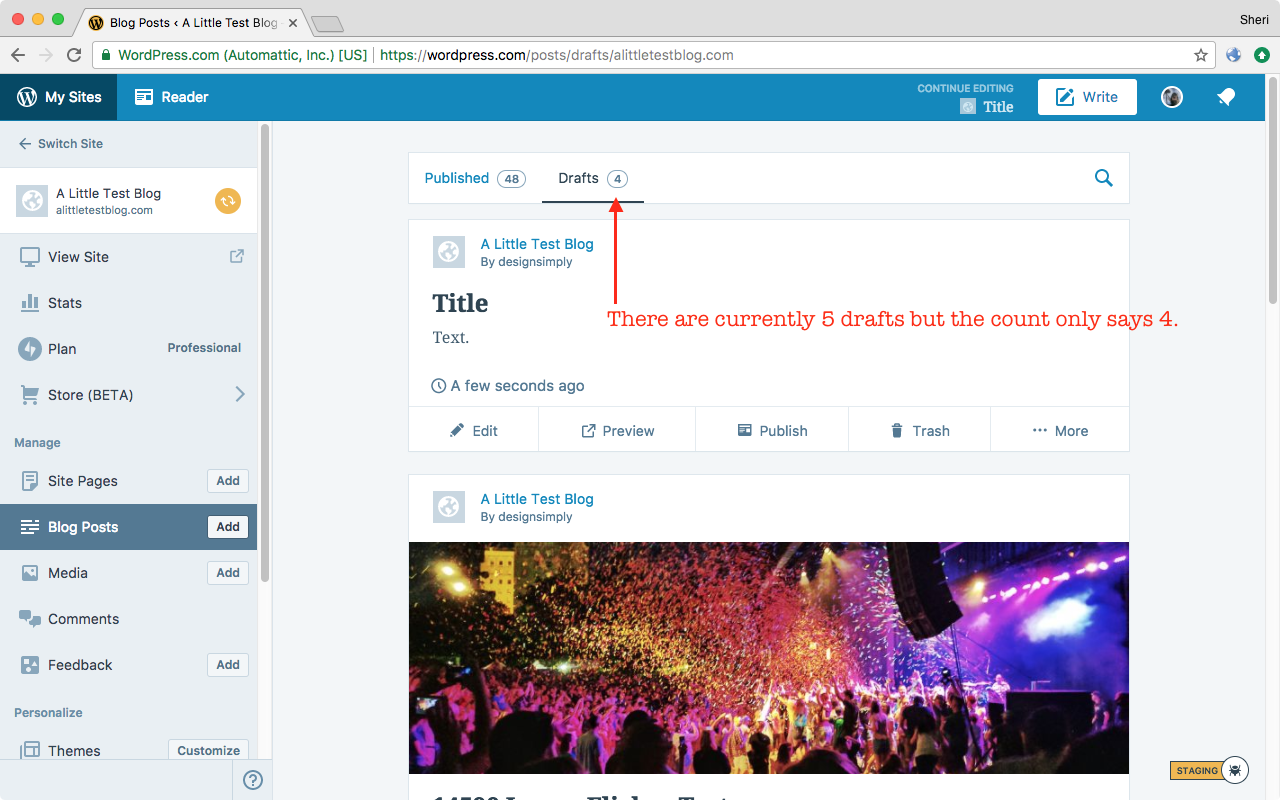
Seen at https://wordpress.com/posts/drafts/alittletestblog.com using Firefox 57.0 on Mac OS X 10.12.6.
 designsimply
on 17 Nov 2017
designsimply
on 17 Nov 2017
This issue has been marked as stale. This happened because:
- It has been inactive in the past 6 months.
- It hasn’t been labeled `[Pri] Blocker`, `[Pri] High`.
No further action is needed. But it's worth checking if this ticket has clear reproduction steps and it is still reproducible. Feel free to close this issue if you think it's not valid anymore — if you do, please add a brief explanation.
![stale[bot] picture](https://avatars.githubusercontent.com/in/1724?v=4&s=40) stale[bot]
on 30 Jun 2018
stale[bot]
on 30 Jun 2018
Another case here:
Ticket: 1676124-zen
Site: 144976815
 brezocordero
on 8 Jan 2019
brezocordero
on 8 Jan 2019
Also possibly related to this issue here: 2987-gh-jpop-issues
This happens when the shadow site has the incorrect values and we have seen this happening very often when rewinding a site, as there's a value miss match for the post count. We try to Jetpack sync first but most of times this does not solve the problem.
 iamgabrielma
on 9 Jan 2019
iamgabrielma
on 9 Jan 2019
Also p9F6qB-1LM-p2
iamgabrielma
on 9 Jan 2019
New one on p9F6qB-2eX-p2 , Calypso shows 0 while wp-admin clearly has posts.
iamgabrielma
on 12 Jan 2019
Calypso fetches post counts from WPCOM via https://public-api.wordpress.com/wpcom/v2/sites/$site_id/post-counts/post endpoint which is handled by WPCOM_JSON_API_GET_Post_Counts_V1_1_Endpoint class which queries Jetpack shadow tables, meaning it relies on Jetpack Sync to display the latest stats.
Calypso also seems to update the count itself directly after certain user actions like delete. This is why, after a post is deleted, post counts are immediately updated. Updated post count is not fetched in this case. When user action involves more complex flows, like creating a new draft post, direct update cannot be made so Calypso updates by fetching from WPCOM.
Most of the time, current mechanism displays correct value. But Jetpack Sync does not seem to cover all possible flows. wp post delete 123 CLI command, for example, does trigger Jetpack Sync and Calypso displays the correct stats after a second or two. But when posts are changed using uncommon commands like wp site empty, Jetpack Sync gets confused and shadow tables get out of sync with remote site tables. I think this is why deleted posts sometimes get displayed on Calypso.
Long term fix is to find and address events Jetpack Sync overlooks, if possible, or improve how Jetpack detects changes. Short term fix, limited to this issue only, is to call the remote server instead of relying on shadow tables, if not every time then at least regularly. I'll need to discuss with Calypso and Jetpack teams to see best way to resolve this issue.
 donpark
on 11 Mar 2019
donpark
on 11 Mar 2019
As to why the list of posts on Calypso appears to match the remote site while post counts doesn't, the list is built by querying shadow tables then fetch each post on the remote site to verify, excluding if post does not exist. If there are N posts, N requests to server-side is made. Unless I missed something, this will perform very poorly on large sites. When Jetpack connection is not working, these checks will fail.
donpark
on 12 Mar 2019
Given that:
- post counts takes only a single query to build and
- we're already pounding the remote site for each post on the Calypso posts page where
- post counts are also displayed,
I think it'll be better to forego using the shadow tables, at least for this use-case, and query the remote site directly, adding new Jetpack API endpoints if they're missing.
Thoughts? @gwwar @jhnstn ^^
donpark
on 12 Mar 2019
p1HpG7-4QY-p2 Yes, shadow site data is not reliable enough for API use.
 gwwar
on 12 Mar 2019
gwwar
on 12 Mar 2019
When the time is right, perhaps we should widen the discussion to re-assess the need for the shadow tables. Well, re-re-assess that is given your post already 1+ year old. Egad.
donpark
on 12 Mar 2019
Oh. If shadow tables survive the re-re-visit, we can play switchroo on them.
donpark
on 13 Mar 2019
D25544-code patches post-counts WPCOM v2 API call to fetch true post counts from remote Jetpack/Atomic site. Shadow site tables are used as backup in case network or JP connection issues prevent true post counts from being fetched.
~https://github.com/Automattic/wp-calypso/pull/31446 changes Calypso to use the v1.1 API instead of v2 API which only uses shadow sites.~ Calypso no longer needs to be patched.
donpark
on 13 Mar 2019
D25544-code will be deferred in favor of broader fix recommended in p9o2xV-hM-p2.
donpark
on 15 Mar 2019
I think we need following two features.
- Remove expired (ghost?) posts
- Reset shadow tables
First tool will compare posts on remote site against posts in shadow tables to find what shouldn't be there and _removes_ them. This is what I'm working on now.
Second tool will replace shadow tables with empty blog tables and trigger full sync.
donpark
on 21 Mar 2019
Remove expired (ghost?) posts
Take a look at wp-content/mu-plugins/jetpack/sync/class.jetpack-sync-validator.php on wpcom!
Reset shadow tables
There's an open issue for this https://github.com/Automattic/jpop-issues/issues/3338, I think @dereksmart team is already working on it
 lezama
on 22 Mar 2019
lezama
on 22 Mar 2019
Closing this issue as it's site specific and general solution for the underlying problem is being addressed in https://github.com/Automattic/jpop-issues/issues/3338
donpark
on 28 Mar 2019
Related issues
 beaulebens
·
3Comments
beaulebens
·
3Comments
 Viper007Bond
·
3Comments
Viper007Bond
·
3Comments
 tyxla
·
3Comments
tyxla
·
3Comments
 jeherve
·
3Comments
jeherve
·
3Comments
jeherve
·
3Comments
jeherve
·
3Comments
Most helpful comment
Also possibly related to this issue here: 2987-gh-jpop-issues
This happens when the shadow site has the incorrect values and we have seen this happening very often when rewinding a site, as there's a value miss match for the post count. We try to Jetpack sync first but most of times this does not solve the problem.