Jetpack: Network Activate: Notice looks out of place
After network activating Jetpack today, I saw this notice:

It seems a bit out of place since the text is larger than the notice below it.
Also, what if I don't want the individual site admins to manage their Jetpack connections? This can be handled in Jetpack > Settings from Network Admin, but should we let admins know where to override that?
To repro:
- Create a multisite
- Install Jetpack in Network Admin
- Network activate
 ebinnion
All 11 comments
Similarly, this is the notice that displays when connecting a site in Jetpack > Sites in Network Admin:

ebinnion
on 15 Aug 2016
Similarly:

Visible from the dashboard of a network site, but not the primary.
 MichaelArestad
on 28 Sep 2016
MichaelArestad
on 28 Sep 2016
Related: #3877
 jeherve
on 16 Nov 2016
jeherve
on 16 Nov 2016
I think really the solution here is to reuse the visuals/components we show for single sites, but with a different goal. Instead of encouraging immediate connection of the site, we should encourage individual connections. Probably something similar in design to the JITM banners we have been using, but with different content.
We also should make sure that _every_ notice from Jetpack follows the styles of notices or banners from Calypso.
I think this is going to require two or three PRs to address. One or two for styling fixes and one for the copy update (the first screenshot). I'll follow up with mockups shortly.
MichaelArestad
on 9 Mar 2018
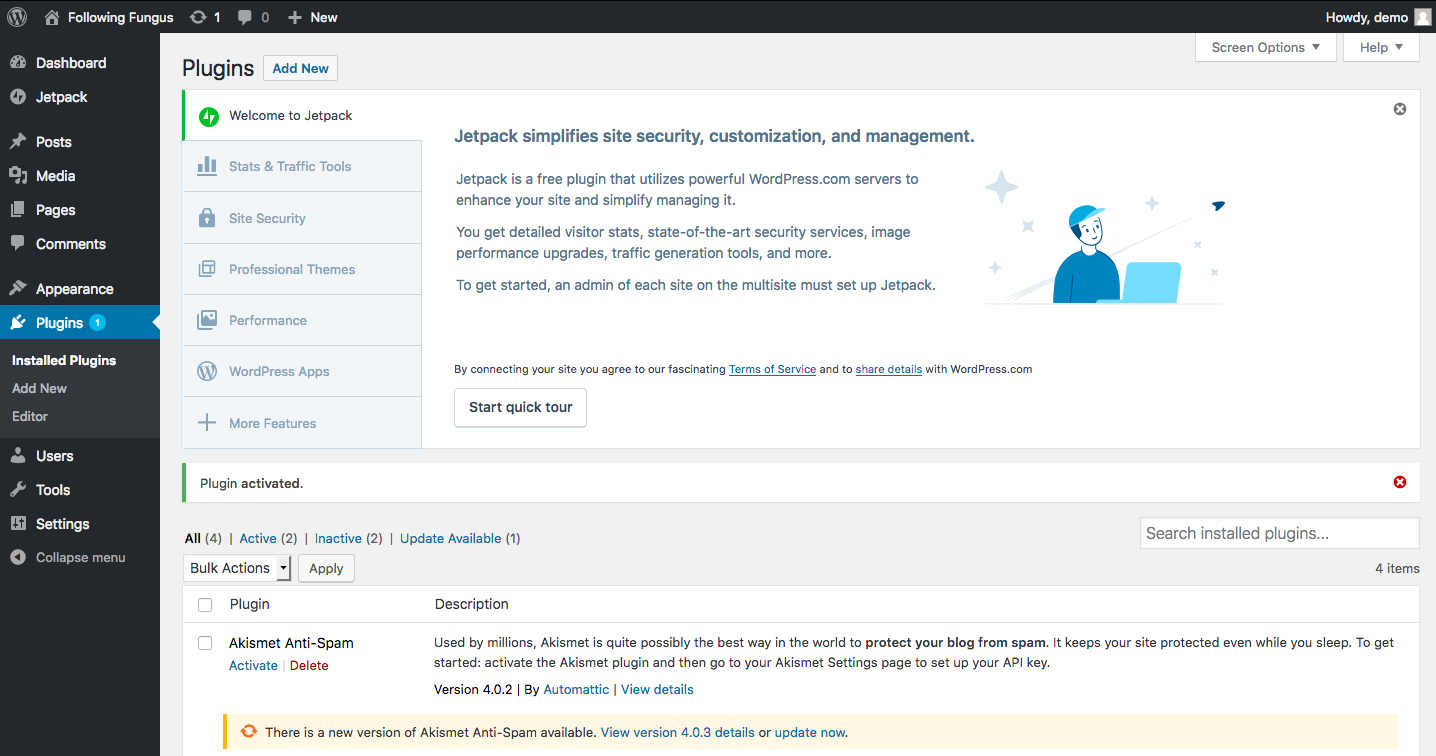
The current view of the Jetpack page on the network admin also needs to change. It looks like this:

MichaelArestad
on 9 Mar 2018
I propose we reuse this thing @jeffgolenski made and @joanrho finessed, but with copy designed for multisite users. On individual sites, it would be the normal one, but on the network admin and on the Jetpack page, it would look like this:
MichaelArestad
on 9 Mar 2018
@MichaelArestad how come that banner doesn't have a 'set up' button in it? Did you remove it from that screenshot or is there some other circumstance happening?
Since we would have to modify the copy to use that for multisite users we probably want to simplify it a bit, perhaps ditch the tabs on the left and link out to more info on jetpack.com if need be.
 rickybanister
on 21 Mar 2018
rickybanister
on 21 Mar 2018
@MichaelArestad how come that banner doesn't have a 'set up' button in it? Did you remove it from that screenshot or is there some other circumstance happening?
@rickybanister There is no set up button because this is the view of the Network Admin. It isn't a site as much as an admin panel. Setup can only happen on the Network sites themselves.
In the copy there's a bit of an explanation as well:
To get started, an admin of each site on the multisite network must set up Jetpack.
MichaelArestad
on 21 Mar 2018
So it already exists in the dashboard of the network's main site and you're simply proposing that we use it in the network admin as well after the plugin has been network activated, is that accurate?
rickybanister
on 21 Mar 2018
So it already exists in the dashboard of the network's main site and you're simply proposing that we use it in the network admin as well after the plugin has been network activated, is that accurate?
That is accurate.
MichaelArestad
on 21 Mar 2018
The PR addressing this has been closed: https://github.com/Automattic/jetpack/pull/9121#issuecomment-484281968
Probably worth closing this issue as well.
 crunnells
on 29 Jun 2019
crunnells
on 29 Jun 2019
Related issues
 NicktheGeek
·
3Comments
jeherve
·
3Comments
NicktheGeek
·
3Comments
jeherve
·
3Comments
 Viper007Bond
·
3Comments
Viper007Bond
·
3Comments
 kevinlisota
·
3Comments
kevinlisota
·
3Comments
 htdat
·
3Comments
htdat
·
3Comments
Most helpful comment
Similarly:
Visible from the dashboard of a network site, but not the primary.