Jetbrainsmono: Curly braces don’t align at certain font sizes in PyCharm
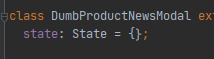
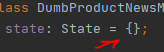
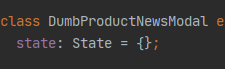
When using {} in PyCharm, the curly braces don’t align at sizes 10-15. They always seem a little misaligned after that, but it is much better.
 davidskeck
All 17 comments
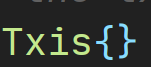
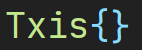
Agreed.
 latifrons
on 16 Jan 2020
latifrons
on 16 Jan 2020
Same in WebStorm. Size 13
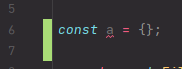
 artem1458
on 16 Jan 2020
artem1458
on 16 Jan 2020
Also happens on Jetbrains Rider 2019.3.1
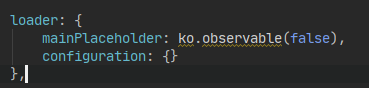
Font size: 14
Line spacing: 1.0
 svenbit
on 16 Jan 2020
svenbit
on 16 Jan 2020
WS-193.5662.54
Font sizes: 12, 13, 14
Line spacing: 1.2
 DominikPalo
on 16 Jan 2020
DominikPalo
on 16 Jan 2020
Hi, it's a bug of the v 0.23 of the JetBrains Mono. Unfortunately, the bundled fonts is always have priority when IDE decided which to use. We are working on correcting this behaviour. This problem will be solved when v 1.0 will be bundled.
You can try to fix it for now by switching to grayscale _antialiasing_ in Settings → Appearance
 philippnurullin
on 16 Jan 2020
philippnurullin
on 16 Jan 2020
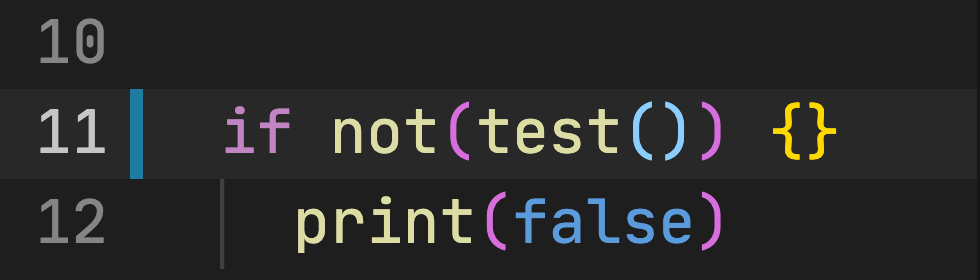
I don't see the misalignment on VS Code, XCode, IntelliJ, and TextEdit on my Mac.
 pakLebah
on 17 Jan 2020
pakLebah
on 17 Jan 2020
Likely a slight misalignment between brace outlines. A custom CVT would also help lock these together.
 aaronbell
on 17 Jan 2020
aaronbell
on 17 Jan 2020
This problem will be solved when v 1.0 will be bundled.
Any ETA on v1 bundle?
 Renerick
on 17 Jan 2020
Renerick
on 17 Jan 2020
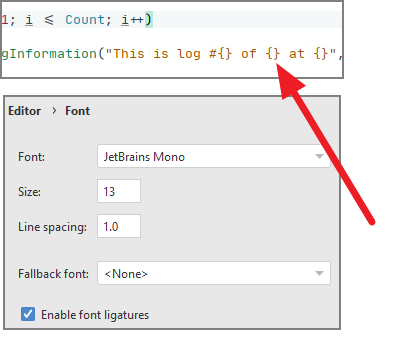
Seems that this problem is still present in v1.0.0 bundle, see the following screenshot from JetBrains Rider IDE:
 gimmi
on 20 Jan 2020
gimmi
on 20 Jan 2020
Workaround found in #49 - remove bundled font and install latest version from the site systemwide
Renerick
on 20 Jan 2020
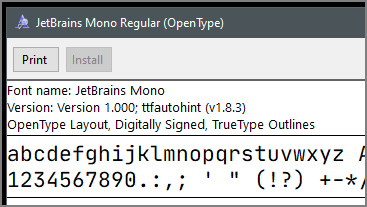
I am using the font downloaded from https://www.jetbrains.com/lp/mono/ but the issue is still there.
Here is the reported version:
gimmi
on 20 Jan 2020
I did the same thing as @gimmi and the bracers are still mis-aligned.
 hntd187
on 20 Jan 2020
hntd187
on 20 Jan 2020
Can confirm this is... a bit disturbing :)
Using latest IntelliJ Idea (2019.3.2) on Windows (didn't try downloading the font separately, but it doesn't seem to be making any difference anyway).
 jtouati-keyyo
on 22 Jan 2020
jtouati-keyyo
on 22 Jan 2020
a workaround is to use the medium variant of the font. (using phpstorm + windows 10 1080p)
 dennis-f
on 4 Feb 2020
dennis-f
on 4 Feb 2020
@gimmi Did you properly removed the bundled fonts?
The files can be found in:
Win
IDEA\jbr\lib\fonts- If you using Toolbox
C:\Users\ username\AppData\Local\JetBrains\Toolbox\apps\CLion\ch-0\193.6015.37\jbr\lib\fonts\
Mac
IntelliJ\ IDEA.app/Contents/jbr/Contents/Home/lib/fonts/
And it's important to restart.
philippnurullin
on 5 Feb 2020
@philippnurullin It worked!
I'm using Rider, so I removed the JetBrains fonts from
C:\Program Files\JetBrains\JetBrains Rider 2019.3.1\jbr\lib\fonts
gimmi
on 5 Feb 2020
This issue is fixed in the latest version of PyCharm. Thank you!
davidskeck
on 7 Feb 2020
Related issues
 CreamyCookie
·
3Comments
CreamyCookie
·
3Comments
 khasbilegt
·
3Comments
khasbilegt
·
3Comments
 thlinard
·
6Comments
thlinard
·
6Comments
 mehmandarov
·
6Comments
mehmandarov
·
6Comments
 pohlium
·
3Comments
pohlium
·
3Comments
Most helpful comment
Same in WebStorm. Size 13
