Jest-puppeteer: Unknown option "setupFilesAfterEnv" error when running my test file
Hey
Im using jest-puppeteer (version 4.1.0). when running my tests i got that alert:
Deprecation Warning:
"setupTestFrameworkScriptFile" was replaced by configuration "setupFilesAfterEnv", which supports multiple paths.
Please update your configuration.
but when i replace "setupTestFrameworkScriptFile" with: "setupFilesAfterEnv" i get this error:
Unknown option "setupFilesAfterEnv" with value "
This is probably a typing mistake. Fixing it will remove this message.
this is my jest.config.js file content:
module.exports = {
  preset: 'jest-puppeteer',
  globalTeardown: './teardown.js',
  reporters: [
    'default',
    './reporters/slack',
  ],
  setupFilesAfterEnv: ['<rootDir>/reporters/screenshot.js'],
};
what am i doing wrong here? (probably something stupid that im missing)
Thanks
 galtubi91
All 14 comments
hi @galtubi91
Could you please give us a demo to check this?
 xiaoyuhen
on 28 Mar 2019
xiaoyuhen
on 28 Mar 2019
I guess reporters dir is located in your project folder. If yes, try relative path:
setupFilesAfterEnv: ['./reporters/screenshot.js'],
 lukaszfiszer
on 1 Apr 2019
lukaszfiszer
on 1 Apr 2019
Hey @lukaszfiszer and @xiaoyuhen
thanks for your replies!
@lukaszfiszer, i tried that and it still throws that warning.
@xiaoyuhen what kind of demo do you need?
this what my project looks like:
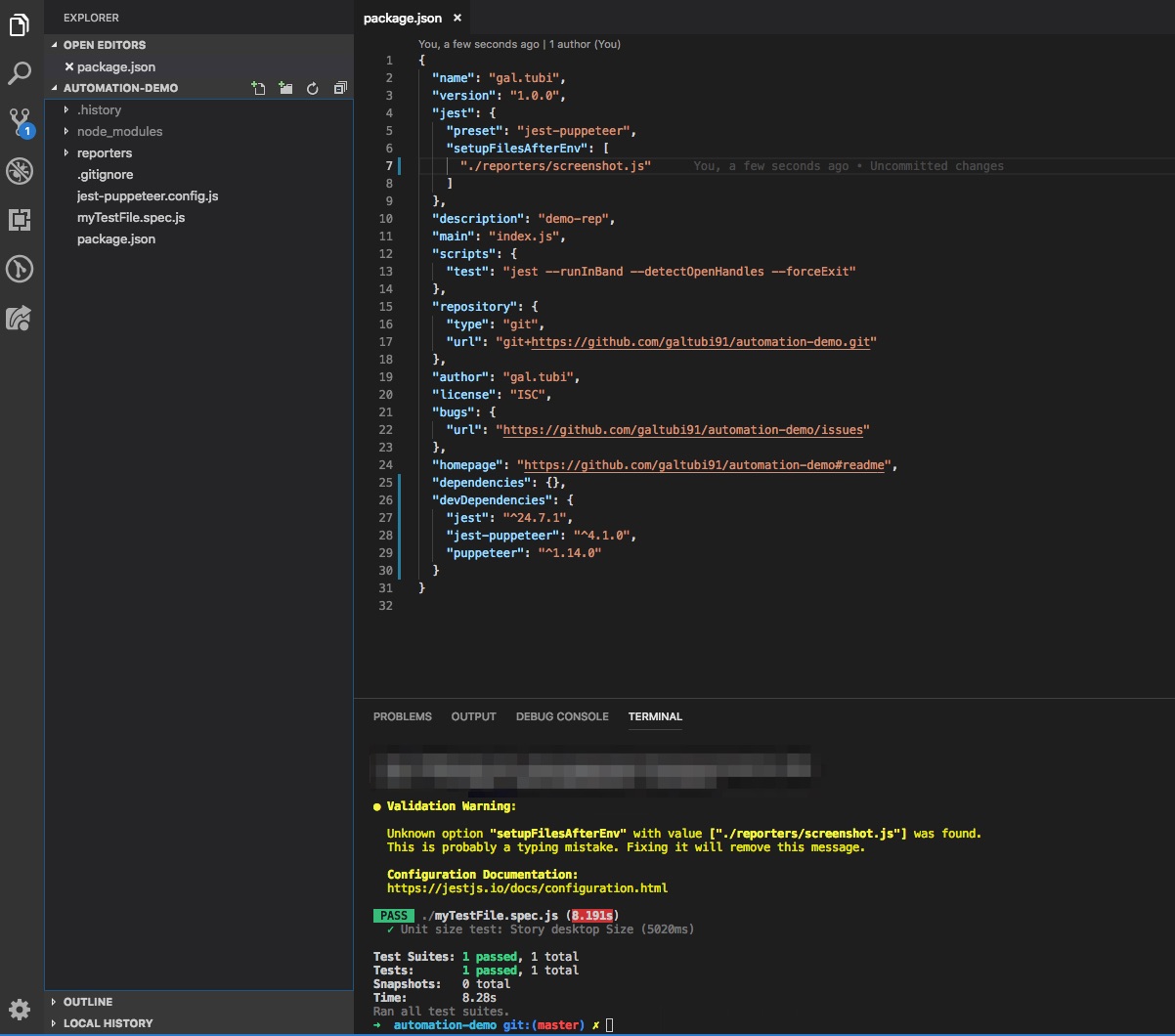
what more information can i provide you?
Thanks
galtubi91
on 4 Apr 2019
I had a similar issue that I also wasn't able to resolve.
```Validation Warning:
Unknown option "setupFilesAfterEnv" with value ["./test/jest.timeoutSetup.js"] was found.
This is probably a typing mistake. Fixing it will remove this message. ```
 Bhavikpatel576
on 4 Apr 2019
Bhavikpatel576
on 4 Apr 2019
hi @galtubi91
this PR works well https://github.com/galtubi91/automation-demo/pull/1
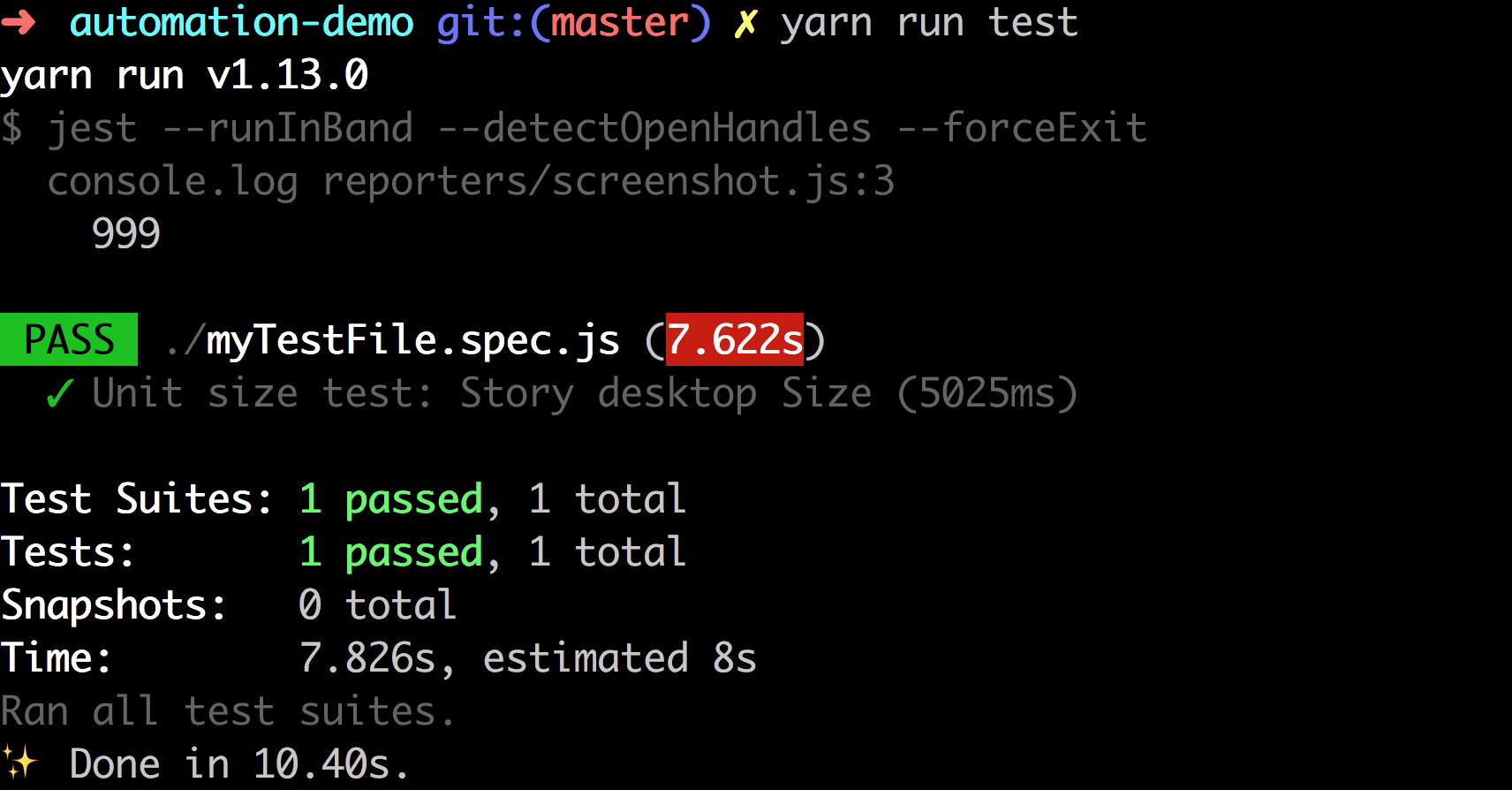
Maybe your screenshot.js is wrong,I dont know.
You can push your code on automation-demo,so I can know what happend.
xiaoyuhen
on 6 Apr 2019
hi @Bhavikpatel576
Could you create a demo for us to check? If its possible.
xiaoyuhen
on 6 Apr 2019
@xiaoyuhen wrong @ mention?
 backbone87
on 6 Apr 2019
backbone87
on 6 Apr 2019
@backbone87
I am very sorry to bother you, made a mistake.
xiaoyuhen
on 6 Apr 2019
Hey @xiaoyuhen
i pushed my changes. about the screenshot.js file, i don't think its related to its content because jest doesn't even run it because my console log at the top of the file isn't printed .
https://github.com/galtubi91/automation-demo
thanks for your help man
galtubi91
on 7 Apr 2019
Unknown configuration option errors are usually related to version mismatch. Reconciling your version with the minimal jest version that supports the unknown configuration will be an advisable starting point.
If the problem persists, then a deeper look may be warranted. In this case, while the jest-puppeteer version may have thrown the deprecation warning regarding the configuration option, the jest configuration processor is ultimately responsible for processing the configuration options and setting up the jest environment.
The question then becomes whether the said processor is run by the jest-puppeteer or by jest itself. If by jest-puppeteer, which by the way is a highly dubitable assumption, then the jest-puppeteer would have easily recognized the very same configuration option it suggested.
However, if the configuration processor is run by jest framework, which is very much likely to be the case, then can the jest version you are currently using recognize and process the configuration option in question? If not, upgrade to the jest version that can, if you can.
 steveswork
on 17 Aug 2019
steveswork
on 17 Aug 2019
@steveswork thanks a lot for your answer! actually when i upgraded jest-cli to latest version it solved the problem..
but thank you anyway 🙏
galtubi91
on 19 Aug 2019
@galtubi91 True, it is totally understandable. jest-cli is the jest dependency responsible for configuration processing among other things. You could use the opportunity also to upgrade your jest installation if it would not cause breaking changes in your tests. That's what I usually do. Upgrades tend to have current updates for bugs and security vulnerabilities when they exist.
Great work though.
steveswork
on 19 Aug 2019
I got the same issue here when setting up custom jasmine setting, have tried to updated my jest-cli version to lastest but failed, here are my setting files:
jest config in package.json file
  "jest": {
    "transform": {
      ".(ts|tsx)": "ts-jest"
    },
    "testEnvironment": "jsdom",
    "testRegex": "(/__tests__/.*|\\.(test|spec))\\.(ts|tsx|js)$",
    "moduleFileExtensions": [
      "ts",
      "tsx",
      "js"
    ],
    "coveragePathIgnorePatterns": [
      "/node_modules/",
      "/test/"
    ],
    "coverageThreshold": {
      "global": {
        "branches": 90,
        "functions": 95,
        "lines": 95,
        "statements": 95
      }
    },
    "collectCoverageFrom": [
      "src/*.{js,ts}"
    ],
    "setupFilesAfterEnv": [
      "<rootDir>/test/boot.js"
    ]
  },
boot.ts
console.log('excute...............................................................................................................');
const JasmineCore = require('jasmine-core')
// @ts-ignore
global.getJasmineRequireObj = function () {
  return JasmineCore
}
require('jasmine-ajax')
please correct if I've done anything wrong, thanks in advance!
 chenxiaoyao6228
on 6 Oct 2019
chenxiaoyao6228
on 6 Oct 2019
@chenxiaoyao6228 did you get error messages when running it? Could you update your post with the error message as well?
steveswork
on 18 Oct 2019
Related issues
 songguohfut
·
6Comments
songguohfut
·
6Comments
 paperbackdragon
·
4Comments
paperbackdragon
·
4Comments
 lakesare
·
3Comments
lakesare
·
3Comments
 tkrotoff
·
4Comments
tkrotoff
·
4Comments
 alexander-elgin
·
4Comments
alexander-elgin
·
4Comments
Most helpful comment
@steveswork thanks a lot for your answer! actually when i upgraded jest-cli to latest version it solved the problem..
but thank you anyway 🙏