Jellyfin-web: All the Chinese plug-in subtitles in ASS format are displayed as squares
Here just one of them:
Media Info of the file
General
Unique ID                   : 194207812477410874192100440539938439317 (0x921B106C07E042109BB612B44B544095)
Complete name               : (hide path)\Game.of.Thrones.S01E01.2011.BluRay.1080p.DTS.x264-CHD.mkv
Format                      : Matroska
Format version              : Version 4 / Version 2
File size                   : 5.99 GiB
Duration                    : 1 h 15 min
Overall bit rate            : 11.4 Mb/s
Encoded date                : UTC 2017-07-27 15:18:27
Writing application         : mkvmerge v14.0.0 ('Flow') 64bit
Writing library             : libebml v1.3.4 + libmatroska v1.4.5

Video
ID                          : 1
Format                      : AVC
Format/Info                 : Advanced Video Codec
Format profile              : [email protected]
Format settings             : CABAC / 4 Ref Frames
Format settings, CABAC      : Yes
Format settings, ReFrames   : 4 frames
Codec ID                    : V_MPEG4/ISO/AVC
Duration                    : 1 h 1 min
Bit rate                    : 12.4 Mb/s
Width                       : 1 920 pixels
Height                      : 1 080 pixels
Display aspect ratio        : 16:9
Frame rate mode             : Constant
Frame rate                  : 23.976 FPS
Color space                 : YUV
Chroma subsampling          : 4:2:0
Bit depth                   : 8 bits
Scan type                   : Progressive
Bits/(Pixel*Frame)          : 0.250
Stream size                 : 5.34 GiB (89%)
Writing library             : x264 core 114 r1913 5fd3dce
Encoding settings           : cabac=1 / ref=4 / deblock=1:-3:-3 / analyse=0x3:0x113 / me=umh / subme=10 / psy=1 / psy_rd=1.05:0.10 / mixed_ref=1 / me_range=48 / chroma_me=1 / trellis=2 / 8x8dct=1 / cqm=1 / deadzone=21,11 / fast_pskip=0 / chroma_qp_offset=-2 / threads=12 / sliced_threads=0 / nr=0 / decimate=1 / interlaced=0 / constrained_intra=0 / bframes=6 / b_pyramid=2 / b_adapt=2 / b_bias=0 / direct=3 / weightb=1 / open_gop=0 / weightp=2 / keyint=250 / keyint_min=23 / scenecut=40 / intra_refresh=0 / rc_lookahead=60 / rc=2pass / mbtree=1 / bitrate=12442 / ratetol=2.0 / qcomp=0.70 / qpmin=3 / qpmax=69 / qpstep=4 / cplxblur=20.0 / qblur=0.5 / vbv_maxrate=40000 / vbv_bufsize=30000 / nal_hrd=none / ip_ratio=1.40 / aq=2:1.00
Language                    : English
Default                     : Yes
Forced                      : No

Audio
ID                          : 2
Format                      : DTS
Format/Info                 : Digital Theater Systems
Codec ID                    : A_DTS
Duration                    : 1 h 1 min
Bit rate mode               : Constant
Bit rate                    : 1 509 kb/s
Channel(s)                  : 6 channels
Channel positions           : Front: L C R, Side: L R, LFE
Sampling rate               : 48.0 kHz
Frame rate                  : 93.750 FPS (512 SPF)
Bit depth                   : 24 bits
Compression mode            : Lossy
Stream size                 : 665 MiB (11%)
Default                     : Yes
Forced                      : No

Text
ID                          : 3
Format                      : ASS
Codec ID                    : S_TEXT/ASS
Codec ID/Info               : Advanced Sub Station Alpha
Duration                    : 1 h 13 min
Bit rate                    : 121 b/s
Count of elements           : 641
Compression mode            : Lossless
Stream size                 : 65.6 KiB (0%)
Default                     : Yes
Forced                      : No
Logs
Log.txt
FFmpeg Logs
ffmpeg-directstream-8ea0c2ef-f064-40d3-9670-e3133aef1899.txt
Stats for Nerds Screenshots

Server System (please complete the following information):
- OS: Docker on Synology DS918+
- Jellyfin Version: 10.5.0 (Same subtitle under 10.4.3 is fine.)
- Hardware settings & device: VAAPI or None has same problem.
- Reverse proxy: Yes , unknown
- Other hardware notes: [e.g. Media mounted in CIFS/SMB share, Media mounted from Google Drive]
Client System (please complete the following information):
- Device: ENVY laptop
- OS: Windows 10
- Client: Web
- Browser (if Web client): Chrome, Edge
- Client and Browser Version: Edge 80.0.361.66, Chrome 80.0.3987.106
 rushfly
All 38 comments
Could this be to the reworking the fonts in 10.5? I'm not sure if the docker container holds the packages
 Artiume
on 13 Mar 2020
Artiume
on 13 Mar 2020
That's definitely the problem here, but I think this issue is a duplicate although I can't find the original one.
 dkanada
on 14 Mar 2020
dkanada
on 14 Mar 2020
Maybe it's this one for Japanese that you're thinking of?
Artiume
on 14 Mar 2020
Yeh that's the one, I think they're related.
dkanada
on 14 Mar 2020
It is strange that srt files are working.
 frankyifei
on 17 Mar 2020
frankyifei
on 17 Mar 2020
I think it is a different problem with #674 since that one was resolved. But It also only affects ASS files.
frankyifei
on 18 Mar 2020
 MrTimscampi
on 20 Mar 2020
MrTimscampi
on 20 Mar 2020
I build a version with embedded Notosans CJK.
js.zip
replaced files in /jellyfin-web/library
It include the full sized Notosans CJK sc. So this should be good enough to display any subtitle.
frankyifei
on 22 Mar 2020
That makes the data about 10x as big, though, so instead of 2.4 MiB we end up with 25 MiB.
Less then ideal IMHO... I'm thinking on other possible solutions for now.
 JustAMan
on 2 Apr 2020
JustAMan
on 2 Apr 2020
@JustAMan, embedding is not ideal. It is easier to load font from js side, I can concat my font path to fonts option of Octopus for it to load.
For the large size, we can include subset fonts that are much smaller. for example, the standard version of simplified Chinese noto sans woff2 is 1.35Mb, which is good enough for most SC subtitles.
Check here webfont-noto. It is better to include at least JP SC TC, maybe KR, because there are differences for same glyph in these varient.
Maybe it is also good to have web-ui options to set CJK varients and use custom fonts for text subtitles.
frankyifei
on 2 Apr 2020
@frankyifei I'm currently thinking on a solution to just re-use the same .woff2 fonts we have in our main repo without embedding them. Need to mull about that for a bit, because blind inserting would mean all fonts would get loaded (even e.g. CJK ones for a latin subtitle) all the time increasing memory consumption.
JustAMan
on 2 Apr 2020
Problem is that jellyfin-noto fonts split each CJK font variant into about 100 .woff2 files, which is not easy to use. Adding 100s of .woff2 files to Octopus's virtual folder when loading subtitles could be inefficient.
The subset CJK fonts I mentioned are not large. If you can make an option somewhere to let user decide which fonts variant should be used or only use latin, by this way only the font needed gets loaded.
frankyifei
on 3 Apr 2020
I build a version with embedded Notosans CJK.
js.zipreplaced files in /jellyfin-web/library
It include the full sized Notosans CJK sc. So this should be good enough to display any subtitle.
works for me,thanks
 crazygit
on 5 Apr 2020
crazygit
on 5 Apr 2020
I build a version with embedded Notosans CJK.
js.zip
replaced files in /jellyfin-web/library
It include the full sized Notosans CJK sc. So this should be good enough to display any subtitle.works for me,thanks
it is a older version. better to edit plugin.js under jellyfin-web\components\htmlvideoplayer.
Line 1049. I edited several lines to add custom fonts
Change code from 1049
        function renderWithSubtitlesOctopus(videoElement, track, item) {
            var attachments = self._currentPlayOptions.mediaSource.MediaAttachments || [];
            var attachmentsFonts = attachments.map(function (i) {
                    return i.DeliveryUrl;
                });
        var options = {
                video: videoElement,
                subUrl: getTextTrackUrl(track, item),
                fonts: attachmentsFonts.concat(appRouter.baseUrl() + "/libraries/NotoSerifCJKsc-Medium.woff2"),
Replace /libraries/NotoSerifCJKsc-Medium.woff2 with your own fonts, I put my fonts in /jellyfin-web/libraries, you can put it in other place. And here is a smaller version of noto fonts Heiti and Kaiti
noto.zip from https://github.com/CodePlayer/webfont-noto
frankyifei
on 5 Apr 2020
replace jellyfin-web/libraries/subtitles-octopus-worker* files with the ver 4.0.0 files from https://github.com/Dador/JavascriptSubtitlesOctopus/tree/master/dist/js
 swearl
on 7 Apr 2020
swearl
on 7 Apr 2020
replace jellyfin-web/libraries/subtitles-octopus-worker* files with the ver 4.0.0 files from https://github.com/Dador/JavascriptSubtitlesOctopus/tree/master/dist/js
The version in 10.5.3 has been updated to 4.0.0, as long with plenty of performance improvements that @JustAMan is upstreaming.
If you can confirm that our 4.0.0 version works, you shouldn't have to replace the files anymore.
MrTimscampi
on 7 Apr 2020
test on 10.5.3, still no good, CJK glyphs are squares.
running in docker on DS216+II
 FunnyFly-ZW
on 8 Apr 2020
FunnyFly-ZW
on 8 Apr 2020
@MrTimscampi I don't think 10.5.3 fixed that. I think that bundled font contains only latin glyphs (I doubt it even include simpler stuff like Cyrillic, let alone CJK). I'm still musing on how to let the client access the fonts from the server, though.
JustAMan
on 8 Apr 2020
I build a version with embedded Notosans CJK.
js.zip
replaced files in /jellyfin-web/library
It include the full sized Notosans CJK sc. So this should be good enough to display any subtitle.works for me,thanks
it is a older version. better to edit plugin.js under
jellyfin-web\components\htmlvideoplayer.
Line 1049. I edited several lines to add custom fontsChange code from 1049
        function renderWithSubtitlesOctopus(videoElement, track, item) {
            var attachments = self._currentPlayOptions.mediaSource.MediaAttachments || [];
            var attachmentsFonts = attachments.map(function (i) {
                    return i.DeliveryUrl;
                });
        var options = {
                video: videoElement,
                subUrl: getTextTrackUrl(track, item),
                fonts: attachmentsFonts.concat(appRouter.baseUrl() + "/libraries/NotoSerifCJKsc-Medium.woff2"),
Replace
/libraries/NotoSerifCJKsc-Medium.woff2with your own fonts, I put my fonts in /jellyfin-web/libraries, you can put it in other place. And here is a smaller version of noto fonts Heiti and Kaiti
noto.zip from https://github.com/CodePlayer/webfont-noto
it works, thank you
 mgcwolf
on 19 Apr 2020
mgcwolf
on 19 Apr 2020
test on 10.5.3, still no good, CJK glyphs are squares.
running in docker on DS216+II
Still have this problem in 10.5.5, same environment.
FunnyFly-ZW
on 29 Apr 2020
I build a version with embedded Notosans CJK.
js.zip
replaced files in /jellyfin-web/library
It include the full sized Notosans CJK sc. So this should be good enough to display any subtitle.works for me,thanks
it is a older version. better to edit plugin.js under
jellyfin-web\components\htmlvideoplayer.
Line 1049. I edited several lines to add custom fontsChange code from 1049
        function renderWithSubtitlesOctopus(videoElement, track, item) {
            var attachments = self._currentPlayOptions.mediaSource.MediaAttachments || [];
            var attachmentsFonts = attachments.map(function (i) {
                    return i.DeliveryUrl;
                });
      var options = {
                video: videoElement,
                subUrl: getTextTrackUrl(track, item),
                fonts: attachmentsFonts.concat(appRouter.baseUrl() + "/libraries/NotoSerifCJKsc-Medium.woff2"),
Replace
/libraries/NotoSerifCJKsc-Medium.woff2with your own fonts, I put my fonts in /jellyfin-web/libraries, you can put it in other place. And here is a smaller version of noto fonts Heiti and Kaiti
noto.zip from https://github.com/CodePlayer/webfont-noto
Think you, it works for me.
 Xeath
on 9 May 2020
Xeath
on 9 May 2020
Another workaround for me to fix this issue was to use Intel Quick Sync in hardware acceleration for my HEVC (X265), I tried it on my win10 pc using i5-8500 it was a success.
I tried to use VAAPI, but it reports the error of unsupported codec.
http://localhost:8096/videos/667e4a25-aee9-3ad4-fcdf-eeabb002e4de/hls1/main/1527.ts?DeviceId=f3d660ed-d36f-44a0-abb2-18b0393c18b8&MediaSourceId=667e4a25aee93ad4fcdfeeabb002e4de&VideoCodec=h264&AudioCodec=aac&AudioStreamIndex=1&SubtitleStreamIndex=2&VideoBitrate=139776000&AudioBitrate=224000&PlaySessionId=56ba1a97ad744ad699dda29b1273b99c&api_key=2a95caa99af340788d9cb862a42281dc&SubtitleMethod=Encode&TranscodingMaxAudioChannels=2&RequireAvc=false&Tag=ebf7e1aad7070093d18cc62a4cd7e422&SegmentContainer=ts&MinSegments=1&BreakOnNonKeyFrames=True&h264-profile=high,main,baseline,constrainedbaseline&h264-level=51&TranscodeReasons=SubtitleCodecNotSupported
{"Protocol":"File","Id":"667e4a25aee93ad4fcdfeeabb002e4de","Path":"F:\music\指环王1.é”戒å†çŽ°.The.Lord.of.the.Rings.The.Fellowship.of.the.Ring.2001.EXTENDED.1080p.BluRay.x265\指环王1.é”戒å†çŽ°.The.Lord.of.the.Rings.The.Fellowship.of.the.Ring.2001.EXTENDED.1080p.BluRay.x265.mp4","Type":"Default","Container":"mov,mp4,m4a,3gp,3g2,mj2","Size":3818603749,"Name":"指环王1.é”戒å†çŽ°.The.Lord.of.the.Rings.The.Fellowship.of.the.Ring.2001.EXTENDED.1080p.BluRay.x265","IsRemote":false,"ETag":"ebf7e1aad7070093d18cc62a4cd7e422","RunTimeTicks":136917650000,"ReadAtNativeFramerate":false,"IgnoreDts":false,"IgnoreIndex":false,"GenPtsInput":false,"SupportsTranscoding":true,"SupportsDirectStream":true,"SupportsDirectPlay":true,"IsInfiniteStream":false,"RequiresOpening":false,"RequiresClosing":false,"RequiresLooping":false,"SupportsProbing":true,"VideoType":"VideoFile","MediaStreams":[{"Codec":"hevc","CodecTag":"hev1","Language":"und","TimeBase":"1/1200000","CodecTimeBase":"1001/24000","VideoRange":"SDR","DisplayTitle":"1080P HEVC","IsInterlaced":false,"BitRate":2000596,"RefFrames":1,"IsDefault":true,"IsForced":false,"Height":800,"Width":1920,"AverageFrameRate":23.976217,"RealFrameRate":23.976025,"Profile":"Main 10","Type":"Video","AspectRatio":"2.40:1","Index":0,"IsExternal":false,"IsTextSubtitleStream":false,"SupportsExternalStream":false,"PixelFormat":"yuv420p10le","Level":120},{"Codec":"aac","CodecTag":"mp4a","Language":"eng","TimeBase":"1/48000","CodecTimeBase":"1/48000","DisplayTitle":"Eng AAC 5.1 Default","IsInterlaced":false,"ChannelLayout":"5.1","BitRate":224000,"Channels":6,"SampleRate":48000,"IsDefault":true,"IsForced":false,"Profile":"LC","Type":"Audio","Index":1,"IsExternal":false,"IsTextSubtitleStream":false,"SupportsExternalStream":false,"Level":0},{"Codec":"ass","Language":"chs&eng","localizedUndefined":"Undefined","localizedDefault":"Default","localizedForced":"Forced","DisplayTitle":"Chs&eng","IsInterlaced":false,"IsDefault":false,"IsForced":false,"Type":"Subtitle","Index":2,"IsExternal":true,"IsTextSubtitleStream":true,"SupportsExternalStream":true,"Path":"F:\music\指环王1.é”戒å†çŽ°.The.Lord.of.the.Rings.The.Fellowship.of.the.Ring.2001.EXTENDED.1080p.BluRay.x265\指环王1.é”戒å†çŽ°.The.Lord.of.the.Rings.The.Fellowship.of.the.Ring.2001.EXTENDED.1080p.BluRay.x265.chs&eng.ass"}],"MediaAttachments":[],"Formats":[],"Bitrate":2231182,"RequiredHttpHeaders":{}}
D:\Program Files\Jellyfin\Server\ffmpeg.exe -ss 01:16:21.000 -c:v hevc_qsv -noaccurate_seek -i file:"F:\music\指环王1.é”戒å†çŽ°.The.Lord.of.the.Rings.The.Fellowship.of.the.Ring.2001.EXTENDED.1080p.BluRay.x265\指环王1.é”戒å†çŽ°.The.Lord.of.the.Rings.The.Fellowship.of.the.Ring.2001.EXTENDED.1080p.BluRay.x265.mp4" -map_metadata -1 -map_chapters -1 -threads 0 -map 0:0 -map 0:1 -codec:v:0 h264_qsv -preset 7 -look_ahead 0 -b:v 8002384 -maxrate 8002384 -bufsize 16004768 -profile:v high -level 4.1 -g 72 -keyint_min 72 -sc_threshold 0 -vf "scale=trunc(min(max(iw\,ihdar)\,1920)/2)2:trunc(ow/dar/2)*2,subtitles=filename='F\:/music/指环王1.é”戒å†çŽ°.The.Lord.of.the.Rings.The.Fellowship.of.the.Ring.2001.EXTENDED.1080p.BluRay.x265/指环王1.é”戒å†çŽ°.The.Lord.of.the.Rings.The.Fellowship.of.the.Ring.2001.EXTENDED.1080p.BluRay.x265.chs&eng.ass':charenc=utf-8" -start_at_zero -vsync -1 -codec:a:0 copy -copyts -avoid_negative_ts disabled -f hls -max_delay 5000000 -hls_time 3 -individual_header_trailer 0 -hls_segment_type mpegts -start_number 1527 -hls_segment_filename "D:\ProgramData\Jellyfin\Server\transcodes\12fa737621bc5fb86ee19ac1a64096c7%d.ts" -hls_playlist_type vod -hls_list_size 0 -y "D:\ProgramData\Jellyfin\Server\transcodes\12fa737621bc5fb86ee19ac1a64096c7.m3u8"
ffmpeg version N-95234-g35a63a9127 Copyright (c) 2000-2019 the FFmpeg developers
built with gcc 9.2.0 (Rev2, Built by MSYS2 project)
configuration: --disable-static --enable-shared --enable-amf --enable-bzlib --enable-cuvid --enable-d3d11va --enable-dxva2 --enable-iconv --enable-lzma --enable-nvenc --enable-zlib --enable-sdl2 --enable-ffnvcodec --enable-nvdec --enable-gmp --enable-libmp3lame --enable-libopus --enable-libvorbis --enable-libvpx --enable-libx264 --enable-libx265 --enable-libdav1d --disable-debug --enable-fontconfig --enable-libass --enable-libbluray --enable-libfreetype --enable-libmfx --enable-libmysofa --enable-libopencore-amrnb --enable-libopenjpeg --enable-libsnappy --enable-libspeex --enable-libtheora --enable-libtwolame --enable-libvidstab --enable-libvo-amrwbenc --enable-libwavpack --enable-libwebp --enable-libxml2 --enable-libzimg --enable-libshine --enable-gpl --enable-libxvid --enable-libopenmpt --enable-version3 --enable-libsvtav1 --enable-librtmp --enable-gnutls --extra-cflags=-DLIBTWOLAME_STATIC --extra-libs=-lstdc++ --extra-cflags=-DLIBXML_STATIC --shlibdir=/local64/bin-video
libavutil 56. 35.100 / 56. 35.100
libavcodec 58. 59.101 / 58. 59.101
libavformat 58. 33.100 / 58. 33.100
libavdevice 58. 9.100 / 58. 9.100
libavfilter 7. 62.100 / 7. 62.100
libswscale 5. 6.100 / 5. 6.100
libswresample 3. 6.100 / 3. 6.100
libpostproc 55. 6.100 / 55. 6.100
Input #0, mov,mp4,m4a,3gp,3g2,mj2, from 'file:F:\music\指环王1.é”戒å†çŽ°.The.Lord.of.the.Rings.The.Fellowship.of.the.Ring.2001.EXTENDED.1080p.BluRay.x265\指环王1.é”戒å†çŽ°.The.Lord.of.the.Rings.The.Fellowship.of.the.Ring.2001.EXTENDED.1080p.BluRay.x265.mp4':
Metadata:
major_brand : isom
minor_version : 512
compatible_brands: isomiso2mp41
creation_time : 2020-04-04T13:36:10.000000Z
title : The.Lord.of.the.Rings.The.Fellowship.of.the.Ring.2001.EXTENDED.1080p.BluRay.x265-RARBG
encoder : Lavf58.20.100
comment : The.Lord.of.the.Rings.The.Fellowship.of.the.Ring.2001.EXTENDED.1080p.BluRay.x265-RARBG
Duration: 03:48:11.77, start: 0.000000, bitrate: 2231 kb/s
Stream #0:0(und): Video: hevc (Main 10) (hev1 / 0x31766568), yuv420p10le(tv), 1920x800 [SAR 1:1 DAR 12:5], 2000 kb/s, 23.98 fps, 23.98 tbr, 1200k tbn, 23.98 tbc (default)
Metadata:
creation_time : 2020-04-04T13:36:10.000000Z
handler_name : VideoHandler
Stream #0:1(eng): Audio: aac (LC) (mp4a / 0x6134706D), 48000 Hz, 5.1, fltp, 224 kb/s (default)
Metadata:
creation_time : 2020-04-04T13:36:10.000000Z
handler_name : SoundHandler
Stream mapping:
Stream #0:0 -> #0:0 (hevc (hevc_qsv) -> h264 (h264_qsv))
Stream #0:1 -> #0:1 (copy)
Press [q] to stop, [?] for help
[Parsed_subtitles_1 @ 000001ba0c6f1100] Shaper: FriBidi 1.0.7 (SIMPLE) HarfBuzz-ng 2.6.2 (COMPLEX)
[Parsed_subtitles_1 @ 000001ba0c6f1100] Using font provider directwrite
[Parsed_subtitles_1 @ 000001ba0c6f1100] fontselect: (楷体, 400, 0) -> KaiTi, 0, KaiTi
[Parsed_subtitles_1 @ 000001ba0c6f1100] Glyph 0x266A not found, selecting one more font for (楷体, 400, 0)
[Parsed_subtitles_1 @ 000001ba0c6f1100] fontselect: (楷体, 400, 0) -> ArialMT, 0, ArialMT
Output #0, hls, to 'D:\ProgramData\Jellyfin\Server\transcodes\12fa737621bc5fb86ee19ac1a64096c7.m3u8':
Metadata:
encoder : Lavf58.33.100
Stream #0:0: Video: h264 (h264_qsv), nv12, 1920x800 [SAR 1:1 DAR 12:5], q=-1--1, 8002 kb/s, 23.98 fps, 90k tbn, 23.98 tbc (default)
Metadata:
encoder : Lavc58.59.101 h264_qsv
Side data:
cpb: bitrate max/min/avg: 8002384/0/8002384 buffer size: 16004768 vbv_delay: N/A
Stream #0:1: Audio: aac (LC) (mp4a / 0x6134706D), 48000 Hz, 5.1, fltp, 224 kb/s (default)
frame= 1 fps=0.0 q=0.0 size=N/A time=01:16:18.62 bitrate=N/A speed=8.61e+03x
[Parsed_subtitles_1 @ 000001ba0c6f1100] fontselect: (微软雅黑, 400, 0) -> MicrosoftYaHei, 0, MicrosoftYaHei
frame= 43 fps= 42 q=18.0 size=N/A time=01:16:20.18 bitrate=N/A dup=5 drop=0 speed=4.43e+03x
[Parsed_subtitles_1 @ 000001ba0c6f1100] fontselect: (黑体, 400, 0) -> SimHei, 0, SimHei
frame= 75 fps= 49 q=13.0 size=N/A time=01:16:21.50 bitrate=N/A dup=5 drop=0 speed=2.98e+03x
[hls @ 000001ba0c6dc400] Opening 'D:\ProgramData\Jellyfin\Server\transcodes\12fa737621bc5fb86ee19ac1a64096c71527.ts' for writing
frame= 119 fps= 58 q=14.0 size=N/A time=01:16:23.33 bitrate=N/A dup=5 drop=0 speed=2.24e+03x
[hls @ 000001ba0c6dc400] Opening 'D:\ProgramData\Jellyfin\Server\transcodes\12fa737621bc5fb86ee19ac1a64096c71528.ts' for writing
 Milokita
on 10 Jun 2020
Milokita
on 10 Jun 2020
I build a version with embedded Notosans CJK.
js.zip
replaced files in /jellyfin-web/library
It include the full sized Notosans CJK sc. So this should be good enough to display any subtitle.works for me,thanks
it is a older version. better to edit plugin.js under
jellyfin-web\components\htmlvideoplayer.
Line 1049. I edited several lines to add custom fontsChange code from 1049
        function renderWithSubtitlesOctopus(videoElement, track, item) {
            var attachments = self._currentPlayOptions.mediaSource.MediaAttachments || [];
            var attachmentsFonts = attachments.map(function (i) {
                    return i.DeliveryUrl;
                });
      var options = {
                video: videoElement,
                subUrl: getTextTrackUrl(track, item),
                fonts: attachmentsFonts.concat(appRouter.baseUrl() + "/libraries/NotoSerifCJKsc-Medium.woff2"),
Replace
/libraries/NotoSerifCJKsc-Medium.woff2with your own fonts, I put my fonts in /jellyfin-web/libraries, you can put it in other place. And here is a smaller version of noto fonts Heiti and Kaiti
noto.zip from https://github.com/CodePlayer/webfont-noto
thank you, it works.
 jonwinters
on 5 Jul 2020
jonwinters
on 5 Jul 2020
I still got the same problem in Jellyfin(v10.6.0) with docker🙋♂️. Looking for an elegant solution without codes modification if possible🧐
 xjasonlyu
on 21 Jul 2020
xjasonlyu
on 21 Jul 2020
I still got the same problem in Jellyfin(v10.6.0) with docker🙋♂️. Looking for an elegant solution without codes modification if possible🧐
I tried methods above, they do not work in 10.5.5, haven’t tested in 10.6, bad to see your post…😭
FunnyFly-ZW
on 21 Jul 2020
you can burn in the subtitles if you don't want to change code. I wish we can have a gui option to specify the custom fonts for subtitles.
frankyifei
on 21 Jul 2020
Thanks, non-changing code solution found!
Here's my workaround with docker:
- Download missing fonts, I did this by running
apt-get install ttf-wqy-microhei ttf-wqy-zenhei ttf-mscorefonts-installer fonts-wqy-zenhei, then copy the entire/usr/share/fontsto/your-path/fonts😂. - Map volume with extra parameters with docker run:
-v /your-path/fonts:/usr/share/fonts. - In your Jellyfin UI, go to
Settings->Subtitles->Burn subtitles, and selectAll complex formats.
Now all my subtitles work like a charm in Jellyfin👏.
xjasonlyu
on 21 Jul 2020
that's transcoding, I'd prefer a direct play/stream option. Font is not a problem on my windows machine.
frankyifei
on 21 Jul 2020
I still got the same problem in Jellyfin(v10.6.0) on windows10,
 ssyangchn
on 26 Jul 2020
ssyangchn
on 26 Jul 2020
It is being addressed with #1636 and the associated server PR. We expect it to be included in 10.7, since it's too big of a change to backport to 10.6.
MrTimscampi
on 26 Jul 2020
Hi @frankyifei where is the file: plugin.js exactly? I can't find it, I've just upgraded my Jellyfin to 10.6.3. Has anything changed?
 microexpression
on 24 Aug 2020
microexpression
on 24 Aug 2020
Thanks, non-changing code solution found!
Here's my workaround with docker:
- Download missing fonts, I did this by running
apt-get install ttf-wqy-microhei ttf-wqy-zenhei ttf-mscorefonts-installer fonts-wqy-zenhei, then copy the entire/usr/share/fontsto/your-path/fonts😂.- Map volume with extra parameters with docker run:
-v /your-path/fonts:/usr/share/fonts.- In your Jellyfin UI, go to
Settings->Subtitles->Burn subtitles, and selectAll complex formats.Now all my subtitles work like a charm in Jellyfin👏.
It's so wired, I can't find the "Burn subtitles" in my Subtitles settings with Chrome. I'm an admin user but never saw this option before. I tried 10.6.2 and 10.6.3. My Jellyfin is on a Docker in Synology NAS. Do you have any suggestions? @xjasonlyu
microexpression
on 24 Aug 2020
It's definitely there.. @microexpression

xjasonlyu
on 24 Aug 2020
@xjasonlyu Here is my screen:
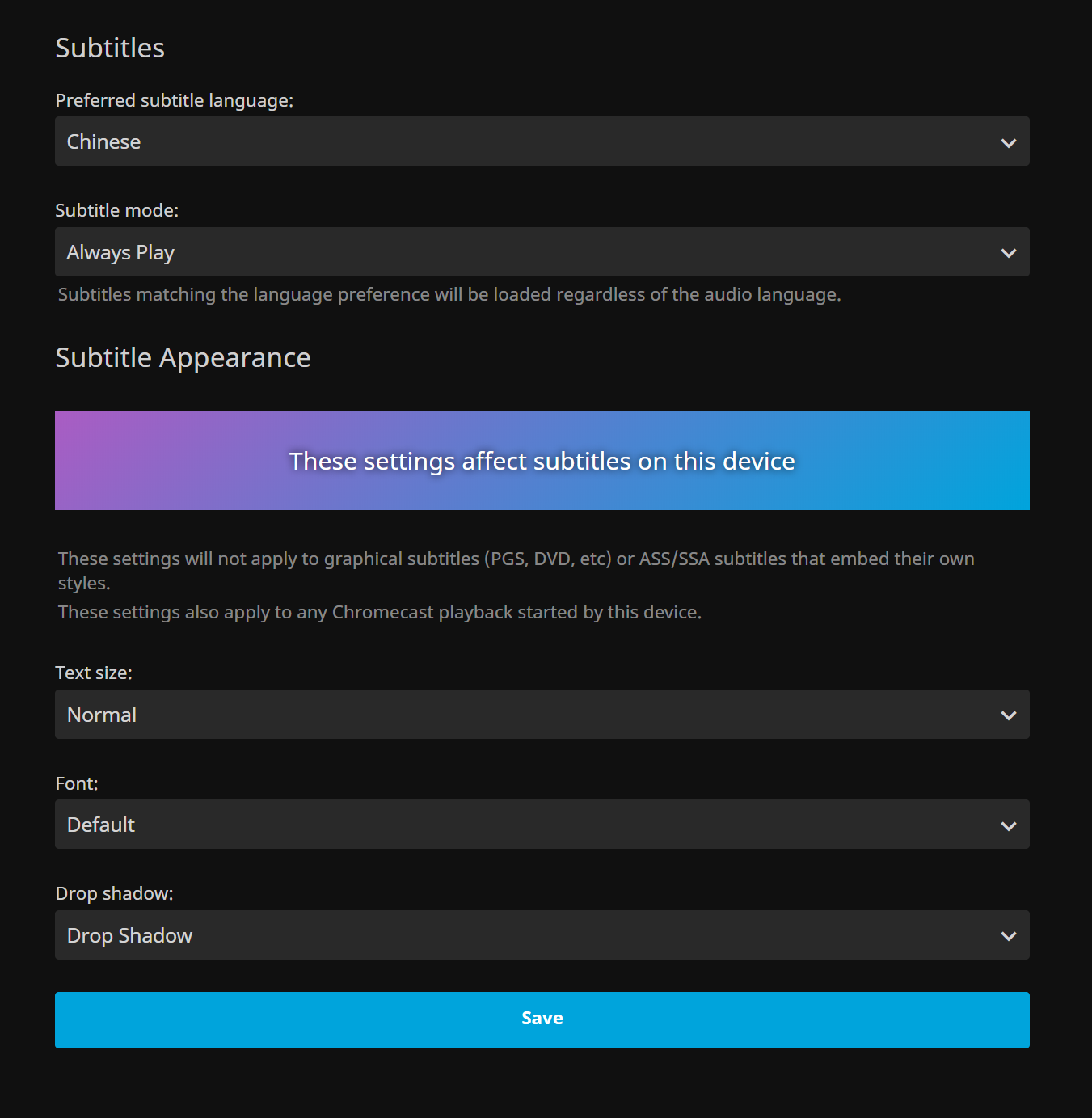
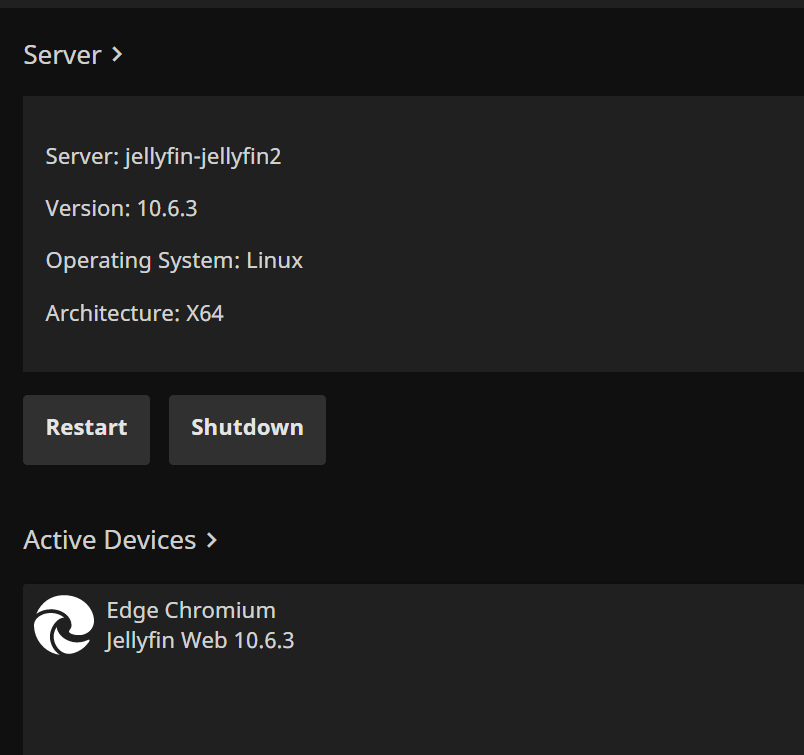
Any idea?
microexpression
on 25 Aug 2020
@microexpression just search htmlvideoplayer, should be in this folder.
frankyifei
on 25 Aug 2020
Seems something has changed in the latest version (10.6.4).
There is no
        function renderWithSubtitlesOctopus(videoElement, track, item) {
            var attachments = self._currentPlayOptions.mediaSource.MediaAttachments || [];
            var attachmentsFonts = attachments.map(function (i) {
                    return i.DeliveryUrl;
                });
      var options = {
                video: videoElement,
                subUrl: getTextTrackUrl(track, item),
                fonts: attachmentsFonts.concat(appRouter.baseUrl() + "/libraries/NotoSerifCJKsc-Medium.woff2"),
in /usr/share/jellyfin/web/plugins/htmlVideoPlayer/plugin.js
Are there any other solutions?
 ASUSWA
on 6 Sep 2020
ASUSWA
on 6 Sep 2020
Just wait v10.7 release, they have PRs to solve this problem:
Part 1: https://github.com/jellyfin/jellyfin/pull/3683
Part 2: https://github.com/jellyfin/jellyfin-web/pull/1636
FunnyFly-ZW
on 6 Sep 2020
Just wait v10.7 release, they have PRs to solve this problem:
Part 1: jellyfin/jellyfin#3683
Part 2: #1636
Already seen that, thanks.😁
ASUSWA
on 6 Sep 2020
Related issues
 Anan5a
·
3Comments
Anan5a
·
3Comments
 advancedslicedbanana
·
3Comments
advancedslicedbanana
·
3Comments
 Redsandro
·
7Comments
Redsandro
·
7Comments
 tamburra
·
6Comments
tamburra
·
6Comments
 AndreCarvalho
·
6Comments
AndreCarvalho
·
6Comments
Most helpful comment
it is a older version. better to edit plugin.js under
jellyfin-web\components\htmlvideoplayer.Line 1049. I edited several lines to add custom fonts
Change code from 1049
Replace
/libraries/NotoSerifCJKsc-Medium.woff2with your own fonts, I put my fonts in /jellyfin-web/libraries, you can put it in other place. And here is a smaller version of noto fonts Heiti and Kaitinoto.zip from https://github.com/CodePlayer/webfont-noto