Javascriptservices: How/where to add third party resource files?
Where is the appropriate place to add third party CSS files, etc.
 im1dermike
All 17 comments
Webpack.vendor file, you can point to the CSS file you want there.
The other option is just importing the CSS file within your main module as well.
 MarkPieszak
on 17 Apr 2017
MarkPieszak
on 17 Apr 2017
@MarkPieszak Thanks for your response. Where exactly in that file would I add a CSS reference? I added the npm dependency in the sharedConfig's entry.vendor list, but that's not right.
im1dermike
on 18 Apr 2017
You want to add the .css file itself wherever it is in that node_modules folder so you'd have the entire location in there.
Just like this for example:
'bootstrap/dist/css/bootstrap.css',
@MarkPieszak That somehow does not seem to be right. I commented out both bootstrap references and added the reference for the CSS I'm trying to add (angular2-toaster) like this:
module.exports = (env) => {
    const extractCSS = new ExtractTextPlugin('vendor.css');
    const isDevBuild = !(env && env.prod);
    const sharedConfig = {
        stats: { modules: false },
        resolve: { extensions: [ '.js' ] },
        module: {
            rules: [
                { test: /\.(png|woff|woff2|eot|ttf|svg)(\?|$)/, use: 'url-loader?limit=100000' }
            ]
        },
        entry: {
            vendor: [
                '@angular/common',
                '@angular/compiler',
                '@angular/core',
                '@angular/http',
                '@angular/platform-browser',
                '@angular/platform-browser-dynamic',
                '@angular/router',
                '@angular/platform-server',
                'angular2-toaster',
                'angular2-toaster/toaster.css',
                'angular2-universal',
                'angular2-universal-polyfills',
                //'bootstrap',
                //'bootstrap/dist/css/bootstrap.css',
                'es6-shim',
                'es6-promise',
                'event-source-polyfill',
                'jquery',
                'zone.js',
            ]
        },
I then start debugging again and check the vendor.css file referenced in my markup and it still only shows Bootstrap's CSS.
im1dermike
on 18 Apr 2017
You need to rebuild the vendor file, also make sure that's the exact address for the file.
Run webpack --config webpack.config.vendor.js
MarkPieszak
on 18 Apr 2017
@MarkPieszak Thanks! Is that always a manual command I need to execute?
im1dermike
on 18 Apr 2017
If you change vendor yes, just make it a new npm script so you can run it as needed 👍
MarkPieszak
on 18 Apr 2017
@MarkPieszak @im1dermike - help me out here.
I got a theme file that is suppose to overrides the bootstrap.min.css
I assume 'bootstrap/dist/css/bootstrap.css' added to webpack.config.vendor.js file refers to the one from node_module folder.
But mine is a loose CSS file and i wish to add to this chain. Currently I have added this file to ~/wwwroot/assets/css/theme.bt.min.css
and changed the above line bootstrap/dist/css/bootstrap.css to wwwroot/assets/css/theme.bt.min.css in webpack.config.vendor.js file - but now i get error on running webpack --config webpack.config.vendor.js
Error:
    ERROR in dll vendor
    Module not found: Error: Can't resolve 'wwwroot/assets/css/theme.bt.min.css' in 'C:\work\code\locl-projects\Test-App\MyCoreApp.Web'
     @ dll vendor
Still very new to using this and cannot get my head around it, thanks in advance
 jsinh
on 21 Apr 2017
jsinh
on 21 Apr 2017
same problem like @jsinh
 noah2233
on 8 Jul 2017
noah2233
on 8 Jul 2017
@jsinh Have you tried something like this?
../wwwroot/assets/css/theme.bt.min.css
Maybe the webpack is looking for the files in the node_modules folder. So you have to take a step back. I have never overwritten a bootstrap before. But the bootstrap js files don't reference the css files somehow? Aren't they expecting the css files to be there? Maybe you have to keep both css files. The one bootstrap uses and the one that overrides it.
 rasert
on 8 Jul 2017
rasert
on 8 Jul 2017
What if I have a general css file that I want to add to my project? How do I add it? with angular-cli I could just add it to the angular.cli.json but with asp.net core Iam just not sure how to do it.
Basically I want to add it my vendor.css file and have it minify on production.
I am just not sure what is the best way.
noah2233
on 8 Jul 2017
This may help:
Hello World Angular 2+ Data Sample Using JavaScriptServices .Net Core and PrimeNg
Open the webpack.config.vendor.js file and add lines like:
'font-awesome/css/font-awesome.css',
'primeng/primeng',
'primeng/resources/themes/omega/theme.css',
'primeng/resources/primeng.min.css',
 ADefWebserver
on 8 Jul 2017
ADefWebserver
on 8 Jul 2017
I want to add my own css and not from library - that is way it wont be on the node_modules.
My scenario is: I have general.css file that is placed on the Clientapp root and I want it to be distributed to all of project files just like vendor.css - or even better add it to the vendor.css because I don't want a lot of css files.
do you have any ideas?
noah2233
on 9 Jul 2017
You can alter Webpack to pick up your custom .css
See:
https://webpack.github.io/docs/tutorials/getting-started/
ADefWebserver
on 9 Jul 2017
Have been using ASP.NET Core + Angular 2/4 with JavaScript SPA templates now since few months.
I think, I can help.
@rasert - Thanks, unfortunately your suggestion of ../wwwroot/assets/css/theme.bt.min.css did not work.
But that triggered me to start trying more things. Agreed - currently webpack is looking into specific folders like - ClientApp (Angular specific) and node_modules but referring other folders relative to webpack config file also works.
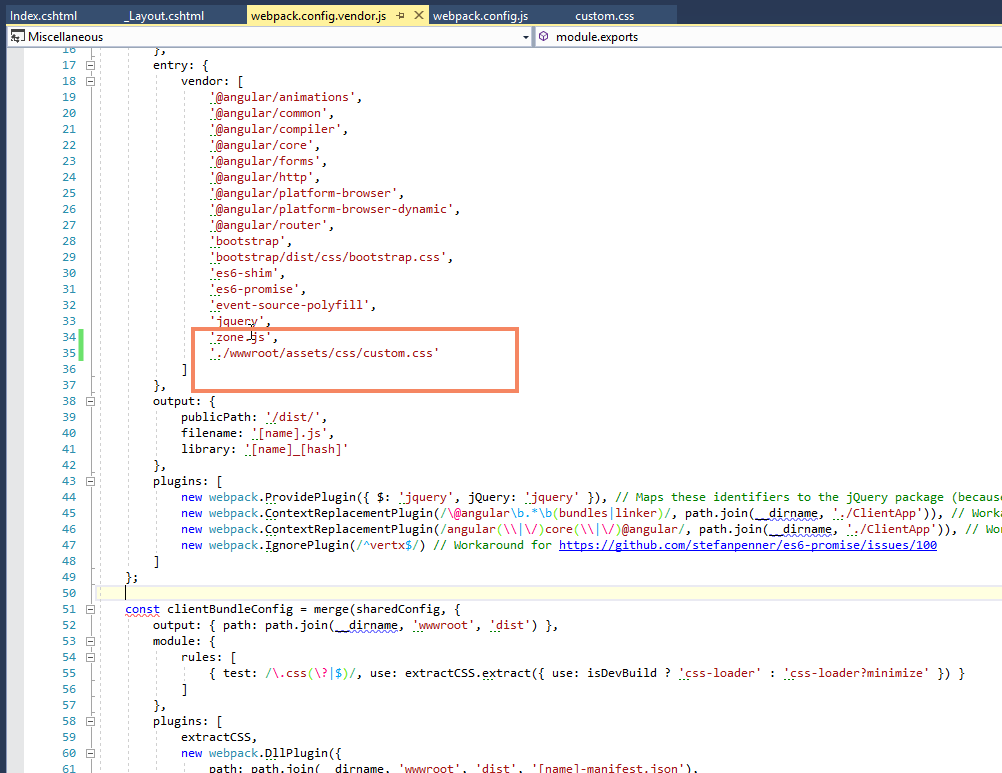
If I add following in entry: vendor: ./wwwroot/assets/css/custom.css - this can be any custom / loose CSS file and it will be picked up by webpack. ./ indicates to start path from root which is where the webpack.config.vendor.js lies in this case. (Works and tested)
Note: this answers your query @noah2233 :)
Screenshot for reference
Caution: This does not compile / re-compile at runtime (not sure why), so if you are tweaking and setting up UI things based on this CSS you need to keep running webpack --config webpack.config.vendor.js after each change to loose CSS file.
This would work fine if your loose file is one time add to pipeline case.
Two more ways to add custom / loose CSS to your application (more convenient if those files have frequent dev. changes)
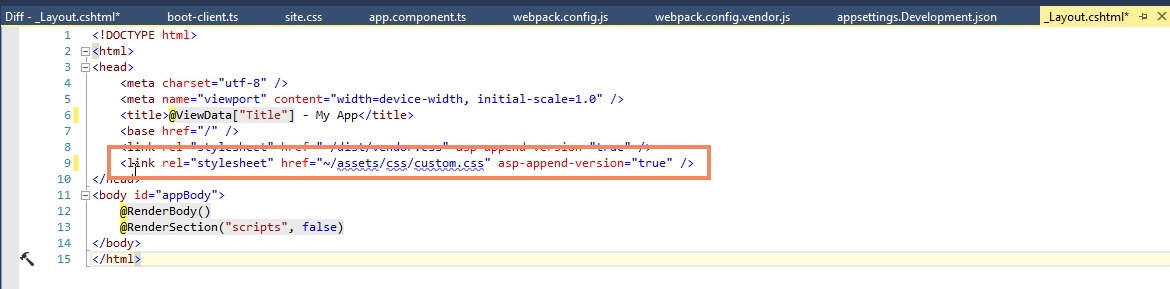
First: Add to your _Layout.cshtml as linked CSS and use simple VS extension to do minification and use it in your application (this works and tested)
Screenshot for reference
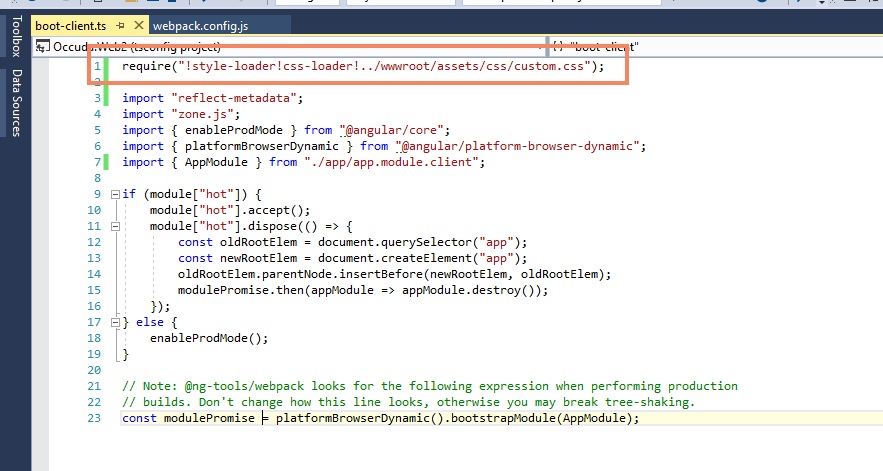
Second - Add / import your loose CSS or custom file to boot-client.ts (I experimented and works based on my learning of webpack in general and how webpack.config.js is setup in this SPA template)
Here is how I added my custom CSS:
require("!style-loader!css-loader!../wwwroot/assets/css/custom.css");
Screenshot for reference:
Hope one of those suits your need and also helpful to others, cheers!
jsinh
on 9 Jul 2017
hello, I've tried to add/replace a custom(bootstrap) theme instead of the default one (gen. by asp.net core boilerplate). I've tried preceding procedure but that didn't work for me. [Theme dir (wwwroot/lib/custom_theme)]
Please help me with few ideas/hints.
 mmonirul
on 25 Oct 2017
mmonirul
on 25 Oct 2017
@mmonirul
I've tried to add/replace a custom(bootstrap) theme instead of the default one (gen. by asp.net core boilerplate).
When you say replace it means you need to remove the one that gets added by boilerplate code in vendor js - bootstrap/dist/css/bootstrap.css assuming this is the one you wish to replace.
And for the path - cannot hint much except you might not be writing correct path so it resolves
jsinh
on 26 Oct 2017
Related issues
 Eilon
·
3Comments
Eilon
·
3Comments
 justinyoo
·
3Comments
justinyoo
·
3Comments
 natemcmaster
·
4Comments
natemcmaster
·
4Comments
 ZeekoZhu
·
3Comments
ZeekoZhu
·
3Comments
 DanHarman
·
4Comments
DanHarman
·
4Comments
Most helpful comment
Have been using ASP.NET Core + Angular 2/4 with JavaScript SPA templates now since few months.
I think, I can help.
@rasert - Thanks, unfortunately your suggestion of
../wwwroot/assets/css/theme.bt.min.cssdid not work.But that triggered me to start trying more things. Agreed - currently webpack is looking into specific folders like -
ClientApp(Angular specific) andnode_modulesbut referring other folders relative to webpack config file also works.If I add following in entry: vendor:
./wwwroot/assets/css/custom.css- this can be any custom / loose CSS file and it will be picked up by webpack../indicates to start path from root which is where thewebpack.config.vendor.jslies in this case. (Works and tested)Note: this answers your query @noah2233 :)
Screenshot for reference
Caution: This does not compile / re-compile at runtime (not sure why), so if you are tweaking and setting up UI things based on this CSS you need to keep running
webpack --config webpack.config.vendor.jsafter each change to loose CSS file.This would work fine if your loose file is one time add to pipeline case.
Two more ways to add custom / loose CSS to your application (more convenient if those files have frequent dev. changes)
First: Add to your
_Layout.cshtmlas linked CSS and use simple VS extension to do minification and use it in your application (this works and tested)Screenshot for reference

Second - Add / import your loose CSS or custom file to
boot-client.ts(I experimented and works based on my learning of webpack in general and howwebpack.config.jsis setup in this SPA template)Here is how I added my custom CSS:
require("!style-loader!css-loader!../wwwroot/assets/css/custom.css");Screenshot for reference:

Hope one of those suits your need and also helpful to others, cheers!