Jackett: [yggtorrent] Login failed: No form found on https://www.yggtorrent.pe/ using form selector
I saw the other closed issues, I tried everything that have been said. My account is not blocked. I put the new links in the config pan. Here's my logs if you see something interesting...
Jackett Version 0.11.760.0
Env : Docker on a Synology NAS. Container
log.txt
Thanks for your help ! (Sorry @garfield69 to participate to the storm after YGG changed top-level domain, but this time I don't know what's the problem...)
 thelouisvivier
All 64 comments
Duplicate of #6040
Hi @thelouisvivier,
This issue looks similar to #6040.
To prevent issue tracker clutter, this issue will now be closed. If you feel this issue isn't a duplicate of #6040, then feel free to post a comment on this issue stating why it's not a duplicate. Your comment will automatically re-open this issue.
![jackettbot[bot] picture](https://avatars2.githubusercontent.com/in/10374?v=4&s=40) jackettbot[bot]
on 3 Oct 2019
jackettbot[bot]
on 3 Oct 2019
It's not a duplicate, I think it's not the usual issue. I read #6039 and this issue is not resolved. Hope my logs will help. I wasn't sure if I needed to respond to #6039 which is closed, or open a new one.
thelouisvivier
on 3 Oct 2019
I have the same issue as well.
Login failed: No form found on https://www.yggtorrent.pe/ using form selector
 dylannla
on 3 Oct 2019
dylannla
on 3 Oct 2019
hello i have the same issue it look that jackett can't find the form into the website
my log:
Error on 20191003200752 for YGGtorrent.txtJackett.Common.ExceptionWithConfigData: Login failed: No form found on https://www.yggtorrent.pe/ using form selector #user-login
at Jackett.Common.Indexers.CardigannIndexer.DoLogin() in /home/appveyor/projects/jackett/src/Jackett.Common/Indexers/CardigannIndexer.cs:line 478
at Jackett.Common.Indexers.CardigannIndexer.PerformQuery(TorznabQuery query) in /home/appveyor/projects/jackett/src/Jackett.Common/Indexers/CardigannIndexer.cs:line 1248
307 Temporary Redirect
 Miko2708
on 3 Oct 2019
Miko2708
on 3 Oct 2019
i have an another one if it can help
log_jackett.txt
thx for your help
mikael
Miko2708
on 3 Oct 2019
Hi,
Got the same problem too
 samimaarouf
on 3 Oct 2019
samimaarouf
on 3 Oct 2019
Hello there,
as I already said on the post #6039 , the problem does not come from the account itself because the error message is the same when we leave the fields empty. same thing with different configuration (Linux, Windows, Docker), and tested from several IP in different countries, same problem.
Surely part of the site structure to change when migrating to their new host.
thx for your help
 RH2WTF
on 3 Oct 2019
RH2WTF
on 3 Oct 2019
Same issue here :
What I tried
$ wget https://www.yggtorrent.pe/
2019-10-03 20:52:38 (1018 KB/s) - ‘index.html’ saved [27983]

$ cat index.html | grep user-login
<form action="/user/login" method="post" id="user-login">
But, there IS a form called "user-login".
The part of the Jackett code that throws an error is located at :
https://github.com/Jackett/Jackett/blob/master/src/Jackett.Common/Indexers/CardigannIndexer.cs
Line 475:478
@Miko2708 So it looks like Jackett can't follow the 307 redirect http response.
Is it linked to the changes made yesterday to the CardigannIndexer.cs code (to resolve a cloudflare cookie issue, and YggTorrent DO use cloudflare) ?
Edit (add some details about 307 redirection) :
xxxxxx@xxxxxxxx:~$ wget -v https://www.yggtorrent.pe/
Will not apply HSTS. The HSTS database must be a regular and non-world-writable file.
ERROR: could not open HSTS store at '/home/xxxxxx/.wget-hsts'. HSTS will be disabled.
--2019-10-03 21:11:19--  https://www.yggtorrent.pe/
Resolving www.yggtorrent.pe (www.yggtorrent.pe)... 104.31.91.128, 104.31.90.128, 2606:4700:30::681f:5a80, ...
Connecting to www.yggtorrent.pe (www.yggtorrent.pe)|104.31.91.128|:443... connected.
HTTP request sent, awaiting response... **307 Temporary Redirect**
Location: http://www.yggtorrent.pe/?attempt=1 [following]
--2019-10-03 21:11:20--  http://www.yggtorrent.pe/?attempt=1
Connecting to www.yggtorrent.pe (www.yggtorrent.pe)|104.31.91.128|:80... connected.
HTTP request sent, awaiting response... **301 Moved Permanently**
Location: https://www.yggtorrent.pe/?attempt=1 [following]
--2019-10-03 21:11:20--  https://www.yggtorrent.pe/?attempt=1
Connecting to www.yggtorrent.pe (www.yggtorrent.pe)|104.31.91.128|:443... connected.
HTTP request sent, awaiting response... 200 OK
Length: unspecified [text/html]
Saving to: ‘index.html.1’

index.html.1                      [ <=>                                              ]  27.33K  --.-KB/s    in 0.02s
It's actually a 307 redirect followed by a 301 redirect. Is Jackett able to handle that ?
Edit : The
 aztazt
on 3 Oct 2019
aztazt
on 3 Oct 2019
I already saw /?attempt=1 /?attempt=2 or /?attempt=3 never above
RH2WTF
on 3 Oct 2019
I have the same problem here
 Turakam83
on 3 Oct 2019
Turakam83
on 3 Oct 2019
Hello, same here since .pe extension.
 Sigri44
on 4 Oct 2019
Sigri44
on 4 Oct 2019
Hello!
Same problem.
Thanks
 Djeremaille
on 4 Oct 2019
Djeremaille
on 4 Oct 2019
Hi, same problem here
 pedipaco
on 4 Oct 2019
pedipaco
on 4 Oct 2019
I confirm this bug. It’s been happened since today in v0.11.768
 freMea
on 4 Oct 2019
freMea
on 4 Oct 2019
Same for me :)
 PastaGringo
on 4 Oct 2019
PastaGringo
on 4 Oct 2019
Same here :/
 guim31
on 5 Oct 2019
guim31
on 5 Oct 2019
It works for me by replacing login form by cookie :
  site: yggtorrent
  name: YGGtorrent
  description: "YGGTorrent is a FRENCH Semi-Private Torrent Tracker for 0DAY / GENERAL"
  language: fr-fr
  type: semi-private
  encoding: UTF-8
  followredirect: true
  links:
    - https://www.yggtorrent.pe/
    # don't forget to also change bellow in settings !
  legacylinks:
    - https://yggtorrent.com/
    - https://ww1.yggtorrent.com/
    - https://yggtorrent.is/
    - https://www.yggtorrent.is/
    - https://ww1.yggtorrent.is/
    - https://ww2.yggtorrent.is/
    - https://ww3.yggtorrent.is/
    - https://ww4.yggtorrent.is/
    - https://yggtorrent.to/
    - https://www3.yggtorrent.to/
    - https://www6.yggtorrent.to/
    - https://www8.yggtorrent.to/
    - https://www9.yggtorrent.to/
    - https://ygg.to/
    - https://www.ygg.to/
    - https://ww3.yggtorrent.gg/
    - http://www2.yggtorrent.gg/
    - https://www.yggtorrent.gg/
    - https://www.yggtorrent.ch/

  caps:
    categorymappings:
      - {id: 2145, cat: TV, desc: "Film/Vidéo"}
      - {id: 2178, cat: Movies, desc: "Film/Vidéo : Animation"} # changed to movies, see #3553
      - {id: 2179, cat: TV/Anime, desc: "Film/Vidéo : Animation Série"}
      - {id: 2180, cat: TV, desc: "Film/Vidéo : Concert"}
      - {id: 2181, cat: TV, desc: "Film/Vidéo : Documentaire"}
      - {id: 2182, cat: TV, desc: "Film/Vidéo : Emission TV"}
      - {id: 2183, cat: Movies, desc: "Film/Vidéo : Film"}
      - {id: 2184, cat: TV, desc: "Film/Vidéo : Série TV"}
      - {id: 2185, cat: TV, desc: "Film/Vidéo : Spectacle"}
      - {id: 2186, cat: TV, desc: "Film/Vidéo : Sport"}
      - {id: 2187, cat: TV, desc: "Film/Vidéo : Vidéo-clips"}
      - {id: 2139, cat: Audio, desc: "Audio"}
      - {id: 2147, cat: Audio, desc: "Audio : Karaoké"}
      - {id: 2148, cat: Audio, desc: "Audio : Musique"}
      - {id: 2150, cat: Audio, desc: "Audio : Podcast Radio"}
      - {id: 2149, cat: Audio, desc: "Audio : Samples"}
      - {id: 2144, cat: PC, desc: "Application"}
      - {id: 2177, cat: PC, desc: "Application : Autre"}
      - {id: 2176, cat: PC, desc: "Application : Formation"}
      - {id: 2171, cat: PC, desc: "Application : Linux"}
      - {id: 2172, cat: PC, desc: "Application : MacOS"}
      - {id: 2174, cat: PC, desc: "Application : Smartphone"}
      - {id: 2175, cat: PC, desc: "Application : Tablette"}
      - {id: 2173, cat: PC, desc: "Application : Windows"}
      - {id: 2142, cat: PC/Games, desc: "Jeu vidéo"}
      - {id: 2167, cat: PC/Games, desc: "Jeu vidéo : Autre"}
      - {id: 2159, cat: PC/Games, desc: "Jeu vidéo : Linux"}
      - {id: 2160, cat: PC/Games, desc: "Jeu vidéo : MacOS"}
      - {id: 2162, cat: PC/Games, desc: "Jeu vidéo : Microsoft"}
      - {id: 2163, cat: PC/Games, desc: "Jeu vidéo : Nintendo"}
      - {id: 2165, cat: PC/Games, desc: "Jeu vidéo : Smartphone"}
      - {id: 2164, cat: PC/Games, desc: "Jeu vidéo : Sony"}
      - {id: 2166, cat: PC/Games, desc: "Jeu vidéo : Tablette"}
      - {id: 2161, cat: PC/Games, desc: "Jeu vidéo : Windows"}
      - {id: 2140, cat: Books, desc: "eBook"}
      - {id: 2151, cat: Books, desc: "eBook : Audio"}
      - {id: 2152, cat: Books, desc: "eBook : Bds"}
      - {id: 2153, cat: Books, desc: "eBook : Comics"}
      - {id: 2154, cat: Books, desc: "eBook : Livres"}
      - {id: 2155, cat: Books, desc: "eBook : Mangas"}
      - {id: 2156, cat: Books, desc: "eBook : Presse"}
      - {id: 2141, cat: Other, desc: "Emulation"}
      - {id: 2157, cat: Other, desc: "Emulation : Emulateurs"}
      - {id: 2158, cat: Other, desc: "Emulation : Roms"}
      - {id: 2143, cat: Other, desc: "GPS"}
      - {id: 2168, cat: Other, desc: "GPS : Applications"}
      - {id: 2169, cat: Other, desc: "GPS : Cartes"}
      - {id: 2170, cat: Other, desc: "GPS : Divers"}
      - {id: 2188, cat: XXX, desc: "XXX"}
      - {id: 2189, cat: XXX, desc: "XXX : Films"}
      - {id: 2190, cat: XXX, desc: "XXX : Hentai"}
      - {id: 2191, cat: XXX, desc: "XXX : Images"}

    modes:
      search: [q]
      tv-search: [q, season, ep]
      movie-search: [q]

  settings:
    - name: cookie
      type: text
      label: Cookie
    - name: info
      type: info
      label: How to get the Cookie
      default: "<ol><li>Login to this tracker in your browser<li>Open the <b>DevTools</b> panel by pressing <b>F12</b><li>Select the <b>Network</b> tab<li>Click on the <b>Doc</b> button<li>Refresh the page by pressing <b>F5</b><li>Select the <b>Headers</b> tab<li>Find 'cookie:' in the <b>Request Headers</b> section<li>Copy & paste the whole cookie string to here</ol>"
    - name: searchanddlurl
      label: Search and download URL
      type: text
      default: www2.yggtorrent.pe
    - name: category
      type: select
      label: Catégorie
      default: all
      options:
        all : "Tous"
        2145 : "Film/Vidéo"
        2139 : "Audio"
        2144 : "Application"
        2142 : "Jeu vidéo"
        2140 : "eBook"
        2141 : "Emulation"
        2143 : "GPS"
        2188 : "XXX"
    - name: filter_title
      type: checkbox
      label: Try to normalize releases names by moving year after the title
      default: false
    - name: multilang
      type: checkbox
      label: Replace MULTI by another language in release name
      default:  false
    - name: multilanguage
      type: select
      label: Replace MULTI by this language
      default: FRENCH
      options:
        FRENCH : "FRENCH"
        MULTI.FRENCH: "MULTI.FRENCH"
        ENGLISH: "ENGLISH"
        MULTI.ENGLISH: "MULTI.ENGLISH"
        VOSTFR: "VOSTFR"
        MULTI.VOSTFR: "MULTI.VOSTFR"
    - name: vostfr
      type: checkbox
      label: Replace VOSTFR with ENGLISH
      default:  false
    - name: enhancedAnime
      type: checkbox
      label: Enhance sonarr compatibility with anime by renaming episode (xxx to exxx). Works only if episode is at the end of the query. Can disturb movies search. (back to the future 3 -> back to the future e3)
      default: false
# NEW SEARCH ENGINE MIGH BE BETTER THAN THAT
#    - name: sonarrv3hack
#      type: checkbox
#      label: "REMOVED"
#      default: false
    - name: betasearchengine
      type: checkbox
      label: "Use Beta Search engine URL (Less restrictive) / SonarrV3 Full Series Search NEW"
      default: false

  login:
    method: cookie
    inputs:
      cookie: "{{ .Config.cookie }}"
    test:
      path: /
      selector: div#top_panel:contains("Déconnexion")

  search:
    followredirect: true
    keywordsfilters:
      # Hack For anime Search ! example : replace sonarr search of
      # One Punch Man S2 10 OR One Punch Man S2 2
      # BY
      # One Punch Man S02E10 OR One Punch Man S02E02
      - name: re_replace #S 1-9 & EP >= 10
        args: ["(.*)[sS]([1-9])\\s(\\d{2,3})$", "$1 S0$2E$3"]
      - name: re_replace #S 1-9 & EP 1-9
        args: ["(.*)[sS]([1-9])\\s(\\d{1})$", "$1 S0$2E0$3"]
      - name: re_replace #S >= 10 & EP >= 10
        args: ["(.*)[sS]([1-9][0-9])\\s(\\d{2,3})$", "$1 S0$2E$3"]
      - name: re_replace #S >= 10 & EP 1-9
        args: ["(.*)[sS]([1-9][0-9])\\s(\\d{1})$", "$1 S0$2E0$3"]
      - name: re_replace #Full season S 1-9
        args: ["(.*)[sS]([1-9])$", "$1 S0$2"]
      - name: re_replace #Full season S >= 10
        args: ["(.*)[sS]([1-9][0-9])$", "$1 S0$2"]
      # END ANIME HACK
      - name: replace
        args: ["\"", ""]
      - name: trim
    paths:
      - path: "https://{{ .Config.searchanddlurl }}/{{if .Config.betasearchengine}}new_search{{else}}engine{{end}}/search?category={{ .Config.category }}&name={{if .Config.betasearchengine}}{{ .Keywords }}{{else}}{{ re_replace .Keywords \"\\b[^\\s]+\\b\"  \"\"$&\"\"}}{{end}}&description=&file=&uploader=&sub_category=&do=search&order=desc&sort=publish_date"
      - path: "https://{{ .Config.searchanddlurl }}/{{if .Config.betasearchengine}}new_search{{else}}engine{{end}}/search?category={{ .Config.category }}&name={{if .Config.betasearchengine}}{{ .Keywords }}{{else}}{{ re_replace .Keywords \"\\b[^\\s]+\\b\"  \"\"$&\"\"}}{{end}}&description=&file=&uploader=&sub_category=&do=search&order=desc&sort=publish_date&page=50"
    rows:
      selector: "table.table > tbody > tr"
    fields:
      _id:
        selector: ":nth-child(2) > a"
        attribute: href
        filters:
          - name: regexp
            args: "/(\\d+)-"
      title_normal:
        selector: ":nth-child(2) > a"
      title_filtered:
        selector: ":nth-child(2) > a"
        filters:
          - name: re_replace
            args: ["(?i)^(?:(.+?)((?:[\\.\\-\\s_\\[]+(?:imax|(?:dvd|bd|tv)(?:rip|scr)|bluray(?:\\-?rip)?|720\\s*p?|1080\\s*p?|vof?|vost(?:fr)?|multi|vf(?:f|q)?[1-3]?|(?:true)?french|eng?)[\\.\\-\\s_\\]]*)*)([\\(\\[]?(?:20|1[7-9])\\d{2}[\\)\\]]?)(.*)$|(.*))$", "$1 $3 $2 $4 $5"]
          # Replace Saison/saison by 'S' to match for Full season search Sonarrv3 and tidy up
          - name: re_replace
            args: ["([Ss]aison|[Ss]aison )(\\d{1,4})", "S$2"]
          - name: re_replace
            args: ["S(\\d+)E(\\d+)(\\D+)", "S$1E$2 $3"]
          - name: re_replace
            args: ["([Mm][Uu][Ll][Tt][Ii])", "MULTi"]
          # End tidy up for sonarrv3 season search
          - name: replace
            args: [".", " "]
          - name: trim
          - name: re_replace
            args: ["(?i)\\s(mkv|avi|divx|xvid|mp4)$", ""]
          - name: re_replace
            args: ["(\\s{2,5})", " "]
          - name: trim
      title_phase1:
        text: "{{if .Config.filter_title }}{{ .Result.title_filtered }}{{else}}{{ .Result.title_normal }}{{end}}"
      title_multilang:
        text: "{{ .Result.title_phase1 }}"
        filters:
          - name: re_replace
            args: ["[\\.\\s\\[\\-][Mm][Uu][Ll][Tt][Ii][\\.\\s\\]\\-]", ".{{ .Config.multilanguage }}."]
      title_phase2:
        text: "{{if .Config.multilang }}{{ .Result.title_multilang }}{{else}}{{ .Result.title_phase1 }}{{end}}"
      title_vostfr:
        text: "{{ .Result.title_phase2 }}"
        filters:
          - name: re_replace
            args: ["[\\.\\s\\[\\-][Vv][Oo][Ss][Tt][Ff][Rr][\\.\\s\\]\\-]", ".ENGLISH."]
          - name: re_replace
            args: ["[\\.\\s\\[\\-][Ss][Uu][Bb][Ff][Rr][Ee][Nn][Cc][Hh][\\.\\s\\]\\-]", ".ENGLISH."]
      title_phase3:
        text: "{{if .Config.vostfr }}{{ .Result.title_vostfr }}{{else}}{{ .Result.title_phase2 }}{{end}}"
      title_anime:
        text: "{{ .Result.title_phase3 }}"
        filters:
        # Sonarr need E in front of 3 digit number or else it thinks it is episode
        # S01E10 for number 110 for example ==> enhancedAnime
          - name: re_replace
            args: ["(.*)(\\.| |\\-)(\\d{2,3})(\\.| |\\-)(.*)", "$1 E$3 $5"]
      title:
        text: "{{if .Config.enhancedAnime }}{{ .Result.title_anime }}{{else}}{{ .Result.title_phase3 }}{{end}}"
      details:
        selector: ":nth-child(2) > a"
        attribute: href
      category:
      # changed the catid into and hidden div as of last tracker problem
        selector: ":nth-child(1) > div.hidden"

      comments:
        optional: true
        selector: "td:nth-child(1) > a[href$=\"#comments\"]"
        attribute: href
      download:
        text: "https://{{ .Config.searchanddlurl }}/engine/download_torrent?id={{ .Result._id }}"
      date:
        selector: "td:nth-child(5)"
        filters:
          - name: replace
            args: ["il y a ", ""]
          - name: replace
            args: [ " jours", " days"]
          - name: replace
            args: [ " jour", " day"]
          - name: replace
            args: [ " heures", " hours"]
          - name: replace
            args: [ " heure", " hour"]
          - name: replace
            args: [ " semaines", " weeks"]
          - name: replace
            args: [ " semaine", " week"]
          - name: replace
            args: [ " mois", " month"]
          - name: replace
            args: [ " ans", " years"]
          - name: replace
            args: [ " an", " year"]
          - name: append
            args: " ago"
      size:
        selector: "td:nth-child(6)"
        filters:
          - name: replace
            args: ["o", "B"]
      grabs:
        selector: "td:nth-child(7)"
      seeders:
        text: 0
      seeders:
        selector: "td:nth-child(8)"
        optional: true
      leechers:
        text: 0
      leechers:
        selector: "td:nth-child(9)"
        optional: true
      downloadvolumefactor:
        text: "1"
      uploadvolumefactor:
        text: "1"
I don't know if it's a good long-term solution, but it works temporarly.
 trusta
on 5 Oct 2019
trusta
on 5 Oct 2019
I tried your method, but it didn't work for me.
I got : "Exception (yggtorrent): Login Failed, got redirected. Try changing the indexer URL to https://www.yggtorrent.pe/. Updated site link, please try again.: Parse error"
I tried with http, but it tells me to try with https then.
Maybe i didn't put the good thing on the cookie field, idk.
samimaarouf
on 5 Oct 2019
I tried too with cookies and same error : « Exception (yggtorrent): Login Failed, got redirected. Try changing the indexer URL to https://www.yggtorrent.pe/. Updated site link, please try again.: Parse error »
 Mrmel94
on 5 Oct 2019
Mrmel94
on 5 Oct 2019
I have a cookie that look like : __cfduid=XXXXX; ca_=XXXX; hide_side_menu=true; ygg_=XXX
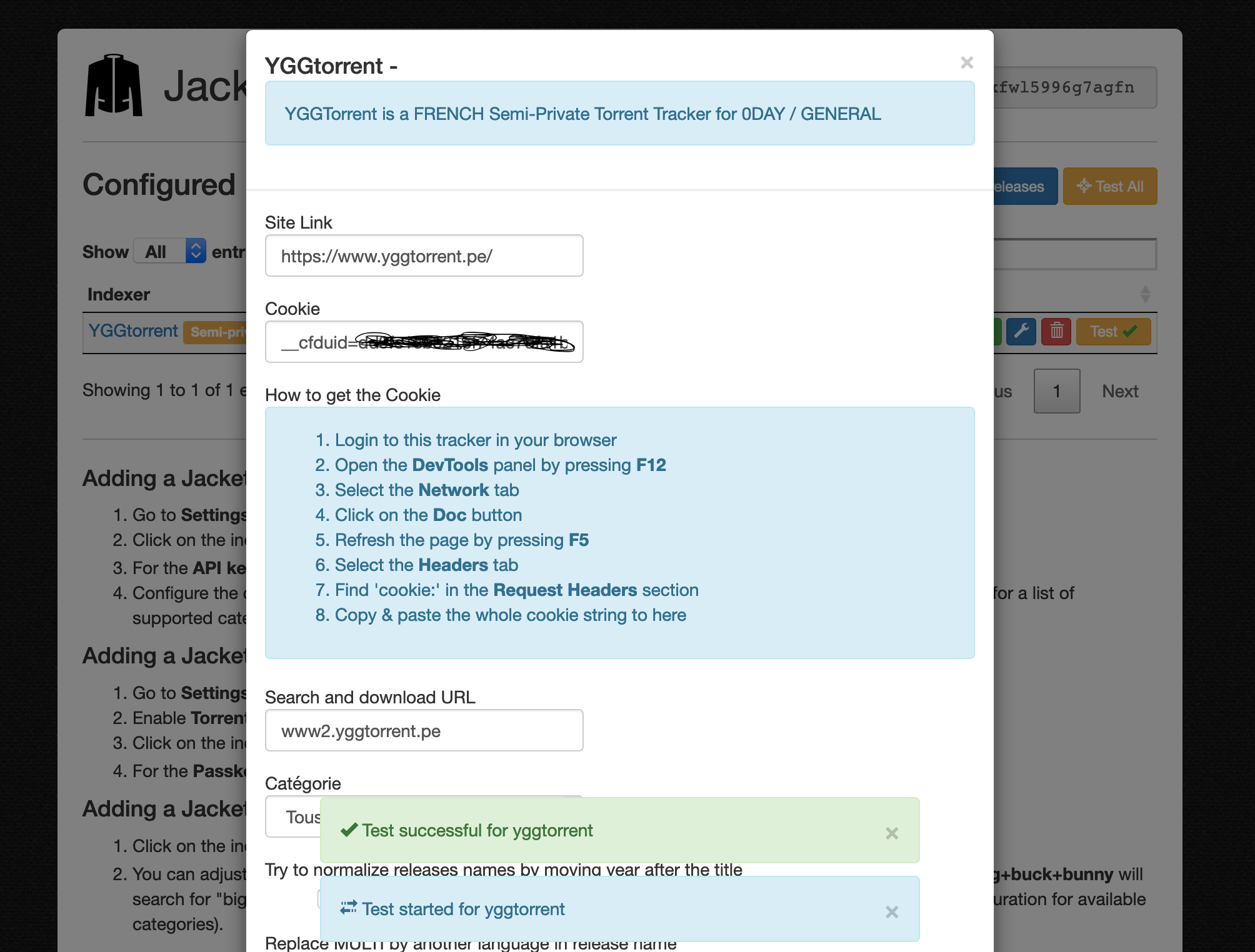
trusta
on 5 Oct 2019
Same issue here.
 Dakulin
on 5 Oct 2019
Dakulin
on 5 Oct 2019
I have a cookie that look like :
__cfduid=XXXXX; ca_=XXXX; hide_side_menu=true; ygg_=XXX
I copy paste again your ygg's config, now it worked. Maybe I forgot a character.
Thanks for your solution !
samimaarouf
on 5 Oct 2019
Hello,
I have copy/paste the whole config, I have restarted jackett but I still have this issue :
10-05 19:21:32 Error Jackett.Common.ExceptionWithConfigData: Login Failed, got redirected. Try changing the indexer URL to http://www.yggtorrent.pe/. Updated site link, please try again.
  at Jackett.Common.Indexers.CardigannIndexer+<TestLogin>d__20.MoveNext () [0x0014e] in <9a761919f8a94035808a4dc8fb70cc43>:0
--- End of stack trace from previous location where exception was thrown ---
  at System.Runtime.ExceptionServices.ExceptionDispatchInfo.Throw () [0x0000c] in <cb410c64c7fa4e8d9841a0cbe4173d66>:0
  at System.Runtime.CompilerServices.TaskAwaiter.ThrowForNonSuccess (System.Threading.Tasks.Task task) [0x0003e] in <cb410c64c7fa4e8d9841a0cbe4173d66>:0
  at System.Runtime.CompilerServices.TaskAwaiter.HandleNonSuccessAndDebuggerNotification (System.Threading.Tasks.Task task) [0x00028] in <cb410c64c7fa4e8d9841a0cbe4173d66>:0
  at System.Runtime.CompilerServices.TaskAwaiter.ValidateEnd (System.Threading.Tasks.Task task) [0x00008] in <cb410c64c7fa4e8d9841a0cbe4173d66>:0
  at System.Runtime.CompilerServices.TaskAwaiter
1[TResult].GetResult () [0x00000] in
at Jackett.Common.Indexers.CardigannIndexer+
`
Site link when I start jackett is with http, I change it but nothing better :/
 bennyboom38
on 5 Oct 2019
bennyboom38
on 5 Oct 2019
same here cooki work but link is supposedly wrong even though it work in the browser
Jackett.Common.ExceptionWithConfigData: Login Failed, got redirected. Try changing the indexer URL to http://www.yggtorrent.pe/. Updated site link, please try again.
   à Jackett.Common.Indexers.CardigannIndexer.<TestLogin>d__20.MoveNext()
--- Fin de la trace de la pile à partir de l'emplacement précédent au niveau duquel l'exception a été levée ---
   à System.Runtime.CompilerServices.TaskAwaiter.ThrowForNonSuccess(Task task)
   à System.Runtime.CompilerServices.TaskAwaiter.HandleNonSuccessAndDebuggerNotification(Task task)
   à Jackett.Common.Indexers.CardigannIndexer.<ApplyConfiguration>d__24.MoveNext()
--- Fin de la trace de la pile à partir de l'emplacement précédent au niveau duquel l'exception a été levée ---
   à System.Runtime.CompilerServices.TaskAwaiter.ThrowForNonSuccess(Task task)
   à System.Runtime.CompilerServices.TaskAwaiter.HandleNonSuccessAndDebuggerNotification(Task task)
   à Jackett.Server.Controllers.IndexerApiController.<UpdateConfig>d__13.MoveNext()
--- Fin de la trace de la pile à partir de l'emplacement précédent au niveau duquel l'exception a été levée ---
   à System.Runtime.CompilerServices.TaskAwaiter.ThrowForNonSuccess(Task task)
   à System.Runtime.CompilerServices.TaskAwaiter.HandleNonSuccessAndDebuggerNotification(Task task)
   à Microsoft.AspNetCore.Mvc.Internal.ActionMethodExecutor.TaskOfIActionResultExecutor.<Execute>d__0.MoveNext()
--- Fin de la trace de la pile à partir de l'emplacement précédent au niveau duquel l'exception a été levée ---
   à System.Runtime.CompilerServices.TaskAwaiter.ThrowForNonSuccess(Task task)
   à System.Runtime.CompilerServices.TaskAwaiter.HandleNonSuccessAndDebuggerNotification(Task task)
   à Microsoft.AspNetCore.Mvc.Internal.ControllerActionInvoker.<InvokeActionMethodAsync>d__12.MoveNext()
--- Fin de la trace de la pile à partir de l'emplacement précédent au niveau duquel l'exception a été levée ---
   à System.Runtime.CompilerServices.TaskAwaiter.ThrowForNonSuccess(Task task)
   à System.Runtime.CompilerServices.TaskAwaiter.HandleNonSuccessAndDebuggerNotification(Task task)
   à Microsoft.AspNetCore.Mvc.Internal.ControllerActionInvoker.<InvokeNextActionFilterAsync>d__10.MoveNext()
--- Fin de la trace de la pile à partir de l'emplacement précédent au niveau duquel l'exception a été levée ---
   à Microsoft.AspNetCore.Mvc.Internal.ControllerActionInvoker.Rethrow(ActionExecutedContext context)
   à Microsoft.AspNetCore.Mvc.Internal.ControllerActionInvoker.Next(State& next, Scope& scope, Object& state, Boolean& isCompleted)
   à Microsoft.AspNetCore.Mvc.Internal.ControllerActionInvoker.<InvokeInnerFilterAsync>d__13.MoveNext()
--- Fin de la trace de la pile à partir de l'emplacement précédent au niveau duquel l'exception a été levée ---
   à System.Runtime.CompilerServices.TaskAwaiter.ThrowForNonSuccess(Task task)
   à System.Runtime.CompilerServices.TaskAwaiter.HandleNonSuccessAndDebuggerNotification(Task task)
   à Microsoft.AspNetCore.Mvc.Internal.ResourceInvoker.<InvokeNextResourceFilter>d__23.MoveNext()
--- Fin de la trace de la pile à partir de l'emplacement précédent au niveau duquel l'exception a été levée ---
   à Microsoft.AspNetCore.Mvc.Internal.ResourceInvoker.Rethrow(ResourceExecutedContext context)
   à Microsoft.AspNetCore.Mvc.Internal.ResourceInvoker.Next(State& next, Scope& scope, Object& state, Boolean& isCompleted)
   à Microsoft.AspNetCore.Mvc.Internal.ResourceInvoker.<InvokeFilterPipelineAsync>d__18.MoveNext()
--- Fin de la trace de la pile à partir de l'emplacement précédent au niveau duquel l'exception a été levée ---
   à System.Runtime.CompilerServices.TaskAwaiter.ThrowForNonSuccess(Task task)
   à System.Runtime.CompilerServices.TaskAwaiter.HandleNonSuccessAndDebuggerNotification(Task task)
   à Microsoft.AspNetCore.Mvc.Internal.ResourceInvoker.<InvokeAsync>d__16.MoveNext()
--- Fin de la trace de la pile à partir de l'emplacement précédent au niveau duquel l'exception a été levée ---
   à System.Runtime.CompilerServices.TaskAwaiter.ThrowForNonSuccess(Task task)
   à System.Runtime.CompilerServices.TaskAwaiter.HandleNonSuccessAndDebuggerNotification(Task task)
   à Microsoft.AspNetCore.Builder.RouterMiddleware.<Invoke>d__4.MoveNext()
--- Fin de la trace de la pile à partir de l'emplacement précédent au niveau duquel l'exception a été levée ---
   à System.Runtime.CompilerServices.TaskAwaiter.ThrowForNonSuccess(Task task)
   à System.Runtime.CompilerServices.TaskAwaiter.HandleNonSuccessAndDebuggerNotification(Task task)
   à System.Runtime.CompilerServices.TaskAwaiter.ValidateEnd(Task task)
   à Microsoft.AspNetCore.Authentication.AuthenticationMiddleware.<Invoke>d__6.MoveNext()
--- Fin de la trace de la pile à partir de l'emplacement précédent au niveau duquel l'exception a été levée ---
   à System.Runtime.CompilerServices.TaskAwaiter.ThrowForNonSuccess(Task task)
   à System.Runtime.CompilerServices.TaskAwaiter.HandleNonSuccessAndDebuggerNotification(Task task)
   à System.Runtime.CompilerServices.TaskAwaiter.ValidateEnd(Task task)
   à Microsoft.AspNetCore.StaticFiles.StaticFileMiddleware.<Invoke>d__7.MoveNext()
--- Fin de la trace de la pile à partir de l'emplacement précédent au niveau duquel l'exception a été levée ---
   à System.Runtime.CompilerServices.TaskAwaiter.ThrowForNonSuccess(Task task)
   à System.Runtime.CompilerServices.TaskAwaiter.HandleNonSuccessAndDebuggerNotification(Task task)
   à Jackett.Server.Middleware.CustomExceptionHandler.<Invoke>d__3.MoveNext()
 Bastien42
on 5 Oct 2019
Bastien42
on 5 Oct 2019
Is a fix in work actually, or do we have to rely on cookie now ?
 virtualfrancky
on 6 Oct 2019
virtualfrancky
on 6 Oct 2019
not a clue. I can not get either the regular login or the cookie login to work.
looking deeper I see troubling re-directions.
the site takes my https login, redirect it to http, then redirects it back to https.
what on earth!
I do not know if this is deliberate or a problem with the site config, but it opens a security hole, as my login goes from secure, to unsecure (and therefore snoop-able) and back again.
why would anyone want to break the https security in the middle of a login if not to look at details un-encrypted.
looks very dodgie to me.
anyway, the current redirection spaghetti is breaking the cardigann processor, which interprets the redirection during login as a failure to login.
I hope some one who has a better understanding of what is going on can help because this issue is out of my expertise.
 garfield69
on 6 Oct 2019
garfield69
on 6 Oct 2019
I think it's due to the cloudflare configuration.
The first connexion to this website redirects to http (ddos protection i think) then goes back to https.
Then user can log properly without any redirection.
What you did is you logged at first connexion, that's what script does. But the average user on a web browser never does that, he loads the page then he sends credentials.
 twolaw
on 6 Oct 2019
twolaw
on 6 Oct 2019
Look at my first comment. A recent commit, made 4 days agos in CardigannIndexer.cs file, address a cloudflare's cookie problem (https://github.com/Jackett/Jackett/blob/master/src/Jackett.Common/Indexers/CardigannIndexer.cs). Since that, Ygg has broken up.
https://github.com/Jackett/Jackett/issues/6086#issuecomment-538078641
aztazt
on 6 Oct 2019
Same issue with the 0.11.760.0
 skynono
on 6 Oct 2019
skynono
on 6 Oct 2019
The only way to login YGG now is to handle redirects and cookies correctly.
How ?
 zorrax2b
on 6 Oct 2019
zorrax2b
on 6 Oct 2019
I tried the trusta's method.
I find my cookie, it's ok.
On my PC (Windows) it's work fine, but on my NAS Synology I have an error :
« Exception (yggtorrent): Login Failed, got redirected. Try changing the indexer URL to https://www.yggtorrent.pe/. Updated site link .......
I use the wrong cookie for my NAS I think.
How I can get the right cookie for my NAS ?
Turakam83
on 6 Oct 2019
I would try the cookie method but i allready delete the indexer ygg in the list my question is how could i add again with the cookie field please ?
skynono
on 6 Oct 2019
@skynono
- replace yggtorrent.yml with the one provided by trusta above (in the Jackett/Definitions folder)
- restart Jackett
- activate the indexer using your jackett dashboard.
garfield69
on 6 Oct 2019
@Turakam83
usually the cookie session_id values are created using unique information about the machine, userid, ip address and secret keys, and any additional data pulled from the local machine that the web site wants to use and then encrypted for security.
so, for instance, a session_id cookie generated for a windows session on one machine is not likely to work on a NAS running linux on a different machine.
you would need to fetch the cookie from a Browser running on the same machine as Jackett.
in your case, a browser running on the NAS that is also running Jackett.
note: this is not guaranteed to work, its anecdotal evidence from years of answering similar questions on github.
garfield69
on 6 Oct 2019
@aztazt the change you are referring to was included in jackett pre-release 0.11.672 but has not been included in any stable release yet.
you can go back to using stable 0.11.760 to test your theory if you like, but I think you will find it will not make a difference in this case.
Other users on .760 are having the same issue.
garfield69
on 6 Oct 2019
@garfield69
I do not know how to generate a cookie and recover it from the NAS. I do not even know if this is possible because no browser is available on Synology (to my knowledge).
Will you have an idea to do this?
Turakam83
on 6 Oct 2019
@Turakam83 sorry no, I do not own a NAS and am not familiar with the platform or with any terminal commands that might allow you to emulate a browser session and capture the cookie.
garfield69
on 6 Oct 2019
@skynono
- replace yggtorrent.yml with the one provided by trusta above (in the Jackett/Definitions folder)
- restart Jackett
- activate the indexer using your jackett dashboard.
thank but with docker version not so easy
why is it not possible to choose cookie or login option when we add indexers ...??
zorrax2b
on 7 Oct 2019
@zorrax2b
because no one has coded that option in the cardigann processor ;-)
garfield69
on 7 Oct 2019
On my Jacket version (docker) i have only one folder (indexers) and i have a Json file for each indexer. do you have the Json version with the cookies activated ?
 Ikosane
on 7 Oct 2019
Ikosane
on 7 Oct 2019
I have a cookie that look like :
__cfduid=XXXXX; ca_=XXXX; hide_side_menu=true; ygg_=XXX
I can't get this screen on my jacket Version 0.11.760.0. I try to add yggtorrent but every time i have only the login and password screen
Ikosane
on 7 Oct 2019
@Ikosane Short answer: On what operating system are you trying to access the cookie login page ? You must edit the .yml of YGGTorrent based on the file post by @trusta to be able to login via cookies.
Long answer: if I assume you're on a Linux based server like a NAS, what you're attempting to do will be dangerous if you don't know how to proceed. If you want to try despite the risks involved, here's what you need to do:
- You need to activate the SSH connection on port 22 on your NAS.
- Connect with an admin account through a SFTP software like WinSCP (on SCP Protocol), CyberDuck or PuTTY.
- Once you're connected pass to the root account to obtain full permissions (with the command
sudo su -on PuTTY for exemple). - Go to your Docker app folder located by default in
volume1/@docker/Jackett/Definitionsand locate the yggtorrent.yml file. - Extract it, modify it with your favorite IDE or text editor with the file mentionned above then reupload it to the same destination.
- Restart the container of Jackett in Docker and close the SSH connection.
You should now see the cookie login mentioned above.
Please be careful when messing around with your NAS, and note that this solution is NOT guaranteed to be a permanent solution and could NOT work with your setup.
 GhostPyxel
on 7 Oct 2019
GhostPyxel
on 7 Oct 2019
I also confirm the fact mentionned above by @Turakam83, your cookie will not be the same as the one used by your "classic" web browser like Chrome or Firefox - if your environement differ between the request and the cookie used in Jackett.
If you're using the docker version of Jackett for NAS (like the LinuxServer.io image for example, as it's the most popular), you'll need to get the cookie from the machine with Jackett when the login is realised. If not, most datas containted won't "match" (see @garfield69 for a more complete explanation) and you'll not be able to login.
To anyone using a NAS Jackett setup, you should probably verify that you have the cookie corresponding to the matching request before doing anything related with SSH protocol.
GhostPyxel
on 7 Oct 2019
For those who want to have a go using the solution provided by @trusta, I have made available YGGcookie in jackett pre-release 0.11.785
I am making no guarantees that this version of the YGGtorrent indexer will work for you, but you may get lucky, so try it and see what happens.
garfield69
on 7 Oct 2019
An error occured while updating this indexer
Login failed: Selector "div#top_panel:contains("Déconnexion")" didn't match
On Bytesized Server with YggCookie
 NBSDEVApp
on 7 Oct 2019
NBSDEVApp
on 7 Oct 2019
@NBSDEVApp this most likely means that you copied a cookie that was not created AFTER you logged onto YGGtorrent from your Browser.
if you had logged into yggtorrent via your browser successfully, then you would see the logout link near your userid on that page.
the fact that that logout link was not there means that the cookie you copied from your browser was not from the yggtorrent page taken after you successfully logged on.
so have another go.
garfield69
on 7 Oct 2019
Oh flipping heck.
yggtorrent just changed their domain again. The timing could not have been better.
so in addition, you first need to login to your Browser using https://www3.yggtorrent.pe/
then edit your YGGcookie indexer, change the Site Link to https://www3.yggtorrent.pe/ then paste your cookie from the Browser and click OKAY.
if you get an error click CLOSE and try again.
It works for me.
garfield69
on 7 Oct 2019
Oh, and with the change of domain to www3. the YGGTorrent indexer is working again!!!
so new instructions to get your YGGTorrent indexer going again:
- access your jackett dashboard and use the wrench icon to edit your yggtorrent indexer config.
- set the Site Link to
https://www3.yggtorrent.pe/and - set the Search and download URL to
www2.yggtorrent.pe - Click OKAY
- if you get an error, click CLOSE then edit again and click OKAY. it should save the second time.
garfield69
on 7 Oct 2019
I'm dumb sorry I have taken the cookie on Jackett ...
NBSDEVApp
on 7 Oct 2019
All work good with the new domain ;)
NBSDEVApp
on 7 Oct 2019
Oh, and with the change of domain to www3. the YGGTorrent indexer is working again!!!
so new instructions to get your YGGTorrent indexer going again:
- access your jackett dashboard and use the wrench icon to edit your yggtorrent indexer config.
- set the Site Link to
https://www3.yggtorrent.pe/and- set the Search and download URL to
www2.yggtorrent.pe- Click OKAY
- if you get an error, click CLOSE then edit again and click OKAY. it should save the second time.
Working here! Thanks garfield69
 t3cneo
on 7 Oct 2019
t3cneo
on 7 Oct 2019
@as-de-pique work for me too thx a lot to @garfield69
Miko2708
on 7 Oct 2019
Same for me, thx everyone
RH2WTF
on 7 Oct 2019
Perfect ! Thank you @garfield69 ;)
 quadeare
on 7 Oct 2019
quadeare
on 7 Oct 2019
Thank you @garfield69 :D
 t0ch3
on 7 Oct 2019
t0ch3
on 7 Oct 2019
v0.11.786 has solved the issue on windows 10
freMea
on 7 Oct 2019
I have Login failed: Selector "div#top_panel:contains("Déconnexion")" didn't match with Jackett Version 0.11.786.0 in W10
 Hackparadize
on 7 Oct 2019
Hackparadize
on 7 Oct 2019
@Hackparadize are you using yggtorrent or yggcookie?
did you update the sitelink to https://www3.yggtorrent.pe/ and checked that the searchurl is set to www2.yggtorrent.pe ?
if you are trying out yggcookie then you can delete it and go back to using yggtorrent.
after checking and updating the sitelink and searchurl as specified above, all users have reported success so far.
garfield69
on 7 Oct 2019
@garfield69
It's works again thanks !
I have an error the first time, when I add again the indexer but the 2nd time it's ok
Turakam83
on 7 Oct 2019
It's working with the new domain :)
Ikosane
on 7 Oct 2019
@Hackparadize are you using yggtorrent or yggcookie?
did you update the sitelink tohttps://www3.yggtorrent.pe/and checked that the searchurl is set towww2.yggtorrent.pe?
if you are trying out yggcookie then you can delete it and go back to using yggtorrent.
after checking and updating the sitelink and searchurl as specified above, all users have reported success so far.
@garfield69 Thx dude :)
Hackparadize
on 8 Oct 2019
Hi, it was working, but the same problem seem to be her again. still working for you ?
Ikosane
on 25 Nov 2019
Hi, it was working, but the same problem seem to be her again. still working for you ?
No issue with 0.12.1026.0

freMea
on 25 Nov 2019
Hi, it was working, but the same problem seem to be her again. still working for you ?
No issue with 0.12.1026.0
Thanks for your response. so it's a problem with the container or something else. i will check :)
Ikosane
on 25 Nov 2019
Related issues
 hergonoway
·
74Comments
hergonoway
·
74Comments
 RoloSoze
·
60Comments
RoloSoze
·
60Comments
 JuezFenix
·
116Comments
JuezFenix
·
116Comments
 RaphaelDucay
·
48Comments
RaphaelDucay
·
48Comments
 aarsenca
·
43Comments
aarsenca
·
43Comments
Most helpful comment
Oh, and with the change of domain to www3. the YGGTorrent indexer is working again!!!
so new instructions to get your YGGTorrent indexer going again:
https://www3.yggtorrent.pe/andwww2.yggtorrent.pe