Jackett: [yggtorrent] Exception (yggtorrent): Login failed: No form found on https://www2.yggtorrent.gg/ using form selector
A few days ago YggTorrent seems to have switched to CloudFlare, causing this error.
Jackett version: 0.10.641.0
 Hakujou
All 69 comments
Duplicate of #4489
Hi @Hakujou,
This issue looks similar to #4489.
To prevent issue tracker clutter, this issue will now be closed. If you feel this issue isn't a duplicate of #4489, then feel free to post a comment on this issue stating why it's not a duplicate. Your comment will automatically re-open this issue.
![jackettbot[bot] picture](https://avatars2.githubusercontent.com/in/10374?v=4&s=40) jackettbot[bot]
on 21 Jan 2019
jackettbot[bot]
on 21 Jan 2019
Previous issue was automatically closed because no details were provided, please keep this one open.
Let me know if you need any further information, I'll be glad to help if I can :)
Hakujou
on 21 Jan 2019
I have updated in 0.10.649.0
I guess there is one more step to fix that :
An error occured while updating this indexer
Login failed: No form found on https://www2.yggtorrent.gg/ using form selector #user-login
Click here to open an issue on GitHub for this indexer.
This is the new form :
<form action="/user/login" method="post" id="user-login">
        <input type="text" name="id" placeholder="Pseudo" required="">
        <input type="password" name="pass" placeholder="Mot de passe" required="" autocomplete="off">
 darkpisto
on 21 Jan 2019
darkpisto
on 21 Jan 2019
The issue is not the form, it still has the same ID.
Ygg is now using CloudFlare, so there's a "check" before accessing the page, which makes Jackett fail to find the form (since it's not there until the check pass). I don't know if there's anyway to circumvent this but I hope so.
Hakujou
on 21 Jan 2019
I have the same problem with ygg on Jackett, I think same of you Hakujou. Need to add the check step on this indexer.
 maxtop51
on 22 Jan 2019
maxtop51
on 22 Jan 2019
# curl https://www2.yggtorrent.gg/

<html>
<head><title>307 Temporary Redirect</title></head>
<body bgcolor="white">
<center><h1>307 Temporary Redirect</h1></center>
<hr><center>nginx</center>
</body>
</html>
Are you sure the Jackett code implement the 307 Temp redirect when cloudflare is on ?
 xfouloux
on 22 Jan 2019
xfouloux
on 22 Jan 2019
Also, I see that XSpeeds have cloudflare too, but instead of a .yml file, it is a .cs file for the tracker definition.
Maybe we need to switch to this to be able to use trackers with cloudflare ?
Or your code is designed to check for cloudflare always ? Or os there a keyword to put in the .yml to force the use of some code that permit the use of cloudflare ?
Thanks
xfouloux
on 22 Jan 2019
tried some stuff but need to take some time looking into this
Jackett has the page but won't follow the redirection.
seems like we can fool the thing by maybe trying to log in https://www.yggtorrent.gg/ and then doing search and download with https://www.yggtorrent.gg/
I need to try, in the mean time :
01-22 18:09:54 Debug WebClient(HttpWebClient): Returning TemporaryRedirect => https://www2.yggtorrent.gg/?attempt=1 <html>
<head><title>307 Temporary Redirect</title></head>
<body bgcolor="white">
<center><h1>307 Temporary Redirect</h1></center>
<hr><center>nginx</center>
</body>
</html>

01-22 18:09:54 Debug updating Cookies  => BPC=1b76d04acf148b374412298ce098b8b9
01-22 18:09:54 Debug Connection id "0HLK07261286I" received FIN.
01-22 18:09:54 Info Executed action method Jackett.Server.Controllers.IndexerApiController.Config (JackettConsole), returned result Microsoft.AspNetCore.Mvc.OkObjectResult in 973.3943ms.
01-22 18:09:54 Debug Connection id "0HLK07261286I" sending FIN because: "The client closed the connection."
01-22 18:09:54 Debug List of registered output formatters, in the following order: Microsoft.AspNetCore.Mvc.Formatters.HttpNoContentOutputFormatter, Microsoft.AspNetCore.Mvc.Formatters.StringOutputFormatter, Microsoft.AspNetCore.Mvc.Formatters.StreamOutputFormatter, Microsoft.AspNetCore.Mvc.Formatters.JsonOutputFormatter
01-22 18:09:54 Debug Connection id "0HLK07261286I" disconnecting.
01-22 18:09:54 Debug No information found on request to perform content negotiation.
01-22 18:09:54 Debug Connection id "0HLK07261286I" stopped.
01-22 18:09:54 Debug Attempting to select an output formatter without using a content type as no explicit content types were specified for the response.
01-22 18:09:54 Debug Attempting to select the first formatter in the output formatters list which can write the result.
01-22 18:09:54 Debug Selected output formatter 'Microsoft.AspNetCore.Mvc.Formatters.JsonOutputFormatter' and content type 'application/json' to write the response.
01-22 18:09:54 Info Executing ObjectResult, writing value of type 'Newtonsoft.Json.Linq.JArray'.
01-22 18:09:54 Debug The response will be compressed with 'gzip'.
01-22 18:09:54 Info Executed action Jackett.Server.Controllers.IndexerApiController.Config (JackettConsole) in 1032.8075ms
01-22 18:09:54 Debug Connection id "0HLK07261286H" completed keep alive response.
01-22 18:09:54 Info Request finished in 1139.4202ms 200 application/json; charset=utf-8
01-22 18:10:00 Info Request starting HTTP/1.1 POST http://localhost:9117/api/v2.0/indexers/yggtorrent/config application/json 747
01-22 18:10:00 Debug Request is continuing in applying rules. Current url is http://localhost:9117/api/v2.0/indexers/yggtorrent/config
01-22 18:10:00 Debug Request is continuing in applying rules. Current url is http://localhost:9117/api/v2.0/indexers/yggtorrent/config
01-22 18:10:00 Debug Request is continuing in applying rules. Current url is http://localhost:9117/api/v2.0/indexers/yggtorrent/config
01-22 18:10:00 Debug POST requests are not supported
01-22 18:10:00 Debug AuthenticationScheme: Cookies was successfully authenticated.
01-22 18:10:00 Debug Request successfully matched the route with name '(null)' and template 'api/v2.0/indexers/{indexerId?}/Config'
01-22 18:10:00 Debug Action 'Jackett.Server.Controllers.IndexerApiController.Config (JackettConsole)' with id '120f6952-4ff3-4d9d-9aae-68aa206e34d7' did not match the constraint 'Microsoft.AspNetCore.Mvc.Internal.HttpMethodActionConstraint'
01-22 18:10:00 Info Route matched with {action = "UpdateConfig", controller = "IndexerApi"}. Executing action Jackett.Server.Controllers.IndexerApiController.UpdateConfig (JackettConsole)
01-22 18:10:00 Debug Execution plan of authorization filters (in the following order): Microsoft.AspNetCore.Mvc.Authorization.AuthorizeFilter
01-22 18:10:00 Debug Execution plan of resource filters (in the following order): Microsoft.AspNetCore.Mvc.ViewFeatures.Internal.SaveTempDataFilter
01-22 18:10:00 Debug Execution plan of action filters (in the following order): Microsoft.AspNetCore.Mvc.Internal.ControllerActionFilter (Order: -2147483648), Microsoft.AspNetCore.Mvc.ModelBinding.UnsupportedContentTypeFilter (Order: -3000), Microsoft.AspNetCore.Mvc.Internal.ResponseCacheFilter, Jackett.Server.Controllers.RequiresIndexer
01-22 18:10:00 Debug Execution plan of exception filters (in the following order): None
01-22 18:10:00 Debug Execution plan of result filters (in the following order): Microsoft.AspNetCore.Mvc.ViewFeatures.Internal.SaveTempDataFilter
01-22 18:10:00 Info Authorization was successful.
01-22 18:10:00 Debug Attempting to bind parameter 'config' of type 'Jackett.Common.Models.DTO.ConfigItem[]' ...
01-22 18:10:00 Debug Attempting to bind parameter 'config' of type 'Jackett.Common.Models.DTO.ConfigItem[]' using the name '' in request data ...
01-22 18:10:00 Debug Rejected input formatter 'Microsoft.AspNetCore.Mvc.Formatters.JsonPatchInputFormatter' for content type 'application/json'.
01-22 18:10:00 Debug Selected input formatter 'Microsoft.AspNetCore.Mvc.Formatters.JsonInputFormatter' for content type 'application/json'.
01-22 18:10:00 Debug Connection id "0HLK07261286H", Request id "0HLK07261286H:00000004": started reading request body.
01-22 18:10:00 Debug Connection id "0HLK07261286H", Request id "0HLK07261286H:00000004": done reading request body.
01-22 18:10:00 Debug Done attempting to bind parameter 'config' of type 'Jackett.Common.Models.DTO.ConfigItem[]'.
01-22 18:10:00 Debug Done attempting to bind parameter 'config' of type 'Jackett.Common.Models.DTO.ConfigItem[]'.
01-22 18:10:00 Debug Attempting to validate the bound parameter 'config' of type 'Jackett.Common.Models.DTO.ConfigItem[]' ...
01-22 18:10:00 Debug Done attempting to validate the bound parameter 'config' of type 'Jackett.Common.Models.DTO.ConfigItem[]'.
01-22 18:10:00 Info Executing action method Jackett.Server.Controllers.IndexerApiController.UpdateConfig (JackettConsole) with arguments (Jackett.Common.Models.DTO.ConfigItem[]) - Validation state: Valid
01-22 18:10:00 Info Executed action Jackett.Server.Controllers.IndexerApiController.UpdateConfig (JackettConsole) in 131.12ms
01-22 18:10:00 Error Jackett.Common.ExceptionWithConfigData: Login failed: No form found on https://www2.yggtorrent.gg/ using form selector #user-login
   à Jackett.Common.Indexers.CardigannIndexer.<DoLogin>d__16.MoveNext()
--- Fin de la trace de la pile à partir de l'emplacement précédent au niveau duquel l'exception a été levée ---
   à System.Runtime.CompilerServices.TaskAwaiter.ThrowForNonSuccess(Task task)
   à System.Runtime.CompilerServices.TaskAwaiter.HandleNonSuccessAndDebuggerNotification(Task task)
   à Jackett.Common.Indexers.CardigannIndexer.<ApplyConfiguration>d__24.MoveNext()
--- Fin de la trace de la pile à partir de l'emplacement précédent au niveau duquel l'exception a été levée ---
   à System.Runtime.CompilerServices.TaskAwaiter.ThrowForNonSuccess(Task task)
   à System.Runtime.CompilerServices.TaskAwaiter.HandleNonSuccessAndDebuggerNotification(Task task)
   à Jackett.Server.Controllers.IndexerApiController.<UpdateConfig>d__13.MoveNext()
--- Fin de la trace de la pile à partir de l'emplacement précédent au niveau duquel l'exception a été levée ---
   à System.Runtime.CompilerServices.TaskAwaiter.ThrowForNonSuccess(Task task)
   à System.Runtime.CompilerServices.TaskAwaiter.HandleNonSuccessAndDebuggerNotification(Task task)
   à Microsoft.AspNetCore.Mvc.Internal.ActionMethodExecutor.TaskOfIActionResultExecutor.<Execute>d__0.MoveNext()
--- Fin de la trace de la pile à partir de l'emplacement précédent au niveau duquel l'exception a été levée ---
   à System.Runtime.CompilerServices.TaskAwaiter.ThrowForNonSuccess(Task task)
   à System.Runtime.CompilerServices.TaskAwaiter.HandleNonSuccessAndDebuggerNotification(Task task)
   à Microsoft.AspNetCore.Mvc.Internal.ControllerActionInvoker.<InvokeActionMethodAsync>d__12.MoveNext()
--- Fin de la trace de la pile à partir de l'emplacement précédent au niveau duquel l'exception a été levée ---
   à System.Runtime.CompilerServices.TaskAwaiter.ThrowForNonSuccess(Task task)
   à System.Runtime.CompilerServices.TaskAwaiter.HandleNonSuccessAndDebuggerNotification(Task task)
   à Microsoft.AspNetCore.Mvc.Internal.ControllerActionInvoker.<InvokeNextActionFilterAsync>d__10.MoveNext()
--- Fin de la trace de la pile à partir de l'emplacement précédent au niveau duquel l'exception a été levée ---
   à Microsoft.AspNetCore.Mvc.Internal.ControllerActionInvoker.Rethrow(ActionExecutedContext context)
   à Microsoft.AspNetCore.Mvc.Internal.ControllerActionInvoker.Next(State& next, Scope& scope, Object& state, Boolean& isCompleted)
   à Microsoft.AspNetCore.Mvc.Internal.ControllerActionInvoker.<InvokeInnerFilterAsync>d__13.MoveNext()
--- Fin de la trace de la pile à partir de l'emplacement précédent au niveau duquel l'exception a été levée ---
   à System.Runtime.CompilerServices.TaskAwaiter.ThrowForNonSuccess(Task task)
   à System.Runtime.CompilerServices.TaskAwaiter.HandleNonSuccessAndDebuggerNotification(Task task)
   à Microsoft.AspNetCore.Mvc.Internal.ResourceInvoker.<InvokeNextResourceFilter>d__23.MoveNext()
--- Fin de la trace de la pile à partir de l'emplacement précédent au niveau duquel l'exception a été levée ---
   à Microsoft.AspNetCore.Mvc.Internal.ResourceInvoker.Rethrow(ResourceExecutedContext context)
   à Microsoft.AspNetCore.Mvc.Internal.ResourceInvoker.Next(State& next, Scope& scope, Object& state, Boolean& isCompleted)
   à Microsoft.AspNetCore.Mvc.Internal.ResourceInvoker.<InvokeFilterPipelineAsync>d__18.MoveNext()
--- Fin de la trace de la pile à partir de l'emplacement précédent au niveau duquel l'exception a été levée ---
   à System.Runtime.CompilerServices.TaskAwaiter.ThrowForNonSuccess(Task task)
   à System.Runtime.CompilerServices.TaskAwaiter.HandleNonSuccessAndDebuggerNotification(Task task)
   à Microsoft.AspNetCore.Mvc.Internal.ResourceInvoker.<InvokeAsync>d__16.MoveNext()
--- Fin de la trace de la pile à partir de l'emplacement précédent au niveau duquel l'exception a été levée ---
   à System.Runtime.CompilerServices.TaskAwaiter.ThrowForNonSuccess(Task task)
   à System.Runtime.CompilerServices.TaskAwaiter.HandleNonSuccessAndDebuggerNotification(Task task)
   à Microsoft.AspNetCore.Builder.RouterMiddleware.<Invoke>d__4.MoveNext()
--- Fin de la trace de la pile à partir de l'emplacement précédent au niveau duquel l'exception a été levée ---
   à System.Runtime.CompilerServices.TaskAwaiter.ThrowForNonSuccess(Task task)
   à System.Runtime.CompilerServices.TaskAwaiter.HandleNonSuccessAndDebuggerNotification(Task task)
   à System.Runtime.CompilerServices.TaskAwaiter.ValidateEnd(Task task)
   à Microsoft.AspNetCore.Authentication.AuthenticationMiddleware.<Invoke>d__6.MoveNext()
--- Fin de la trace de la pile à partir de l'emplacement précédent au niveau duquel l'exception a été levée ---
   à System.Runtime.CompilerServices.TaskAwaiter.ThrowForNonSuccess(Task task)
   à System.Runtime.CompilerServices.TaskAwaiter.HandleNonSuccessAndDebuggerNotification(Task task)
   à System.Runtime.CompilerServices.TaskAwaiter.ValidateEnd(Task task)
   à Microsoft.AspNetCore.StaticFiles.StaticFileMiddleware.<Invoke>d__7.MoveNext()
--- Fin de la trace de la pile à partir de l'emplacement précédent au niveau duquel l'exception a été levée ---
   à System.Runtime.CompilerServices.TaskAwaiter.ThrowForNonSuccess(Task task)
   à System.Runtime.CompilerServices.TaskAwaiter.HandleNonSuccessAndDebuggerNotification(Task task)
   à Jackett.Server.Middleware.CustomExceptionHandler.<Invoke>d__3.MoveNext() Jackett.Common.ExceptionWithConfigData: Login failed: No form found on https://www2.yggtorrent.gg/ using form selector #user-login
   à Jackett.Common.Indexers.CardigannIndexer.<DoLogin>d__16.MoveNext()
--- Fin de la trace de la pile à partir de l'emplacement précédent au niveau duquel l'exception a été levée ---
   à System.Runtime.CompilerServices.TaskAwaiter.ThrowForNonSuccess(Task task)
   à System.Runtime.CompilerServices.TaskAwaiter.HandleNonSuccessAndDebuggerNotification(Task task)
   à Jackett.Common.Indexers.CardigannIndexer.<ApplyConfiguration>d__24.MoveNext()
--- Fin de la trace de la pile à partir de l'emplacement précédent au niveau duquel l'exception a été levée ---
   à System.Runtime.CompilerServices.TaskAwaiter.ThrowForNonSuccess(Task task)
   à System.Runtime.CompilerServices.TaskAwaiter.HandleNonSuccessAndDebuggerNotification(Task task)
   à Jackett.Server.Controllers.IndexerApiController.<UpdateConfig>d__13.MoveNext()
--- Fin de la trace de la pile à partir de l'emplacement précédent au niveau duquel l'exception a été levée ---
   à System.Runtime.CompilerServices.TaskAwaiter.ThrowForNonSuccess(Task task)
   à System.Runtime.CompilerServices.TaskAwaiter.HandleNonSuccessAndDebuggerNotification(Task task)
   à Microsoft.AspNetCore.Mvc.Internal.ActionMethodExecutor.TaskOfIActionResultExecutor.<Execute>d__0.MoveNext()
--- Fin de la trace de la pile à partir de l'emplacement précédent au niveau duquel l'exception a été levée ---
   à System.Runtime.CompilerServices.TaskAwaiter.ThrowForNonSuccess(Task task)
   à System.Runtime.CompilerServices.TaskAwaiter.HandleNonSuccessAndDebuggerNotification(Task task)
   à Microsoft.AspNetCore.Mvc.Internal.ControllerActionInvoker.<InvokeActionMethodAsync>d__12.MoveNext()
--- Fin de la trace de la pile à partir de l'emplacement précédent au niveau duquel l'exception a été levée ---
   à System.Runtime.CompilerServices.TaskAwaiter.ThrowForNonSuccess(Task task)
   à System.Runtime.CompilerServices.TaskAwaiter.HandleNonSuccessAndDebuggerNotification(Task task)
   à Microsoft.AspNetCore.Mvc.Internal.ControllerActionInvoker.<InvokeNextActionFilterAsync>d__10.MoveNext()
--- Fin de la trace de la pile à partir de l'emplacement précédent au niveau duquel l'exception a été levée ---
   à Microsoft.AspNetCore.Mvc.Internal.ControllerActionInvoker.Rethrow(ActionExecutedContext context)
   à Microsoft.AspNetCore.Mvc.Internal.ControllerActionInvoker.Next(State& next, Scope& scope, Object& state, Boolean& isCompleted)
   à Microsoft.AspNetCore.Mvc.Internal.ControllerActionInvoker.<InvokeInnerFilterAsync>d__13.MoveNext()
--- Fin de la trace de la pile à partir de l'emplacement précédent au niveau duquel l'exception a été levée ---
   à System.Runtime.CompilerServices.TaskAwaiter.ThrowForNonSuccess(Task task)
   à System.Runtime.CompilerServices.TaskAwaiter.HandleNonSuccessAndDebuggerNotification(Task task)
   à Microsoft.AspNetCore.Mvc.Internal.ResourceInvoker.<InvokeNextResourceFilter>d__23.MoveNext()
--- Fin de la trace de la pile à partir de l'emplacement précédent au niveau duquel l'exception a été levée ---
   à Microsoft.AspNetCore.Mvc.Internal.ResourceInvoker.Rethrow(ResourceExecutedContext context)
   à Microsoft.AspNetCore.Mvc.Internal.ResourceInvoker.Next(State& next, Scope& scope, Object& state, Boolean& isCompleted)
   à Microsoft.AspNetCore.Mvc.Internal.ResourceInvoker.<InvokeFilterPipelineAsync>d__18.MoveNext()
--- Fin de la trace de la pile à partir de l'emplacement précédent au niveau duquel l'exception a été levée ---
   à System.Runtime.CompilerServices.TaskAwaiter.ThrowForNonSuccess(Task task)
   à System.Runtime.CompilerServices.TaskAwaiter.HandleNonSuccessAndDebuggerNotification(Task task)
   à Microsoft.AspNetCore.Mvc.Internal.ResourceInvoker.<InvokeAsync>d__16.MoveNext()
--- Fin de la trace de la pile à partir de l'emplacement précédent au niveau duquel l'exception a été levée ---
   à System.Runtime.CompilerServices.TaskAwaiter.ThrowForNonSuccess(Task task)
   à System.Runtime.CompilerServices.TaskAwaiter.HandleNonSuccessAndDebuggerNotification(Task task)
   à Microsoft.AspNetCore.Builder.RouterMiddleware.<Invoke>d__4.MoveNext()
--- Fin de la trace de la pile à partir de l'emplacement précédent au niveau duquel l'exception a été levée ---
   à System.Runtime.CompilerServices.TaskAwaiter.ThrowForNonSuccess(Task task)
   à System.Runtime.CompilerServices.TaskAwaiter.HandleNonSuccessAndDebuggerNotification(Task task)
   à System.Runtime.CompilerServices.TaskAwaiter.ValidateEnd(Task task)
   à Microsoft.AspNetCore.Authentication.AuthenticationMiddleware.<Invoke>d__6.MoveNext()
--- Fin de la trace de la pile à partir de l'emplacement précédent au niveau duquel l'exception a été levée ---
   à System.Runtime.CompilerServices.TaskAwaiter.ThrowForNonSuccess(Task task)
   à System.Runtime.CompilerServices.TaskAwaiter.HandleNonSuccessAndDebuggerNotification(Task task)
   à System.Runtime.CompilerServices.TaskAwaiter.ValidateEnd(Task task)
   à Microsoft.AspNetCore.StaticFiles.StaticFileMiddleware.<Invoke>d__7.MoveNext()
--- Fin de la trace de la pile à partir de l'emplacement précédent au niveau duquel l'exception a été levée ---
   à System.Runtime.CompilerServices.TaskAwaiter.ThrowForNonSuccess(Task task)
   à System.Runtime.CompilerServices.TaskAwaiter.HandleNonSuccessAndDebuggerNotification(Task task)
   à Jackett.Server.Middleware.CustomExceptionHandler.<Invoke>d__3.MoveNext()
01-22 18:10:00 Debug The response will be compressed with 'gzip'.
01-22 18:10:00 Debug Connection id "0HLK07261286H" completed keep alive response.
01-22 18:10:00 Info Request finished in 330.39ms 500 application/json
Hello! Same problem of course.. All my automations of my seedbox is broken, and in France, yggtorrent is the only website where we can find decent, and recent, contents.. Hope you can fix that.. :/
 pinedours
on 22 Jan 2019
pinedours
on 22 Jan 2019
I guess Jackett uses cs for special cases (as it's more flexible), like here with CloudFlare. Unfortunately I'm not familiar with Microsoft languages so it'll be a bit hard for me to create a patch in C#, but I'll see if I can find something.
Hakujou
on 22 Jan 2019
Hello,
same here :'(
Please fix this
 leloki
on 22 Jan 2019
leloki
on 22 Jan 2019
Uh, apparently Jackett is already supposed to take care of CloudFlare protection.
I'll make some additional checks to see what's going on.
Hakujou
on 22 Jan 2019
I managed to make a quick and dirty fix.
you need to login on https://www.yggtorrent.gg/ but search and downloads must be done on https://www2.yggtorrent.gg/
So i hardcoded the url value in search and download, as I cannot see how to use this
  settings:
    - name: searchanddlurl
      type: text
      label: "URL for Search And Download (remove trailing slash)"
don't know how to set a default value ? Maybe put at the top ?
  encoding: UTF-8
  followredirect: true
  searchanddlurl: https://www2.yggtorrent.gg/
  links:
    - https://www.yggtorrent.gg/
but then if I use
paths:
      - path: "{{ .Config.searchanddlurl}}engine/search?category={{ .Config.category }}&name={{if .Config.enhancedAnime}}{{ re_replace .Keywords \"([\\.\\s\\[\\-])(\\d+)$\" \"$1e$2\" }}{{else}}{{ .Keywords }}{{end}}&description=&file=&uploader=&sub_category=&do=search&order=desc&sort=publish_date"
      - path: "{{ .Config.searchanddlurl}}engine/search?category={{ .Config.category }}&name={{if .Config.enhancedAnime}}{{ re_replace .Keywords \"([\\.\\s\\[\\-])(\\d+)$\" \"$1e$2\" }}{{else}}{{ .Keywords }}{{end}}&description=&file=&uploader=&sub_category=&do=search&order=desc&sort=publish_date&page=50"
instead of
paths:
      - path: "https://www2.yggtorrent.gg/engine/search?category={{ .Config.category }}&name={{if .Config.enhancedAnime}}{{ re_replace .Keywords \"([\\.\\s\\[\\-])(\\d+)$\" \"$1e$2\" }}{{else}}{{ .Keywords }}{{end}}&description=&file=&uploader=&sub_category=&do=search&order=desc&sort=publish_date"
      - path: "https://www2.yggtorrent.gg/engine/search?category={{ .Config.category }}&name={{if .Config.enhancedAnime}}{{ re_replace .Keywords \"([\\.\\s\\[\\-])(\\d+)$\" \"$1e$2\" }}{{else}}{{ .Keywords }}{{end}}&description=&file=&uploader=&sub_category=&do=search&order=desc&sort=publish_date&page=50"
for the search url, the URL is wrong because it still use the siteurl in front of the path.
https://www2.yggtorrent.gg/https://www2.yggtorrent.gg/engine/search?category=all&name=&description=&file=&uploader=&sub_category=&do=search&order=desc&sort=publish_date&page=50
so in attachment the file that works but need a bit of work.
yggtorrent.txt
I know there is re_replace, but I don't seem to find where to use it on search and download, also as the wiki is poor about variables that we can use, I do not found anything on that.
xfouloux
on 23 Jan 2019
Doesn't work for me:
 Jackett.Common.IndexerException: Exception (yggtorrent): Connection reset by peer ---> System.Exception: Parse error ---> System.Net.Http.HttpRequestException: An error occurred while sending the request ---> System.Net.WebException: Error: SecureChannelFailure (Unable to read data from the transport connection: Connection reset by peer.) ---> System.IO.IOException: Unable to read data from the transport connection: Connection reset by peer. ---> System.Net.Sockets.SocketException: Connection reset by peer
 at System.Net.Sockets.Socket.EndReceive (System.IAsyncResult asyncResult) [0x00012] in <5bf358e735be486487282a37cb3bce80>:0
It's a bit hard to do in-depth debugging since I use linuxserver Docker container for Jackett, but if I have some time I'll deploy it on an host to do further debugging.
My current best guess is that www.yggtorrent.gg doesn't work properly (for login).
Hakujou
on 23 Jan 2019
Ok fixed it replacing https://www.yggtorrent.gg by https://yggtorrent.gg. You should make a PR with current file @xfouloux, a dirty fix is better than a broken thing ;).
I'll see if I can figure something out to use a variable instead of hardcoded URI.
Hakujou
on 23 Jan 2019
it works for me, thank you
 jimsaye
on 23 Jan 2019
jimsaye
on 23 Jan 2019
Here is a (slightly) cleaner file with variable for search and dl url. It works without "https://" and the trailing slash, not if you put the whole URI. Don't know why.
Hakujou
on 23 Jan 2019
I test that and i have this error: An error occured while testing this indexer
Exception (yggtorrent): Error: NameResolutionFailure: An error occurred while sending the request
maxtop51
on 23 Jan 2019
With the latest one ?
Please confirm that site link is "https://yggtorrent.gg/" and Search and download URL is "www2.yggtorrent.gg" in the Yggtorrent configuration.
Hakujou
on 23 Jan 2019
if the latest one is the post 3hours ago so yes. so in the config .yml is ww2. and need www2. I change that and work. The update have the same error here -https://github.com/Hakujou/Jackett/commit/9bf9ec7029d16713380ff0c64aec32c329f8b636
maxtop51
on 23 Jan 2019
Please show me your "site link" and "Search and download URL" from YggTorrent configuration on Jackett.
EDIT: Nevermind, got it. I'll make an hotfix.
Hakujou
on 23 Jan 2019
Here you go: https://github.com/Hakujou/Jackett/commit/4d32627382db6b03d5602adb6191e307395f3be1
If you don't want to redownload, just change "Search and download URL" to "www2.yggtorrent.gg" instead of "ww2.yggtorrent.gg".
Hakujou
on 23 Jan 2019
Thanks it work😊
maxtop51
on 23 Jan 2019
it works for me too, nice, thank you :)
 matayy
on 23 Jan 2019
matayy
on 23 Jan 2019
Can someone explain to me what to do with the .yml file ? My jackett is a docker container (the linuxserver one) on a NAS and i can't find the folder where the .yml belong.
 TheMrJuco
on 23 Jan 2019
TheMrJuco
on 23 Jan 2019
Put it in your Jackett installation folder, under Jackett.Common/Definitions.
Replace yggtorrent.yml with the one provided (be careful, you have to rename ours from "yggtorrent.txt" to "yggtorrent.yml").
I've submitted the changes to Jackett, hopefully it'll get merged soon ;)
Hakujou
on 23 Jan 2019
Put it in your Jackett installation folder, under Jackett.Common/Definitions.
Replace yggtorrent.yml with the one provided (be careful, you have to rename ours from "yggtorrent.txt" to "yggtorrent.yml").I've submitted the changes to Jackett, hopefully it'll get merged soon ;)
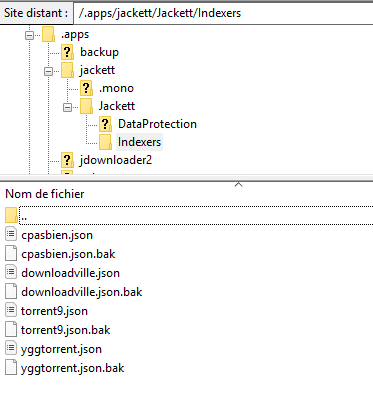
On my side I can't find this folder you mentioned, on my server the jacket folder I have contains a subfolder "Indexers" in which I have 2 files related to ygg :
yggtorrent.json and yggtorrent.json.bak
I opened both and content totally different vs what I found in the yggtorrent.txt I got in previous builds of the topic.
Any idea on what I should do ?
Thanks !
 SuissoNaBisso9
on 23 Jan 2019
SuissoNaBisso9
on 23 Jan 2019
Put it in your Jackett installation folder, under Jackett.Common/Definitions.
Replace yggtorrent.yml with the one provided (be careful, you have to rename ours from "yggtorrent.txt" to "yggtorrent.yml").I've submitted the changes to Jackett, hopefully it'll get merged soon ;)
I don't have the Definitions folder, i only hav two folders named "DataProtection" and "Indexers" in my Jackett folder...
TheMrJuco
on 23 Jan 2019
Put it in your Jackett installation folder, under Jackett.Common/Definitions.
Replace yggtorrent.yml with the one provided (be careful, you have to rename ours from "yggtorrent.txt" to "yggtorrent.yml").
I've submitted the changes to Jackett, hopefully it'll get merged soon ;)I don't have the Definitions folder, i only hav two folders named "DataProtection" and "Indexers" in my Jackett folder...
yes same here...
SuissoNaBisso9
on 23 Jan 2019
My bad, I was used to the source. You should have the folder "Definitions" at the root of your Jackett installation folder.
If not, use search feature of you computer to find it, as I don't use Windows and it might be different.
Hakujou
on 23 Jan 2019
I don't use Windows either (i'm on a synology) and i'm using a docker container to run Jackett, so i don't have any "installation folder", only a config folder that i mounted on docker. In the config folder, "Definitions" is not here as i said before so i don't know where to find him...
TheMrJuco
on 23 Jan 2019
not using windows, Jackett is installed on seedbox with no root access, so in my Jacket folder I don't have anything called "Definitions", see attached what we have in Jackett folder !
SuissoNaBisso9
on 23 Jan 2019
@TheMrJuco Mount provided "yggtorrent.yml" to "/app/Jackett/Definitions/yggtorrent.yml"
@SuissoNaBisso9 This is not it. It's not your installation folder, it's your configuration folder. Locate your installation folder.
Hakujou
on 23 Jan 2019
@TheMrJuco Mount provided "yggtorrent.yml" to "/app/Jackett/Definitions/yggtorrent.yml"
@SuissoNaBisso9 This is not it. It's not your installation folder, it's your configuration folder. Locate your installation folder.
Ok then I guess I can't do anything as I don't have root access to my seedbox, installation folder is certainly not accessible....do you think we can get an update from Jackett directly ?
SuissoNaBisso9
on 23 Jan 2019
The update will be released once the modifications are merged. Usually it is only a matter of a few days. Just be patient.
Hakujou
on 23 Jan 2019
Thanks, it seems to have changed something because i now have a "Search and download URL" that i didn't have before on jackett, but it still doesn't work (i get the "Login failed: No form found on https://www2.yggtorrent.gg/ using form selector #user-login" error)
TheMrJuco
on 23 Jan 2019
You added the nyaasi.yml file, not yggtorrent.yml.
Hakujou
on 23 Jan 2019
OK i make it to work by setting it like this :
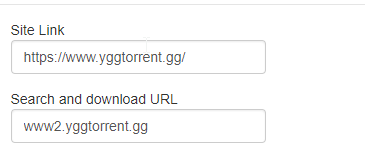
EDIT: i've added your yggtorrent.yml file
EDIT: it seems to be the only combination that work for me, wich is weird because it seems like it doesn't work for anyone else in this issue ?
TheMrJuco
on 23 Jan 2019
OK i make it to work by setting it like this :
EDIT: i've added your yggtorrent.yml file
EDIT: it seems to be the only combination that work for me, wich is weird because it seems like it doesn't work for anyone else in this issue ?
How did you get the "Search and download URL" ? I can't have this section on my side...
SuissoNaBisso9
on 23 Jan 2019
@TheMrJuco The one you have is the default configuration, and the one that supposed to work, that's normal.
@SuissoNaBisso9 You need the patch to get it.
Hakujou
on 23 Jan 2019
I think i'm completely lost.
The default configuration wasn't working before your patch that added the "Search and download" section BUT when i used your patch the "Site link" was www2.yggtorrent.gg and i needed to change it manually to www.yggtorrent.gg.
Anyway, everything works now so thank you very much.
TheMrJuco
on 23 Jan 2019
Damn. I encountered this bug earlier and thought latest updates fixed it, but it seems not.
Jackett seems to want to put the first default text in site link no matter what, in this case "Search and download URL", which breaks it since site link is indeed supposed to be "https://www.yggtorrent.gg/".
I'll check the patch again tomorrow and see if I can come up with something better.
Hakujou
on 23 Jan 2019
TheMrJuco could you tell how you added the .yml file? Seems like we had the same configuration of jackett as you also mentioned the same folders i have previously... Did you finally find the Definitions folder? Can you tell where to search?
Thanks
SuissoNaBisso9
on 23 Jan 2019
No he's not. He's using a Docker container.
Hakujou
on 23 Jan 2019
Sorry but as Hakujou said i'm using a docker container on a synology nas i have locally, not a seedbox :(
TheMrJuco
on 23 Jan 2019
Ok then I'll wait for Jackett to push that fix and be patient :) thanks for the help guys and have a good one
SuissoNaBisso9
on 23 Jan 2019
EDIT: Do not do this, as @Hakujou said this is not a proper way to interact with Docker containers. See next posts for an example configuration in UnRaid
For docker, what you might want to do is to
1. Get the id of the running container: docker ps | grep jackett
2. Get a shell in that container: docker exec -it ID_HERE bash
3. cd to the /app/Jackett/Definitions folder and paste the file there
 mabrodeur
on 23 Jan 2019
mabrodeur
on 23 Jan 2019
This is not a proper way to use Docker.
Mount it as explained above, it's how you're supposed to mess with files/folders inside container. Don't edit them directly.
Hakujou
on 23 Jan 2019
Haven't found another way in UnRaid (and I guess it is the same on Synology)... Still works though 🤷🏻♂️
mabrodeur
on 23 Jan 2019
Nope, it works just fine in synology by mounting the file, and i think you can do the same in UnRaid, you just need to configure docker properly.
TheMrJuco
on 23 Jan 2019
You are right, I guess the first time I made a mistake. I managed to make it work in UnRaid by editing the configuration of the docker container. Works fine now and in a clean way.

mabrodeur
on 23 Jan 2019
thanks @Hakujou
definitely better than my hardcoded url =) !
xfouloux
on 23 Jan 2019
Same for me with Jackett Version 0.10.657.0
 bibi32
on 24 Jan 2019
bibi32
on 24 Jan 2019
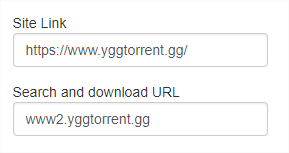
After updating to 0.10.657.0, works with this setup :
 rushapoil
on 24 Jan 2019
rushapoil
on 24 Jan 2019
I stop jackett remove ygg in folder indexers and start, it works now, thanks.
bibi32
on 24 Jan 2019
Sorry for dump question.
I do have Jackett Version 0.9.6.0. Running on docker.
I try the link but still have the problem and i don't know how to update to 10.667.0.
Please help Ygg is the only torrent that i use and it always stop working
 akpdionne
on 24 Jan 2019
akpdionne
on 24 Jan 2019
Stop and remove the container, pull the image, then restart it.
Then you'll have an updated container.
Hakujou
on 24 Jan 2019
Hello,
I've have the same problem and jackett does not provide me the field "Search and download URL"
I use jackett on synology nas , jackett is on version 0.10.657.0 with mono 5.8.0.108-11
Do you have an idea why ?
Thanks a lot
 bennyboom38
on 25 Jan 2019
bennyboom38
on 25 Jan 2019
Hello,
Remove your config file from YggTorrent (yggtorrent.json).
If that doesn't work, remove your container then re-create it.
Hakujou
on 25 Jan 2019
I've tried with a new container but same problem. And I just have the "Site Link" field.
 ghost
on 25 Jan 2019
ghost
on 25 Jan 2019
Which container are you using ? I use the one from linuxserver.io, it has the latest update (0.10.657.0) and it works fine.
If you have not this version, re-pull the container before starting it again. Also, make sure you don't have mounted a config file to your container.
Hakujou
on 25 Jan 2019
Yep that wasn't the latest update, it works fine now. Thanks for your help
ghost
on 25 Jan 2019
Hello,
Remove your config file from YggTorrent (yggtorrent.json).
If that doesn't work, remove your container then re-create it.
I don't use container.
I removed the yggtorrent.json but I can't recreate it , it failed with same message about login failed
bennyboom38
on 25 Jan 2019
@bennyboom38 Do you have the new field when you recreate it ?
If not, please make sure you're on the latest update. If version displayed is indeed 0.10.657.0, reinstall it. Something isn't right with your setup.
Hakujou
on 25 Jan 2019
@bennyboom38 Do you have the new field when you recreate it ?
If not, please make sure you're on the latest update. If version displayed is indeed 0.10.657.0, reinstall it. Something isn't right with your setup.
Thanks I'm going to try to reinstall.
bennyboom38
on 25 Jan 2019
Hello,
after complete reinstall everything is working well, I got the field "Search and download URL" well set.
Thanks a lot Hakujou
bennyboom38
on 25 Jan 2019
With the latest one ?
Please confirm that site link is "https://yggtorrent.gg/" and Search and download URL is "www2.yggtorrent.gg" in the Yggtorrent configuration.
This worked for me. Thanks
 razlebol
on 30 Jan 2019
razlebol
on 30 Jan 2019
It seems like the "search and download url" field has been deleted in the 10.685 version of jackett ? Is it just me ?
TheMrJuco
on 1 Feb 2019
No, that's normal, since it was not necessary anymore. Now it's broken, but for other reasons.
See #4562.
Hakujou
on 1 Feb 2019
Related issues
 aarsenca
·
43Comments
aarsenca
·
43Comments
 JuezFenix
·
116Comments
JuezFenix
·
116Comments
 marranaga
·
39Comments
marranaga
·
39Comments
 hergonoway
·
74Comments
hergonoway
·
74Comments
 cadatoiva
·
37Comments
cadatoiva
·
37Comments