Iridium: Issues with loading youtube videos
software details:
manifestVersion: 1.2.4
cookieEnabled: true
doNotTrack: 1
language: sv-SE
buildID: 20200217142647
name: Firefox
vendor: Mozilla
version: 73.0.1
arch: x86-64
os: win
steps to recreate the problem:
Page has just the background elements loaded in and it takes several reloads to get the video and rest of the page to finally load
additional information that could be helpful:
 coolbond1
All 29 comments
I am not having any issues with Firefox 73.0.1 and Iridium 1.2.4 only installed. Did you follow the instructions before reporting a bug as requested? The steps included contain specifically to test the issue with all other addons disabled or a brand new profile with only the Iridium addon installed to rule out the possibility of another addon interfering with it or a browser setting being problematic:
https://github.com/ParticleCore/Iridium/wiki/Report-a-bug
I am assuming you did not follow all the steps as requested because using the information you provided I cannot recreate the problem.

 ParticleCore
on 8 Mar 2020
ParticleCore
on 8 Mar 2020
Yes i did follow the steps listed and still had issues with the addon
Skaffa Outlook för Androidhttps://aka.ms/ghei36
From: Particle notifications@github.com
Sent: Sunday, March 8, 2020 8:18:06 PM
To: ParticleCore/Iridium Iridium@noreply.github.com
Cc: coolbond1 arturwen91@Hotmail.com; Author author@noreply.github.com
Subject: Re: [ParticleCore/Iridium] Issues with loading youtube videos (#825)
I am not having any issues with Firefox 73.0.1 and Iridium 1.2.4 only installed. Did you follow the instructions before reporting a bug as requested? The steps included contain specifically to test the issue with all other addons disabled or a brand new profile with only the Iridium addon installed to rule out the possibility of another addon interfering with it or a browser setting being problematic:
https://github.com/ParticleCore/Iridium/wiki/Report-a-bug
I am assuming you did not follow all the steps as requested because using the information you provided I cannot recreate the problem.
[ss5]https://user-images.githubusercontent.com/9222661/76169580-22b57880-6169-11ea-8d35-829712b45150.gif
—
You are receiving this because you authored the thread.
Reply to this email directly, view it on GitHubhttps://github.com/ParticleCore/Iridium/issues/825?email_source=notifications&email_token=AKQB6VVU53JWF6CVU72VVULRGPVO5A5CNFSM4LD4B6VKYY3PNVWWK3TUL52HS4DFVREXG43VMVBW63LNMVXHJKTDN5WW2ZLOORPWSZGOEOE6XPQ#issuecomment-596241342, or unsubscribehttps://github.com/notifications/unsubscribe-auth/AKQB6VRGXWXBVZZK4ZAAOYDRGPVO5ANCNFSM4LD4B6VA.
coolbond1
on 8 Mar 2020
I'm afraid that I cannot recreate your issue, the information you provided is not sufficient.
ParticleCore
on 8 Mar 2020
I have the same issue. FF74 (beta)
 BubiBalboa
on 8 Mar 2020
BubiBalboa
on 8 Mar 2020
@BubiBalboa Please avoid "me toos" without adding any new information that might help in recreating the issue.
ParticleCore
on 8 Mar 2020
The new information is that it happens to more than one person and it also happens on FF74 with the latest version of the addon.
I'm not turning off all my 40+ extensions and I'm not creating a new profile. You want me to try anything else?
uBlock, Violentmonkey and Video Speed Controller are often responsible if something doesn't load properly but turning them off didn't help.
BubiBalboa
on 8 Mar 2020
@BubiBalboa This kind of attitude is counter-productive and has no place in this repository, especially when I've already detailed to large lengths that I have limited time to dedicate to this extension. I don't need others telling me to do what they want with such aggression, if you don't want to help then don't post any more because doing so will constitute as plain noise and spam for anyone subscribed to the repository.
Happening to one person or many for me is the same thing, it means nothing seeing that it can still be an issue caused by another addon installed or a browser setting, which has happened many times before. I treat each issue the same way I've always have and having others saying "me too" has never contributed to anything productive, what did was when those "me toos" actually posted new information that helped clue in on the problem.
Either follow the instructions for reporting a problem or not, each one yields a certain consequence, but don't complain about it afterwards.
ParticleCore
on 8 Mar 2020
Alright i will go step by step
Make sure that you are using the new YouTube Material layout. If you aren't then enable it and try again: youtube claims its unavailable right now

Make sure that you are using the most recent Iridium version. If you aren't then update it, restart the browser and see if the problem has already been fixed: already done this

This extension is only being supported for stable versions of Firefox 57: latest version of firefox so not this either

Make sure you are not using the Flash player: Not using flash

Disable the extension and restart the browser: Did it and it started working again

Disable all other extensions except Iridium you might have running in your browser and restart the browser:did not work

Check if your browser or extension has a new update version, if it does then update them: they are all up to date

Reset the extension settings to their default: did that and still issues

Create a new browser profile and install only Iridium, see if the problem still persists: did that and still issues
Because of the nature of the issue there is no way for me to actually provide step by step other than try to open several videos at ones that you have not seen before and see if that works, the issue comes up after a while i seem to have noticed so its not something immediately obvious and while a good restart does solve it temporary with the add-on installed the issue always comes back while without it does not.
coolbond1
on 8 Mar 2020
(...) the issue comes up after a while i seem to have noticed so its not something immediately obvious (...)
Ok, so it's not an always thing, but something that occurs eventually. This is something that should've been added in the original post, because I was left to believe it was happening to any video at any time. I'll keep an eye out to see if it happens to me, I understand there are bugs like these that are hard to recreate. Thanks for detailing a bit more what the issue is.
ParticleCore
on 9 Mar 2020
I could have sworn i posted that i huess i missed it so sorry for that
Skaffa Outlook för Androidhttps://aka.ms/ghei36
From: Particle notifications@github.com
Sent: Monday, March 9, 2020 12:02:33 AM
To: ParticleCore/Iridium Iridium@noreply.github.com
Cc: coolbond1 arturwen91@Hotmail.com; Author author@noreply.github.com
Subject: Re: [ParticleCore/Iridium] Issues with loading youtube videos (#825)
(...) the issue comes up after a while i seem to have noticed so its not something immediately obvious (...)
Ok, so it's not an always thing, but something that occurs eventually. This is something that should've been added in the original post, because I was left to believe it was happening to any video at any time. I'll keep an eye out to see if it happens to me, I understand there are bugs like these recreate. Thanks for detailing a bit more what the issue is.
—
You are receiving this because you authored the thread.
Reply to this email directly, view it on GitHubhttps://github.com/ParticleCore/Iridium/issues/825?email_source=notifications&email_token=AKQB6VUMSQCJCRUBXD57WGDRGQPYTA5CNFSM4LD4B6VKYY3PNVWWK3TUL52HS4DFVREXG43VMVBW63LNMVXHJKTDN5WW2ZLOORPWSZGOEOFEEBQ#issuecomment-596263430, or unsubscribehttps://github.com/notifications/unsubscribe-auth/AKQB6VTOBUHREJWI4QD4TU3RGQPYTANCNFSM4LD4B6VA.
coolbond1
on 9 Mar 2020
Hi there,
I'm also receiving this issue. It happens infrequently and I can't seem to reproduce it reliably, however the last time it happened I made sure to investigate a bit. After disabling all extensions except Iridium and refreshing the page, the issue was still present. Once it starts happening, no video pages will fully load.

The contents of the console appear to show some errors:
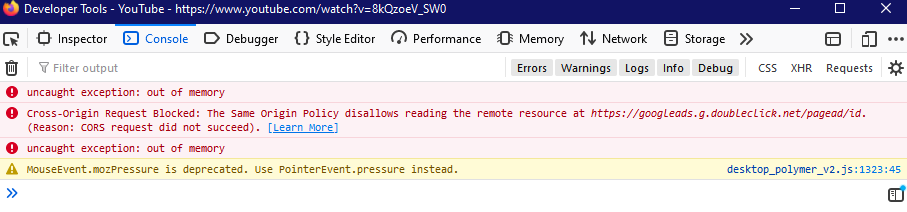
Forcing a cache refresh with Ctrl + F5 allows the video page to fully load once more. The contents of the console after a cache refresh and successful load are:
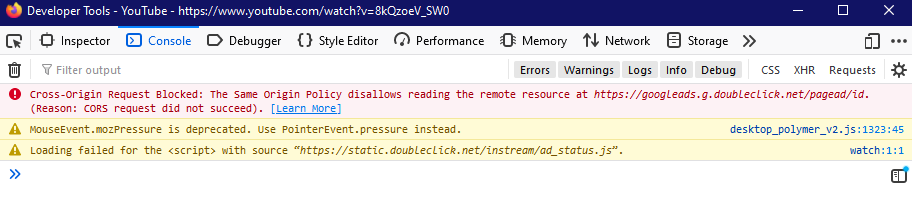
I hope this information is useful in sussing out the issue.
 SootyOwl
on 12 Mar 2020
SootyOwl
on 12 Mar 2020
@TytoDan That was very helpful and hopeless unfortunately, in a way. It appears the API being used is having serious memory handling issues, causing the remaining of the page to fail to load correctly.
This is a problem that I am afraid I cannot fix, but I will look into it. However, it might also be fixed in the recent versions of Firefox. Could either of you by chance use Firefox Nightly and see if the same issue occurs? I ask this because my main browser version is Nightly (76 as I write this) and I have yet to get that memory issue.
Once again, thank you very much for that information, that really helped understand what is going on.
ParticleCore
on 12 Mar 2020
I'll swap to Nightly and keep an eye on it.
Happy to help!
SootyOwl
on 12 Mar 2020
Firefox has a bug report of memory issues on 72 and 73 marked as wontfix
https://bugzilla.mozilla.org/show_bug.cgi?id=1584266#c48
Although that started with Facebook page navigation, I am suspecting it might be correlated with this one.
I'm left wondering if this is when the API is feeding resource data from cached content, if so I might work a way around this.
ParticleCore
on 12 Mar 2020
Can confirm that I just had the same bug on Nightly 76.0a1 (2020-03-11).
SootyOwl
on 12 Mar 2020
@TytoDan Thanks for the information. I have been running for the past 3 days non-stop on 73 and 76 with autoplay next and autoplay all enabled, I have no idea how many videos played but it never had any problems. I will continue checking, but this might be some change on YouTube that I have not been hit with yet and is causing the memory issue with the add-on.
Next step is to wait, which is always boring.
ParticleCore
on 12 Mar 2020
@ParticleCore From my observations it seems to happen more frequently when queuing up multiple videos at the same time in tabs.
SootyOwl
on 12 Mar 2020
@ParticleCore From my observations it seems to happen more frequently when queuing up multiple videos at the same time in tabs.
I have definitely not tested this yet as I tend to only use YouTube on one tab, will take this into consideration now.
ParticleCore
on 13 Mar 2020
Finally got it to happen to me, will see what is going on.
ParticleCore
on 14 Mar 2020
Looks like an event is being called by the browser twice instead of just once. I'm trying to understand if this is a bug in the browser or not.
ParticleCore
on 14 Mar 2020
This should be fixed in version 1.2.5
@TytoDan Let me know if it works for you
ParticleCore
on 14 Mar 2020
As I feared this is due to a Firefox bug that has yet to be fixed: https://bugzilla.mozilla.org/show_bug.cgi?id=1595197
Firefox is dispatching its events twice, which in turn causes the StreamFilter to run twice almost at the same time which now results in out of memory problems because of how big the YouTube resource files are after their recent update. The biggest one is over 3MB in size.
Hopefully the workaround should be enough since it tries to reduce unnecessary heavy operations as much as possible, thus reducing the risk of out of memory problems, but the main issue lies with Firefox still.
ParticleCore
on 14 Mar 2020
Good job working out the issue, will update now and hope the workaround helps.
SootyOwl
on 16 Mar 2020
https://addons.mozilla.org still has 1.2.4. Is this intentional?
 Dreomite
on 19 Mar 2020
Dreomite
on 19 Mar 2020
@Azumgi The new version is stuck in review with more unreasonable demands for changes to the code and I am on the verge of giving up on AMO once again as a result of that.
ParticleCore
on 19 Mar 2020
I am being asked to implement a prompt asking users authorization for collecting data...
The add-on does not collect data and is clearly disclosed in the addon description page.

ParticleCore
on 19 Mar 2020
Aye, this is annoying :I
I hope it's some robot shenanigans which can be easily resolved in a conversation with a human reviewer.
Even though I checked the extension with addons-linter and it showed only 1 completely unrelated error.
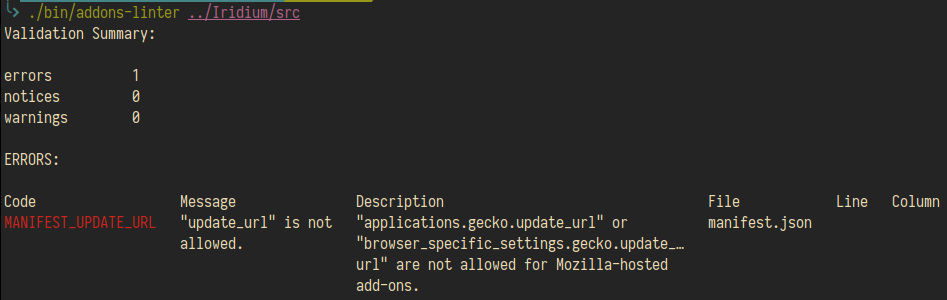
I feel you, bud. Getting stuck with an angry crowd, constantly changing youtube/firefox, lack of free time, and AMO stupidity can kill any motivation.
Dreomite
on 19 Mar 2020
Aye, this is annoying :I
I hope it's some robot shenanigans which can be easily resolved in a conversation with a human reviewer.I feel you, bud. Getting stuck with an angry crowd, constantly changing youtube/firefox, lack of free time, and AMO stupidity can kill any motivation.
If only it was a robot I would understand, but no, it is not... It is what it is
ParticleCore
on 19 Mar 2020
Apparently the reviewer still thinks the prompt is required for the user to know more about the cookie the add-on already explains in the description.
If after today no new version comes up on the AMO store that means there will be no more updates to the AMO store version.
If anyone wants to continue receiving updates then install the unlisted version which is exactly the same, except it is not listed on their store: https://github.com/ParticleCore/Iridium/wiki/Download
I'm sorry it had to come to this, but I'm beyond tired of their retarded demands.
I will post an announcement regarding this situation.
ParticleCore
on 20 Mar 2020
Related issues
 Zero-ELEC
·
5Comments
Zero-ELEC
·
5Comments
 thegranddesign
·
3Comments
thegranddesign
·
3Comments
 MattSturgeon
·
3Comments
ParticleCore
·
5Comments
MattSturgeon
·
3Comments
ParticleCore
·
5Comments
 erkinalp
·
3Comments
erkinalp
·
3Comments
Most helpful comment
As I feared this is due to a Firefox bug that has yet to be fixed: https://bugzilla.mozilla.org/show_bug.cgi?id=1595197
Firefox is dispatching its events twice, which in turn causes the StreamFilter to run twice almost at the same time which now results in out of memory problems because of how big the YouTube resource files are after their recent update. The biggest one is over 3MB in size.
Hopefully the workaround should be enough since it tries to reduce unnecessary heavy operations as much as possible, thus reducing the risk of out of memory problems, but the main issue lies with Firefox still.