Iridium: Reverse Playlist button is gone.
Browser Name: Mozilla Firefox
Browser Version: 67.0b10 (64-bit)
Operating System: Windows 7 Ultimate
Software Type: Add-on
Software Version: 0.2.5
Problem Description: The Reverse Playlist button is just gone from all playlists.
Steps to reproduce: It's just not there.
 Mathew322
All 42 comments
Browser Name: Mozilla Firefox
Browser Version: 66.0.2 (64-bit) and 66.0.3 (64-bit)
Operating System: macOS 10.14.4 Mojave
Software Type: Add-on
Software Version: 0.2.5
Problem Description: The "Loop playlist", "Shuffle playlist", "Reverse playlist" and "Save playlist" buttons are all missing and have been replaced with a different button. The new button displays 3 vertical dots. I believe it's supposed to open a dropdown menu but clicking it only starts the google material design ripple effect and no menu appears. Hovering over the button displays no tooltip. Here is the rendered markup of the toolbar that is meant to contain the four buttons listed above:
<div id="playlist-actions" class="style-scope ytd-playlist-panel-renderer"><ytd-menu-renderer class="yt-playlist-buttons style-scope ytd-playlist-panel-renderer">

    <div id="top-level-buttons" class="style-scope ytd-menu-renderer"></div>
    <yt-icon-button id="button" class="dropdown-trigger style-scope ytd-menu-renderer"><button id="button" class="style-scope yt-icon-button">
      <yt-icon class="style-scope ytd-menu-renderer"><svg viewBox="0 0 24 24" preserveAspectRatio="xMidYMid meet" focusable="false" style="pointer-events: none; display: block; width: 100%; height: 100%;" class="style-scope yt-icon"><g class="style-scope yt-icon">
        <path d="M12 8c1.1 0 2-.9 2-2s-.9-2-2-2-2 .9-2 2 .9 2 2 2zm0 2c-1.1 0-2 .9-2 2s.9 2 2 2 2-.9 2-2-.9-2-2-2zm0 6c-1.1 0-2 .9-2 2s.9 2 2 2 2-.9 2-2-.9-2-2-2z" class="style-scope yt-icon"></path>
      </g></svg>


  </yt-icon>
    </button><paper-ripple class="style-scope yt-icon-button circle"><!--css-build:shady-->

    <div id="background" class="style-scope paper-ripple" style="opacity: 0.0068;"></div>
    <div id="waves" class="style-scope paper-ripple"></div>
</paper-ripple></yt-icon-button>
  </ytd-menu-renderer><div id="save-button-wrapper" class="style-scope ytd-playlist-panel-renderer"><ytd-toggle-button-renderer class="style-scope ytd-playlist-panel-renderer" button-renderer=""></ytd-toggle-button-renderer></div><div id="overflow-menu" class="style-scope ytd-playlist-panel-renderer"></div></div>
Curiously enough, the buttons appear correctly when opening the same page in a private window. Here is the markup from the private window:
<div id="playlist-actions" class="style-scope ytd-playlist-panel-renderer"><ytd-menu-renderer class="yt-playlist-buttons style-scope ytd-playlist-panel-renderer">

    <div id="top-level-buttons" class="style-scope ytd-menu-renderer"><ytd-toggle-button-renderer button-renderer="" class="style-scope ytd-menu-renderer style-grey-text size-default" is-icon-button="" has-no-text=""><a class="yt-simple-endpoint style-scope ytd-toggle-button-renderer" tabindex="-1"><yt-icon-button id="button" class="style-scope ytd-toggle-button-renderer style-grey-text size-default"><button id="button" class="style-scope yt-icon-button" aria-label="Loop playlist"><yt-icon class="style-scope ytd-toggle-button-renderer"><svg viewBox="0 0 24 24" preserveAspectRatio="xMidYMid meet" focusable="false" style="pointer-events: none; display: block; width: 100%; height: 100%;" class="style-scope yt-icon"><g class="style-scope yt-icon">
        <path d="M7 7h10v3l4-4-4-4v3H5v6h2V7zm10 10H7v-3l-4 4 4 4v-3h12v-6h-2v4z" class="style-scope yt-icon"></path>
      </g></svg>


  </yt-icon></button></yt-icon-button><paper-tooltip role="tooltip" tabindex="-1" class="style-scope ytd-toggle-button-renderer" style="inset: 910px auto auto 837.408px;">


    <div id="tooltip" class="style-scope paper-tooltip hidden">
      Loop playlist
    </div>
  </paper-tooltip></a></ytd-toggle-button-renderer><ytd-toggle-button-renderer button-renderer="" class="style-scope ytd-menu-renderer style-grey-text size-default" is-icon-button="" has-no-text=""><a class="yt-simple-endpoint style-scope ytd-toggle-button-renderer" tabindex="-1"><yt-icon-button id="button" class="style-scope ytd-toggle-button-renderer style-grey-text size-default"><button id="button" class="style-scope yt-icon-button" aria-label="Shuffle playlist"><yt-icon class="style-scope ytd-toggle-button-renderer"><svg viewBox="0 0 24 24" preserveAspectRatio="xMidYMid meet" focusable="false" style="pointer-events: none; display: block; width: 100%; height: 100%;" class="style-scope yt-icon"><g class="style-scope yt-icon">
        <path d="M10.59 9.17L5.41 4 4 5.41l5.17 5.17 1.42-1.41zM14.5 4l2.04 2.04L4 18.59 5.41 20 17.96 7.46 20 9.5V4h-5.5zm.33 9.41l-1.41 1.41 3.13 3.13L14.5 20H20v-5.5l-2.04 2.04-3.13-3.13z" class="style-scope yt-icon"></path>
      </g></svg>


  </yt-icon></button></yt-icon-button><paper-tooltip role="tooltip" tabindex="-1" class="style-scope ytd-toggle-button-renderer" style="inset: 910px auto auto 879.958px;">


    <div id="tooltip" class="style-scope paper-tooltip hidden">
      Shuffle playlist
    </div>
  </paper-tooltip></a></ytd-toggle-button-renderer><ytd-toggle-button-renderer button-renderer="" class="style-scope ytd-menu-renderer style-grey-text size-default" is-icon-button="" has-no-text=""><a class="yt-simple-endpoint style-scope ytd-toggle-button-renderer" tabindex="-1"><yt-icon-button id="button" class="style-scope ytd-toggle-button-renderer style-grey-text size-default"><button id="button" class="style-scope yt-icon-button" aria-label="Reverse playlist"><yt-icon class="style-scope ytd-toggle-button-renderer"><svg viewBox="0 0 24 24" preserveAspectRatio="xMidYMid meet" focusable="false" style="pointer-events: none; display: block; width: 100%; height: 100%;" class="style-scope yt-icon"><g class="style-scope yt-icon">
        <path d="M6 21l-4-4h3V5h2v12h3L6 21z M19 7v12h-2V7h-3l4-4l4 4H19z" class="style-scope yt-icon"></path>
      </g></svg>


  </yt-icon></button></yt-icon-button><paper-tooltip role="tooltip" tabindex="-1" class="style-scope ytd-toggle-button-renderer" style="inset: 910px auto auto 925.033px;">


    <div id="tooltip" class="style-scope paper-tooltip hidden">
      Reverse playlist
    </div>
  </paper-tooltip></a></ytd-toggle-button-renderer></div>
    <yt-icon-button id="button" class="dropdown-trigger style-scope ytd-menu-renderer" hidden=""><button id="button" class="style-scope yt-icon-button">
      <yt-icon class="style-scope ytd-menu-renderer"><svg viewBox="0 0 24 24" preserveAspectRatio="xMidYMid meet" focusable="false" style="pointer-events: none; display: block; width: 100%; height: 100%;" class="style-scope yt-icon"><g class="style-scope yt-icon">
        <path d="M12 8c1.1 0 2-.9 2-2s-.9-2-2-2-2 .9-2 2 .9 2 2 2zm0 2c-1.1 0-2 .9-2 2s.9 2 2 2 2-.9 2-2-.9-2-2-2zm0 6c-1.1 0-2 .9-2 2s.9 2 2 2 2-.9 2-2-.9-2-2-2z" class="style-scope yt-icon"></path>
      </g></svg>


  </yt-icon>
    </button></yt-icon-button>
  </ytd-menu-renderer><div id="save-button-wrapper" class="style-scope ytd-playlist-panel-renderer"><ytd-toggle-button-renderer class="style-scope ytd-playlist-panel-renderer style-grey-text size-default" button-renderer="" is-icon-button="" has-no-text=""><a class="yt-simple-endpoint style-scope ytd-toggle-button-renderer" tabindex="-1"><yt-icon-button id="button" class="style-scope ytd-toggle-button-renderer style-grey-text size-default"><button id="button" class="style-scope yt-icon-button" aria-label="Save playlist"><yt-icon class="style-scope ytd-toggle-button-renderer"><svg viewBox="0 0 24 24" preserveAspectRatio="xMidYMid meet" focusable="false" style="pointer-events: none; display: block; width: 100%; height: 100%;" class="style-scope yt-icon"><g class="style-scope yt-icon">
        <path d="M14 10H2v2h12v-2zm0-4H2v2h12V6zm4 8v-4h-2v4h-4v2h4v4h2v-4h4v-2h-4zM2 16h8v-2H2v2z" class="style-scope yt-icon"></path>
      </g></svg>


  </yt-icon></button></yt-icon-button><paper-tooltip role="tooltip" tabindex="-1" class="style-scope ytd-toggle-button-renderer" style="inset: 910px auto auto 1168.08px;">


    <div id="tooltip" class="style-scope paper-tooltip hidden">
      Save playlist
    </div>
  </paper-tooltip></a></ytd-toggle-button-renderer></div><div id="overflow-menu" class="style-scope ytd-playlist-panel-renderer"></div></div>
Disabling the addon correctly returns the playlist buttons to their original state. The problem reappears after re-enabling the addon
 spartanatreyu
on 15 Apr 2019
spartanatreyu
on 15 Apr 2019
Oh wow I didn't even notice those buttons were missing too.
Mathew322
on 15 Apr 2019
At least it still works in private mode so I can still listen to my music, podcasts and shows in the right order
spartanatreyu
on 16 Apr 2019
Private mode? you mean the add-on works in private windows?
Mathew322
on 16 Apr 2019
yep
spartanatreyu
on 16 Apr 2019
What I'd figured out is that if I'm logged out of YouTube on a Private Window then the Plugin works like it should, if I log in however is breaks which is annoying cause is means I can't use YouTube Premium on my account.
Mathew322
on 16 Apr 2019
Same issue, same browser. Please help sobs
 Freelancer95
on 17 Apr 2019
Freelancer95
on 17 Apr 2019
Same issue for me on FireFox. Started just today, though.
 Schazmen
on 23 Apr 2019
Schazmen
on 23 Apr 2019
Are you on the firefox beta channel? That's what I'm on, might explain the delay.
Mathew322
on 23 Apr 2019
Yes please address this :/ This has been bothering me for months.
I followed all the troubleshooting guids to no avail...
 charlificate
on 23 Apr 2019
charlificate
on 23 Apr 2019
It probably won't be fixed right now.
The main developer is on hold due to health issues: https://github.com/ParticleCore/Iridium/issues/673
spartanatreyu
on 24 Apr 2019
Browser Name: Mozilla Firefox
Browser Version: 66.0.3 (64-bit)
Operating System: Win 10 pro
Software Type: Add-on
Software Version: 0.2.5
Problem Description: instead of the three buttons it's a singular button with vertical dots.
Steps to reproduce: Just have it installed. Disable and reload it goes back to normal, but re-enable and it's the button of doom again. Autoplay has some jankiness too where it won't work.
For me it doesn't matter what window I open it in, it still has the useless three dot button. It only just started effecting my browser a few days ago and I used to could just refresh the page and it'd be fine, only that now no longer works. It's also sadly not my only issue, since the automatic play function of the playlist no longer works either depending on the playlist even with the "turning on autoplay in iridium's settings" work around. I wonder what youtube changed to make such a conflict. o3o I guess until it get's fixed I'll have to disable the add-on, since I don't think there's a keyboard control for making a playlist loop... ; x ;
Hopefully the dev feels better soon, health issues suck whatever they may be. x.x;
 Quizicalgin
on 24 Apr 2019
Quizicalgin
on 24 Apr 2019
Don't know if it's for everyone else, but the issue is fixed for me now. I did nothing, it's just back.
Schazmen
on 25 Apr 2019
Oh hey it looks like it's working again for me too!
Mathew322
on 25 Apr 2019
Huzzah!
Quizicalgin
on 26 Apr 2019
The problem seems to be intermittent. I was fine for the past 4-5 days, but today it's reappeared.
 TheRangor
on 30 Apr 2019
TheRangor
on 30 Apr 2019
for me it's not showing yet.
 dvdhngs
on 2 May 2019
dvdhngs
on 2 May 2019
problem reappeared
 rnnc
on 3 May 2019
rnnc
on 3 May 2019
I had this issue, so I planned on reinstalling it to see that would fix it. Now I can't install it at all. Going through the addon store says that I need to check my connection and installing from file says that the addon is corrupt.
 XEntombmentX
on 4 May 2019
XEntombmentX
on 4 May 2019
Okay so to make sure everyone is on the same page let me explain what happened. A certificate expired on Firefox when it shouldn't have done so which made a huge number of add-ons no longer work, this is why your add-ons might have been disabled at some point yesterday, this seems to be fixed now and all add-ons should be working again.
As far as Iridium not working again, I'm also experiencing this issue with playlists again as of today and not even going into a private window seems to fix it.
Mathew322
on 5 May 2019
Issue has cropped up on Chrome now also
Browser Google Chrome
Version 74.0.3729.131 (Official Build) (64-bit)
 Sebron
on 5 May 2019
Sebron
on 5 May 2019
Experiencing the same issue on the latest version of Firefox. The button comprised of 3 dots is not functional. Any other option has disappeared for a while now. Nothing seems to fix it.
 furiifuu
on 5 May 2019
furiifuu
on 5 May 2019
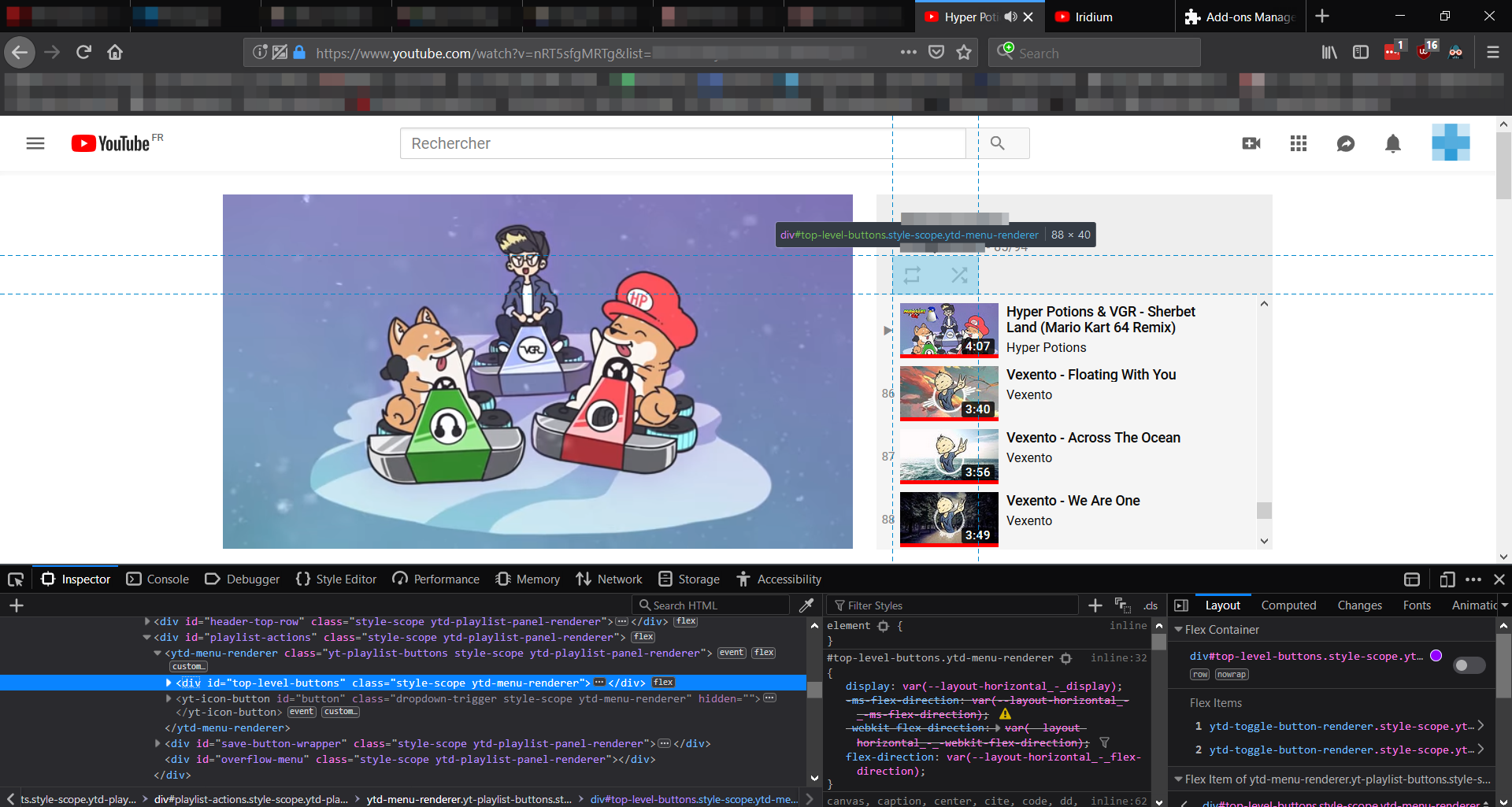
I thought some images might help.
Without Iridium:
With Iridium:
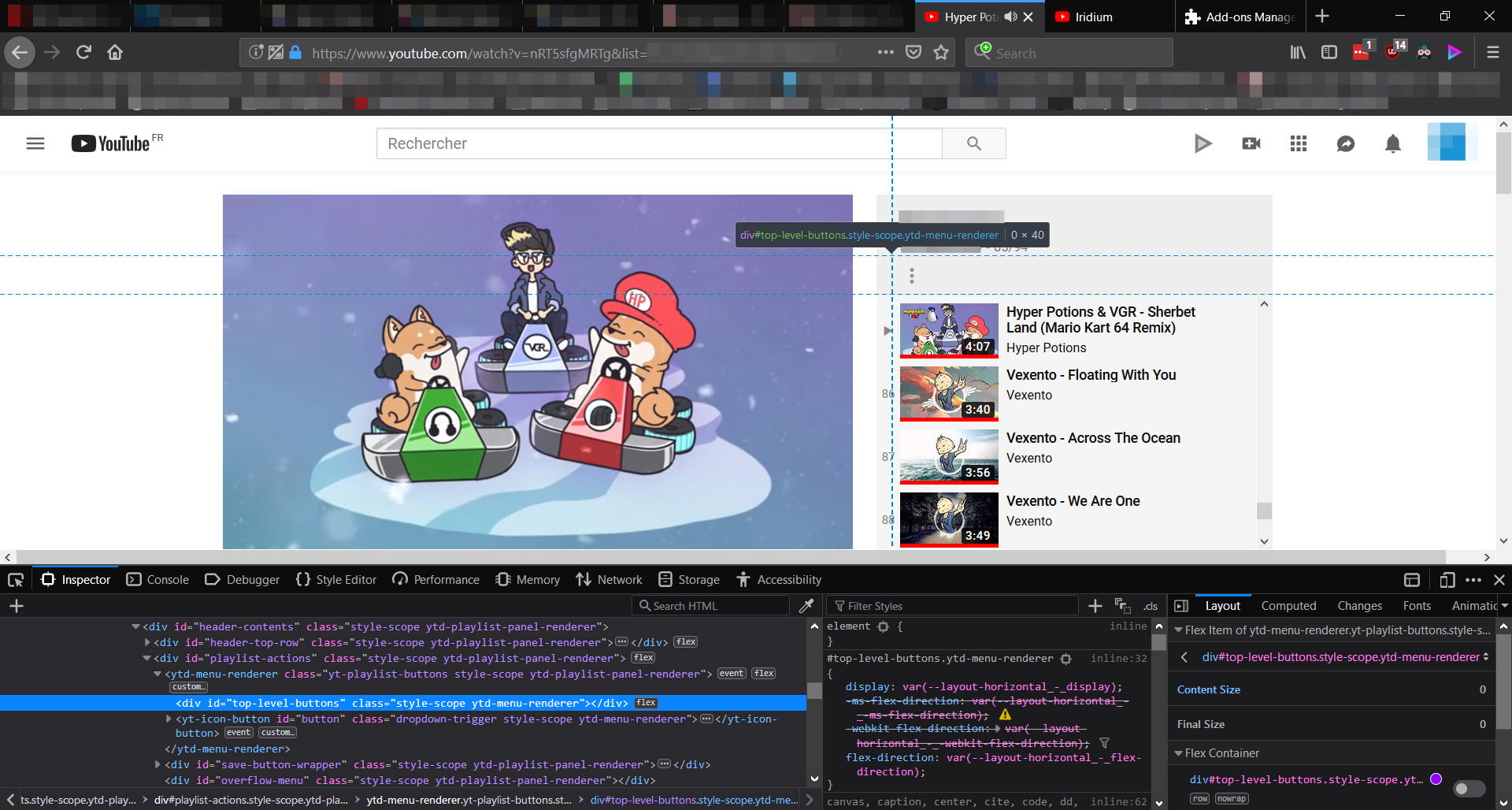
Take care!
 milklineep
on 14 May 2019
milklineep
on 14 May 2019
Seems like a typical this error
 Ebuall
on 2 Jun 2019
Ebuall
on 2 Jun 2019
Firefox had rolled out some fixes for their addons a few weeks ago and it worked for a few days, but it’s back to not working. Hopefully it gets figured out soon.
XEntombmentX
on 3 Jun 2019
Even ignoring Firefox, it doesn't work in Chrome. There is an error in the code https://github.com/ParticleCore/Iridium/issues/715#issuecomment-497924442
Ebuall
on 3 Jun 2019
Google Chrome developers revealed their plans to deprecate a lot of old browser features and youtube developers are testing new versions of Polymer to support future Google Chrome versions. Sometimes youtube gets completely broken and empty even when all addons are disabled. I guess youtube uses random people as guineapig Q&A testers. As far as Iridium is concerned it is working fine when i force youtube to use older versions of Polymer and playlist reverse worked marvelously even on a monster 6790 video playlist
 bskyb-backport
on 12 Jun 2019
bskyb-backport
on 12 Jun 2019
Google does trial new changes to a small portion of the public at a time before rolling out those changes to everyone so anything can break at any time but a refresh will always revert you back to normal.
spartanatreyu
on 12 Jun 2019
You mean refresh as in CTRL+F5?
Mathew322
on 12 Jun 2019
sometimes deleting youtube cookies can opt you out current youtube experiment some cookies are set up to self destruct after some time. In the old days people copied new youtube cookies from each other to have new youtube website looks but nowadays youtube experiments are useless and outright destructive. If you dig inside youtube back end code you literally find destructive code named "Destructive". Google is waging war on the public
bskyb-backport
on 12 Jun 2019
So is this issue fixed or nah? Cause this feature is the only thing I need this extension for
 ghost
on 1 Jul 2019
ghost
on 1 Jul 2019
It's not fixed for me, I think it's just broken.
Mathew322
on 2 Jul 2019
it was working on older version of youtube polymer 1.09212442 i could enable old polymer with fake user agent extension that told youtube i used old browser but now youtube is forcing polymer 3.2.0 even on old browsers and Iridium is not working with polymer 3.2.0
bskyb-backport
on 8 Jul 2019
Looks like we'll just have to wait till Particle returns and updates it. :
Mathew322
on 8 Jul 2019
Mine was working just yesterday, and now it's not. I mean it's been on and off ever since I even added the plugin, but it usually fixed itself after a refresh, or browser-close, or a computer restart. Not this time.
Also,
- First, a year or so ago, I was able to watch the 5,500+ videos of the Game Grumps channel from the very first video by reversing the playlist with no problems.
- As recently as a few months ago or less, I was able to watch all 4,000+ videos of Jacksepticeye's channel from the very first (objectively awkward 😜) video after reversing the playlist.
- Within the last 1 to 2 months, I've been unable to reverse long playlists correctly - it would only send me back 79 videos or so. I'd have to manually type the video number into the URL, and then they STILL wouldn't play in reverse order (the correct chronological order).
- TODAY, I'm unable to reverse ANY playlist. The button is just GONE.
Please fix this. I know Youtube updates every three freaking seconds, but I'm chronically ill and I used your extension to watch long playlists without having to painfully sit up and even-more-painfully click around to get to the correct video after every single video... it hasn't been good for my health to do that with the super-long playlist so I've been avoiding them until this is fixed, but now it's affecting ALL PLAYLISTS and I don't know what to do... ☹
 Bananasaurus
on 18 Jul 2019
Bananasaurus
on 18 Jul 2019
I haven't found any other extension, website, script or anything to reverse a playlist order. Iridium was the only one and now it's gone. It's very annoying to not be able to watch all the videos of a channel in the right order or having to press multiple time the previous button before it switch to the next videos instead of just sitting and watching... :(
 hydargos123
on 22 Jul 2019
hydargos123
on 22 Jul 2019
as a crude fix you can try jamming the PageDown button with a toothpick or a mouse on the channel Uploads page until all videos load then Ctrl+S to save the page as a text file then import all the urls into a desktop player
bskyb-backport
on 28 Jul 2019
Is this fixed in version 1?
 AceAttorneyMaster111
on 6 Oct 2019
AceAttorneyMaster111
on 6 Oct 2019
@AceAttorneyMaster111 I'm afraid not, I haven't been able to re-develop this feature yet, but I plan to. For the moment it will remain as is
Closed due to https://github.com/ParticleCore/Iridium/tree/1.0.0
 ParticleCore
on 6 Oct 2019
ParticleCore
on 6 Oct 2019
@ParticleCore, would you be willing to keep this open since you plan to re-implement it? That would make it easier to track when this feature is done, instead of just checking the release list every so often.
Totally get it if the answer is no, but it would be nice.
 gappleto97
on 24 Oct 2019
gappleto97
on 24 Oct 2019
I'm not sure if this issue is the right place to do that since it had to do with a previous version, but you can make a new issue framed as a feature request if you want. (disclaimer: i'm not particlecore, not sure where they want to take the project)
AceAttorneyMaster111
on 25 Oct 2019
Please keep this open or create a new one for a new feature.
 lkamal
on 25 Jan 2020
lkamal
on 25 Jan 2020
Related issues
 windowlicker79
·
4Comments
windowlicker79
·
4Comments
 juozaspo
·
3Comments
juozaspo
·
3Comments
 ELECTROHAXZ
·
3Comments
ELECTROHAXZ
·
3Comments
 KaiusWolf
·
3Comments
KaiusWolf
·
3Comments
 megamorphg
·
4Comments
megamorphg
·
4Comments
Most helpful comment
Mine was working just yesterday, and now it's not. I mean it's been on and off ever since I even added the plugin, but it usually fixed itself after a refresh, or browser-close, or a computer restart. Not this time.
Also,
Please fix this. I know Youtube updates every three freaking seconds, but I'm chronically ill and I used your extension to watch long playlists without having to painfully sit up and even-more-painfully click around to get to the correct video after every single video... it hasn't been good for my health to do that with the super-long playlist so I've been avoiding them until this is fixed, but now it's affecting ALL PLAYLISTS and I don't know what to do... ☹