Iridium: Videos no longer loading at all if Iridium is enabled.
Browser Name: Firefox
Browser Version: 64.0.2 (64-bit)
Operating System: Windows 10 Pro 64Bit
Software Type: Addon
Software Version: 0.2.5
Problem Description: YouTube videos no longer play. They forever set at a buffering icon. The Play/Pause buttons do not respond when clicked, using shortcuts (k for example) or the space-bar. If you manage to find a video that doesn't autoplay (because that's broken as well but there is already a bug report filed for that) clicking the play icon in the center of the video does nothing.
Steps to reproduce: Attempt to watch a video with Iridium enabled.
Additional details: Unknown if it affects all videos but I've been able to reproduce on basically all videos I've tried, even videos I know worked without issue prior. This problem just started within the past few hours.
 RadioActiveLobster
All 35 comments
If you enable videos to autoplay in the settings they will work again. And since the prevent autoplay is bugged right now anyway you aren't losing anything with this current workaround.
 rberlew
on 29 Jan 2019
rberlew
on 29 Jan 2019
Same issue on chrome os with tampermonkey. As rberlew said enabling autoplay fixes the problem.
 nathgit
on 29 Jan 2019
nathgit
on 29 Jan 2019
If you enable videos to autoplay in the settings they will work again. And since the prevent autoplay is bugged right now anyway you aren't losing anything with this current workaround.
I can confirm this works. Enabling autoplay fixes the issue.
 Joshdw
on 29 Jan 2019
Joshdw
on 29 Jan 2019
Again confirming workaround by rberlew [thanks!], and restating from elsewhere that Firefox in about:config now allows control of media autoplay. So, turning autoplay _on_ in Iridium and [in Firefox] setting media.autoplay.default to "1" in about:config gets you back to square 1: videos play, autoplay disabled.
PS: setting media.autoplay.default [Firefox] to "2" asks permission to run. Only briefly messed with that, a popup asks run and remember or just that time.
EDIT: okay, not exactly "back to square one"... if you load a new video in the same page, it autoplays. Apparently the Firefox about:config setting only works on the first video in the page. For now I will just load in a new tab [can't stand that autoplay!].
On my system a middle click opens link in a new tab. Shift/middle-click switches to the new tab immediately.
This is in Firefox 64
OS: Manjaro Linux 64 bit
 ttggzz
on 29 Jan 2019
ttggzz
on 29 Jan 2019
Again confirming workaround by rberlew, and restating from elsewhere that Firefox in about:config now allows control of media autoplay. So, turning autoplay _on_ in Iridium and [in Firefox] setting media.autoplay.default to "1" in about:config gets you back to square 1: videos play, autoplay disabled.
Thanks. It stopped working today for me about 2 or 3 hours ago. Making these changes fixed it for me. Hopefully this isn't Youtube(google), doing a Facebook(FBPurity) on extensions that change how YT works for users.
 bonelifer
on 29 Jan 2019
bonelifer
on 29 Jan 2019
Same issue here thanks!
 ng4ever
on 29 Jan 2019
ng4ever
on 29 Jan 2019
I too have this issue.
Browser Name: Chrome
Browser Version: 71.0.3578.98 (Official Build) (64-bit)
Operating System: macOS High Sierra 10.13.6
Software Type: Addon
Software Version: 0.2.5
Just adding that refreshing the page sometimes allows the video to play. And in those cases, once the video loads and plays, loading a new video from within the same tab, seems to work. But if I navigate away from youtube and go back, or refresh the page or navigate to youtube page that requires the entire page to load and not just the bit that loads within that red loading bar at the top of the screen (sorry, don't know what its called), the issue occurs again.
Turning Autoplay on has allowed a workaround for me too.
 spiderkitten
on 29 Jan 2019
spiderkitten
on 29 Jan 2019
I am using Iridium with Tampermonkey on Firefox Nightly. Autoplay Workaround works for me too. Thanks.
 chella1cm
on 29 Jan 2019
chella1cm
on 29 Jan 2019
Same here
 perdolka
on 29 Jan 2019
perdolka
on 29 Jan 2019
I agree with you, videos no longer play definitively.
i used: Firefox Quantum 64.0.2
 Nawaf-NM
on 29 Jan 2019
Nawaf-NM
on 29 Jan 2019
Autoplay workaround works for me too. FF65 with the iridium webextension.
 BondiBear
on 29 Jan 2019
BondiBear
on 29 Jan 2019
With Firefox 66 Beta released today the autoplay is disabled by default.
 pmusial
on 29 Jan 2019
pmusial
on 29 Jan 2019
I was going through the entire script to see which line was causing the issue when autoplay is off. By searching "!user_settings.player_auto_play", I got to this section of code that loads the video.
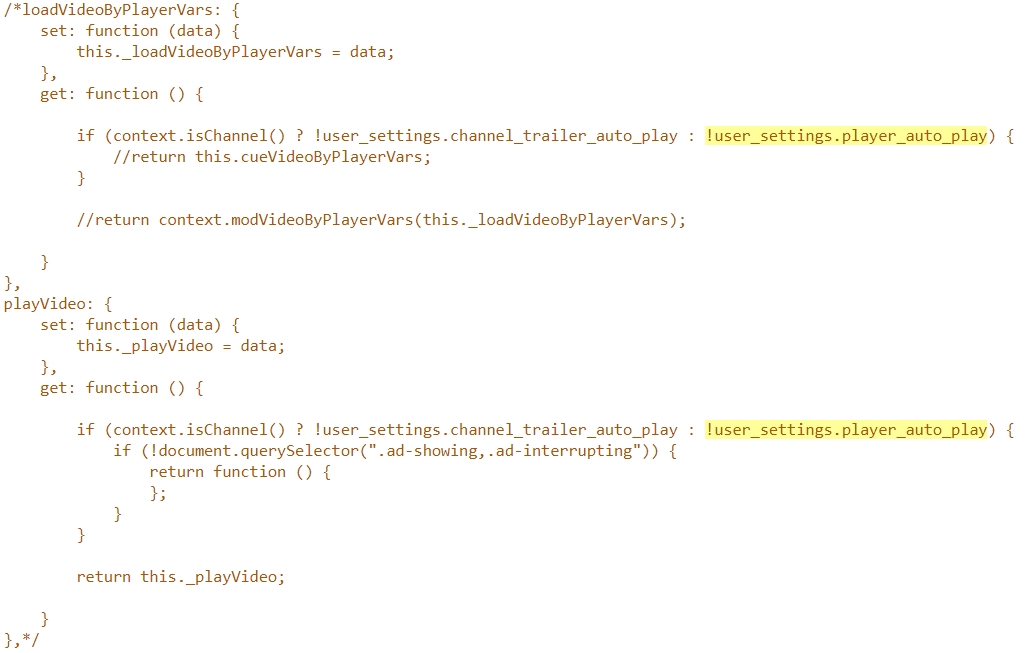
By commenting out this section of code, the video loads just fine without having to turn on autoplay, which also makes the video play automatically when the tab goes into focus.
 Recchan
on 29 Jan 2019
Recchan
on 29 Jan 2019
Same, using Firefox Quantum 64.0. Works only when I enable auto-play in Iridium
 OrIOg
on 29 Jan 2019
OrIOg
on 29 Jan 2019
Same here i just installed iridium on firefox and had this occur. Got the new Firefox 65.0 update last night also.
 thepcwiz101
on 31 Jan 2019
thepcwiz101
on 31 Jan 2019
I was going through the entire script to see which line was causing the issue when autoplay is off. By searching "!user_settings.player_auto_play", I got to this section of code that loads the video.
By commenting out this section of code, the video loads just fine without having to turn on autoplay, which also makes the video play automatically when the tab goes into focus.
This solution works well! Thanks Recchan.
 dougbenham
on 1 Feb 2019
dougbenham
on 1 Feb 2019
I was going through the entire script to see which line was causing the issue when autoplay is off. By searching "!user_settings.player_auto_play", I got to this section of code that loads the video.
By commenting out this section of code, the video loads just fine without having to turn on autoplay, which also makes the video play automatically when the tab goes into focus.
If I do this the video play, so yay for that, but they autoplay even if I have it turned off in settings. Any way to fix that?
 psonnosp
on 2 Feb 2019
psonnosp
on 2 Feb 2019
I was going through the entire script to see which line was causing the issue when autoplay is off. By searching "!user_settings.player_auto_play", I got to this section of code that loads the video.
By commenting out this section of code, the video loads just fine without having to turn on autoplay, which also makes the video play automatically when the tab goes into focus.If I do this the video play, so yay for that, but they autoplay even if I have it turned off in settings. Any way to fix that?
The point is that you can open videos in a new tab and they won't play until you activate that tab. Not perfect but better than nothing.
dougbenham
on 2 Feb 2019
Along with the commented sections of code. Put this in the top section or in a completely new script to disable both autoplay and autobuffering. The video will load as long as the sections of code are commented out.
```//Autobuffer
'use strict';
var prefs = {
playlist: false,
visible: true,
hidden: true
};
var script = document.createElement('script');
// pause the video if spfready is not yet emitted and video is not a playlist
{
const canplay = e => {
document.removeEventListener('canplay', canplay);
if (script.dataset.act !== 'true') {
const href = location.href;
if (prefs.playlist === false && (href.indexOf('&list=') !== -1 || href.indexOf('&index=') !== -1)) {
return;
}
e.target.pause();
}
};
document.addEventListener('canplay', canplay, true);
}
Object.assign(script.dataset, prefs);
script.textContent =
  var yttools = window.yttools || [];
  yttools.noBuffer = {
    prefs: document.currentScript.dataset
  };
  yttools.push(e => {
    const policy = () => {
      const prefs = yttools.noBuffer.prefs;
      const href = location.href;
      return prefs.playlist === 'true' || href.indexOf('&list=') === -1 || href.indexOf('&index=') === -1;
    };
    const stop = () => {
      if (e.stopVideo) {
        yttools.noBuffer.prefs.act = true;
        e.stopVideo();
      }
    };
    // Method 0
    stop();
    // Method 1; stop subsequent plays
    document.addEventListener('yt-page-data-fetched', () => policy() && stop());
    // visibility
    document.addEventListener('visibilitychange', () => {
      const prefs = yttools.noBuffer.prefs;
      if (prefs.visible === 'true' && document.visibilityState === 'visible') {
        //e.playVideo();
        if (prefs.hidden === 'false') {
          yttools.noBuffer.prefs.visible = 'false';
        }
      }
      if (prefs.hidden === 'true' && document.visibilityState === 'hidden') {
        //e.pauseVideo();
      }
    });
  });
  // install listener
  function onYouTubePlayerReady(e) {
    yttools.forEach(c => {
      try {
        c(e);
      }
      catch (e) {}
    });
  }
  // https://youtube.github.io/spfjs/documentation/events/
  window.addEventListener('spfready', () => {
    if (typeof window.ytplayer === 'object' && window.ytplayer.config) {
      window.ytplayer.config.args.jsapicallback = 'onYouTubePlayerReady';
    }
  });
;
document.documentElement.appendChild(script);
script.remove();
```
Recchan
on 2 Feb 2019
After I did the comment thing Firefox wont run the add-on after a restart cause it can't be verified.
And I have xpinstall.signatures.required set to false so don't get why that happen, what am I missing?
psonnosp
on 4 Feb 2019
The point is that you can open videos in a new tab and they won't play until you activate that tab. Not perfect but better than nothing.
IDK, tested youtube videos on a clean Chrome profile, opening videos in background does not activate them, so they don't play. Maybe something's up with your browser if it plays them in background.
 ViperCode7
on 5 Feb 2019
ViperCode7
on 5 Feb 2019
The point is that you can open videos in a new tab and they won't play until you activate that tab. Not perfect but better than nothing.
IDK, tested youtube videos on a clean Chrome profile, opening videos in background does not activate them, so they don't play. Maybe something's up with your browser if it plays them in background.
Yes I think you're right, I have some other extensions that might be affecting that behavior.
dougbenham
on 6 Feb 2019
Don't know how related it is, but my videos wouldn't autoplay, even with Iridium told to do it.
Then I figured out it was Firefox's permissions for youtube that had Autoplay sound set to block
 Orrielel
on 7 Feb 2019
Orrielel
on 7 Feb 2019
Browser Name: Firefox
Browser Version: 65.0 (64-bit)
Operating System: Windows 7 Pro 64Bit
Software Type: Addon
Software Version: 0.2.5
I had the same issue (video buffers and doesn't play) Turning on the "Play videos automatically" toggle allows videos to play again.
 karma12gaming
on 7 Feb 2019
karma12gaming
on 7 Feb 2019
Don't know how related it is, but my videos wouldn't autoplay, even with Iridium told to do it.
Then I figured out it was Firefox's permissions for youtube that had Autoplay sound set to block
This is possibly a decent workaround for autoplay for now. Just keep autoplay enabled in Iridium. If you want autoplay, allow audio to automatically play in Firefox. If you don't want the video to autoplay, just block the video from automatically playing. Personally just tried both allowing and blocking autoplay using this method and it works. Thanks @Orrielel
EDIT: After playing around a bit more, it looks like this workaround only works if you open in a new tab (i.e. middle click or ctrl+click) as opposed to directly opening the link. Of course you can always just make an exception for YouTube and block via preferences.
 buitim
on 10 Feb 2019
buitim
on 10 Feb 2019
I think I'm seeing a similar issue w/ Iridium 0.2.5 on Chrome 71.0.3578.98 x64, OSX 10.13.6. However, even with the autoplay setting checked on the Youtube site, videos don't play. Disabling Iridium resolves this issue. I do have Tampermonkey 4.7.54 installed and enabled.
 jasonhemann
on 16 Feb 2019
jasonhemann
on 16 Feb 2019
Don't know how related it is, but my videos wouldn't autoplay, even with Iridium told to do it.
Then I figured out it was Firefox's permissions for youtube that had Autoplay sound set to block
This suggestion actually fixed autoplay issues and 'click to unmute' issues I have only recently been experiencing on two different platforms. Thank you!!!
 touchnova
on 8 May 2019
touchnova
on 8 May 2019
I still have this issue 6 months later, when will it get fixed?
 Nancok
on 12 Jun 2019
Nancok
on 12 Jun 2019
I was going through the entire script to see which line was causing the issue when autoplay is off. By searching "!user_settings.player_auto_play", I got to this section of code that loads the video.
By commenting out this section of code, the video loads just fine without having to turn on autoplay, which also makes the video play automatically when the tab goes into focus.
Yes but who wants it to play on focus. I want it to play when I click play. None of the fixes achieve this. It’s one of the main reasons I even used this plugin
 swakefield81
on 21 Jun 2019
swakefield81
on 21 Jun 2019
@swakefield81 commented on Jun 21, 2019, 3:32 PM GMT+2:
By commenting out this section of code, the video loads just fine without having to turn on autoplay, which also makes the video play automatically when the tab goes into focus.
Yes but who wants it to play on focus. I want it to play when I click play. None of the fixes achieve this. It’s one of the main reasons I even used this plugin
Commenting out that section and also adding the script from https://github.com/ParticleCore/Iridium/issues/671#issuecomment-459957104 does achieve that. Did you try it? You might have to install TamperMonkey and use the userscript version if your browser won't let you modify your extensions.
@Nancok commented on Jun 12, 2019, 4:48 AM GMT+2:
I still have this issue 6 months later, when will it get fixed?
There has been a fix available since Feb 2, if you're willing to do a little work. See above.
 ElhemEnohpi
on 19 Jul 2019
ElhemEnohpi
on 19 Jul 2019
This issue has run its course and turning into a support issue for someone's script, there is nothing more to add to this issue at the moment. Locking it to avoid further derailment.
 ParticleCore
on 19 Jul 2019
ParticleCore
on 19 Jul 2019
Unlocking since version 1.0.0 has been released, let me know if this problem still persists.
ParticleCore
on 6 Oct 2019
Yeah, the thing I commented in https://github.com/ParticleCore/Iridium/issues/734#issuecomment-538792214 should apply to all autoplay-related issues.
 BobbyWibowo
on 7 Oct 2019
BobbyWibowo
on 7 Oct 2019
still having a problem on chrome. You say v1 was released? I only see v0.25 on my computer
 chiptus
on 18 Apr 2020
chiptus
on 18 Apr 2020
@chiptus Please see 1.0.0 release note.
Unfortunately the API required for this method to work (webRequest.filterResponseData()) is only available in Firefox, Chrome appears to have decided to not implement it. It is only for this reason Chrome no longer has any support.
 gluons
on 18 Apr 2020
gluons
on 18 Apr 2020
Related issues
 Keith94
·
6Comments
Keith94
·
6Comments
 thegranddesign
·
3Comments
thegranddesign
·
3Comments
 MattSturgeon
·
3Comments
MattSturgeon
·
3Comments
 eduzappa18
·
4Comments
eduzappa18
·
4Comments
 KaiusWolf
·
3Comments
KaiusWolf
·
3Comments
Most helpful comment
If you enable videos to autoplay in the settings they will work again. And since the prevent autoplay is bugged right now anyway you aren't losing anything with this current workaround.