Ipfs-desktop: Permission denied on macOS (ipfs-on-path feature)
Please describe what you were doing when this error happened.
- Download .dmg file
- Open it and drag
IPFS Desktop.appto$HOME/Applications - Double-click
IPFS Desktop.app
Specifications
- OS: darwin
- IPFS Desktop Version: 0.8.0
- Electron Version: 5.0.2
- Chrome Version: 73.0.3683.121
Error
```
Error: Command failed: /Users/hinsen/Applications/IPFS Desktop.app/Contents/MacOS/IPFS Desktop /Users/hinsen/Applications/IPFS Desktop.app/Contents/Resources/app.asar/out/late/ipfs-on-path/scripts/install.js --data="/Users/hinsen/Library/Application Support/IPFS Desktop"
fs.js:122
throw err
 khinsen
All 29 comments
At first sight, IPFS seems to work fine in spite of this error. The only function that doesn't work is adding the ipfs binary to the system path. Trying it raises the same error as reported above.
khinsen
on 11 Jun 2019
That's the only information you get from the error?
 hacdias
on 11 Jun 2019
hacdias
on 11 Jun 2019
First I get this dialog box:
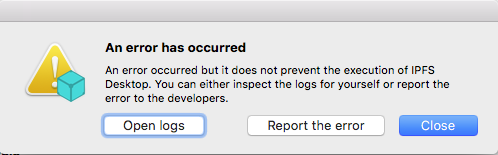
Clicking on "Report the error" is what created this issue. I tried "Open logs", but that merely opens a directory full of funny files in Finder.
khinsen
on 11 Jun 2019
I have a laptop with a near-identical configuration, so I tried installing IPFS Desktop there as well. No error message there. No idea what triggers the error on my desktop machine.
khinsen
on 11 Jun 2019
Yeah, definitely a weird error. I'll try to see if I can pull out something from this log.
hacdias
on 13 Jun 2019
@khinsen @diegotco what are the permissions for /usr/local/bin?
@khinsen are they the same on both computers?
hacdias
on 13 Jun 2019
How can I check that permmissions? :(
 diegotco
on 13 Jun 2019
diegotco
on 13 Jun 2019
On the machine where I get the error message:
~/ $ ls -ld /usr/local/bin
drwxr-xr-x@ 119 administrateur  admin  4046 May 17 11:37 /usr/local/bin
On the machine without any error:
~/ $ ls -ld /usr/local/bin
drwxr-xr-x  157 administrateur  admin  5024 Apr 25 20:45 /usr/local/bin
So there is some difference in Apple's extended permissions, but the basic Unix permissions are the same. Note that I installed IPFS Desktop via the account "administrateur", but I run it under my personal account that has no administrator privileges.
khinsen
on 13 Jun 2019
@diegotco Open Terminal.app (under /Applications/Utilities), paste the command ls -ld /usr/local/bin into it, and press Return.
khinsen
on 13 Jun 2019
Thanks: Here it is :)
drwxr-xr-x 15 root wheel 480 Jun 9 08:22 /usr/local/bin
diegotco
on 13 Jun 2019
yeah, the permissions look vaguely the same so that shouldn't be the problem. Oh, wait. @khinsen did you install it through a different account on the computer where it works?
@diegotco did you install with the same account you're using or you did the same as @khinsen?
hacdias
on 21 Jun 2019
@hacdias On both computers, I work with a plain user account and switch to an administrator account for installing software.
khinsen
on 21 Jun 2019
I have no idea hehe. I had installed this: https://screencast.com/t/Y9UZs0ddJ
And this on Firefox and Chrome: https://screencast.com/t/cmDtBiie
All of them shows me the same CID, same files :)
diegotco
on 22 Jun 2019
For both of you, does this happen _all the times_?
hacdias
on 24 Jun 2019
Nope, that happened just once
diegotco
on 24 Jun 2019
It happened on the first startup, and then whenever I try to install the IPFS command-line tools. Otherwise IPFS Desktop works just fine, and I don't really need the command-line tools since I have go-ipfs installed anyway.
khinsen
on 24 Jun 2019
@hacdias Happened to me again, today. Reason: I had to reset my Macbook, then, I do clic on Launchpad and... https://screencast.com/t/BLN555bQ1V
diegotco
on 25 Jun 2019
I wonder if it is happening due to permissions, such as https://github.com/ipfs-shipyard/ipfs-desktop/issues/966. Next time it happens, could you click 'Report the error'? That'd give us much more detail.
@diegotco can you check the content of ~/Library/Application Support/IPFS Desktop/error.log?
hacdias
on 30 Jun 2019
@hacdias Can you provide me with your public PGP key in order to send you my error.log file?
diegotco
on 30 Jun 2019
@diegotco https://keybase.io/hacdias/pgp_keys.asc?fingerprint=4dc16358711be325fb3633cf2e80d38374cd55aa
hacdias
on 1 Jul 2019
@hacdias done! :)
Check your inbox pls
diegotco
on 1 Jul 2019
@diegotco your error is clearly related to permissions when making the symlink:
Error: EACCES: permission denied, symlink '/Applications/IPFS Desktop.app/Contents/Resources/app.asar.unpacked/out/late/ipfs-on-path/scripts/ipfs.sh' -> '/usr/local/bin/ipfs'
    at Object.symlinkSync (fs.js:961:3)
    at Object.createSymlinkSync (/Applications/IPFS Desktop.app/Contents/Resources/app.asar/node_modules/fs-extra/lib/ensure/symlink.js:55:25)
    at Object.<anonymous> (/Applications/IPFS Desktop.app/Contents/Resources/app.asar/out/late/ipfs-on-path/scripts/install.js:61:4)
    at Module._compile (internal/modules/cjs/loader.js:808:30)
    at Object.Module._extensions..js (internal/modules/cjs/loader.js:820:10)
    at Module.load (internal/modules/cjs/loader.js:677:32)
    at tryModuleLoad (internal/modules/cjs/loader.js:609:12)
    at Function.Module._load (internal/modules/cjs/loader.js:601:3)
    at Function.Module.runMain (internal/modules/cjs/loader.js:873:10)
    at internal/main/run_main_module.js:21:11
@khinsen could you also check ~/Library/Application Support/IPFS Desktop/error.log?
hacdias
on 1 Jul 2019
@hacdias I had to re installed the Mac OS but I have all the permissions
How can I change this?
diegotco
on 1 Jul 2019
@diegotco we'll hopefully fix this on your end. Although I find it weird why some people have permissions and some don't.
@khinsen could you confirm it's the same error you're facing?
hacdias
on 2 Jul 2019
@hacdias I get exactly the same error. So it seems that IPFS Desktop assumes that the user has write access to /usr/local/bin. I think this is not true on a fresh macOS installation, but it has been a long time since I did one, so I am not 100% sure. Many people make /usr/local recursively writable, or change ownership to their user account, in the course of installing Homebrew. I'd thus expect that Homebrew users don't get an error, whereas many others do. Some macOS users also give administrator rights to their standard user account, which makes life easier but also more dangerous. That makes two reasons why some people have permissions whereas others don;t.
I'd say the correct way of installing system-wide stuff under macOS is to ask for administrator rights for that step. That's what many macOS application do during installation or updates. Another option is distributing IPFS Desktop as a .pkg rather than as a .app. The link in /usr/local is then set as part of the package installation.
khinsen
on 3 Jul 2019
@khinsen what we add to /usr/local/bin is the ipfs binary, not the application binary. Basically we're doing the following:
- On Windows, we just add the path to the
PATHbecause we have permission to do so. - On Linux, we don't do it automatically. The user needs to manually toggle it in the settings and permission will be asked.
- On macOS, we add it to
/usr/local/binautomatically because I was thinking everyone had permission.
My idea is to change, both for Linux and macOS:
- Test for write permission on
/usr/local/bin.
1.1 If has permission, add the binary symlink.
1.2 If has not permission, does not add it, and does not trigger an error. The user can manually enable it via the Settings page and will get a dialog asking for permission like this:
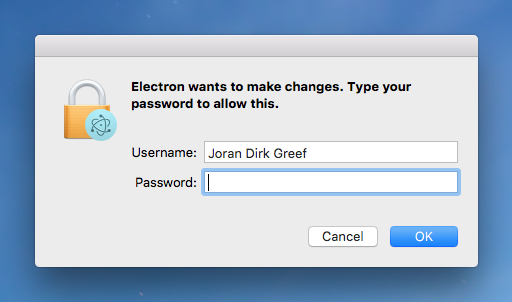
@khinsen what does it sound like?
Edit: also, as per #966, I also notice that /usr/local/bin does not exist by default on some macOS versions. Don't know yet if it applies to all.
Also, /cc @olizilla
hacdias
on 3 Jul 2019
@hacdias Your proposal sounds just fine!
khinsen
on 3 Jul 2019
Thanks for fixing this!
khinsen
on 15 Jul 2019
Thanks for reporting! 😃 Will be available on the next release
hacdias
on 15 Jul 2019
Related issues
 NatoBoram
·
3Comments
hacdias
·
6Comments
NatoBoram
·
3Comments
hacdias
·
6Comments
 Luflosi
·
5Comments
Luflosi
·
5Comments
 nlko
·
3Comments
nlko
·
3Comments
 dignifiedquire
·
4Comments
dignifiedquire
·
4Comments
Most helpful comment
@hacdias Your proposal sounds just fine!