Iotedge: How to get the host IP in a module?
Hi ,
I have a question about how to get the host IP .
OS : Win 10
See the architecture picture:
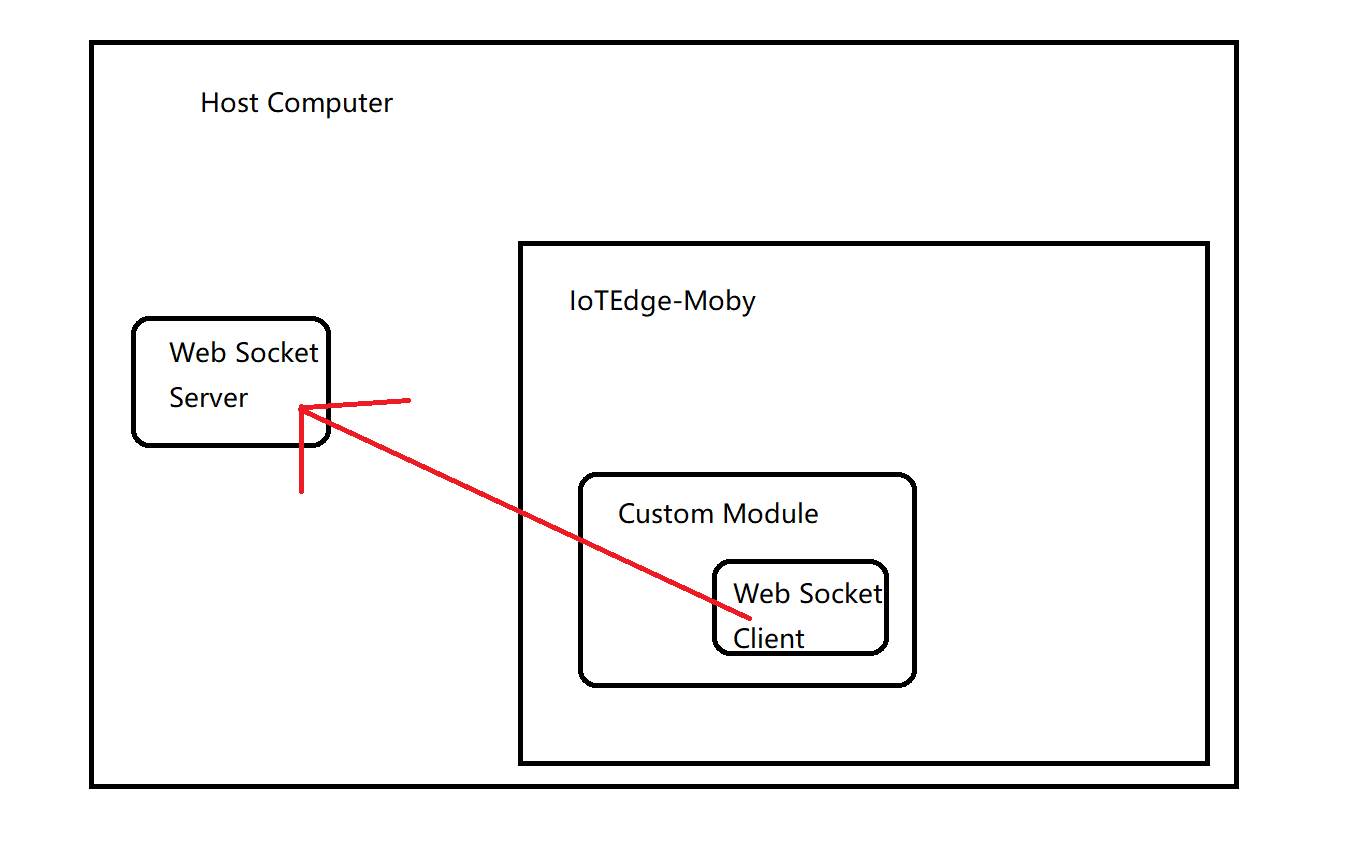
I want to build a connection (the red line),but the client is in a module which means it need an IP.
With docker for Windows , I can use the host name host.docker.internal to achieve my work.
Because when I install docker for Windows, it will modify my hosts file .

If I only use Moby downloaded by using "Deploy-IoTEdge" script , How can I get the host IP?
Give some suggestions, please ~
 LiangJy123
All 27 comments
@v-jiq
 sw6y15
on 9 Aug 2019
sw6y15
on 9 Aug 2019
The edgeAgent will inject an environment variable called IOTEDGE_GATEWAYHOSTNAME which you can use from within the module.
 veyalla
on 9 Aug 2019
veyalla
on 9 Aug 2019
Hi @veyalla
I have tried this way ,but it didn't work for me.
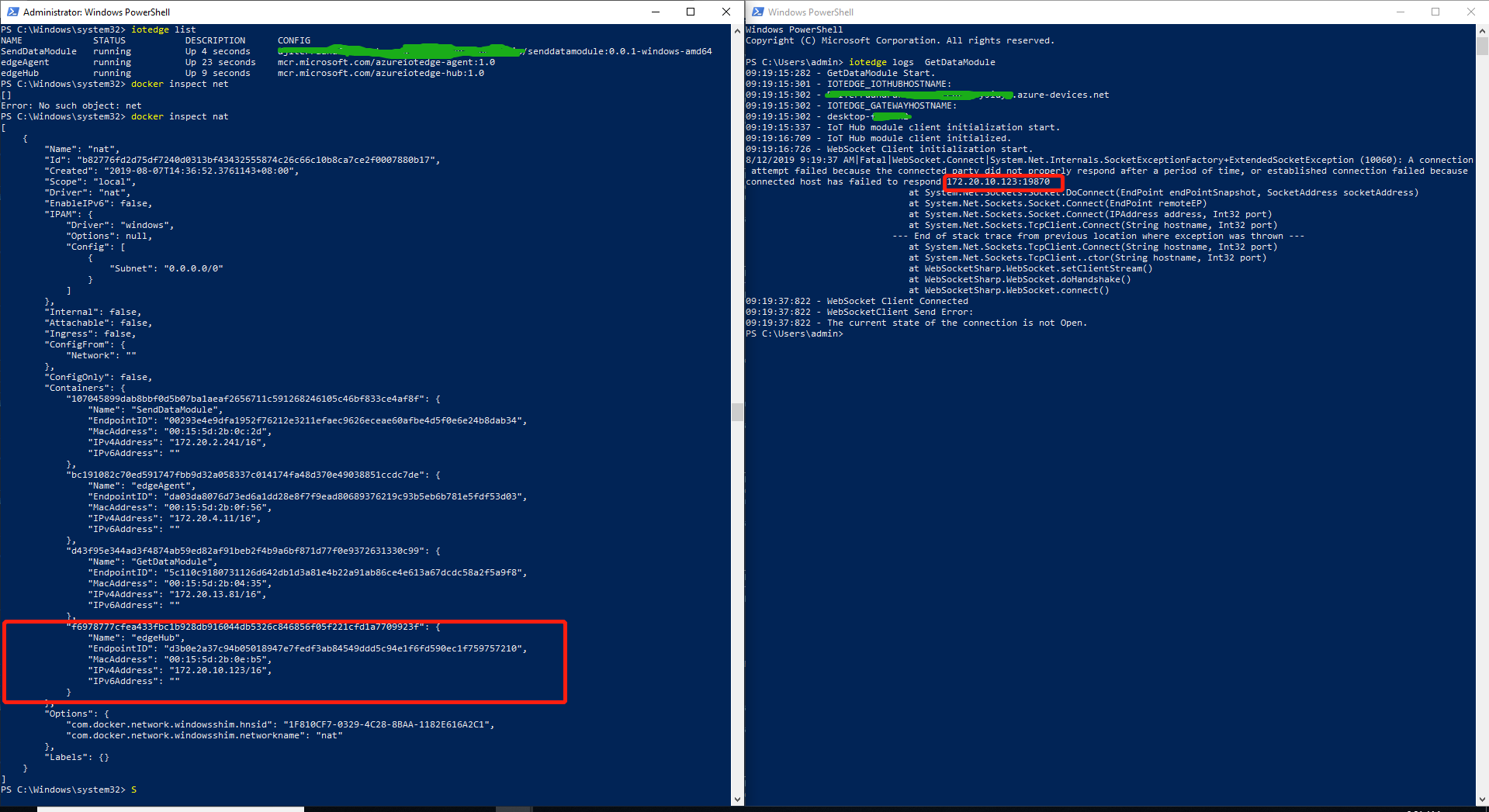
Because , the IOTEDGE_GATEWAYHOSTNAME finally converts to the edgeHub IP.
My CSharp Code:
C#
        string HostName = Environment.GetEnvironmentVariable("IOTEDGE_GATEWAYHOSTNAME");
        ws = new WebSocket($"ws://{HostName}:19870/Laputa");
Try the way again and get the same log:
LiangJy123
on 12 Aug 2019
Hmm, if I use the command:
docker.exe -H npipe:////./pipe/iotedge_moby_engine exec -it tempSensor cmd
...to login in to the module and do:
ping %IOTEDGE_GATEWAYHOSTNAME%
...it resolves to the ip address of the host.
veyalla
on 12 Aug 2019
It also gets the edgeHub IP.
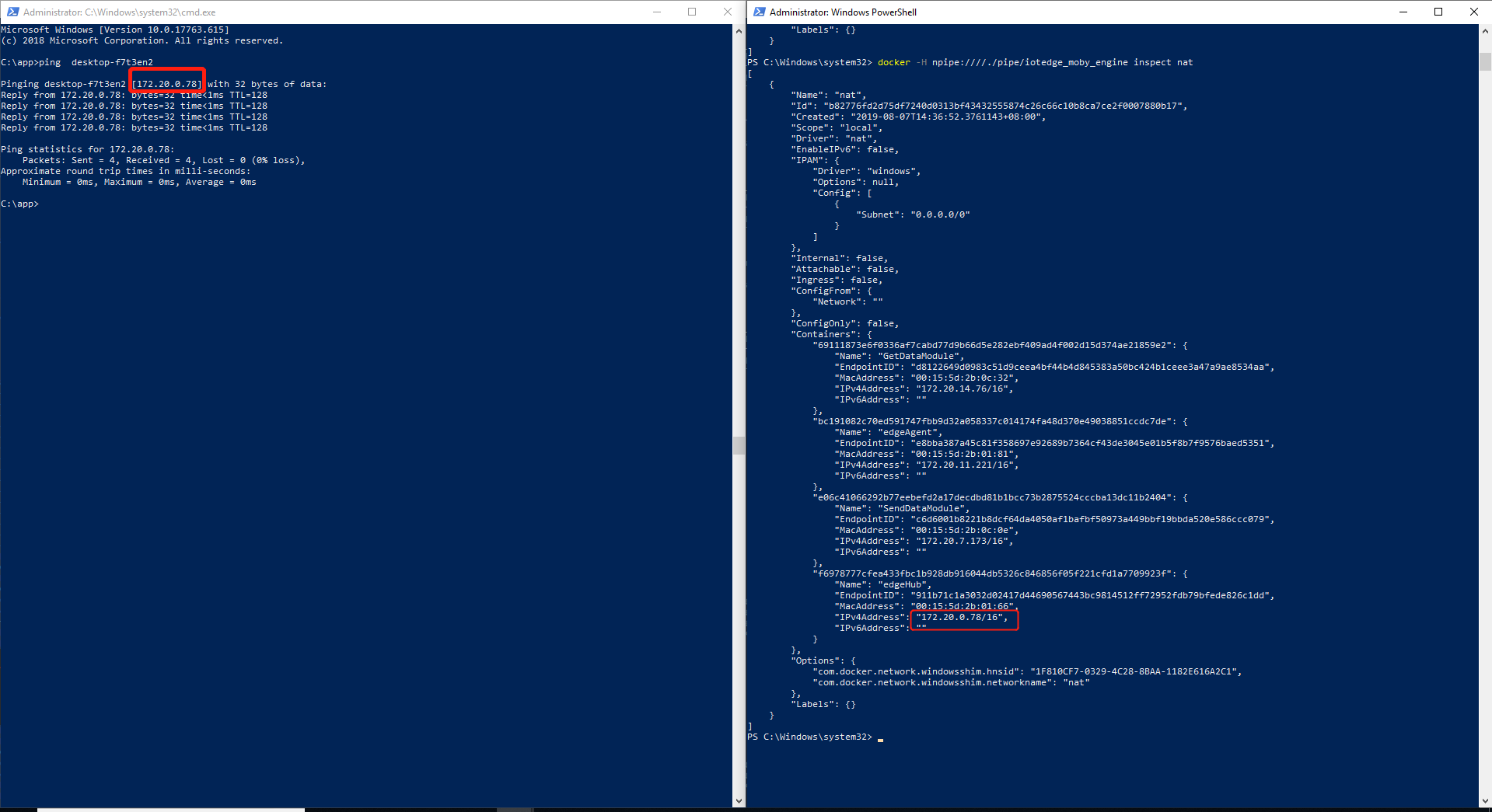
Is it possible that my device is in domain management which caused this problem?
LiangJy123
on 12 Aug 2019
@dineshgovindasamy - do you know why there would be a difference in behavior?
veyalla
on 13 Aug 2019
As a workaround, the FQDN of the host might resolve correctly. Try that.
It that does work, then the value of the env var is the same as what you set for hostname in config.yaml. So set the FQDN there and your module should also get it.
 arsing
on 14 Aug 2019
arsing
on 14 Aug 2019
Hi @arsing ,
I check that the hostname in config.yaml , the host computer name ,and the environment variable of the IOTEDGE_GATEWAYHOSTNAME are same.
When I ping my host computer name in _host computer_ , I can get my IP in the LAN.(This IP can be used in Edge module to build the communication)
When I ping my host computer name in the _module_ , I will get edgeHub IP.
Please let me know if I understand wrong what your means.
LiangJy123
on 15 Aug 2019
I'm not asking you to confirm that they're the same; I already told you they would be the same. I'm saying that you should check if resolving the FQDN from within the container gives the correct IP instead of Edge Hub's IP. If the FQDN gives the correct IP, I'm telling you to set the hostname in config.yaml to the FQDN.
arsing
on 15 Aug 2019
For example, if your domain is example.com, then your host's FQDN would be desktop-f7t3en2.example.com. So if you now do docker.exe -H npipe:////./pipe/iotedge_moby_engine exec -it SendDataModule ping desktop-f7t3en2.example.com does that give you the host IP? If yes, then edit the config.yaml to have hostname: 'desktop-f7t3en2.example.com' instead of hostname: 'desktop-f7t3en2'
arsing
on 15 Aug 2019
Hi @arsing
Thank you for your patience.
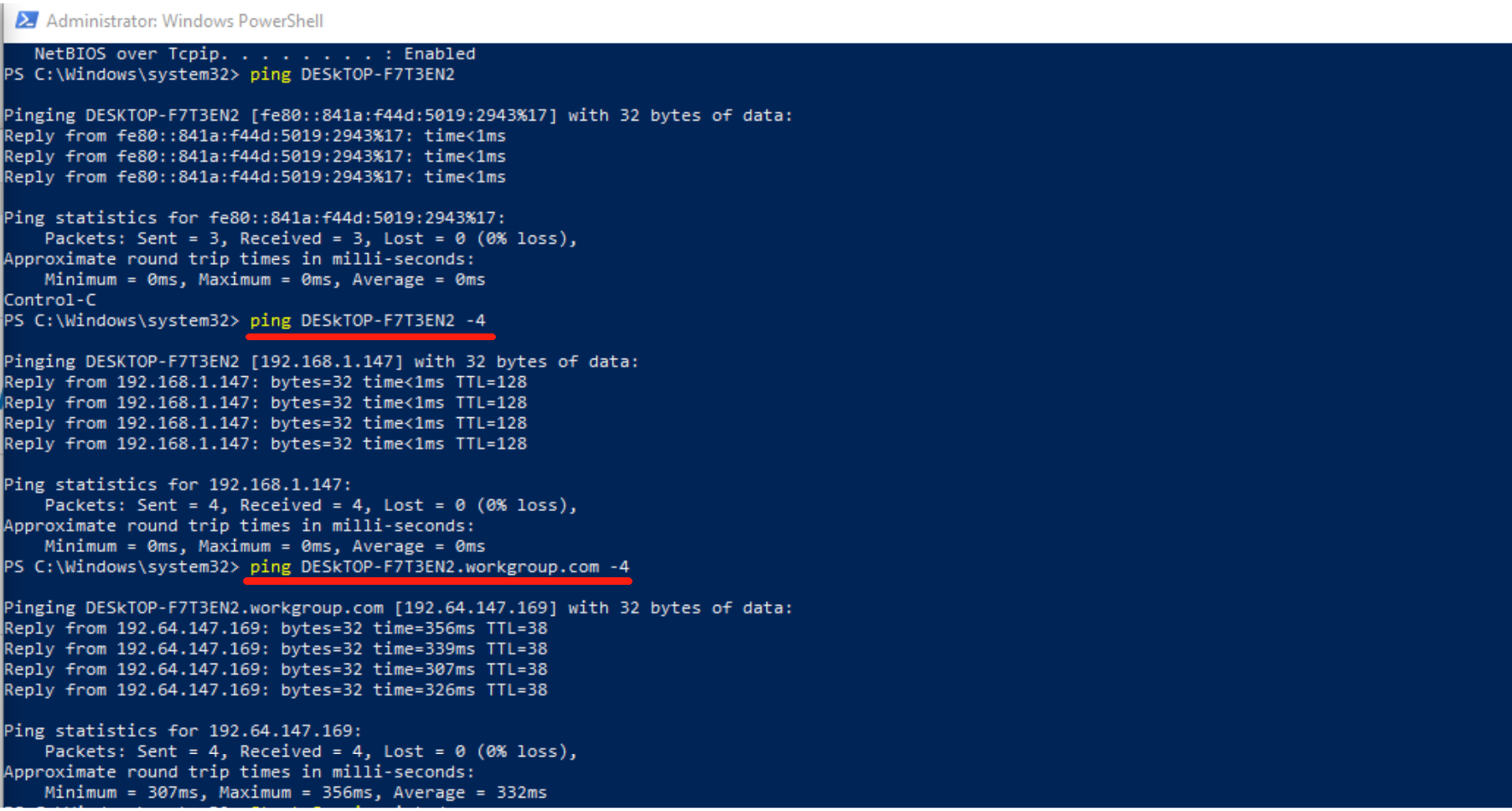
Following your steps, I got a strange result:
- The host computer Info:
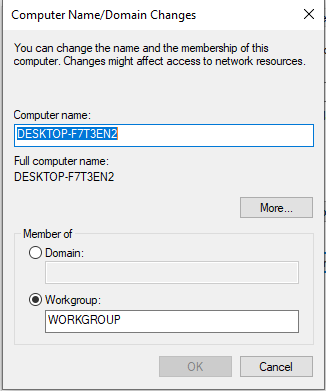
Ping in host computer:
Ping in edge module:
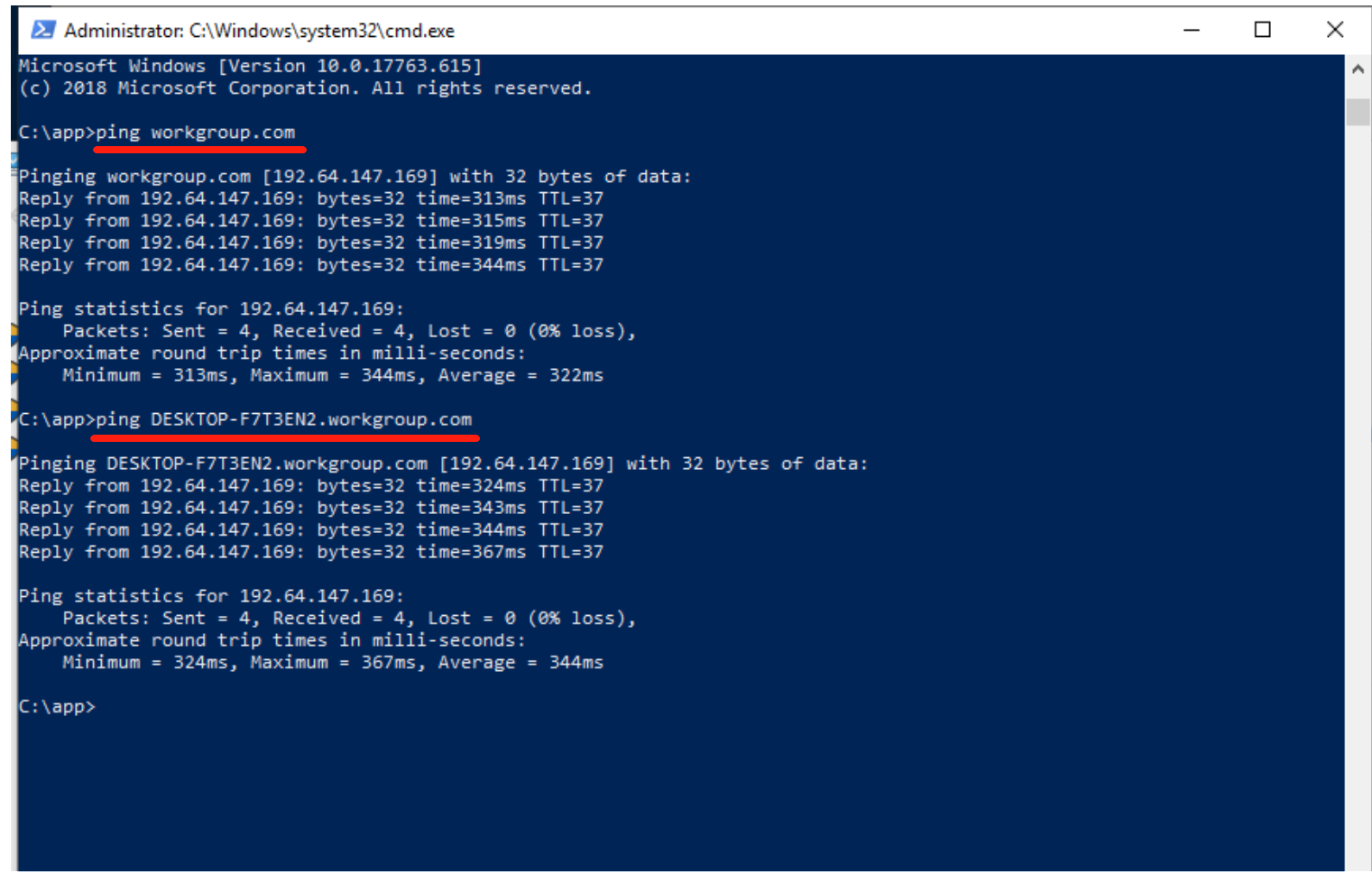
The desktop-f7t3en2.workgroup.com gets an IP ,but it is not my host computer's.
LiangJy123
on 15 Aug 2019
Your domain is not workgroup.com. You originally said your host is domain-joined, but your screenshot shows it's in a workgroup, not a domain.
arsing
on 15 Aug 2019
Hi @arsing ,
Sorry for my misunderstanding about domain management .
And thank you for your help.
LiangJy123
on 16 Aug 2019
It seems to be not active, so I just close this question.
I will try other ways to solve the problem.
Thank you.
LiangJy123
on 28 Aug 2019
what's the solution for this?
Is there a way to get host IP from iot edge module?
 keshava-hm
on 19 Nov 2019
keshava-hm
on 19 Nov 2019
I believe the right approach is to take the host's name from the environment variable.
Then convert the host name to IP.
It's just that I can't do it in my network environment.
So I found two ways to get around it.
- Just like @arsing saying , use FQDN.
To find your device's FQDN, use the command "NSLOOKUP + your device computer name".
Then you can get computer name alias.
But it's not working all the time . It depends your network enviroment. - Change module network mode from bridge to transparent mode ( Windows platform).
But this I closed the firewall before pinging through my host computer.
LiangJy123
on 19 Nov 2019
Thanks, @LiangJy123 for response.
When I convert the host name to IP, I get a different IP than the host IP.
- Change module network mode from bridge to transpant mode ( Windows platform).
But this I closed the firewall before pinging through my host computer.
You mean , "NetworkMode": "host", ?
keshava-hm
on 19 Nov 2019
- Just like @arsing saying , use FQDN.
To find your device's FQDN, use the command "NSLOOKUP + your device computer name".
Then you can get computer name alias.
But it's not working all the time . It depends your network enviroment.
This does work when I hard code the FQDN name. But is there a way to get this from edge module?
Thanks a lot.
keshava-hm
on 19 Nov 2019
I also hard code it. (Laughing and crying)
I tried to get this from edge module but didn't find the way, for example, specifying a DNS resolution server.
---------------------------------------------------分割线---------------------------------------
I can't implement host mode in Windows system, maybe Moby is like docker.
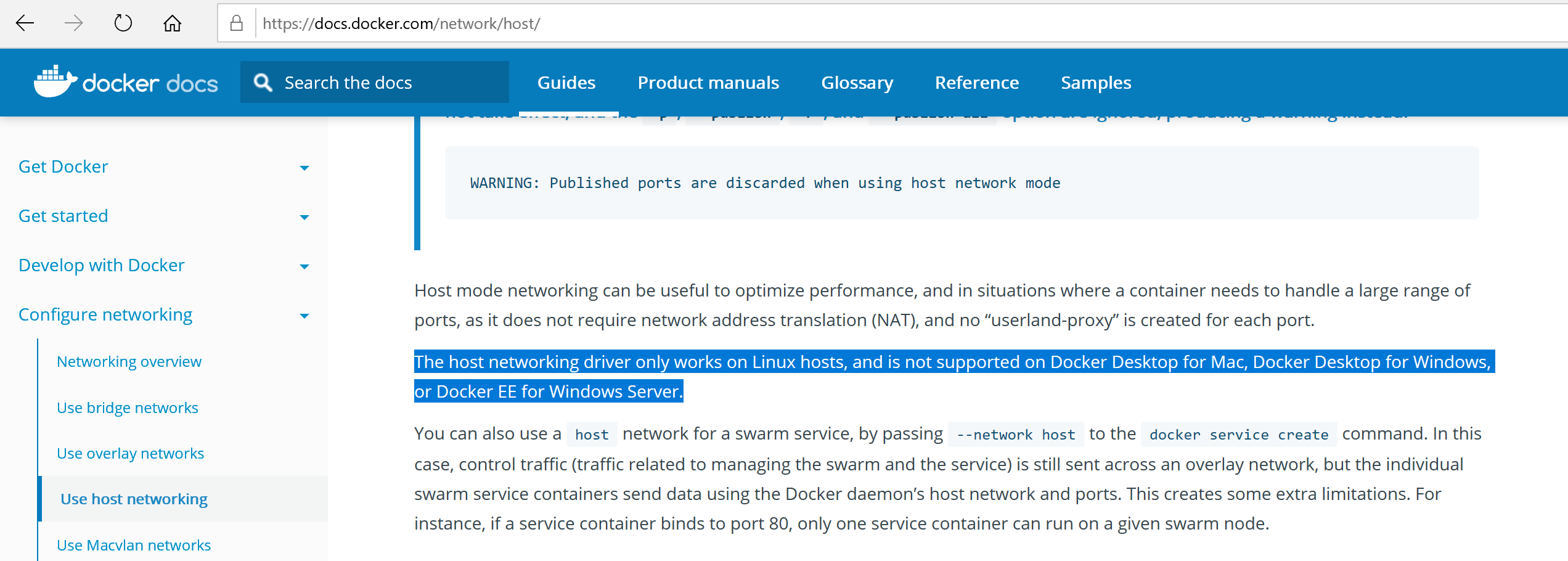
Create a transparent mode driver :
- use "netadapter" command , find a physical net adapter name.
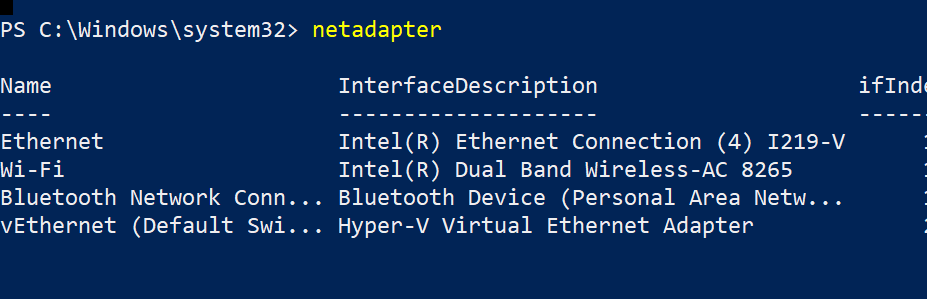
- Create a transparent mode driver , named "host"(so you can use same config like host mode):
docker network create -d transparent -o com.docker.network.windowsshim.interface="Ethernet" host
The variable of "com.docker.network.windowsshim.interface" is a physical net adapter name.
- Bind it
   "createOptions": {
                "NetworkingConfig": {
                    "EndpointsConfig": {
                         "host": {}
                    }
                },
                "HostConfig": {
                    "NetworkMode": "host"
                }
            }
If your app in module can't connect your host computer ,maybe you need close your firewall or other firewall setting
LiangJy123
on 19 Nov 2019
Thanks a lot for the details, @LiangJy123
But when I run "_docker network create ..._" I get the error:
_error during connect: Post http://%2F%2F.%2Fpipe%2Fdocker_engine/v1.40/networks/create: open //./pipe/docker_engine: The system cannot find the file specified. In the default daemon configuration on Windows, the docker client must be run elevated to connect. This error may also indicate that the docker daemon is not running._
My aim is to communicate over TCP to an app on host which is listening on a port.
I was using a workaround to write the host IP from app to a text file and access this file by mounting the directory in docker to get the host IP on my module... Do you think there's a better way to do this?
keshava-hm
on 19 Nov 2019
You can try this command:
docker.exe -H npipe:////./pipe/iotedge_moby_engine exec network create -d transparent -o com.docker.network.windowsshim.interface="Ethernet" host
I have no problem with your method.
The method of getting around is never better than the direct method.
Or Microsoft's friends will bring a better and more direct approach.
LiangJy123
on 19 Nov 2019
You can try this command:
docker.exe -H npipe:////./pipe/iotedge_moby_engine exec network create -d transparent -o com.docker.network.windowsshim.interface="Ethernet" hostThanks a lot for the response. I think you mean by
docker.exe -H npipe:////./pipe/iotedge_moby_engine network create -d transparent -o com.docker.network.windowsshim.interface="Ethernet" host
I'll try this.
I have no problem with your method.
The method of getting around is never better than the direct method.
Or Microsoft's friends will bring a better and more direct approach.
I agree. Thanks.
-- Keshava
keshava-hm
on 20 Nov 2019
Thanks for the help, @LiangJy123 , but when I try this, I get following exception:
_Transient network error occurred, please retry._
Same error with firewall turned off as well.
Do you have any idea on this?
Thanks.
--Keshava
keshava-hm
on 21 Nov 2019
Hi @keshava-hm , Where did you get the exception?
LiangJy123
on 25 Nov 2019
Hi @keshava-hm , Where did you get the exception?
I think I get exception when I try to communicate to edge hub. Do we need to set the above options to edge hub as well?
With this network settings, can we communicate to the other modules using MQTT?
One more thing, can we use "vEthernet (nat)" network interface to communicate between host pc and edge module?
Because, if we can, then we can get and use the default gateway IP from docker container. Is there any issues in doing so?
Thanks a lot.
Regards,
Keshava
keshava-hm
on 25 Nov 2019
I think I get exception when I try to communicate to edge hub. Do we need to set the above options to edge hub as well?
Oh! I can't help you with this exception.
I can't install iotedge because my computer version is not 17763.
I read the c-sharp-sdk source code about the module communication.
It might be used the value of IOTEDGE_GATEWAYHOSTNAME
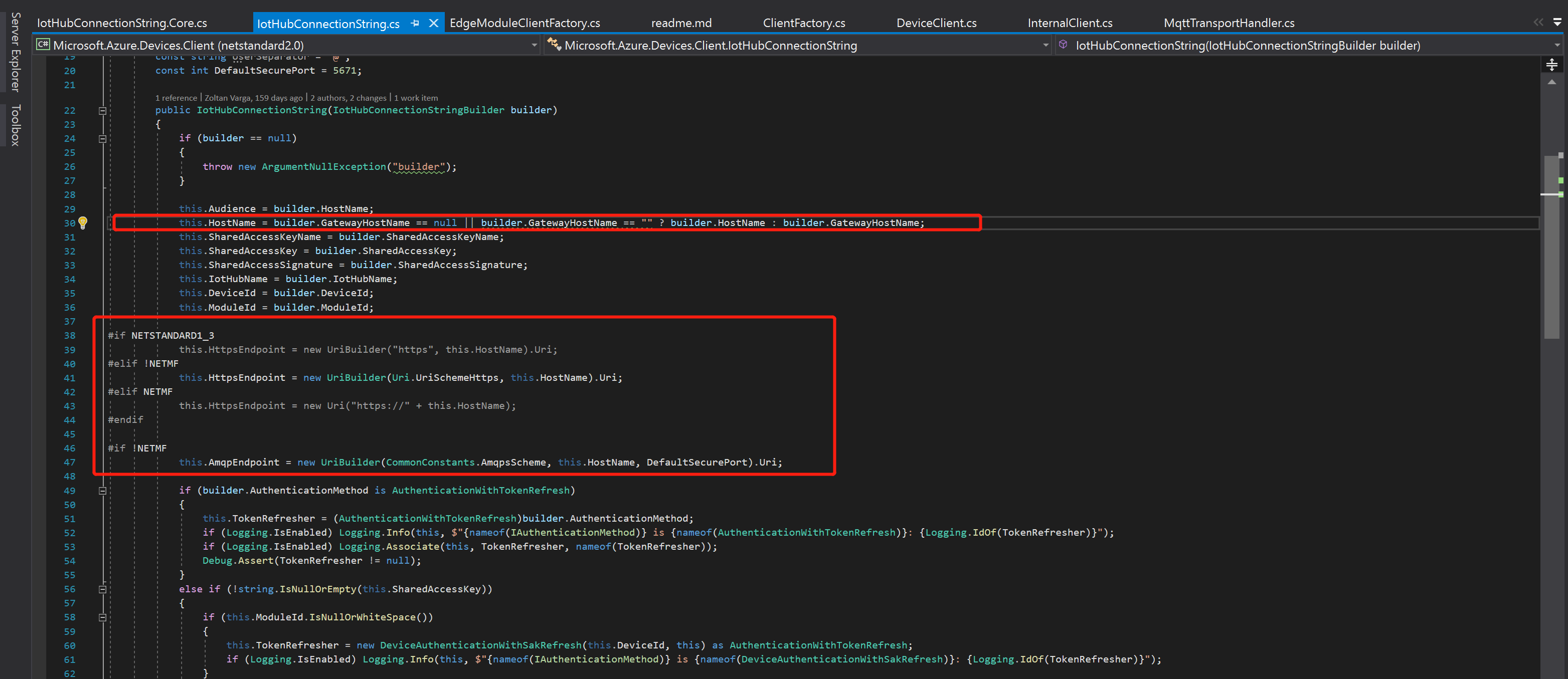
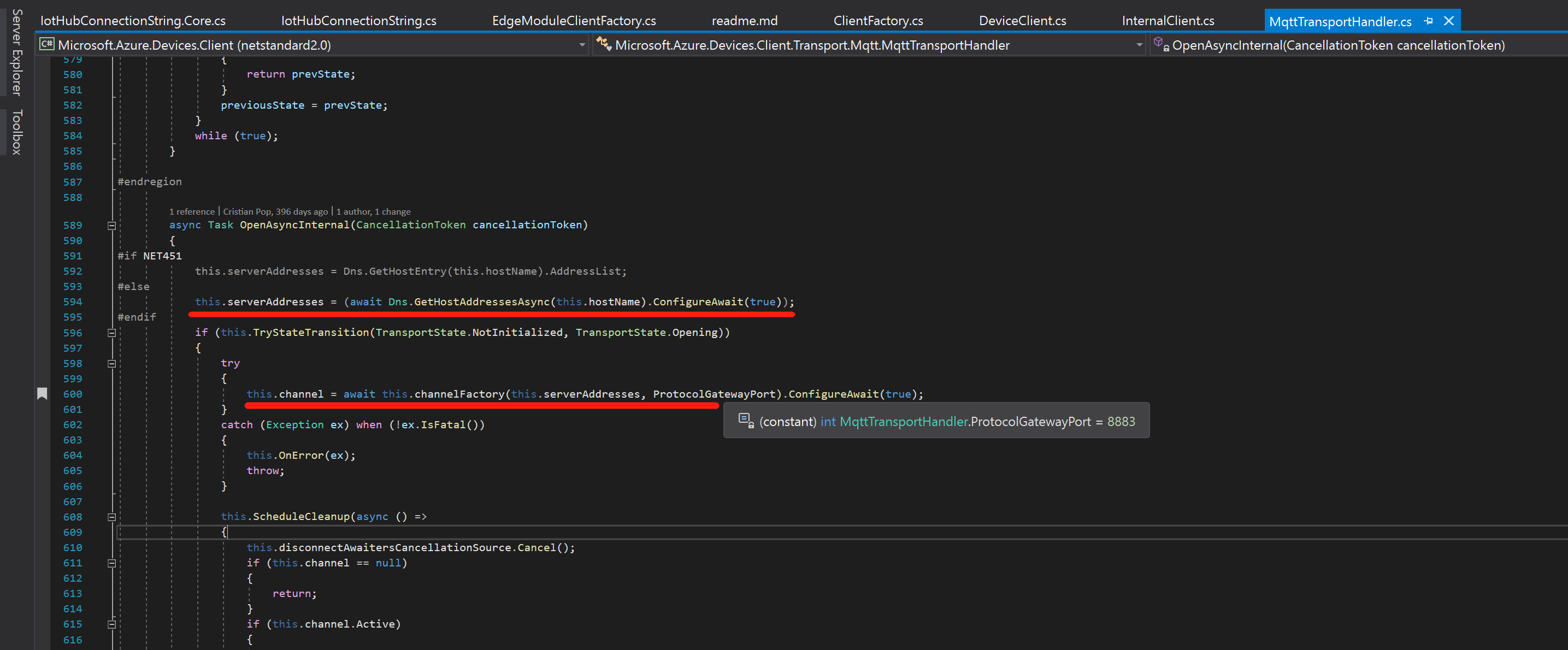
The mapping port:
    "edgeHub": {
            "type": "docker",
            "status": "running",
            "restartPolicy": "always",
            "settings": {
              "image": "mcr.microsoft.com/azureiotedge-hub:1.0",
              "createOptions": {"PortBindings": {
                "5671/tcp": [
                  {
                    "HostPort": "5671"
                  }
                ],
                "8883/tcp": [
                  {
                    "HostPort": "8883"
                  }
                ],
                "443/tcp": [
                  {
                    "HostPort": "443"
                  }
                ]
              }
            }
          }
        }
So the data route is:
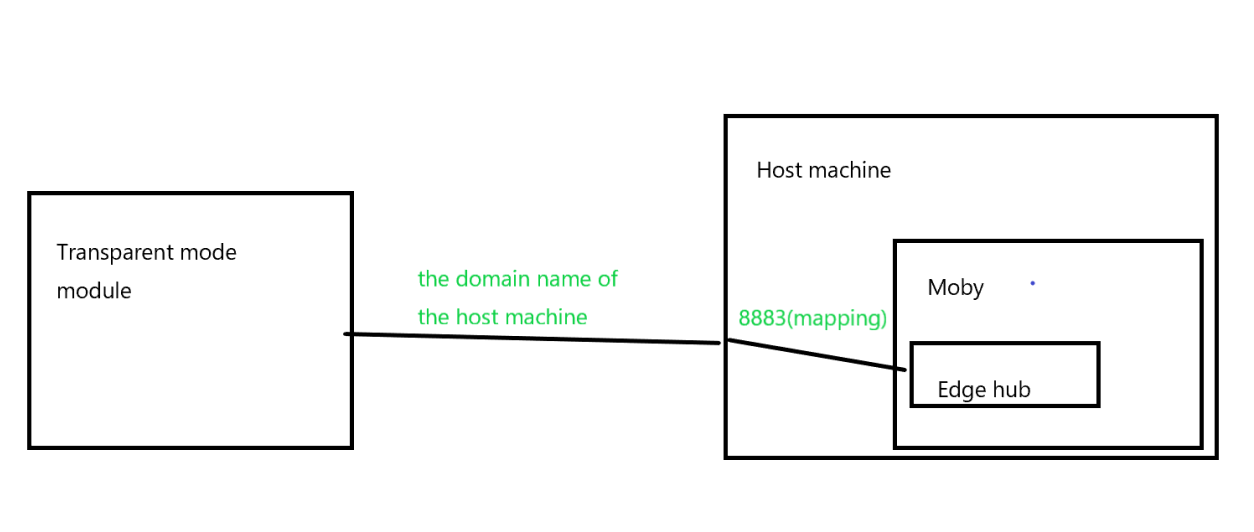
Hope this helps you.
One more thing, can we use "vEthernet (nat)" network interface to communicate between host pc and edge module?
Because, if we can, then we can get and use the default gateway IP from docker container. Is there any issues in doing so?
I tried it six months ago and it didn't work.
Probably disabled for security reasons.
LiangJy123
on 27 Nov 2019
Thanks @LiangJy123 , thanks a lot for the help! :)
keshava-hm
on 27 Nov 2019
Related issues
 mill5james
·
3Comments
mill5james
·
3Comments
 gauravagarwal28
·
4Comments
gauravagarwal28
·
4Comments
 alaendle
·
4Comments
alaendle
·
4Comments
 lakshmisivareddy
·
3Comments
lakshmisivareddy
·
3Comments
 yenseaman
·
5Comments
yenseaman
·
5Comments