Hi there,
I'm trying to figure out a good way to implement CI/CD for IoT Edge deployments. My requirements are:
- Everything should be managed using VSTS
- Build azure container registry on check-in (GIT)
- Deploy to my own device automatically
- Approve deployments for other test-devices and production-devices using VSTS
- I use references to other projects, which required me to change the dockerfile and this breaks the default IoT Edge Push And Build in VSTS https://github.com/Azure/iotedge/issues/67
So currently, I have created docker-build and docker-push tasks, which create an image on my azure container registry (not using module.json and deployment.template.json). I use the BuildId variable as 'versioning'. I think my only option is to use Powershell using Azure CLI: az iot edge deployment create to create a deployment in VSTS.
As an alternative I could use the default Azure IoT Edge - Build and Push modules if I merge my projects (which is undesirable).
To approve deployments, I need to create a release pipeline in VSTS, but I can only link a release to an azure container registry artifact at the repository level, not at the version level. So how can I approve a previously build version (non-latest) that has been deployed to test devices, such that it gets deployed to my production devices (next step)?
I've found https://docs.microsoft.com/en-us/azure/iot-edge/how-to-ci-cd to do this, but this requires the default VSTS Task of IoT Edge (which I can't use). On top of that, this creates a deployment as part of the build pipeline, which means that I can't approve the build to different stages in deployment (mine, Test, Prod). This is solved in the example by using master/dev branching structure, which is fine, but then I need to do a pull request to deploy from Test-stage to production-stage, and I'm afraid I will have to resolve merge-conflicts during this pull request and immediately deploy to production afterwards.
What is the best way to move forward?
 nhuurnink
All 11 comments
I apologize for the delayed response on this. @shizn will get back with a response.
 dsajanice
on 24 Sep 2018
dsajanice
on 24 Sep 2018
Hi @nhuurnink . I answered the similar question raised by you in https://github.com/Azure/iotedge/issues/345
I believe you can achieve all your current requirements except for the last one with the VSTS plugin. For the last one, we have added contextPath support in module.json, the VSTS plugin will support this schema soon. For now, using Docker plugin is the best way to do this.
The tutorial (https://docs.microsoft.com/en-us/azure/iot-edge/how-to-ci-cd) only covers the basic scenarios, so it puts both build&push, and deploy tasks in one Build pipeline. As you mentioned, you are on the correct way by separating the master/dev branch. To me, you need to use different variables for master/dev branch, have you tried using environment variables for your branches? You can use .env files to control it in VS Code, and later use replace token plugin or others in VSTS.
One practice example can be found here - https://github.com/toolboc/IoTEdge-DevOps (still working in progress)
An env example is shown as below.
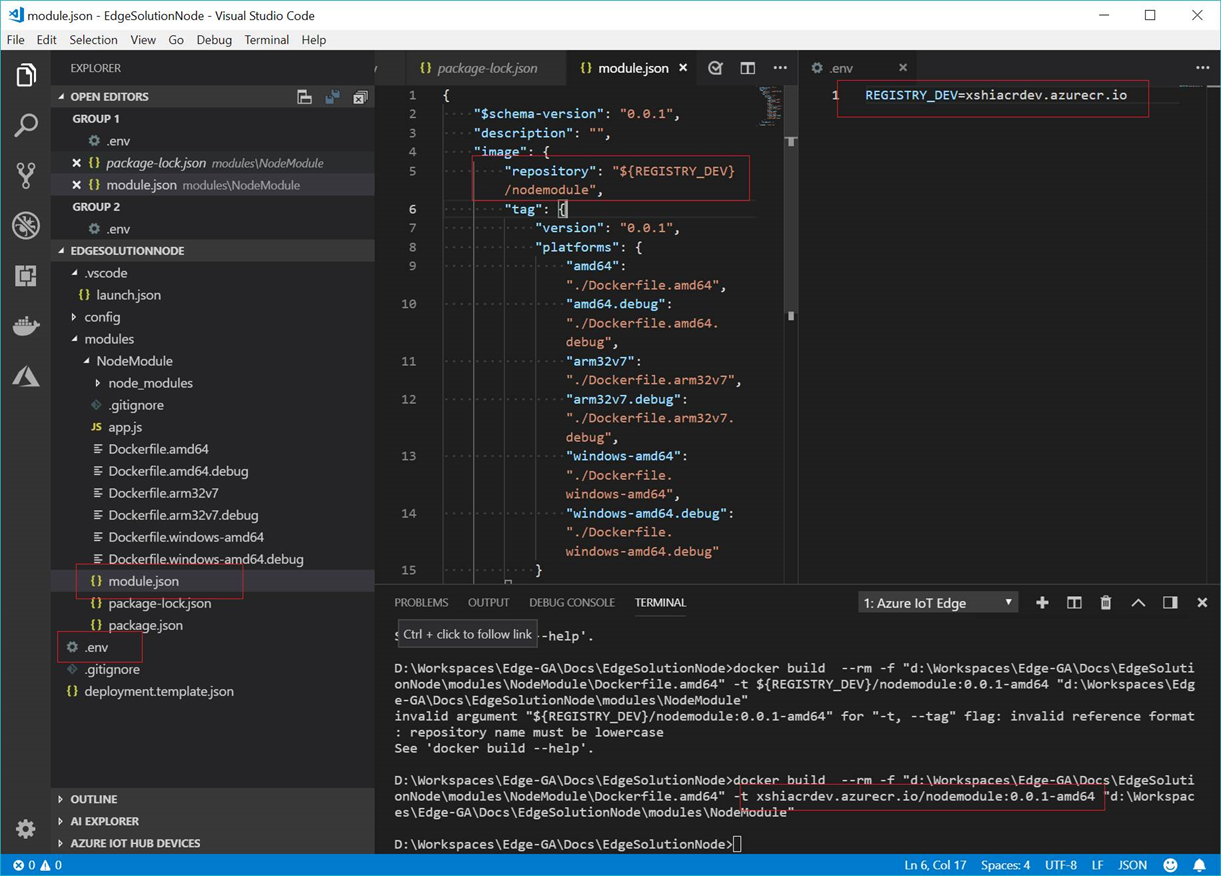
Let me know if these can help you. Thanks!
 shizn
on 25 Sep 2018
shizn
on 25 Sep 2018
Ok that makes sense. I have an additional question regarding this subject:
How can I easily update versioning? It seems to be on multiple locations (image url, schema-version, tag version, and I use it in the label of my deployment).
In my custom deployscript I used the BuildID as the 'increment', like version 0.0.BuildId. If I want to upgrade minor/major, I could do this in my deployment variables in VSTS. This way I didn't need to always update version manually during development. But maybe there is a good reason not to do it like this? I'm not sure.
nhuurnink
on 25 Sep 2018
Hi, @nhuurnink. I thought we only need to bump the version in module.json. This version will be reflected in final image url. Let me know why you need to control the multiple locations you mentioned.
You can definitely use the BuildID. Today if you build a newer container image with the same URL (same version), IoT Edge will not automatically fetch the latest changes. So in CI/CD, developers need to have a mechanism to bump the image version or tag. BuildID is a good solution. In our CI/CD plugin, we don't do it automatically for now, because people can control this with their own practices. For example, bind Github release tag with docker image tag. In general, IoT Edge module image build and push CI/CD practice should be exactly the same as general Docker image CI/CD, except you can read some metadata in the module.json which describes the module itself. You can use variables to replace the value in the module.json.
Not sure if I have answered your question, let me know your thoughts so that can help us improve. Thanks.
shizn
on 26 Sep 2018
Ok then I think I should use replace-tokens (or others) to alter module.json and then use for instance BuildID, I think that makes sense.
One more question:
I see multiple variables, for instance in https://github.com/Microsoft/vscode-azure-iot-edge/tree/master/testResources I see deployment.template.js with version "1.0" and in module.json I see $schema-version "0.0.1" and version "0.0.1". What do each of these versions mean / what is their purpose?
nhuurnink
on 26 Sep 2018
Yes. Replace token is exactly the good plugin for this!
This is the definition for each key in deployment.template.json. Version 1.0 is just for your book keeping. You should respect the image tag/version with the full URL.
"modules": { // List of modules for edgeAgent to start
    "mongo-server": { // User provided module
        "version": "1.0", // Version of the module to be installed. Used by user for book keeping.
        "type": "docker", // Enum - values – docker
        "status": "running", // Enum - values - running, stopped
        "restartPolicy": "on-failed", // Enum values - never, on-failed, on-unhealthy, always
        "env": { // List of environment variables
            "EnvVar1": {
                "value": "" // Environment variable value
            }
        },
        "settings": {
            "image": "mongo:1.0", // Image of the module to start. Should be in a registry in the list of registried above, or public (such as Docker hub)
            "createOptions": "" // The Docker create options for this module in a stringified form
        }
    }
}
Hi @nhuurnink, the latest version of Azure IoT Edge for DevOps Support to put deploy task in the release pipeline and use artifact to pass the deployment.json. You can refer to this blog post Create a CI/CD pipeline for your IoT Edge solution with Azure DevOps to setup new CI/CD pipeline.
 michaeljqzq
on 29 Oct 2018
michaeljqzq
on 29 Oct 2018
Hi,
is contextPath support also added in this new version?
With kind regards,
Norbert Huurnink
+31 6 2278 3221
norbert.[email protected]
On Mon, Oct 29, 2018 at 6:11 AM Zhiqing Qiu notifications@github.com
wrote:
Hi @nhuurnink https://github.com/nhuurnink, the latest version of Azure
IoT Edge for DevOps
https://marketplace.visualstudio.com/items?itemName=vsc-iot.iot-edge-build-deploy
Support to put deploy task in the release pipeline and use artifact to pass
the deployment.json. You can refer to this blog post Create a CI/CD
pipeline for your IoT Edge solution with Azure DevOps
https://blogs.msdn.microsoft.com/iotdev/2018/10/29/create-a-ci-cd-pipeline-for-your-iot-edge-solution-with-azure-devops/
to setup new CI/CD pipeline.—
You are receiving this because you were mentioned.
Reply to this email directly, view it on GitHub
https://github.com/Azure/iotedge/issues/321#issuecomment-433790086, or mute
the thread
https://github.com/notifications/unsubscribe-auth/AnHoK_QvGU_Ccvq7TQACA8K8G_7wl19sks5upo3qgaJpZM4WwOxG
.
nhuurnink
on 29 Oct 2018
@nhuurnink Hello, sorry for the very late answer. Do you still need help with this?
 lt72
on 30 Oct 2019
lt72
on 30 Oct 2019
No we don't really use IoT Edge anymore
 Noppey
on 30 Oct 2019
Noppey
on 30 Oct 2019
Closing this issue as it seems stale. Please re-open as needed.
lt72
on 19 Nov 2019
Related issues
 mathiash98
·
4Comments
mathiash98
·
4Comments
 rajatkumarsarma
·
4Comments
rajatkumarsarma
·
4Comments
 gauravagarwal28
·
4Comments
gauravagarwal28
·
4Comments
 pierrickcurt
·
4Comments
pierrickcurt
·
4Comments
 has-taiar
·
6Comments
has-taiar
·
6Comments