Ios: Device binary sensor not reporting the state correctly
Device model, version and app version
Model Name: iMac 27 inch, late 2013
macOS Version: macOS Big Sur 11.2 version
App Version: Home Assistant (downloaded from app store) (2021.50)
Safari Version: 14.0.3
Home Assistant Core Version
core-2021.2.2
Describe the bug
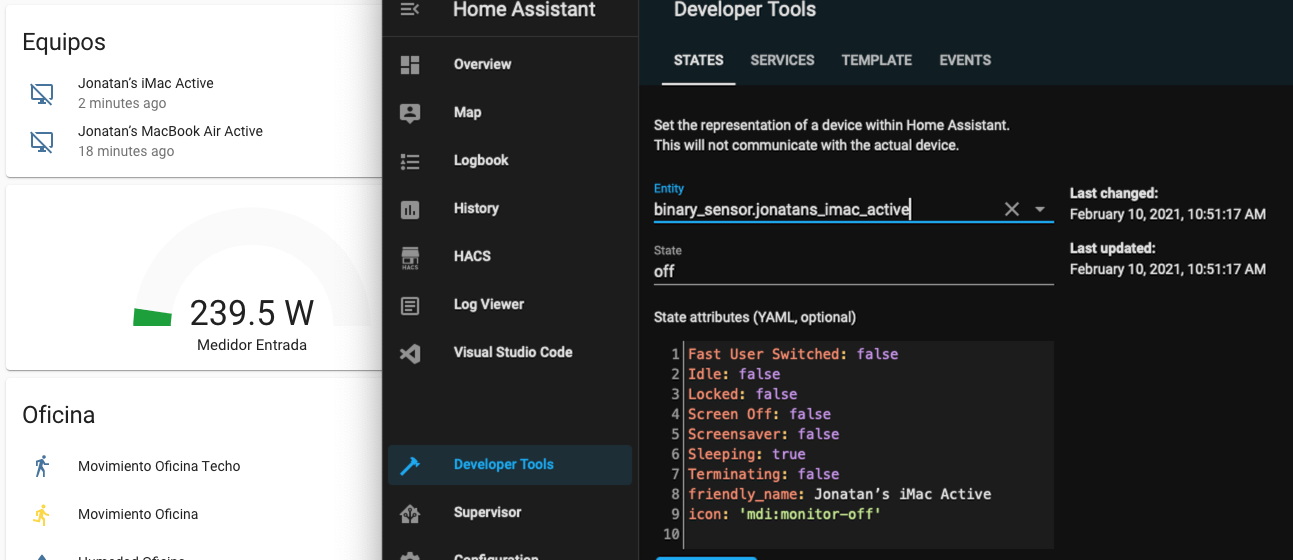
The binary sensor that's created from the device (binary_sensor.jonatans_imac_active) doesn't seem to report correctly the state. Sometimes it will show correctly as "on" on Developer Tools > States, sometimes I will wake up the iMac and it will be still in off state until I restart the home assistant app
To Reproduce
Put to sleep the mac, check the state
Expected behavior
Should be on when iMac is wake up, or at least after a few seconds
 jcastro
All 24 comments
I think this is another occurrence of #1460. I will push an app update in the next few days which includes the fix.
 zacwest
on 9 Feb 2021
zacwest
on 9 Feb 2021
@zacwest Sorry to re-open. I've tried the new version released yesterday but still having the same problem. On the screenshot below I'm using the iMac to check the state which it says it's off, but of course it's not the case
jcastro
on 10 Feb 2021
Darn. Can you confirm in-app whether the sensor is correct app-side? This will be in Preferences > Sensors.
This is, much like the other one, an issue that logging will help. Can you grab the logs (in Preferences, reveal in Finder) and extract the relevant lines for when the problem occurs? You can redact and attach here or you can drop them here.
zacwest
on 10 Feb 2021
Sure! I will try to reproduce the bug (not always is happening) and send the logs. Thanks :)
jcastro
on 11 Feb 2021
@zacwest just uploaded to your dropbox an screenshot where you can see the sensor in settings shows the correct value while on HA it shows offline. I've also attached the logs. Let me know if it's enough or if you need something else.
As always thanks so much for your work!
jcastro
on 11 Feb 2021
Thanks for the logs, I think I see what's going wrong this time.
zacwest
on 12 Feb 2021
Hello @zacwest. I'm testing new version 65 and it seems to be working better! So far I found a problem when restarting my Macbook Air, it didn't report to HA that it was inactive. While the restart process happened it was showing as Active
jcastro
on 15 Feb 2021
Hello again,
It looks like it still failing. I just woke up my iMac and it wasn't reported on the HA website that it was active. I had to manually click on the HA menu bar icon, to bring it on focus (and it looks like it loaded again) and then it reported the state
jcastro
on 15 Feb 2021
Do you mind sending logs and an approximate time of when it was incorrect?
zacwest
on 15 Feb 2021
I will try to replicate again and tell you the exact time it happened. Thanks!
jcastro
on 15 Feb 2021
Just replicated it! uploaded the log on your dropbox, time was 20:16
jcastro
on 15 Feb 2021
OK, thanks again! This helped narrow down a completely different issue with the same result.
zacwest
on 15 Feb 2021
That’s amazing! Thanks to you! Appreciate your time and work! :)
jcastro
on 15 Feb 2021
If you'd like to give this a try before the next beta, grab the "mac-developer-id" artifact from this build. It's the same as this past weekend's beta build but with this change.
zacwest
on 16 Feb 2021
Great, will give it a try now! Thanks
jcastro
on 16 Feb 2021
Looks like it's still failing. I installed the new version, put my iMac to sleep and when waking it up again it didn't report the active state on the HA website. Time was 07:23, uploading the logs to your dropbox now! Thanks
jcastro
on 16 Feb 2021
Interesting. This time, I'm not finding anything in the logs that suggests a sensor problem (hooray! I think). However, I am seeing another bug with my change above which may break, so you may want to drop back to the last beta release after debugging.
Were you checking the value in a browser or in the webview in the app? If in the app, it's possible the WebSocket connection in the app needed to reconnect before you saw it, and it's on a multi-second-long timer.
Timing-wise, I'm seeing…
2021-02-16 07:18:52.764 - active
2021-02-16 07:22:35.515 - not active, locked/sleeping
2021-02-16 07:23:04.237 - active
With some properly-cancelled sensor updates in-between.
There are a couple things we can do to debug here:
- Check out the logbook to see whether it can corroborate what the app thinks.
- Add some logging so we can see the timing of what the server received.
You can enable some logging on that side to see exactly what's coming in. In your configuration.yaml you can add…
logger:
  logs:
    homeassistant.components.webhook: debug
    homeassistant.components.mobile_app: debug
It should log things like…
[homeassistant.components.mobile_app.webhook] Received webhook payload from … for type update_sensor_states: …
Thanks again for being so helpful! There's something about your network connectivity when the app is waking from sleep that makes it really good at reproducing this. 😆
zacwest
on 16 Feb 2021
I was checking the value using Chrome, to avoid touch the HA.app to see what it would do by itself in the background. I've added the logger option on my configuration and once I can reproduce I will send those as well
jcastro
on 16 Feb 2021
Once this build finishes, please give that one a go (mac-developer-id, as before) and see if it helps. It shouldn't make a difference but it eliminates a variable.
zacwest
on 16 Feb 2021
Just happened again, I'm uploading to your dropbox HA logs, HA.app logs and 2 screenshots where you can see the app was updating other sensors like frontmost app, for example. Approximate time would be around 15:30. Thanks!
jcastro
on 16 Feb 2021
Thanks again. Spent some time this evening matching up the client and server logs. This is the order of events merged:
[CLIENT] 15:31:08.160 #1077 Start (not active)
[CLIENT] 15:31:08.167 #1078 Start (not active)
[CLIENT] 15:31:08.168 #1079 Start (not active)
[CLIENT] 15:31:08.169 #1077 Cancel (not active)
[CLIENT] 15:31:08.170 #1078 Cancel (not active)
[CLIENT] 15:31:08.242 #1080 Start (not active)
[CLIENT] 15:31:08.243 #1079 Cancel (not active)
[CLIENT] 15:31:08.356 #1080 End (not active)
[SERVER] 15:31:08 (not active) [client #1080]
[CLIENT] 15:31:39.638 #1081 Start (not active) [Eventually Bad One]
[CLIENT] 15:31:39.735 #1082 Start (not active)
[CLIENT] 15:31:39.736 #1081 Cancel (not active) [Eventually Bad One]
[CLIENT] 15:31:39.746 #1083 Start (not active)
[CLIENT] 15:31:39.747 #1082 Cancel (not active)
[CLIENT] 15:31:40.654 #1084 Start (active)
[CLIENT] 15:31:40.655 #1085 Start (active)
[CLIENT] 15:31:40.658 #1083 Cancel (not active)
[CLIENT] 15:31:40.659 #1084 Cancel (active)
[CLIENT] 15:31:45.858 #1085 End - (active)
[SERVER] 15:31:45 (active) [client #1085]
[SERVER] 15:31:46 (not active) [client #1081]
tl;dr - request #1085 (setting active=true) is what we _think_ was the latest request and successful, but request #1081 (setting active=false) which we thought we cancelled completed after the fact. This one unfortunately is going to require some thought to a good way to resolve it. The client is _technically_ behaving correctly here, but it's still at fault for the values it is sending up.
This is probably an issue that has "always" been happening, but the sensor caching -- which was the annoying thing previously occurring -- is worsening it by not including the now-correct value in subsequent sensor updates.
zacwest
on 17 Feb 2021
Thanks for looking at this, please let me know if I can be of any more help!
jcastro
on 17 Feb 2021
Hi
I have a possibly related issue.
The 'active' sensor remains on when my iMac (early 2009 - MacOS Catalina 10.15.3) is shut down. It works as expected when I put the Mac to sleep or when the app is closed (quit).
 PierreScerri
on 19 Feb 2021
PierreScerri
on 19 Feb 2021
Yes when restarting it's also happening to me on all of my macs (MBA M1 and iMac 2013)
jcastro
on 23 Feb 2021
Related issues
 CCOSTAN
·
3Comments
CCOSTAN
·
3Comments
 mynameisdaniel32
·
9Comments
mynameisdaniel32
·
9Comments
 wolverinevn
·
3Comments
wolverinevn
·
3Comments
 rifelpet
·
4Comments
rifelpet
·
4Comments
 vandalon
·
8Comments
vandalon
·
8Comments