Ios: Mobile App integration – notifications stopped working
iOS device model, version and app version
Model Name: iPhone 8
Software Version: 13.6
App version: 2020.4.1 (updated yesterday)
Home Assistant Core Version
HA version: 0.113.2 (updated today)
Describe the bug
I've updated the app yesterday and I was using it till now without any problems. I've restarted HA and host device a couple of times since then. I've also updated the HA to 0.113.2 from 0.112.4 few hours ago (and also restarted HA a couple of times since then).
Right now, out of the blue, I have this problem with Mobile App integration that my HA instance can't send any notification to my mobile device. It was working today, but now isn't anymore.
The only error that I'm getting is the one presented below.
I've checked the integration and entities name. I've tried calling a notify service manually – same result.
Screenshots

 fi-sch
All 48 comments
I've also tried removing the token for this device and re-authenticating the mobile app. The outcome of this was that the new integration appeared in HA UI with new entities. So I removed the old one, renamed the entities (removed '_2' at the end of each one) and restarted HA once more, just to be sure.
Notifications still do not work. I get the same error as before. That's really bad.
fi-sch
on 29 Jul 2020
Can you try resetting the "Push ID" in App Configuration>Notifications and then restarting Home Assistant.
 TomBrien
on 29 Jul 2020
TomBrien
on 29 Jul 2020
I'm not quite sure what helped now because I've tried removing integration completely from HA prior to re-installing and authenticating the application. I've also reset push ID at the same time – sorry for that. All working good now, anyways.
fi-sch
on 29 Jul 2020
No worries. I'm sorry this happened but I'm glad to hear it's working. We have noticed a fair few tokens expiring in the last day or so, we are actively trying to understand what has happened here. Appreciate you reporting the issue. Is it ok if I close this now?
TomBrien
on 29 Jul 2020
I am having a similar issue. It goes away once I reset push ID, but seems to only fix the issue for a couple of hours. Happening on two different devices. Getting "Errors" logged under "Rate Limits" in iOS app, but not sure how to see more info on those. (iPhone XR and iPhone 11 - iOS 13.5.1, same HA and HA app versions as OP)
 davearneson
on 29 Jul 2020
davearneson
on 29 Jul 2020
I've got the same error. Changing the iphone name helps only for few hours. (iphone X, iOS 13.6)
 Wojcioo
on 29 Jul 2020
Wojcioo
on 29 Jul 2020
No worries. I'm sorry this happened but I'm glad to hear it's working. We have noticed a fair few tokens expiring in the last day or so, we are actively trying to understand what has happened here. Appreciate you reporting the issue. Is it ok if I close this now?
For me it worked but I will check in a couple of hours if it does not break again.
Another issue I experience is that Actions have stopped working for me. I don't even get any record when I try to listen to 'ios.action_fired' event in HA dev tools.
fi-sch
on 29 Jul 2020
This does appear to be an active issue, and it looks like it may be related to the app transfer which is currently in progress. What we do know is:
- The issue appears to be on the FCM (Firebase Cloud Messaging, what HA uses for sending pushes) side
- Resetting the push ID seems to temporarily resolve the issue, but the problem comes back a little while later
 zacwest
on 29 Jul 2020
zacwest
on 29 Jul 2020
This does appear to be an active issue, and it looks like it may be related to the app transfer which is currently in progress. What we do know is:
- The issue appears to be on the FCM (Firebase Cloud Messaging, what HA uses for sending pushes) side
- Resetting the push ID seems to temporarily resolve the issue, but the problem comes back a little while later
How about actions? Is it also caused by the app transfer?
Can I provide any useful details for you guys?
fi-sch
on 29 Jul 2020
How about actions? Is it also caused by the app transfer?
Can I provide any useful details for you guys?
No, this is likely unrelated. Please open another ticket, and it would be useful to provide app logs via App Configuration > Export Logs. Be aware that this will contain personal data like locations, you can join Discord to send them more privately.
zacwest
on 29 Jul 2020
No, this is likely unrelated. Please open another ticket, and it would be useful to provide app logs via App Configuration > Export Logs. Be aware that this will contain personal data like locations, you can join Discord to send them more privately.
Ok, I did completely reset, reinstall the app, set up actions again and the issue with them is gone. End off topic, no need to create an issue.
fi-sch
on 29 Jul 2020
Emergency priority ticket opened with Firebase and I am working behind the scenes to escalate it further.
 robbiet480
on 29 Jul 2020
robbiet480
on 29 Jul 2020
Update: Friends in high places are working to make sure Firebase actions this problem ASAP. Watch this issue for further updates.
For context, here’s what I sent Firebase:
48 hours ago we completed an App Transfer between two Apple Developer accounts. We followed their instructions and updated the APNS key in Firebase to use the new account key instead of the old. Push notifications continued to flow just fine with no user visible outage. Within the last 24 hours however, we have started receiving reports that the Instance ID/FCM Token is now refreshing multiple times per hour. The only change recently has been the App Transfer. Notifications will eventually start working again but only after one or more Instance ID resets in the app. We have confirmed the underlying APNs token has remained stable the entire time. Therefore it appears that this is a FCM specific issue on your backend.
robbiet480
on 29 Jul 2020
Update: Friends in high places are working to make sure Firebase actions this problem ASAP. Watch this issue for further updates.
For context, here’s what I sent Firebase:
48 hours ago we completed an App Transfer between two Apple Developer accounts. We followed their instructions and updated the APNS key in Firebase to use the new account key instead of the old. Push notifications continued to flow just fine with no user visible outage. Within the last 24 hours however, we have started receiving reports that the Instance ID/FCM Token is now refreshing multiple times per hour. The only change recently has been the App Transfer. Notifications will eventually start working again but only after one or more Instance ID resets in the app. We have confirmed the underlying APNs token has remained stable the entire time. Therefore it appears that this is a FCM specific issue on your backend.
Thanks Robbie.
davearneson
on 29 Jul 2020
Initial update from Firebase:
For app transfers between Apple Developer accounts, this typically results in existing registration tokens for the app getting invalidated, due to changes in the TeamID and/or auth key. Once the token is invalidated, the app will need to retrieve a new registration token. The fastest way to do so would be to release a new app version, which allows the app to re-register with FCM. Otherwise, the app will need to wait until the token is automatically refreshed on the client app, which can take up to around 7 days.
I replied with:
Thanks for the quick response. Is this still the case even if we confirm that the underlying APNS token remains the same and is able to send notifications directed to it via APNS (meaning, without Firebase in the loop)?
We are in a tough spot right now and unable to release an update. As part of the app transfer we lost our Critical Alerts entitlement. We are working with Apple to expedite receiving it on the new account but until we have it we can’t release an update without breaking existing users setups.
robbiet480
on 29 Jul 2020
@zacwest reminded me that the response from support doesn’t check out, since force resetting the token in app will let it work for a few minutes and then break again.
Just heard from back channels that I am about to receive an escalated response from Firebase shortly. Will keep y’all posted.
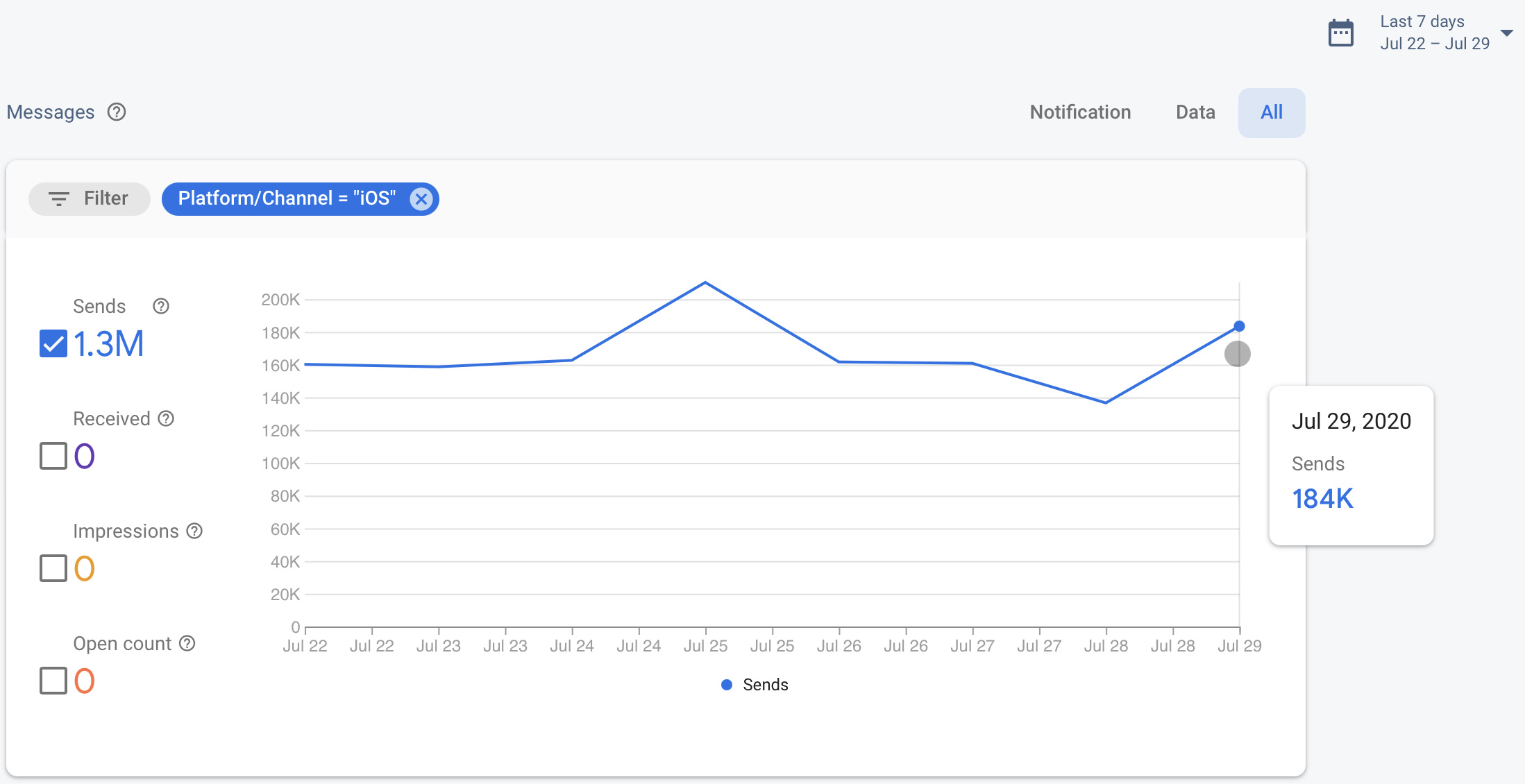
Last thing is I checked today’s stats thus far. Here they are:
robbiet480
on 30 Jul 2020
Update from Firebase:
Right, it is still the case even if the underlying APNs token may be the same. Deleting the InstanceID should force regenerate the registration token and may help to re-register tokens, however, may not be as reliable as actually re-registering again. Uninstalling/re-installing the application might also perform similarly, though I understand if that's not as feasible of an option.
Outside of releasing a new app version that re-registers though, there's just waiting a week for the tokens to automatically refresh. My apologies that we can't do much else to help here.
robbiet480
on 30 Jul 2020
Thanks @robbiet480 for looking into this. Im in the same boat, no notifications, doing notifications reset, reinstalling app or restarting HA doesn't help either.
 dlo747
on 30 Jul 2020
dlo747
on 30 Jul 2020
Stumbled here after spending some time troubleshooting. @robbiet480 appreciate the real time feedback on this!
 curt7000
on 30 Jul 2020
curt7000
on 30 Jul 2020
Firebase replied again and said the 7 day timer is an estimate. They are going to keep digging in on this. I provided some info they asked for.
I left a voicemail for the senior Apple advisor assigned to the app transfer begging for an update and if they can put any pressure on to make it go faster.
I’ve started back channeling to friends at Apple but don’t expect much from that.
robbiet480
on 30 Jul 2020
To anyone reading this and specifically @TomBrien @davearneson @Wojcioo @curt7000 @fi-sch: Please provide any tokens you can to me. For safety, iMessage them to [email protected]. I need to give Firebase more. Thanks.
I've got enough tokens, thanks!
robbiet480
on 30 Jul 2020
@mattcooksey1 yes, that's what he wants. I just sent some over
davearneson
on 30 Jul 2020
Update from Firebase:
Currently evaluating if we can get you that IID to APNs token mapping.
(Robbie here: If they can get us this, I can bypass Firebase, at least temporarily, entirely. This would be huge.)
The issue might be a bit more complex than initially thought though. You mention that you've gotten reports that the IID/FCM token refreshed multiple times per hour, but also that notification work again after multiple resets. Do you know if the notification flow is working for the devices that have been refreshed? If the token refreshes after the app transfer and APNs credentials being updated, normally, we'd expect the token to work again.
Working up a response now.
robbiet480
on 30 Jul 2020
What I just sent them:
I've gotten reports that sometimes resetting one or more times will sometimes bring notifications back, at least temporarily. And as I've said, the APNS token is remaining stable from everything we've seen thus far, so it appears the Firebase SDK is creating a new IID for no reason at all.
This came from my colleague (Zac) and is probably a bit more explicit:
my specific case:
1. have working fcm id, apns id
2. same apns id, fcm id errors
3. reset fcm id, works temporarily, no apns change
4. reset fcm id, works temporarily, no apns change

my current ID ( `fDC8BwVhTUDJhRGe4-DQGg:APA91bG5EWFNIw8hkRXZ9H7Bnf7ODCBwZAuJCtR6Bc1uXB4Syxj530UaJwqi1lWDzTwvfyya1Sy7G9EfvIYSw60Wk6EK56bDrVlbzstpIEOa89rgLXv1LiE5i4uSCvZG7Ku1fLblaeWt` ) is in an error state after 4
If it helps, the app is entirely open sourced at https://github.com/home-assistant/iOS. Here's the Firebase SDK setup. Outside of that, we only interact with FirebaseMessaging here. The last link is the only place we reset the Instance ID. It is entirely user driven. They have to push a button in the UI to do it (screenshot attached but not sure if you can receive attachments through here so just in case you can find the same image at https://cdn.discordapp.com/attachments/377667559303938050/738192286797529098/IMG_6850.PNG).
The only other weirdness I just thought of is we have
FirebaseMessagingAutoInitEnabledsetfalseinInfo.plistfor privacy reasons, but FCM is turned on by default unless the user specifically disables it in UI. You think that could cause weirdness?Oh and I've been checking tokens (like the one above) against the IID REST endpoint (
https://iid.googleapis.com/iid/info/$TOKEN) and that's returning "No information found about this instance id." when a token is dead. If I try sending a push to it I get "Requested entity was not found." from the FCM admin (NodeJS) SDK.Let me know what else I can get you. Also, just so I don't annoy you or stress myself out further, shall I expect further updates after 6pm or no? It's fine if not, I just need to know if I can start drinking at 6 to try to calm down or not haha.
robbiet480
on 30 Jul 2020
From Firebase:
Thanks Robbie.
We'll see if there's anything else we can determine with this info. This will likely be the last message for today and hopefully we'll have something tomorrow.
Drink safely,
Andy
Sorry all but we're stuck until tomorrow at this point (its just about 1800 PDT now so most companies are done for the day).
Will get back at it tomorrow when I hear something.
robbiet480
on 30 Jul 2020
This is (probably) my final update for the evening:
I didn't have a good handle on how widespread this problem is because the server side notification forwarder wasn't properly logging errors. I've now fixed that. In roughly 3 hours there have been roughly 30,000 notification requests (across both Android and iOS) of which 15,000 iOS requests have failed with the invalid token error. Now, I made some minor mistakes when implementing the error logging that caused double errors for a few minutes, so I'm going to say the actual number is around 10-13,000. That's still around 50% of all requests failing. Not great.
I've declared an outage on our status page. I should've done it first thing this morning, I just didn't think about it. If you want less granular updates you should subscribe to that. Otherwise, keep your eyes on this issue for the firehose of updates.
I apologize for this unexpected major outage everyone. There's no way that we could have known that FCM (appears to) have a bug around app transfers. This situation is only made worse due to the missing critical alerts entitlement which blocks us from doing the "quick fix" which would be to release an update. We are in a real perfect storm of shit. Somethings gotta give before it gets better I think. I'm hoping that something is Firebase fixing the bug on their side. I'm praying it's Apple hears our pleas and expedites the entitlement request.
robbiet480
on 30 Jul 2020
@robbiet480 Thanks again for all your work Robbie. Shit happens sometimes, let us know if there's any opportunity for us to lend a hand.
davearneson
on 30 Jul 2020
Thanks for taking action in such a quick and professional manner! I really appreciate that.
I've just sent you my token via iMessage. Feel free to tell if there'll be anything more that I could provide to help.
fi-sch
on 30 Jul 2020
@robbiet480 Thanks for such quick response. I've just sent you my token.
Wojcioo
on 30 Jul 2020
@robbiet480 I forgot to ask. That token that you requested – should it be actual one (I'm not supposed to change it even if it's not working anymore)? If so, I've just reset it unthinkingly as I needed to revive the notifications.
fi-sch
on 30 Jul 2020
FYI, tokens on both my devices survived the night. Notifications still coming through 12+ hours later. Seems like progress.
davearneson
on 30 Jul 2020
Good morning,
No updates overnight. We received an automated email from Firebase this morning about a recent SDK issue which we thought was related but actually wasn’t sadly. I asked Firebase support about it and received this back a few minutes ago:
Good morning, Robbie.
That should not be related. I believe that email has more to do with the Firebase Installations Service changes that have been introduced in recent SDK versions and problems that may occur involving API key restrictions (a bit more context here). The errors relating to that would exhibit differently, likely something like a 403 or some FirebaseApp misconfiguration on the client side.
In regards to the token issues after the app transfer - I've gotten this bounced around some of our engineers, however there hasn't really been any substantial updates yet. I'll try giving it another bump.
robbiet480
on 30 Jul 2020
Although my tokens survived the night and most of the day today, they broke again just now and had to be refreshed.
davearneson
on 30 Jul 2020
Sorry for lack of updates today, had a lot of other stuff going on. Here's all the comms thus far:
All times 24 hour in PDT/UTC-7.
Firebase
Firebase Support, 1219
Hey Robbie,
So, there's some confusion we have in regards to some of the token refreshes, particularly, which have been done manually:
Are you still seeing FCM tokens rapid refresh without any user interaction?
One of the reports you've shared indicate "3. reset fcm id, works temporarily, no apns change
4. reset fcm id, works temporarily, no apns change" - was the IID reset here done manually/by the user?
Would you be able to provide a clean state without any manual token resets and simply describe what's not working there if nothing is done? If you can provide the debug logs for that device, that would also help.
And another thing we've noticed, the APNs token is set twice here. The first line should be sufficient and should now be able to automatically detect if the token is for development or production. Having it set twice might cause token resets, especially if there's different builds involved.
Robbie, 1236
Will get you everything by 2pm.
I haven’t checked with users yet today to see if they’re still getting rapid refresh, will do and get back to you.
The report you asked about was saying that they reset the token after it stopped working at the end of line 3.
Thanks for catching the double APNS token set, been there for 15 months, not sure how we missed it!
Robbie, 1608
Hey Andy,
Sorry for the delay, I had a work emergency I had to attend to (sadly, Home Assistant is not my dayjob).
So I've spoken with my team and a few users to confirm what's going on. Tokens are not rapidly refreshing, I misunderstood the situation. What is actually happening is tokens are expiring shortly after issuance. The only way for a new token to be issued is by manually resetting the IID, which makes us think the SDK isn't properly detecting the token is now invalid.
I checked our API usage stats and noticed that FCM send errors have gone down significantly, along with Firebase Installation CreateInstallation requests going down too. I take this as a good sign. Is it possible that we have hit that 7 day timer early or something? Most but not all users that were having issues yesterday are now saying their tokens are remaining valid.
Someone on our team was wondering if this whole mess could be linked to our recent use for the first time of the FCM Composer. The timing lines up pretty closely. Maybe the composer started trying to send tons of messages and hit a lot of dead tokens for some reason? A clear example of this is the most recent one "English-UpdateNotification". The targeting part of the setup estimated 400k users would receive the notification but only 100k actually were sent. It's possible we have been looking at all these errors from FCM and our cloud function push forwarder and thinking that it was due to the app transfer when in reality it may have been old tokens in the system being hit and spiking the error rates.
We removed the first APNS token reset call from our code and left the more explicit set with the token type in due to the way we build our application.
I'm still working on getting you logs from a clean state of the app but I'm not sure I'll be able to get it to you before the end of my day due to the work emergency. Just wanted to send something to you well before then.
Firebase, 1639
No worries at all, Robbie. Thanks for providing what you can.
Sounds like things might be normalizing, which is good news. It's still quite unclear what might be going on, so I can't confirm if it's due to the automatic refreshing (7 day timer) though.
For the Firebase Console, there shouldn't be any sends to invalid tokens, so I'd think it's unrelated, but maybe there's a weird case here. Did you have any specific errors that you could share? Error responses from send requests should have more details on why the request failed.
In the meantime, we'll wait for those logs (at your earliest convenience).
Robbie, 1656
No errors in the composer at all. I don't even know where i'd see them for composer generated notifications anyway.
Firebase, 1707
Gotcha. The Notification Composer just shows the status, which might show something like "Failed" if there were problems. I thought perhaps you had some custom or special usage with your app involving the Notification Composer if you were associating errors to it. If it's just direct Notification Composer usage (send message straight to app), there shouldn't be any impact on the client app's tokens, but we'll keep the info in mind given the timing.
Firebase, 1720
Hey Robbie,
Given that this seems to be more about tokens expiring and not refreshing, previously you mentioned that FirebaseMessagingAutoInitEnabled has been set to false - this might be the determining factor here. If a user's token is expired and FirebaseMessagingAutoInitEnabled has been set to false, the client will not automatically refresh the token. Thus, this would naturally result in your back end having all these dead tokens. This would also explain why you'd need to manually reset the IID, since the expiring tokens aren't automatically refreshed.
You might need to re-evaluate opt-in/consent flow and ensure that re-enablement occurs as needed.
Robbie, 1721
That makes sense but why are we seeing such an influx of errors, even before the composer notifications were sent? Are tokens expiring in FCM due to the app transfer and then not getting renewed because of FirebaseMessagingAutoInitEnabled?
Firebase, 1725
I'm not sure what these errors specifically are, but yes, an app transfer can result in tokens being invalidated. And yes, based off the behavior and provided information, the tokens aren't refreshing because FirebaseMessagingAutoInitEnabled has been set to false.
Apple
Most of Apple's responses are redacted because they contain sensitive bits of info like contact details and account identifiers.
Robbie, 1642
Hi Rainie,
Is there any update on this? We are facing a major push notifications bug that requires a full app update according to Firebase but we can’t release until we are given the entitlement. Negative app reviews and tweets are piling up. I have over 300k DAU and I can’t be stuck in limbo like this for long.
Can we escalate this to senior management? You have been a great help but time is of the essence.
Thanks for your help
Rainie (Apple Developer Support Senior Advisor), 1706
We checked the status of your request and confirmed that it is still under review.
We will let you know as soon as we have an update for you.
Robbie, 1707
If you have any experience with this kind of request, how long does it usually take for a review? Also when you say review do you mean the entitlement review or the expedite review?
On another topic, has operations been able to free up the io.robbie.HomeAssistant.beta bundle ID yet?
Thank you
Rainie, 1721
Both of your requests are being handled by our operation team. We are unable to provide review timeframe for your request but we will contact you when an update is available.
Thank you for your understanding.
robbiet480
on 31 Jul 2020
Robbie -> Firebase 1731
The errors I'm talking about are just the high error rate seen on the FCM API metrics window of the Google Cloud Console + our forwarder Firebase Function returning tens of thousands of "Requested entity was not found." from the Firebase Admin SDK during a FCM send.
This all makes sense now. Can you confirm the 7 day timer won't really apply in this case, meaning that even after 7 days tokens will still be broken? If that's the case I'll communicate to our users that they need to do a one time manual reset.
Is it possible for you to get me that data set of IID to APNS tokens, or even just the APNS tokens? Since APNS tokens remained stable I can simply send a notification to all of them directly via APNS to alert users of this issue.
robbiet480
on 31 Jul 2020
Good Work @Robbiet thanks you for all this updates. If you need a new feedback i only reset my PUSH ID and return to work again.
 mironalessandro
on 31 Jul 2020
mironalessandro
on 31 Jul 2020
It seems that resetting your push ID in App Configuration > Notifications is working long-term (or at least, longer term than before) to get notifications working again. Please give this a try if you're running into the issue.
zacwest
on 31 Jul 2020
After 12 hours still working. Tomorrow (evening here in Italy) I can give an another feedback
mironalessandro
on 31 Jul 2020
I'm having this problem too.. Resetting push ID seems to have helped.. Will report back in a day..
 scstraus
on 31 Jul 2020
scstraus
on 31 Jul 2020
Reset around 12:00EDT today, stable and receiving notifications. I’ll come back and report if it stops
curt7000
on 31 Jul 2020
I have reset my ID under the app configuration>notifications settings menu within the app. I still am not receiving notifications. It would appear the “quick fix” does not work for me. I have force closed the app, reset the app and set it back up including uninstalling, and restarted my home assistant docker.
EDIT: 1 more restart of HA and now it works. This makes sense because HA needs to know what the new push ID is of the mobile device or needs to re-register the notify service.
 squirtbrnr
on 1 Aug 2020
squirtbrnr
on 1 Aug 2020
I have reset my ID under the app configuration>notifications settings menu within the app. I still am not receiving notifications. It would appear the “quick fix” does not work for me. I have force closed the app, reset the app and set it back up including uninstalling, and restarted my home assistant docker.
This is true for me as well. Thanks for your work, Robbie, and let us know if we can do anything!
 johnekarlsson
on 1 Aug 2020
johnekarlsson
on 1 Aug 2020
Still working for me after 1 day
mironalessandro
on 1 Aug 2020
Same here, everything works properly since 2 days.
fi-sch
on 2 Aug 2020
I am closing this issue as it appears to be resolved.
robbiet480
on 5 Aug 2020
Yup, it's still working here.
fi-sch
on 6 Aug 2020
Stopped working for me :(
 roger-
on 9 Aug 2020
roger-
on 9 Aug 2020
Stoppd working for me today.
Logger: homeassistant.components.automation.alert_rubbish_collection
Source: core.py:1258
Integration: Automation (documentation, issues)
First occurred: 1:52:03 PM (2 occurrences)
Last logged: 1:58:36 PM
While executing automation automation.alert_rubbish_collection
Traceback (most recent call last):
  File "/usr/src/homeassistant/homeassistant/components/automation/__init__.py", line 430, in async_trigger
    await self.action_script.async_run(variables, trigger_context)
  File "/usr/src/homeassistant/homeassistant/helpers/script.py", line 802, in async_run
    await asyncio.shield(run.async_run())
  File "/usr/src/homeassistant/homeassistant/helpers/script.py", line 183, in async_run
    await self._async_step(log_exceptions=False)
  File "/usr/src/homeassistant/homeassistant/helpers/script.py", line 191, in _async_step
    await getattr(
  File "/usr/src/homeassistant/homeassistant/helpers/script.py", line 380, in _async_call_service_step
    await service_task
  File "/usr/src/homeassistant/homeassistant/core.py", line 1258, in async_call
    raise ServiceNotFound(domain, service) from None
homeassistant.exceptions.ServiceNotFound: Unable to find service notify/mobile_app_anthonys_iphone
I'll be starting by a complete reinstall on my phone to see if this fixes it.
 Rustymage
on 17 Oct 2020
Rustymage
on 17 Oct 2020
Related issues
 LucasJanin
·
6Comments
fi-sch
·
7Comments
LucasJanin
·
6Comments
fi-sch
·
7Comments
 matthew-larner
·
10Comments
matthew-larner
·
10Comments
 jamieshaw
·
8Comments
jamieshaw
·
8Comments
 mynameisdaniel32
·
9Comments
mynameisdaniel32
·
9Comments
Most helpful comment
Update: Friends in high places are working to make sure Firebase actions this problem ASAP. Watch this issue for further updates.
For context, here’s what I sent Firebase: