Ios: App is killed when closing window
Model Name:
Software Version: 10.15.6 (19G2021)
App version: 2020.7 (1)
Home Assistant Core Version
Home Assistant 0.115.1
Describe the bug
When closing the window of the MacOS app, it kills the whole application.
To Reproduce
Close the window (⌘ + w) and the app will be killed completely.
Expected behavior
The app should remain in the dock and stay active. When you click on the dock icon, it should open the window again without having to refresh the page.
 matthew-larner
All 10 comments
Ideally some background process would keep running even on ⌘ + Q. Currently no sensors update if the app is closed.
 AlecRust
on 19 Sep 2020
AlecRust
on 19 Sep 2020
I'm having the same on Catalina 10.15.6.
I get this in the app log shortly before it happens:
2020-09-19 17:32:35.552 [Debug] [main] [BackgroundTask.swift:56] execute(withName:beginBackgroundTask:endBackgroundTask:wrapping:) > ending background task signaled-update-sensors (6379734E-85FD-450A-A2F8-9C3752A42FBC)
and I also see this checking the logs in Console:
[io.robbie.HomeAssistant] Executing termination for reason (none) with request: <FBSProcessTerminationRequest: 0x600002dd9000; label: "Processes that RunningBoard suspends are immediately terminated on macOS."; reportType: (none); explanation: 0x0>
Edit: Just to add, the Home Assistant process will remain running in Activity Monitor for a time after it is no longer running in the Dock. However, after some time (can't tell exactly but it can be as short as a couple of minutes or half an hour or longer) the process will disappear from the Activity Monitor and that is when I get the second message in the Console log.
 gadgetchnnel
on 19 Sep 2020
gadgetchnnel
on 19 Sep 2020
The behavior on Catalina appears to be: as long as a window is open, the app will continue to run. If you close the last window, the app will continue to run if you open another window or until you switch to another app.
The behavior on Big Sur appears to be: the app will always run.
 zacwest
on 20 Sep 2020
zacwest
on 20 Sep 2020
How about an item on the OSX menu bar? That way it's not cluttering up the dock when not being actively open. Could even give quick access to forcing a sensor update and a few other things.
 SeraphimSerapis
on 21 Sep 2020
SeraphimSerapis
on 21 Sep 2020
I'm happy to wait for Big Sur if the issue is resolved on that version.
matthew-larner
on 22 Sep 2020
EDIT: Ignore this. The app closes when it loses focus.
Previous Report:
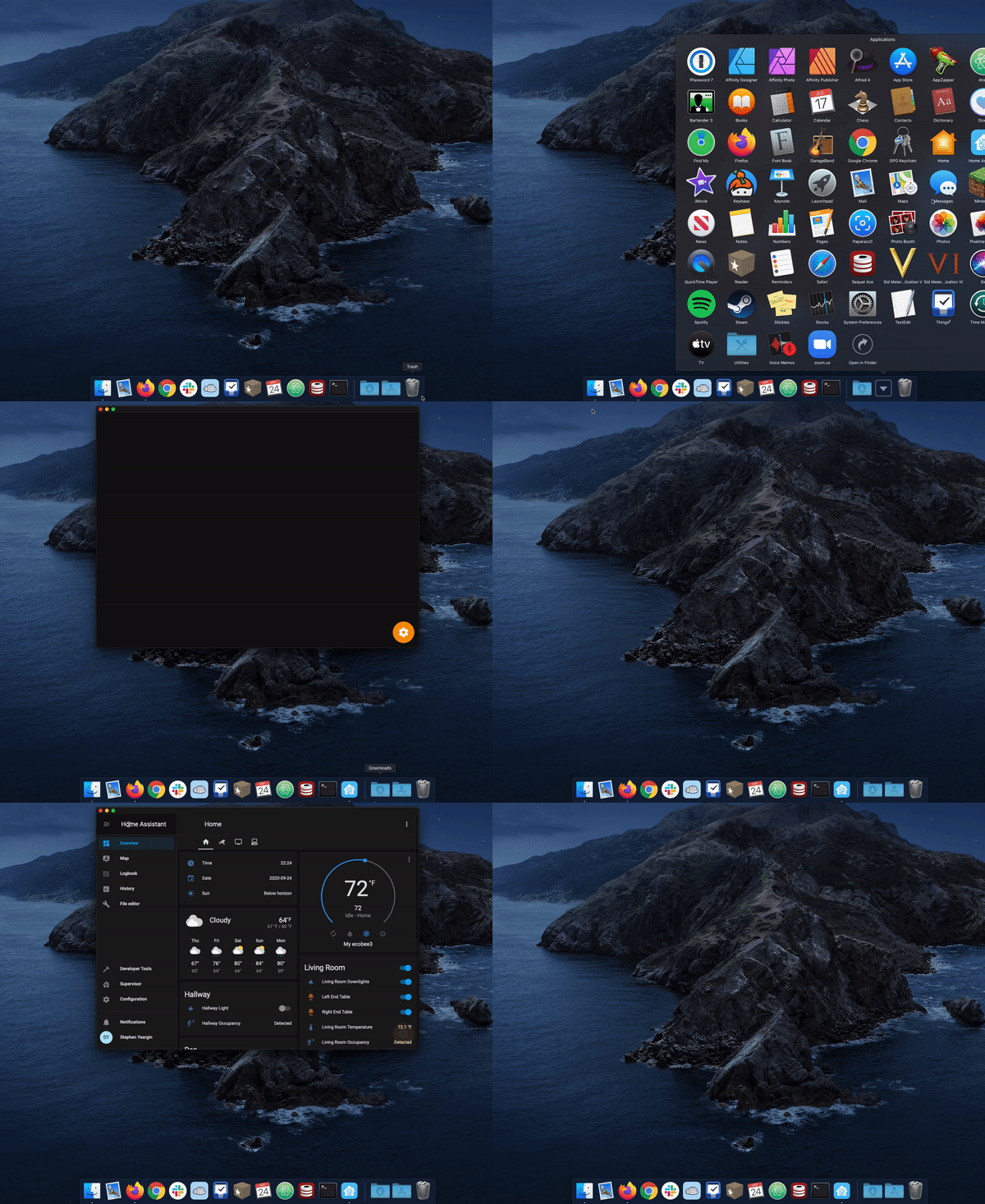
Not sure if macOS 10.15.7 changed the behavior or if another commit squared this away, but I can't reproduce this with 2020.7 (2).
 stephenyeargin
on 25 Sep 2020
stephenyeargin
on 25 Sep 2020
I'm still seeing the same issue with macOS 10.15.7, and I'm also on 2020.7 (2), so I don't think that has fixed it. It still disappears from the Dock for me and, after a period, disappears from Activity Monitor as well and then sensors stop updating.
From the screen recording, it looks like it is still disappearing from the Dock for you as well, but it just seems that the app loads more quickly than it does for me (the splash screen is there but it is disappearing more quickly) which may be something to do with your setup.
gadgetchnnel
on 25 Sep 2020
It remains on the dock with an active indicator at the bottom (I don't have it saved to the Dock). It does load fairly quick.
stephenyeargin
on 25 Sep 2020
Ah, I misinterpreted the video, and thought the app disappeared from the Dock a short time after you closed the window second time (it was just the point when it looped back to the beginning). I believe in Catalina the app will disappear from the Dock as soon as another app gets focus so, if you didn't switch focus to anything else it would probably stay in the Dock. So something like this will probably cause it to disappear:
- Open the Home Assistant app
- Close the window
- Click on any other app in the Dock (or possibly on the desktop background)
gadgetchnnel
on 25 Sep 2020
Okay, that _did_ kill the app. 🤦 Sorry about that.
stephenyeargin
on 25 Sep 2020
Related issues
 rifelpet
·
4Comments
rifelpet
·
4Comments
 fi-sch
·
3Comments
fi-sch
·
3Comments
 jamieshaw
·
8Comments
jamieshaw
·
8Comments
 vmcosco
·
8Comments
vmcosco
·
8Comments
 LucasJanin
·
6Comments
LucasJanin
·
6Comments
Most helpful comment
The behavior on Catalina appears to be: as long as a window is open, the app will continue to run. If you close the last window, the app will continue to run if you open another window or until you switch to another app.
The behavior on Big Sur appears to be: the app will always run.