Ios: Sluggish performance after 0.110.5
iOS device model, version and app version
Model Name: iPhone XR
Software Version: 13.5
App version: 2.0.0 (69)
Home Assistant Core Version
0.110.5
Describe the bug
After the update in home assistant core, performance in app are bad. Rendering of pages, switching tab or entering the app options is sluggish and unresponsive.
Behavior is probably related to upstream fix for sensors not updating, for issue #547.
To Reproduce
Install ha 0.110.5
Install mobile companion app latest version 2.0.0(69)
Log into your instance
Expected behavior
Same performance as with WebKit browsers on same device.
Screenshots
<-- If applicable, add screenshots to help explain your problem. -->
Additional context
 meme1337
All 27 comments
Got the same problem over here, its very laggy almost not usable. (Running HA 0.111.0b1)
 dwainscheeren
on 6 Jun 2020
dwainscheeren
on 6 Jun 2020
This is related to home-assistant/core#36455. I guess it’s either due to the errors spamming the logs or the root of those errors which is the app trying to reregister sensors
 TomBrien
on 6 Jun 2020
TomBrien
on 6 Jun 2020
Same problem over here too (HA 0.110.5)
 kersten-lohmeyer
on 6 Jun 2020
kersten-lohmeyer
on 6 Jun 2020
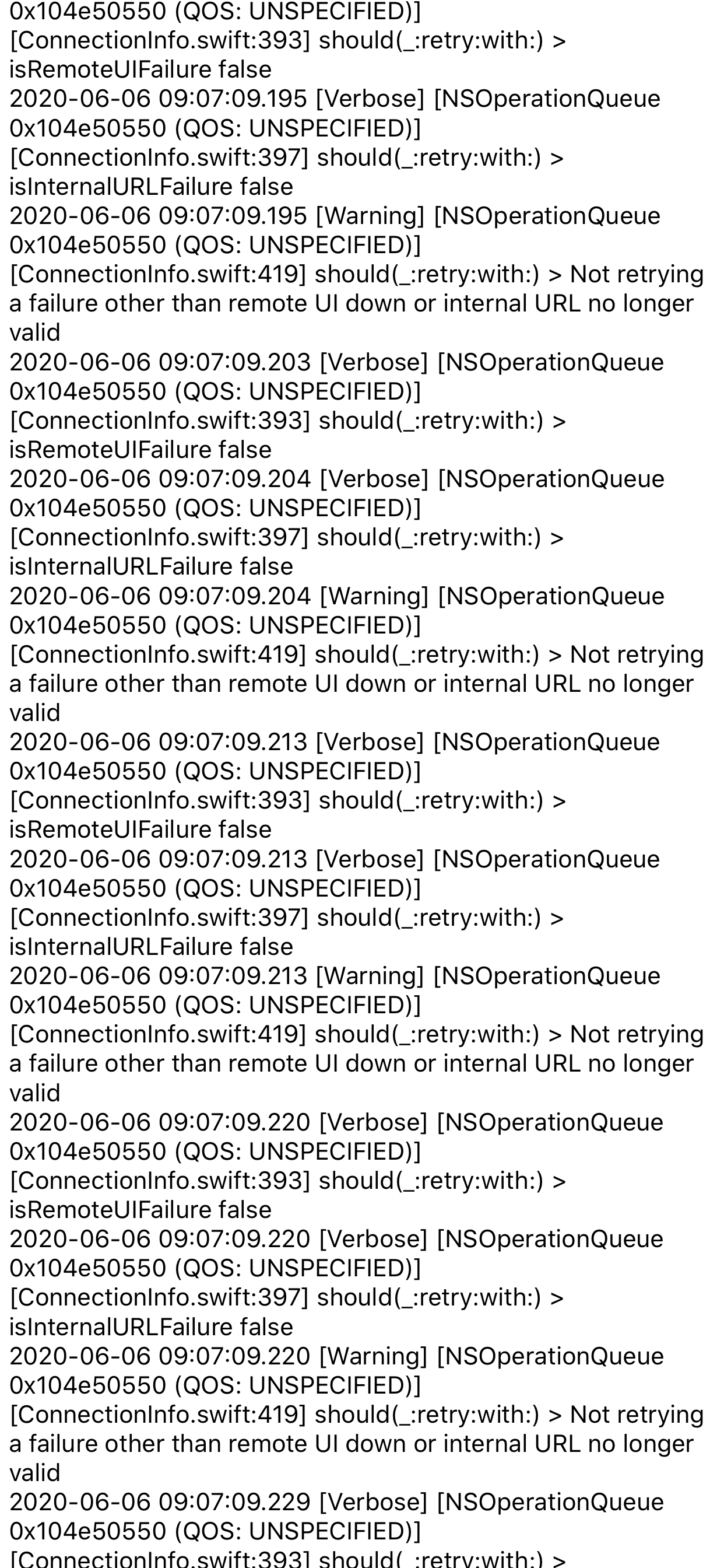
Same here, super sluggish, app is unusable now, even though I have made the ‘reinitialize’ option. I have thousands of pages of this in my iPhone app logs:
 vsaintloup
on 6 Jun 2020
vsaintloup
on 6 Jun 2020
As others have mentioned, sluggish performance.
The constant errors in the log are actually slowing down the entire installation on a Raspberry Pi 3B+ and I had to stop using the iOS app as it was delaying actioning of automations due to writing all the errors out.
I hate complaining as I know this is all done as opensource, but the iOS app is pretty well unusable now
 austwhite
on 6 Jun 2020
austwhite
on 6 Jun 2020
Agreed that the app is unusable with 0.110.5. I’m running HomeAssistant on a Synology DS218+ and my iPhone is a an iPhone 11 Pro, so there should be no reason the app lags that badly and uses that many resources.
I rolled back to 0.110.4 and all is working again.
Thinking the testing strategy for the mobile apps needs to be revisited. It would be great to see multiple code owners, because the issue this was trying to fix is several months old.
 ronaldheft
on 6 Jun 2020
ronaldheft
on 6 Jun 2020
Same issue for me as well
 JManDoo
on 6 Jun 2020
JManDoo
on 6 Jun 2020
I believe this is related to (or is the same issue as) https://github.com/home-assistant/frontend/issues/6079
I think it’s not specific to the app but is manifested on anything using WebKit, including Safari on both iOS and macOS.
I spent some time investigating and posted a little more detail in the issue above (@robbiet480 happy to help in any way if you discover any clues or have any guess on what’s going on).
 chrisaljoudi
on 7 Jun 2020
chrisaljoudi
on 7 Jun 2020
I believe this is related to (or is the same issue as) home-assistant/frontend#6079
I think it’s not specific to the app but is manifested on anything using WebKit, including Safari on both iOS and macOS.
I spent some time investigating and posted a little more detail in the issue above (@robbiet480 happy to help in any way if you discover any clues or have any guess on what’s going on).
Performance in chrome on iOS (which still is WebKit based) are fine on my iPhone.
For me the root of the problem was the update to 0.110.5.
meme1337
on 7 Jun 2020
Performance in chrome on iOS (which still is WebKit based) are fine on my iPhone.
For me the root of the problem was the update to 0.110.5.
@meme1337 just tested in Chrome on iOS—you’re right, performance is a _bit_ better, though CPU usage still frequently pegs past 100%, with many nearly-whole-page layout invalidations... and while smaller dashboards are usable, ones with more entities (like this one I recorded for home-assistant/frontend#6079) remain unusable.
I expect the slight improvement comes from the fact WKWebView might be configured slightly differently by Chrome (and it already omits a subset of features from Safari).
chrisaljoudi
on 7 Jun 2020
I believe this is related to (or is the same issue as) https://github.com/home-assistant/frontend/issues/6079
I am certain this is to do with home-assistant/core#36455 as it came in with the beta that added the sensor fix which is flooding the logs. No issue in safari or chrome on iOS here
TomBrien
on 7 Jun 2020
same here.
When starting the ios app. The Log is spammed with this entries.
I delete the mobile_app integration and reconnected the ios app. But no success. Now are notifications also not working :-(
2020-06-07 14:47:32 ERROR (MainThread) [homeassistant.components.mobile_app.webhook] Refusing to update non-registered sensor: 44e62cca5d28fc9be98579e69ef61614ddc6fa7243332145d507a1616fb20685_connectivity_sim_2
2020-06-07 14:47:32 ERROR (MainThread) [homeassistant.components.mobile_app.webhook] Refusing to re-register existing sensor battery_level!
2020-06-07 14:47:32 ERROR (MainThread) [homeassistant.components.mobile_app.webhook] Refusing to re-register existing sensor battery_state!
2020-06-07 14:47:33 ERROR (MainThread) [homeassistant.components.mobile_app.webhook] Refusing to re-register existing sensor connectivity_bssid!
2020-06-07 14:47:33 ERROR (MainThread) [homeassistant.components.mobile_app.webhook] Refusing to re-register existing sensor connectivity_connection_type!
2020-06-07 14:47:33 ERROR (MainThread) [homeassistant.components.mobile_app.webhook] Refusing to re-register existing sensor connectivity_ssid!
2020-06-07 14:47:33 ERROR (MainThread) [homeassistant.components.mobile_app.webhook] Received invalid webhook payload: required key not provided @ data['state']. Got None
2020-06-07 14:47:33 ERROR (MainThread) [homeassistant.components.mobile_app.webhook] Refusing to re-register existing sensor connectivity_sim_1!
2020-06-07 14:47:33 ERROR (MainThread) [homeassistant.components.mobile_app.webhook] Refusing to re-register existing sensor last_update_trigger!
2020-06-07 14:47:33 ERROR (MainThread) [homeassistant.components.mobile_app.webhook] Refusing to re-register existing sensor geocoded_location!
2020-06-07 14:47:33 ERROR (MainThread) [homeassistant.components.mobile_app.webhook] Refusing to update non-registered sensor: 44e62cca5d28fc9be98579e69ef61614ddc6fa7243332145d507a1616fb20685_connectivity_sim_2
2020-06-07 14:47:33 ERROR (MainThread) [homeassistant.components.mobile_app.webhook] Refusing to re-register existing sensor battery_level!
2020-06-07 14:47:33 ERROR (MainThread) [homeassistant.components.mobile_app.webhook] Refusing to re-register existing sensor battery_state!
2020-06-07 14:47:33 ERROR (MainThread) [homeassistant.components.mobile_app.webhook] Refusing to re-register existing sensor connectivity_bssid!
2020-06-07 14:47:33 ERROR (MainThread) [homeassistant.components.mobile_app.webhook] Refusing to re-register existing sensor connectivity_connection_type!
2020-06-07 14:47:33 ERROR (MainThread) [homeassistant.components.mobile_app.webhook] Refusing to re-register existing sensor connectivity_ssid!
2020-06-07 14:47:33 ERROR (MainThread) [homeassistant.components.mobile_app.webhook] Received invalid webhook payload: required key not provided @ data['state']. Got None
2020-06-07 14:47:33 ERROR (MainThread) [homeassistant.components.mobile_app.webhook] Refusing to re-register existing sensor connectivity_sim_1!
2020-06-07 14:47:33 ERROR (MainThread) [homeassistant.components.mobile_app.webhook] Refusing to re-register existing sensor last_update_trigger!
2020-06-07 14:47:33 ERROR (MainThread) [homeassistant.components.mobile_app.webhook] Refusing to re-register existing sensor geocoded_location!
2020-06-07 14:47:33 ERROR (MainThread) [homeassistant.components.mobile_app.webhook] Refusing to update non-registered sensor: 44e62cca5d28fc9be98579e69ef61614ddc6fa7243332145d507a1616fb20685_connectivity_sim_2
2020-06-07 14:47:33 ERROR (MainThread) [homeassistant.components.mobile_app.webhook] Refusing to re-register existing sensor battery_level!
2020-06-07 14:47:33 ERROR (MainThread) [homeassistant.components.mobile_app.webhook] Refusing to re-register existing sensor battery_state!
2020-06-07 14:47:33 ERROR (MainThread) [homeassistant.components.mobile_app.webhook] Refusing to re-register existing sensor connectivity_bssid!
2020-06-07 14:47:33 ERROR (MainThread) [homeassistant.components.mobile_app.webhook] Refusing to re-register existing sensor connectivity_connection_type!
2020-06-07 14:47:33 ERROR (MainThread) [homeassistant.components.mobile_app.webhook] Refusing to re-register existing sensor connectivity_ssid!
 kolossboss
on 7 Jun 2020
kolossboss
on 7 Jun 2020
I thought reconnecting would probably work. With notifications have you restarted home assistant since reconnecting the app. Doing that should allow the notify.mobile_app… service to be recreated
TomBrien
on 7 Jun 2020
I thought reconnecting would probably work. With notifications have you restarted home assistant since reconnecting the app. Doing that should allow the
notify.mobile_app…service to be recreated
Yes I tried multiple times. I cant get it to work. Maybe the Push ID is wrong. But I dont know how to check this out.
kolossboss
on 7 Jun 2020
Ok, for any reason I cant activate Firebase Cloud Messaging. Its always deactivated after restarting the app.
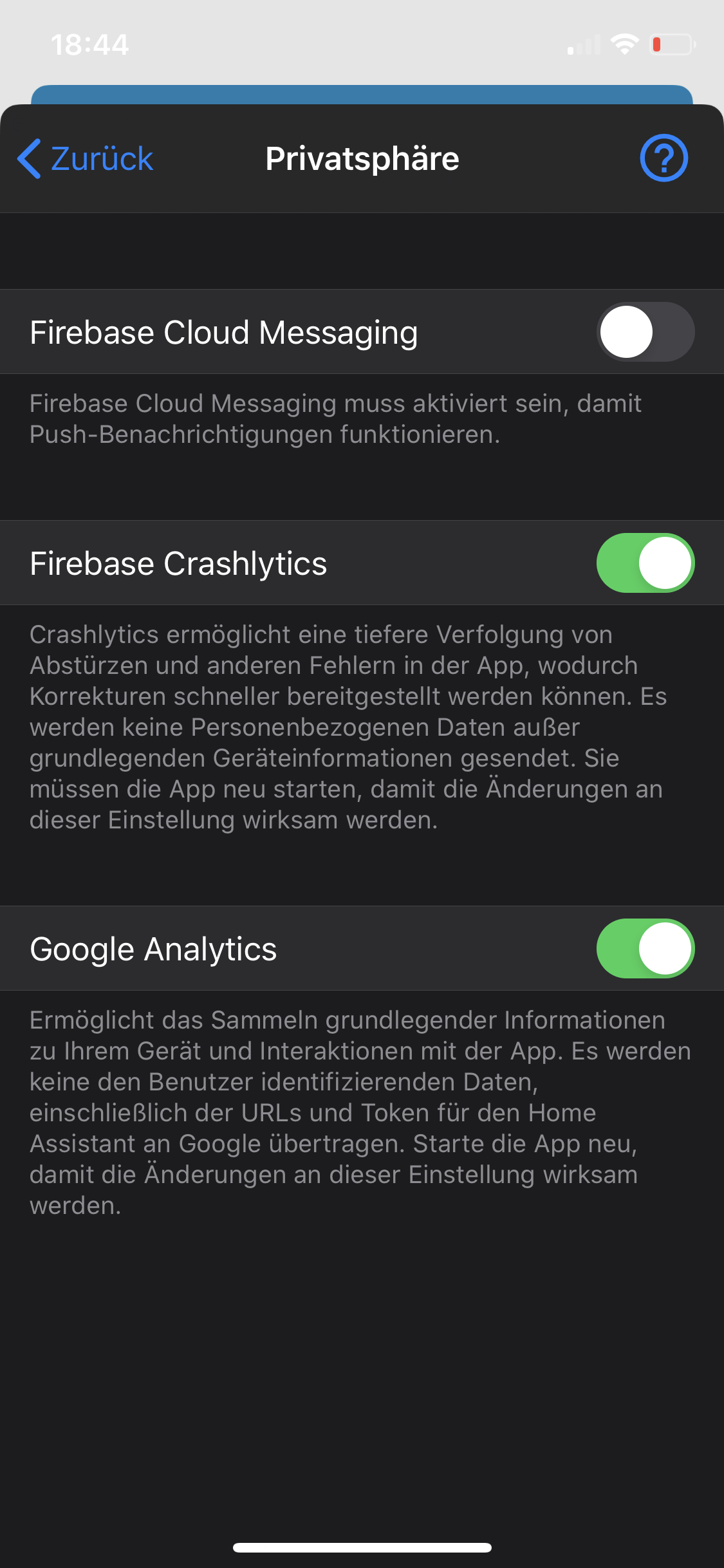
Edit:
Fixt it by reinstalling the ios.app
kolossboss
on 7 Jun 2020
@kolossboss can you pull this out in to a new issue please
TomBrien
on 7 Jun 2020
@kolossboss can you pull this out in to a new issue please
Sorry!! I already solved it.
kolossboss
on 7 Jun 2020
Same here. Scrolling is so choppy and it skips.
 dlo747
on 8 Jun 2020
dlo747
on 8 Jun 2020
Today I updated to 0.110.6. Thanks.
But still having this sluggish performance and massiv Log entries. Do I have to wait for the iOS app update?
kolossboss
on 9 Jun 2020
The full set of updates for this are in 0.111.0 which will come out tomorrow
TomBrien
on 9 Jun 2020
I'm running 0.111.0b4 which has the:
Mobile app fixes (@balloob - #36559)
Fix mobile_app sensor re-registration handling (@frenck - #36567)
But it's still very sluggish/slow.
dwainscheeren
on 9 Jun 2020
@dwainscheeren can you confirm that the only logs you see at ERROR level for refusing to re-register sensors are for connectivity_sim_2 now?
TomBrien
on 9 Jun 2020
@TomBrien my app is sluggish as well; here is what I see going on in my iPhone's app log:
This one, hundreds of times:
2020-06-09 10:03:28.493 [Verbose] [NSOperationQueue 0x1023eed40 (QOS: UNSPECIFIED)] [ConnectionInfo.swift:393] should(_:retry:with:) > isRemoteUIFailure false
2020-06-09 10:03:28.493 [Verbose] [NSOperationQueue 0x1023eed40 (QOS: UNSPECIFIED)] [ConnectionInfo.swift:397] should(_:retry:with:) > isInternalURLFailure false
2020-06-09 10:03:28.493 [Warning] [NSOperationQueue 0x1023eed40 (QOS: UNSPECIFIED)] [ConnectionInfo.swift:419] should(_:retry:with:) > Not retrying a failure other than remote UI down or internal URL no longer valid
This one, hundreds of times as well:
2020-06-09 10:03:30.218 [Error] [main] [HAAPI+WebhookHelpers.swift:31] handleWebhookResponse(response:seal:callingFunctionName:) > Error on RegisterSensors(_:) request: responseValidationFailed(reason: Alamofire.AFError.ResponseValidationFailureReason.unacceptableStatusCode(code: 409))
You may have a look at my log file:
log.txt
vsaintloup
on 9 Jun 2020
@dwainscheeren can you confirm that the only logs you see at
ERRORlevel for refusing to re-register sensors are forconnectivity_sim_2now?
Yes I got:
````
2020-06-09 07:15:31 ERROR (MainThread) [homeassistant.components.mobile_app.webhook] Received invalid webhook payload: required key not provided @ data['state']. Got None
2020-06-09 07:15:32 ERROR (MainThread) [homeassistant.components.mobile_app.webhook] Refusing to update non-registered sensor: c6c7adb6aded566fb637ce_connectivity_sim_2
dwainscheeren
on 9 Jun 2020
So these errors look like what I saw with the current app on dev last night. The home assistant side logs are pretty heavily reduced to only the sim_2 errors. The app errors look about the same, I believe these (and the loop the app is in) are what is causing the performance issues. It's worth mentioning that the beta build of the app ran smoothly for me last night UNTIL is crashed out (possibly my fault) and I got stuck behind the on boarding issue that that build had. I will fire up my dev build again tonight and dig into the performance more
TomBrien
on 9 Jun 2020
I’ve just loaded up a dev instance at the branch from home-assistant/core#36604 and populated with demo: to fill the UI. I do not see any sluggish-ness and the HA side logs are reduced to a single error about invalid data in the eSIM sensor per push. Here's a video of me scrolling through that. I am not scrolling particularly smoothly, just how I would in normal use . See here for a video
TomBrien
on 9 Jun 2020
110.7 will fix this.
 balloob
on 9 Jun 2020
balloob
on 9 Jun 2020
Related issues
 adec
·
5Comments
adec
·
5Comments
 wilfredsmit
·
5Comments
wilfredsmit
·
5Comments
 fi-sch
·
7Comments
fi-sch
·
7Comments
 rifelpet
·
4Comments
rifelpet
·
4Comments
 henrikbjorn
·
7Comments
henrikbjorn
·
7Comments
Most helpful comment
110.7 will fix this.