Ios: Can’t upload files, everything is “In upload” or “Waiting to upload”
Expected behaviour
Uploading files should actually upload them.
Actual behaviour
Files just wait in queue as “Waiting to upload” or “In upload”, whatever that means. Can’t upload new files. Can’t manually start the uploads.

Steps to reproduce
Not sure, just uploaded 50 photos from the Photos app using “Save to Files”. The first 39 worked, and then the rest got stuck.
iOS version
13.2.3
App version
2.25.0
Server configuration
Operating system:
Debian
Database:
MariaDB
Nextcloud version: (see Nextcloud admin page)
Latest
 melyux
All 23 comments
Can we get this fixed ASAP? The app is useless at the moment. @marinofaggiana
melyux
on 27 Nov 2019
Accidentally closed it. @marinofaggiana
melyux
on 28 Nov 2019
Think it’s related to a bigger networking/SSL validation issue, there are similar issues (other symptoms but also caused by latest v2.25 update).
 bcutter
on 2 Dec 2019
bcutter
on 2 Dec 2019
Same here, but only seems to affect LDAP authenticated users, local users are ok. May be related to #1022.
 bh11
on 2 Dec 2019
bh11
on 2 Dec 2019
The issue is still present in the 2.25.1 beta released 2019-12-05, unfortunately.
bh11
on 7 Dec 2019
Doubt it’s even been looked at.
melyux
on 7 Dec 2019
Using Save to Files also often causes “Could not communicate with helper application” and fails.
melyux
on 7 Dec 2019
Seems to be related to #918
melyux
on 8 Dec 2019
Same here, using the Files-App and moving a file from local to Nextcloud, keeps them stuck on uploading. Using the +-Button in the ios App seems working.
I'm using Nextcloud with user_external and IMAP Auth.
When I start the prozess, I'm getting following log-entries:
[user_external] Error: ERROR: Could not connect via roundcube lib: AUTHENTICATE PLAIN: Authentication failed.
PROPFIND /remote.php/webdav/Folder/Folder/Filename.file
from 84.130.250.167 at 2019-12-12T13:53:06+00:00
 voetzi
on 12 Dec 2019
voetzi
on 12 Dec 2019
The fix for #1022 in TestFlight V 2.25.3 (3) also seems to have resolved this.
bh11
on 17 Dec 2019
Wonder why that particular issue got attention, but not this one.
melyux
on 17 Dec 2019
@bh11 Nah, still not fixed.
melyux
on 30 Dec 2019
@melikyuksel Yes, probably your original issue isn't resolved. Before 2.25.3, my Nextcloud got stuck on the first file, now it gets stuck after uploading about 10 files. If I try to upload another file, a few more files get through. Btw., even when the upload succeeds, the upload item (cloud icon) remains on the Upload list and on the file list.
I can only see the successful PUT requests in the web server access log, no messages in nextcloud.log. The server uses Nextcloud 16.0.7.1.
bh11
on 30 Dec 2019
I had the same problem with the iOS app and file integration with by LDAP users, only! Local users had no problems with this iOS stuff.
It has something to do with the nextcloud usernames which are generated of an UUID field from the LDAP server (mapping between internal and LDAP username).
I connect my FreeIPA LDAP with nextcloud and used the step by step guide in "Settings/Ldap / AD integration". So Nextcloud took an UUID attribute from the LDAP for internal user identification. It was something like "000-000000-00000000" - what ever.
Nextclouduser "000-000000-00000000" mapped to LDAPuser "sven".
I logged in on my iOS App with Username "sven" and my LDAP password. That works, but the upload stuff and file integration does NOT (HATE IT)!
I checked my LDAP server query log. When using Webpage or Desktop Sync-Clients there are queries with "....uid=sven...", when using the iOS app they are "...uid=000-000000-00000000..." - But this will not work, because uid is NEVER my UUID from the FreeIPA UUID attribut.
Workaround to fix it: In the "Settings / LDAP / AD integration" go to "expert" tab and enter "uid" in the first field "Internal username". That will only affect new accounts, but it WORKS!!!
I added a new user "test" to my LDAP and Nextcloud uses "test" as internal username. And when i connected with "test" on my iOS system, it work as we all would love that :D
 naruxde
on 6 Jan 2020
naruxde
on 6 Jan 2020
Short version to fix that as workaround: Internal nextcloud user name must be the same as LDAP user name attribute for login.
In an ActiveDirectory environment you have to add „samAccountName“ attribute on „Settings -> LDAP/AD integration“ on the „expert“ tab in the first field „Internal username“.
BUT this affects only NEW nextcloud users (LDAP/AP users who logged in the first time on nextcloud). For testing, add a new LDAP/AP user, login with this user on Nextcloud. Check in nextcloud users that username is the same as login name (not this long UUID) and the data folder name of that user should be the login name, too. And now add this user on your iOS app.
After this steps iOS app works faster on refresh and uploads all the changes including that one, which we change with the iOS files app! I was so happy 🤩
For my existing nextcloud users I had to delete all nextcloud accounts (Or press the evil button to delete the „LDAP user mappings“). After that the LDAP/AD accounts logged in again and both names was equal - including the data folder names, which are now their LDAP/AD names :)
naruxde
on 7 Jan 2020
Using app version 2.25.9.2 with server v.17.0.2 and 18.0.4 I am also having this problem, I do not use LDAP.
Please advise on what I can do to help diagnose and fix the issue - and finally exfiltrate my images from their ipad prison. I do have full control of the server, let me know where to look for clues.
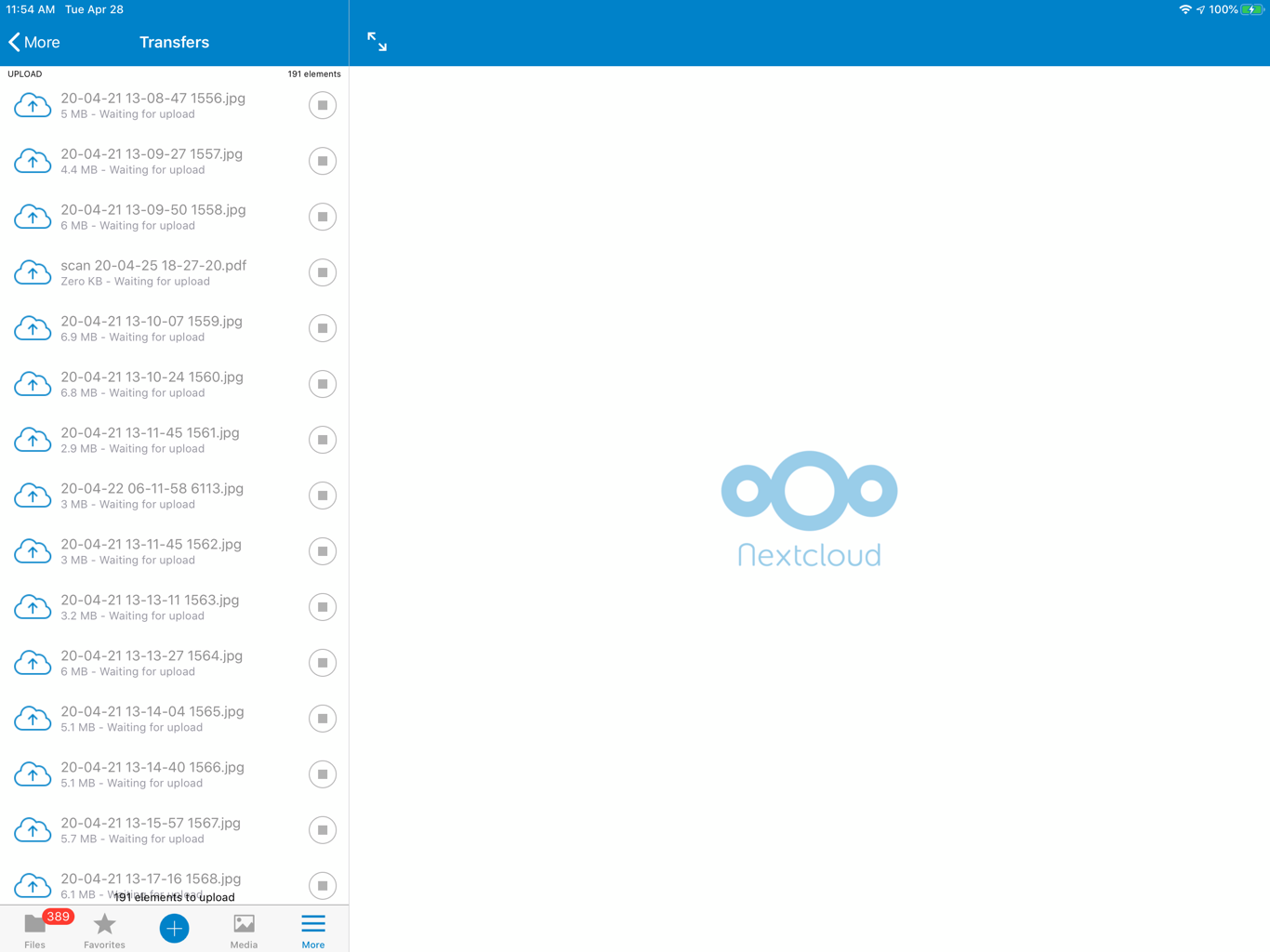
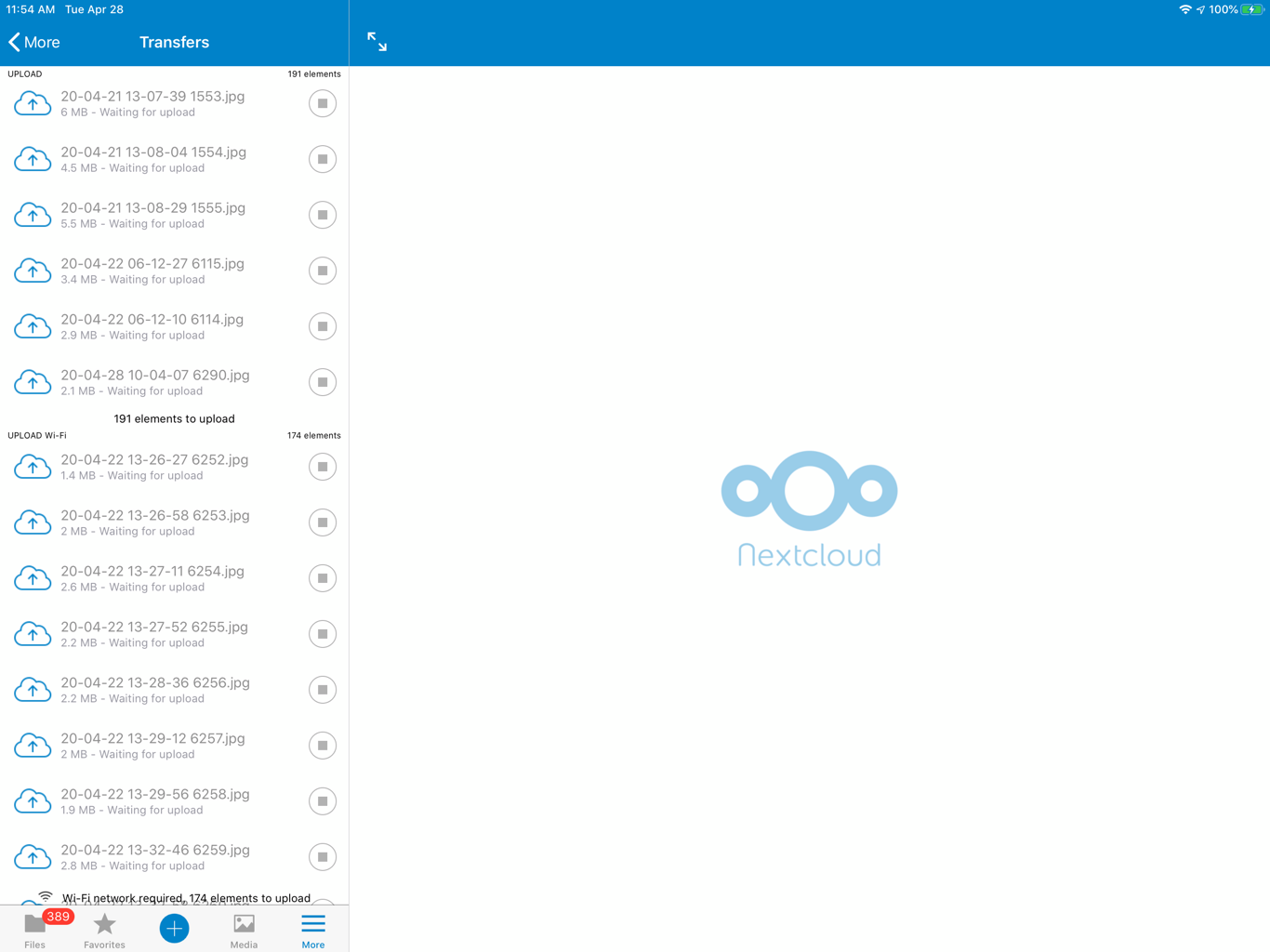
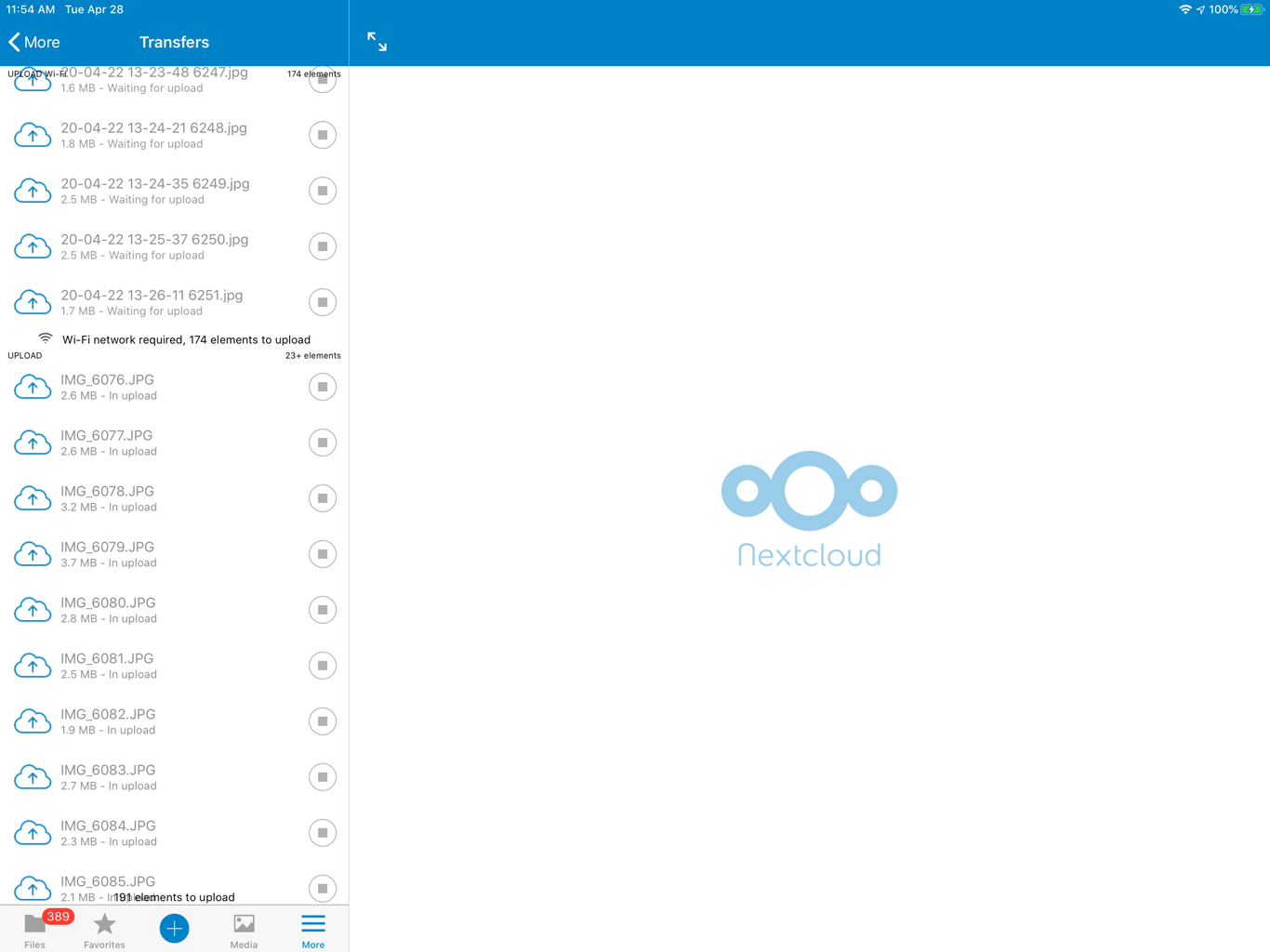
I noticed the list of files is divided in three parts, it is not clear what these mean:
- "UPLOAD"
- "UPLOAD Wi-Fi"
- "Wi-Fi network required, __ elements waiting for upload"
screenshot images attached:
 kr4z33
on 29 Apr 2020
kr4z33
on 29 Apr 2020
I discovered I can long-press and select a start pop-up to get the transfers started one-by-one for the "UPLOAD" and "UPLOAD Wi-Fi" parts of the list, but NOT for the Wi-Fi required... part of the list... this will be fun! A restart-all command would be nice to have here...
kr4z33
on 29 Apr 2020
in the app > settings > advanced > Clear cache seemed to get things working in my case.
kr4z33
on 27 Jun 2020
Clearing Cache solves the issue here as well.
 McQueen2063
on 4 Aug 2020
McQueen2063
on 4 Aug 2020
I was also having this issue. So far using @kr4z33 's solution has worked. Thank you!
I cleared the cache as suggested and then restarted the auto upload process (Settings -> Auto Upload -> Upload the whole camera roll (flip off, then flip on).
After that, the transfers seem to be working properly. I have about 18k images & videos pending upload, so at this point I'm unable to confirm that the entire process has been successful. For the initial upload, I have turned off auto-lock on my iPhone and am leaving the NextCloud app open (visible) with the phone plugged in.
 charles-997
on 16 Nov 2020
charles-997
on 16 Nov 2020
My experiences
I have >100 videos pending upload, they refuse to go all up at once when I initiate "update the whole camera roll"
I've tried tweaking the buffer to 100MB, or -0, same issues.
There are NO interesting backend logs :( ... neither in Apache2, nor in nextcloud
- iOS app
3.0.13 - nextcloud
19.0.4,php7.4 - MANUAL uploads work, one at a time no issues I've ever seen
- AutoUpload has issues:
- photos upload fine (<5MB typically)
- videos usually fail quickly and just "hang there" stuck in "Waiting to upload"
- user can sometimes initial "force now", but not always
- tested both "local storage", and "external storage" (samba) - same results
- clearing cache works briefly, but then fails quickly
- I am NOT using
ldapfor authentication (local users in nextcloud)
EXAMPLE VIDEO: https://vimeo.com/480147484
 fermulator
on 17 Nov 2020
fermulator
on 17 Nov 2020
I have the same issue, upload stuck waiting for upload.
Does anyone have a solution to this problem?
Ios 14.2
Clearing cache worked briefly but issue again after 10-15 uploads.
Now I get logged out of Nextcloud when I force upload.
 srinivasanshyam
on 23 Nov 2020
srinivasanshyam
on 23 Nov 2020
Same issue, when I press "Upload the whole camera roll" (with screen set to never lock, phone plugged in, nextcloud app open) it starts and successfully uploads 10-100 before getting stuck.
- I can long press and force upload individual files one at a time, but the rest don't resume.
- Clearing cache empties the whole "Transfers" section and nothing uploads.
- I can then toggle upload whole camera roll to resume, but it gets stuck again after the first few.
- I've gone through this cycle 3-4 times, stops after a different number of uploads each time.
IOS: 14.1
Nextcloud: 18.0.0
PHP: 7.2.24
OS: Ubuntu Server 18.04.4
 jamedeus
on 25 Nov 2020
jamedeus
on 25 Nov 2020
Related issues
 sakthi-d
·
4Comments
sakthi-d
·
4Comments
 helmut72
·
4Comments
helmut72
·
4Comments
 MorrisJobke
·
4Comments
MorrisJobke
·
5Comments
MorrisJobke
·
4Comments
MorrisJobke
·
5Comments
 zigulle
·
3Comments
zigulle
·
3Comments
Most helpful comment
Same issue, when I press "Upload the whole camera roll" (with screen set to never lock, phone plugged in, nextcloud app open) it starts and successfully uploads 10-100 before getting stuck.
IOS: 14.1
Nextcloud: 18.0.0
PHP: 7.2.24
OS: Ubuntu Server 18.04.4