Expected behaviour
Register app pass
Open iOS app
Enter and grant
Login
NOTE _all other access_ types work, (Firefox & Chrome browsers, Android app)
Actual behaviour
Stuck
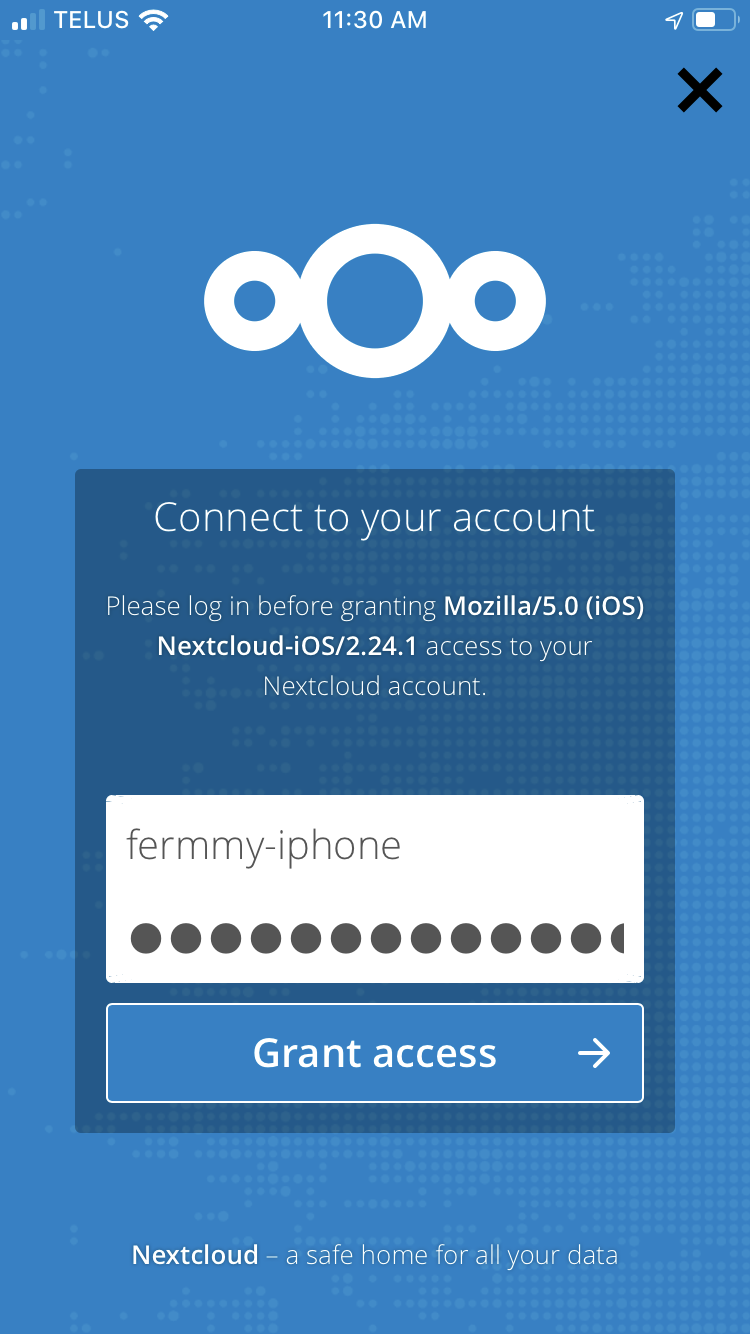
The “grant accessory button clicks but doesn’t do anything
Steps to reproduce
Login to server and add app decide for my user
Open in iOS and try to authgrant
iOS version
13.1.2
App version
2.24.1
Server configuration
URL is something like https://my domain.blah.ca/cloud
$ sudo cat /srv/nextcloud/config/config.php
<?php
$CONFIG = array (
  'instanceid' => 'SNIP',
  'passwordsalt' => 'SNIP',
  'secret' => 'SNIP',
  'trusted_domains' =>
  array (
    0 => 'nextcloud',
    1 => 'SNIP.homenode.ca',
  ),
  'trusted_proxies' =>
  array (
    0 => '10.0.0.52',
  ),
  'overwritehost' => 'SNIP.homenode.ca',
  'overwriteprotocol' => 'https',
  'overwritewebroot' => '/cloud',
  'overwritecondaddr' => '^10\\.0\\.0\\.52$',
  'datadirectory' => '/opt/nextcloud/',
  'dbtype' => 'mysql',
  'version' => '14.0.4.2',
  'overwrite.cli.url' => 'https://nextcloud',
  'dbname' => 'nextcloud',
  'dbhost' => 'localhost',
  'dbport' => '',
  'dbtableprefix' => 'oc_',
  'dbuser' => 'nextcloud_admin',
  'dbpassword' => 'SNIP',
  'installed' => true,
  'theme' => '',
  'loglevel' => 2,
  'maintenance' => false,
  'updater.release.channel' => 'stable',
);
Operating system: linux
Linux nextcloud 4.4.0-164-generic #192-Ubuntu SMP Fri Sep 13 12:02:50 UTC 2019 x86_64 x86_64 x86_64 GNU/Linux

$ cat /etc/issue
Ubuntu 16.04.5 LTS \n \l
Web server:
Apache apache2 2.4.18-2ubuntu3.13
$ cat /etc/apache2/sites-enabled/nextcloud.conf
Alias / "/srv/nextcloud/"

<Directory /srv/nextcloud/>
  Options +FollowSymlinks
  AllowOverride All

 <IfModule mod_dav.c>
  Dav off
 </IfModule>

 SetEnv HOME /srv/nextcloud
 SetEnv HTTP_HOME /srv/nextcloud

 Satisfy Any

</Directory>
- a reverse proxy (10.0.0.52) in front of it
# Nextcloud ("nextcloud" is the local hostname which resolves to 10.0.0.55)
ProxyPass /cloud https://nextcloud:443
ProxyPassReverse /cloud https://nextcloud:443
# https://docs.nextcloud.com/server/14/admin_manual/issues/general_troubleshooting.html#service-discovery
Redirect 301 /.well-known/carddav /cloud/remote.php/dav
Redirect 301 /.well-known/caldav /cloud/remote.php/dav
Database:
N/A
PHP version:
php7.0-common 7.0.33-0ubuntu0.16.04.7
Nextcloud version: (see Nextcloud admin page)
14.0.4
 fermulator
All 18 comments
Tried again with new app pass and after restarting phone no go
What debug steps shall I proceed with?
fermulator
on 12 Oct 2019
The same here:
I already stopped the Nextcloud App, turned my iPhone off and on again. But still no login is possible with Nextcloud App 2.24.1 and iOS version 13.1.2. Than I upgrade to iOS version 13.1.3.
But it's still stuck at "Grant access"... :-(
Nextcloud App 2.24.3 (which seems to be the most current version) is not available at the moment in the App Store.
 thomas-merz
on 16 Oct 2019
thomas-merz
on 16 Oct 2019
Wild stab in the dark based on a similar issue I remember having once: Try dismissing the iOS keyboard before you tap any login or grant access buttons?
 inthreedee
on 19 Oct 2019
inthreedee
on 19 Oct 2019
https://github.com/nextcloud/ios/issues/960#issuecomment-543996678
Tried good idea, didn’t work
fermulator
on 20 Oct 2019
Is there a better way to raise attention to this? Who’s the owner of the iOS functionality? Or does it fall to open source community?
fermulator
on 28 Oct 2019
Assuming you are:
- running your own webserver
- with HTTPS redirection (all HTTP requests redirected)
Can you please confirm that you set the:
'overwriteprotocol' => 'https'
in config/config.php
I had a similar issue in the webbrowser, and this fixed it when running via a reverse proxy.
 ps-git
on 30 Oct 2019
ps-git
on 30 Oct 2019
It is set correctly, yes
@nextcloud:/etc$ sudo grep https /srv/nextcloud/config/config.php
  'overwriteprotocol' => 'https',
  'overwrite.cli.url' => 'https://nextcloud',
EDIT: also back-updated the original post with full server-side details
fermulator
on 2 Nov 2019
I got the same issue with NGINX reverse proxy, which was related to HTTP/2 handling of IOS devices.
Solved it by adding proxy_hide_header Upgrade; within the location part of the configuration. I think you can do this in apache2 with Header unset Upgrade;
 paulluijben
on 6 Nov 2019
paulluijben
on 6 Nov 2019
Hi @paulluijben , I'm really no nginx-expert. So I tried your hint and added this to "location /" and restarted my nextcloud (docker-compose restart). But the problem still exists with iOS-App-Version 2.24.4 :-(
thomas-merz
on 6 Nov 2019
Hi @thomas-merz, this only works in case you are using an reverse proxy in front of your Nextcloud instance.
paulluijben
on 6 Nov 2019
Assuming you are:
- running your own webserver
- with HTTPS redirection (all HTTP requests redirected)
Can you please confirm that you set the:
'overwriteprotocol' => 'https'in config/config.php
I had a similar issue in the webbrowser, and this fixed it when running via a reverse proxy.
Solved my problem perfectly, Thanks very much.
 l33klin
on 16 Nov 2019
l33klin
on 16 Nov 2019
Problem is still existing with 2.24.4 now! 👎 Who can help with this?
Is this a problem with the iOS App, the Nextcloud Server or what can I do to get connected again with my Nextcloud?
I also found this (old) thread on help.nextcloud.com
thomas-merz
on 17 Nov 2019
I got the same issue with NGINX reverse proxy, which was related to HTTP/2 handling of IOS devices.
Solved it by adding
proxy_hide_header Upgrade;within the location part of the configuration. I think you can do this in apache2 withHeader unset Upgrade;
did not work for me, did it like this:
# Nextcloud
ProxyPass /cloud https://nextcloud:443
ProxyPassReverse /cloud https://nextcloud:443

<Location /cloud>
    # nextcloud:
    # https://github.com/nextcloud/ios/issues/960
    Header unset Upgrade
</Location>
Latest version updates
nextcloud iOS 2.25.0iOS = 13.2.3
fermulator
on 26 Nov 2019
UPDATE: (SUCCESS)
It's been a while since I conducted any maintenance on the server back end. Due to v14 unsupported status recently, I fired through the serial updates v14 -> v15 -> v16 -> v17.
After this, my instance continued to work from a web-UI perspective (great!).
Then i (on a whim) decided to retest this. Now it's working! Versioning info is now:
nextcloud v17.02iOS v13.3nextcloud iOS app v2.25.3.6
So not sure if it was that minor app version bump, or the backend server having an incompatibility with the iOS app... but for me it is working now!
Keen to hear if others have similar success based on this information.
fermulator
on 7 Jan 2020
Still had trouble on v17.02 with iOS v13.3 - proposed solution by @paulluijben worked like charm! Wonderful, I love this community!
Also works easily with NGINX proxy manager

 philffm
on 15 Jan 2020
philffm
on 15 Jan 2020
Worked for me on Apache with RequestHeader unset Upgrade
 jmou
on 6 Mar 2020
jmou
on 6 Mar 2020
Worked for me on nginx with the RequestHeader unset Upgrade config under location
proxy_hide_header Upgrade;
 eivl
on 26 May 2020
eivl
on 26 May 2020
Related issues
 sakthi-d
·
4Comments
sakthi-d
·
4Comments
 MorrisJobke
·
4Comments
MorrisJobke
·
4Comments
 Alphakilo
·
3Comments
Alphakilo
·
3Comments
 MarcusE1W
·
5Comments
MorrisJobke
·
5Comments
MarcusE1W
·
5Comments
MorrisJobke
·
5Comments
Most helpful comment
Assuming you are:
Can you please confirm that you set the:
'overwriteprotocol' => 'https'
in config/config.php
I had a similar issue in the webbrowser, and this fixed it when running via a reverse proxy.