Ios: iOS app won't allow connecting with app token (flow)
Expected behaviour
Should connect and present files/folders when adding second account
Actual behaviour
Client hangs, Server shows no hit to the app token
Steps to reproduce
Add a second account using same server as first account
Select "Alternative login using using app token"
Enter secondary username and assigned app token
Click "Grant Access"
Wait forever with no success and no hit on server side
First account continues to work fine
Network activity indicator spins in top corner of iOS screen
Mac clients both work fine with second account and sync just fine.
Behavior is exhibited on both iPhone and iPad Pro 12.9"
iOS version
11.2.5 on iPhone 8+ and iPad Pro 12.9" 2nd Gen
App version
2.20.0.00001
Server configuration
Nextcloud 13.0.0 via manual install
Operating system:
Centos 7 fully patched to current
Web server:
nginx 1.3.8
Database:
Mysql 5.7.21
PHP version:
php 7.1.4
Nextcloud version: (see Nextcloud admin page)
13.0.0
Are their logs available on the client to see what it'd doing or if it's doing anything?
/EKG
 ekgermann
All 54 comments
Updated iOS app to 2.20.1.00001 and behavior is same
ekgermann
on 15 Feb 2018
I'm experiencing a very similar problem (can't login via app-token and the nginx-access-log shows no login-attempt), but in my case I'm not able to add a user via app-token at all. I Deleted the app (and with it the settings) and tried adding the user after a fresh re-install, but it still wouldn't work. So this problem might not be limited to adding a second user for the same server, but rather an issue with app-tokens in general. I'm unable to use TOTP for this reason at the moment.
 MZimmermann
on 18 Feb 2018
MZimmermann
on 18 Feb 2018
Behaves same way on 2.20.2.00001 released today. Sits and spins on iDevice and no hits to the web server.
ekgermann
on 19 Feb 2018
What MZimmerman said ^^^:
took a greenfield iPad (11.2.5) and tried to configure with account with app token.
Same behavior I reported earlier. No hits to the server at all. iOS client appear to hang and data indicator by Wifi/LTE just spins.
/EKG
ekgermann
on 20 Feb 2018
Confirmed still issue in 2.20.3.00001
ekgermann
on 23 Feb 2018
I have open an issue on server side.
 marinofaggiana
on 23 Feb 2018
marinofaggiana
on 23 Feb 2018
Thank you, but I'd like to add that the login via app-token in general seems to work fine when I use the desktop-app for Windows. I would have assumed, that the apps are using the same API, so I'm surprised that this ended up as a server-side ticket. The server doesn't even register the login-request, as far as the nginx-log is concerned.
MZimmermann
on 23 Feb 2018
iOS NC use a flow system (web) another technology :-)
marinofaggiana
on 23 Feb 2018
Ah, good to know. :)
MZimmermann
on 23 Feb 2018
Even on version 2.20.4 I have the same problem the logs show nothing but the ios app shows a dialog with the message :
Error
It is not possible to connect to the server at this time. _error_check_server_[401] -
Connection="Keep-Alive";
"Content-...
Since logs show nothing I can't display the whole message. I hope this helps though.
 DrissiReda
on 6 Mar 2018
DrissiReda
on 6 Mar 2018
for now use :
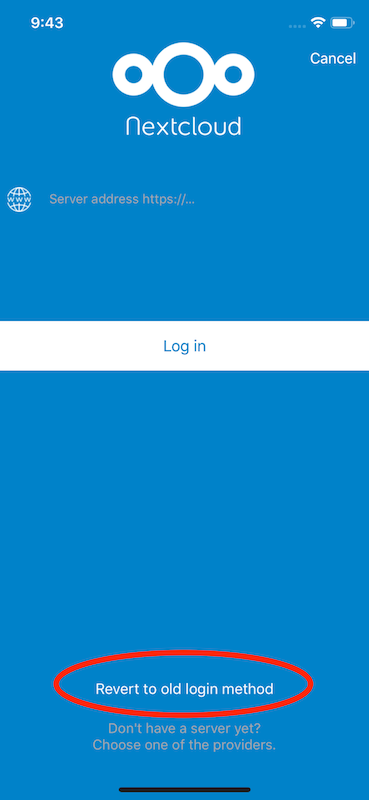
marinofaggiana
on 6 Mar 2018
That is the one I use, the new web login method causes the app to crash
DrissiReda
on 6 Mar 2018
Server version @DrissiReda ? 13 ?
marinofaggiana
on 6 Mar 2018
yes exactly
DrissiReda
on 6 Mar 2018
Ok, send me un account test, tomorrow, thanks ! ios at nextcloud dot com
marinofaggiana
on 6 Mar 2018
done
DrissiReda
on 6 Mar 2018
@marinofaggiana nevermind mine was a jailbreak issue, it works now but with a minor bug.
When I log in it shows me error 401, but it still connects, then when I download a file, it shows error 401 and cancel the download, if I download it again it works, so I just need to retrieve twice the same file in order for it to work
DrissiReda
on 6 Mar 2018
I have the same issue with the last update. I had tested nextcloud talk app on iOS with « app token » authentication and I can connect to my own server, but not with your nextcloud iOS app. This is strange....
 kidrek
on 6 Mar 2018
kidrek
on 6 Mar 2018
@DrissiReda try 2.20.5 (2) TestFlight thanks
marinofaggiana
on 7 Mar 2018
I will once my server is back up.
Refer to Issue #8712 on nextcloud/server
DrissiReda
on 7 Mar 2018
Still can’t get in with app token. NB the iPad app doesn’t have a revert to old login selection
Second account with token sits and spins
On Mar 7, 2018, at 07:25, Marino Faggiana notifications@github.com wrote:
@DrissiReda try 2.20.5 (2) TestFlight thanks
—
You are receiving this because you authored the thread.
Reply to this email directly, view it on GitHub, or mute the thread.
ekgermann
on 7 Mar 2018
Same issue confirmed on 13.0.1.
However somewhat suspect that the way the iOS app token works now is that one uses their Nextcloud password to authorize an app token to be generated and used for a given device. Basically one uses Nextcloud server password once to authorize an app token to be created and utilized going forward on that device. The reason that say this is because when the app token wasn't working just used a regular username and password to login to a new device. When view the security tab Nextcloud 13.0.1 lists the device as a "iOS Client Nextcloud." Previously when logging in with a user name and password into the iOS app nothing would be listed under devices in the security tab.
Assuming this actually is the way app token work now it works better than before. Much easier than having to log in with a web browser, generate an app token, and manually copy the app token. If this is in fact the way it works now more people will use app tokens and not need to have their password stored by the app.
All this being said think the goal was to utilize the new method but also to leave the possibility to utilize an app token the old way (manually generate the app token and type it into device). The old way of logging in with an app token is the where the bug is as believe the new app token login method does work.
Hope this clears up this issue for some.
 twocoolbeans
on 21 Mar 2018
twocoolbeans
on 21 Mar 2018
I have the same problem, cannot log in on iOS app. When using the app password, it doesn't seem to be doing anything. When reverting to old login method, I get the 401 error @DrissiReda already posted.
Nextcloud server: 13.0.2
iOS App: 2.20.8
Nextcloud server is hosted in Apache and is accessed over a reverse proxy running nginx. First I set up a simple nginx proxy_pass, then in an attempt to solve the login problem I followed this article https://www.techandme.se/set-up-nginx-reverse-proxy/ to extend nginx config, enabled apache remoteip mod and added trusted_proxies / forwarded_for_headers sections to the NC's config.php.
Maybe I need to add something to the nginx config? It was working before I added the reverse proxy but I don't remember how I have logged in into the mobile app back then.
In the end I had to turn off the TOTP, then I was able to use the old login method. Now the iOS app is working as long as the TOTP is disabled.
 Elwin00
on 17 May 2018
Elwin00
on 17 May 2018
I think this problem still exists. I wanted to login via the application token but nothing happens. Not even a timeout message is shown. And as others already stated there are no entries in the logfile.
Nextcloud server: 13.0.4
iOS Client: 2.21.3
 fr43nk
on 12 Jul 2018
fr43nk
on 12 Jul 2018
I'm not sure if it's apache that's terrible at handling some requests, or me that is terrible at writing up apache config files.
Switching to nginx and using subdomains instead of subfolders is a breeze, everything is easy, simple, intuitive and works perfectly, well except then new login method, but that's not very annoying
DrissiReda
on 13 Jul 2018
When testing the login keep an eye on the database table "oc_bruteforce_attempts". I had some trouble...
 oberlon
on 25 Jul 2018
oberlon
on 25 Jul 2018
@fr43nk Wanted to echo what said a few months ago, since no one from Nextcloud can be bothered to respond (the habit of not responding/ ignoring/ and not saying anything of value as to an issue if actually do respond is widespread in Nextcloud for "smaller" issues like this).
On iOS if a login is authorized with a user name and password once an app token is actually generated and stored on the device in place of the password. Basically all those who wish to use an app token only need to login once with user name and password (authorize the login) and an app token will be used.
This was confirmed on the Nextcloud Freenode IRC channel. Secondly notice that authorizing a login with a user name and password creates a device entry under "Security." If remember previously logging in with a user name and password did not create device entry under "Security."
Although confirmation on the IRC channel did not come from someone official to the project it is confirmed by the above. A device entry under "Security" can be revoked without changing the password. This proves that a device token is being used even though the first login on iOS is authorized with a user name and password.
Does this make sense? Still the old app token login method should be made to work or be removed to stop confusing people.
twocoolbeans
on 25 Jul 2018
Hi all,
i have the same problem and this is with a new iPhone 7 IOS 11.4.1 (15G77) and Nextcloud 13.0.5.2 (the Client is the latest from the Store). The User has TOTP activated and i created a new app password for that. This is not an apache problem because i use the latest very clean configured nginx.
 SvenKo
on 2 Aug 2018
SvenKo
on 2 Aug 2018
Hi all,
same issue with a iPhone 6+ iOS 11.4.1, server NC 13.06, nginx 1.10.3 and iOS NC app v2.22.2. With username and password I got an CSRF check error and the login is denied with an app token nothing happens. The logs are empty.
BR,
M
 real-pi
on 31 Aug 2018
real-pi
on 31 Aug 2018
Same on Nextcloud 14.0.1 and iOS 12 on my iPad.
 edermi
on 27 Sep 2018
edermi
on 27 Sep 2018
Same issue here as well. No server logs generated, no error on the ipad pops up, just hangs endlessly.
NC 13.0.6, nginx, iOS 11.4.1, NC app v2.22.4
 chippey
on 28 Sep 2018
chippey
on 28 Sep 2018
Same her iOS 12 Nextcloud 14.0.1, App Version 2.22.4
And with Username/Password login I get an Authentication Error and CSRF token invalid.
Really a shame.
 liepertt
on 4 Oct 2018
liepertt
on 4 Oct 2018
Same here on Nextcloud 14.0.3, App Version 2.22.4 (both most recent stable versions).
No hit at the server at all after entering the username and access token, currently tailing the access log.
Pretty sad.
 avnkx
on 14 Oct 2018
avnkx
on 14 Oct 2018
I’m gonna have to post the same as @avnkx. Nextcloud 14.0.3, iOS version 2.22.4. On iPhone and iOS. App password works on desktop client.
 cult-hero13
on 23 Oct 2018
cult-hero13
on 23 Oct 2018
Came here to rapport the same... User password with 2FA works, but username + app token combo not even getting through to the server.
NC v14.0.3, iPhone app v 2.22.5
 sputnik-devops
on 26 Nov 2018
sputnik-devops
on 26 Nov 2018
Same on iOS 12 with app version 2.22.5.10, Windows 10 desktop client version 2.5.0 and Nextcloud server version 13.0.8.
The webserver is apache2 behind an nginx ssl reverse proxy accessed via the subfolder server.de/nextcloud. Could that be the issue?
 Schroedingers-Cat
on 29 Nov 2018
Schroedingers-Cat
on 29 Nov 2018
The webserver is apache2 behind an nginx ssl reverse proxy accessed via the subfolder server.de/nextcloud. Could that be the issue?
No; I'm running Nextcloud with nginx (without reverse proxy) in a dedicated vHost and have the same issue.
edermi
on 29 Nov 2018
<replacing my post with just the issue resolution in my case>
I was able to resolve my issue with the following. Hopefully it will help someone.
location / {
  proxy_pass http://nextcloud02.<my.domain>/;
  client_max_body_size 100M;
  # adding the following line fixed the "CSRF check failed" error on login in iOS app
  proxy_set_header X-Forwarded-Proto https;
}
 tldrm
on 24 Dec 2018
tldrm
on 24 Dec 2018
You may also set set X-Real-IP and X-Forwarded-For headers in your reverse proxy, but thats off-topic for this issue.
avnkx
on 25 Dec 2018
You may also set set
X-Real-IPandX-Forwarded-Forheaders in your reverse proxy, but thats off-topic for this issue.
Thanks, @avnkx. I did that right after. :)
tldrm
on 25 Dec 2018
Doesn't fix the issue for me. For reference, here are the relevant lines from my config.
## Nextcloud
  location /nextcloud {
    proxy_set_header Host $host;
    proxy_set_header X-Real-IP $remote_addr;
    proxy_set_header X-Forwarded-For $proxy_add_x_forwarded_for;
    # adding the following line fixed the "CSRF check failed" error on login in iOS app
    proxy_set_header X-Forwarded-Proto https;
    proxy_pass http://localhost:9000;
    rewrite /nextcloud/(.*) /$1 break;
    rewrite ^/nextcloud$ /nextcloud/ permanent;
  client_body_in_file_only clean;
  client_body_buffer_size 32K;
  client_max_body_size 4000M;
  sendfile on;
  send_timeout 600s;
  }
@Schroedingers-Cat, do you mind sharing your redacted config.php? And the rest of your server { } section might be interesting for troubleshooting purposes.
tldrm
on 25 Dec 2018
@tldrm this is the rest of the server { }
server {
  listen 443 ssl;
  server_name servername.de;

  ssl_certificate /etc/letsencrypt/live/servername.de/fullchain.pem;
  ssl_certificate_key /etc/letsencrypt/live/servername.de/privkey.pem;

ssl_session_timeout 5m;
ssl_session_cache shared:SSL:10m;

ssl_dhparam /etc/ssl/certs/dh2048.pem;

ssl_protocols TLSv1.1 TLSv1.2;
ssl_prefer_server_ciphers on;
ssl_ciphers 'ECDHE-RSA-AES128-GCM-SHA256:ECDHE-ECDSA-AES128-GCM-SHA256:ECDHE-RSA-AES256-GCM-SHA384:ECDHE-ECDSA-AES256-GCM-SHA384:DHE-RSA-AES128-GCM-SHA256:DHE-DSS-AES128-GCM-SHA256:kEDH+AESGCM:ECD$

add_header Strict-Transport-Security max-age=15768000;

## Owncloud well-known redirects
  location /.well-known {
    return 301 https://$server_name/owncloud/remote.php/dav;
  }
  location /.well-known/caldav {
    return 301 https://$server_name/owncloud/remote.php/caldav;
  }
  location /.well-known/carddav {
    return 301 https://$server_name/owncloud/remote.php/carddav;
  }


## Nextcloud
  location /nextcloud {
    proxy_set_header Host $host;
    proxy_set_header X-Real-IP $remote_addr;
    proxy_set_header X-Forwarded-For $proxy_add_x_forwarded_for;
    # adding the following line fixed the "CSRF check failed" error on login in iOS app
    proxy_set_header X-Forwarded-Proto https;
    proxy_pass http://localhost:9000;
    rewrite /nextcloud/(.*) /$1 break;
    rewrite ^/nextcloud$ /nextcloud/ permanent;
    client_body_in_file_only clean;
    client_body_buffer_size 32K;
    client_max_body_size 4000M;
    sendfile on;
    send_timeout 600s;
}
And the config.php:
<?php
$CONFIG = array (
  'instanceid' => '***',
  'passwordsalt' => '***',
  'secret' => '***',
  'trusted_domains' =>
  array (
    0 => 'localhost',
    1 => '***/owncloud',
    2 => 'servername.de/owncloud',
  ),
  'datadirectory' => '/home/owncloud',
  'overwrite.cli.url' => 'https://servername.de/owncloud',
  'overwritehost' => 'servername.de',
  'overwritewebroot' => '/owncloud',
  'overwriteprotocol' => 'https',
  'dbtype' => 'mysql',
  'version' => '13.0.8.2',
  'dbname' => 'owncloud',
  'dbhost' => 'localhost',
  'dbtableprefix' => 'oc_',
  'dbuser' => 'owncloud',
  'dbpassword' => '***',
  'logtimezone' => 'UTC',
  'installed' => true,
  'memcache.local' => '\\OC\\Memcache\\APCu',
  'maintenance' => false,
  'theme' => '',
  'loglevel' => 2,
  'updatechecker' => false,
);
@Schroedingers-Cat, looks like your 'overwriteprotocol' => 'https' was already compensating for the line that had helped me.
Before troubleshooting your case any further, you may want to try to align your nginx config with
what community recommends. That page is for NC 15 but I remember finding very similar page for my older NC 12. Might as well be helpful for your NC 13.
tldrm
on 25 Dec 2018
I'm using nginx as a reverse proxy, the "real" webserver is Apach2. Not sure which options I should use for the reverse proxy.
Schroedingers-Cat
on 25 Dec 2018
@tldrm I set my apache2 configuration like from the manual here, but that didn't help. I don't want to switch to pure nginx hosting and stay with the official apache2 config.
So is there anybody using apache2 affected by this?
Schroedingers-Cat
on 26 Dec 2018
I just bought myself a new iPad and I am experiencing the same issue, trying to connect it to my NC 14.0.6. I am also running apache2…
However, this only seems to apply to LDAP accounts. Local accounts seem to work just fine.
 budachst
on 30 Dec 2018
budachst
on 30 Dec 2018
Same problem here, with iPad Air 2 (MH182NF/A) and iOS 12.1.1; Nextcloud for iOS 2.22.7.4; and Nextcloud Server 15.0.0.
I use nginx with reverse proxy (in IPv6-only network).
BUT, I don't have this issue with Nextcloud Talk on the same device
 lechercheur123
on 12 Jan 2019
lechercheur123
on 12 Jan 2019
I have same issue with iOS apps on ipad air and iphone 6, all current iOS. I can use app tokens with windows/linux/osx clients just fine.
 rdica
on 15 Jan 2019
rdica
on 15 Jan 2019
I can confirm that the App-Token works with my desktop client on Windows. Just iOS seems to be affected.
Schroedingers-Cat
on 15 Jan 2019
I was able to resolve my issue with the following. Hopefully it will help someone.
location / {
  proxy_pass http://nextcloud02.<my.domain>/;
  client_max_body_size 100M;
  # adding the following line fixed the "CSRF check failed" error on login in iOS app
  proxy_set_header X-Forwarded-Proto https;
}
Thank you for this. It made me look into my Nextcloud-web docker container for php-fm and found that in the nginx.conf file fastcgi_param HTTPS on; was commented - uncommenting and restarting the container allowed the iOS app to login right away.
 lehighkid
on 24 Jan 2019
lehighkid
on 24 Jan 2019
uncommenting and restarting the container allowed the iOS app to login right away.
Login with username/password or App Token?
The CSRF-Token-Error is a result of inproper reverse proxy configuration and unrelated to this issue.
avnkx
on 25 Jan 2019
I resolve the CSRF iOS app problem with:
'overwrite.cli.url' => 'https://cloud.blablabla.bla',
'overwriteprotocol' => 'https',
'overwritehost' => 'cloud.blablabla.bla',
'forcessl' => true,
'overwritewebroot' => '',
'overwritecondaddr' => '192.168.1.11', -> IP address - apache2 with reverse proxy
'trusted_proxies' => ['127.0.0.1','192.168.1.11'],
'htaccess.RewriteBase' => '/',
 andre-almeid
on 30 May 2019
andre-almeid
on 30 May 2019
I resolve the CSRF iOS app problem with:
'overwrite.cli.url' => 'https://cloud.blablabla.bla',
'overwriteprotocol' => 'https',
'overwritehost' => 'cloud.blablabla.bla',
'forcessl' => true,
'overwritewebroot' => '',
'overwritecondaddr' => '192.168.1.11', -> IP address - apache2 with reverse proxy
'trusted_proxies' => ['127.0.0.1','192.168.1.11'],
'htaccess.RewriteBase' => '/',
I tried adding the 'forcessl' => true line and that seemed be enough to solve the issue for me. What I didn't test though: if any of the recent iOS nextcloud app updates already resolved this issue.
Schroedingers-Cat
on 31 May 2019
Related issues
 k-matti
·
4Comments
k-matti
·
4Comments
 AxelGard
·
4Comments
AxelGard
·
4Comments
 immortal79
·
4Comments
immortal79
·
4Comments
 zigulle
·
3Comments
zigulle
·
3Comments
 Alphakilo
·
3Comments
Alphakilo
·
3Comments