Ios: Shows wrong cache usage (Settings/Advanced/Clear Cache)
It shows a wrong cache usage in
Settings/Advanced/Clear Cache:
used 279.01 GB
I have an 128GB iPhone 6s.
Nextcloud app is using 62MB as of iOS settings/Storage usage.

 doomi
doomi
All 16 comments
@doomi Which app version are you using?
 rakekniven
on 21 Nov 2017
rakekniven
on 21 Nov 2017
I always use the current version. already updated once or twice since filing the report.
right now it's Nextcloud for iOS 2.18.2.00001
currently the cache usage shows 279.94GB :)
doomi
on 21 Nov 2017
I have the same problem, although not as dramatic. iOS says the app is using ~400MB and the app says it is using ~3GB. Clearing the cache does not help. I even logged out of my accounts and deleted the app.
 paulstewartis
on 27 Dec 2017
paulstewartis
on 27 Dec 2017
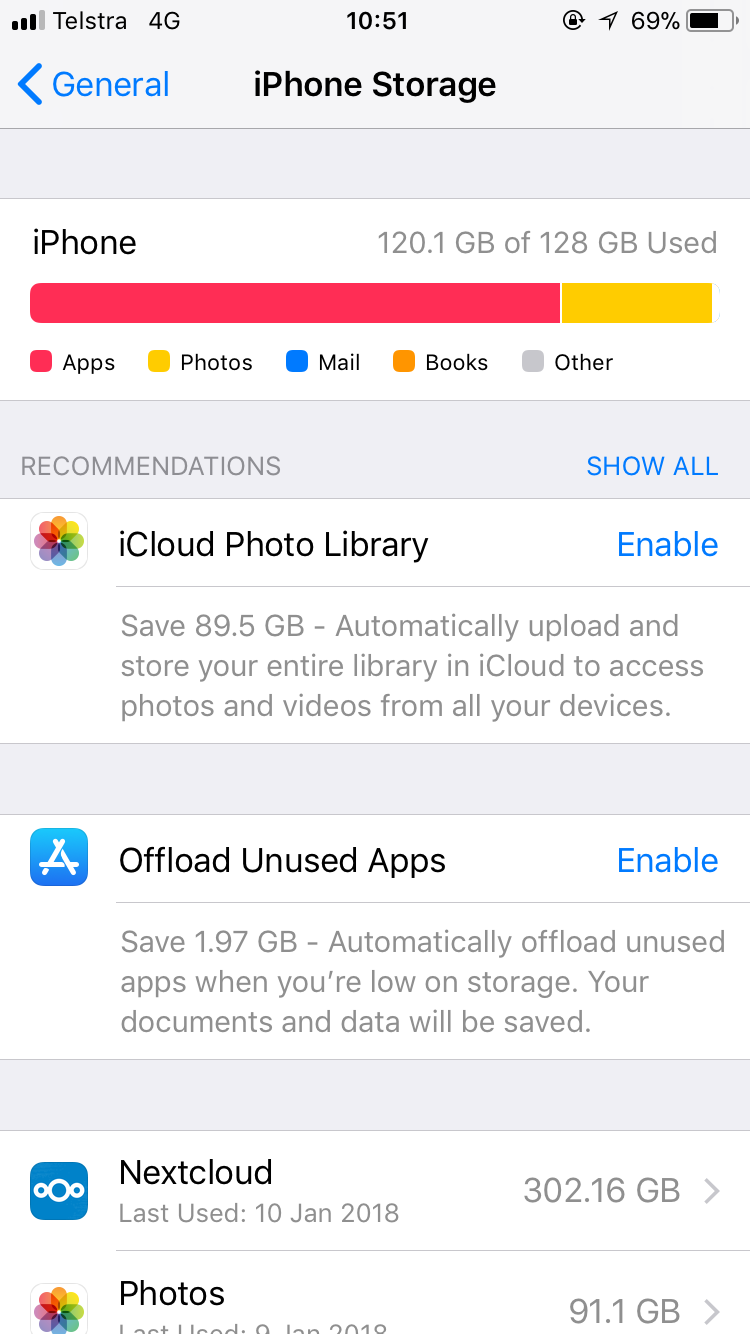
It’s getting worse, iOS is also showing the wrong size.
doomi
on 10 Jan 2018
There seems to be two issues: cache size and iOS storage usage. I finally could clear the cache and for now it looks ok (10MB). I will report on that in the future.
I think I found the cause of the second issue. I configured Google drive as external storage and there‘s about 270GB used. my Nextcloud usage is about 30GB. So together it‘s those 300GB iOS is reporting.
doomi
on 10 Jan 2018
I disabled the external storage plugin on the server and reinstalled nextcloud on my iPhone, now it‘s showing the correct usage again!
I had to delete and reinstall the iPhone app. clearing cache and iPhone reboot didnot work.
Btw: my iPhone backup in iTunes was also 300gb in size! I will see if it‘s smaller now...
doomi
on 2 Feb 2018
for a year now I didn't find out why my iPhone backup with iTunes was about 300GB in size, but I only have an iPhone with 128GB! it took about 2 days to complete each time!
now that I disabled external storage it not only shows the correct size in the iPhone settings, but the backup is now the correct size too!
so the iPhone backup downloads and includes the external storage!!!
guys, this is a big issue, not only a wrong usage display problem!
doomi
on 2 Feb 2018
@doomi Please open seperate issue regarding your last post.
rakekniven
on 2 Feb 2018
@rakekniven ok, I will open a new issue. But I‘m pretty sure if this bug is fixed (by excluding external storage) it will also fix the backup issue.
doomi
on 2 Feb 2018
@doomi Thanks for filing new issue. So we close this?
rakekniven
on 2 Feb 2018
@rakekniven No!! (Why?!)
doomi
on 2 Feb 2018
You are right, misread one of your comments.
rakekniven
on 3 Feb 2018
this bug is still annoying me! I got again the error in iTunes while backing up the iPhone: "itunes could not back up the iphone because not enough free space is available on this computer"
there was 200GB free space on my Macbook and the iPhone is only 128GB.
the Nextcloud app showed 1TB cache size, which is clearly impossible.
after deleting the cache in the app, the iTunes backup works again!
so it also propagates the wrong cache size to iTunes.
and why does Nextcloud not use the proper cache folders on iOS? if it would use the correct folders, then iTunes would not try to backup the cache. and iOS could automatically purge the cache folder by itself, too.
doomi
on 22 Aug 2018
I Remove it, the calculate is too imprecise
 marinofaggiana
on 25 Aug 2018
marinofaggiana
on 25 Aug 2018
Just for the records:
https://github.com/nextcloud/ios/commit/a97768770972935497f355f89b59b273f24b137b
rakekniven
on 25 Aug 2018
Removing the display of the size does not resolve the problem of using the wrong cache directories.
Is there a reason to not use the official cache directory defined by Apple standards? Then iOS could automatically delete the cache if the device gets full and iTunes would not backup the cache, neither.
doomi
on 2 Mar 2019
Related issues
 immortal79
·
4Comments
immortal79
·
4Comments
 MorrisJobke
·
5Comments
MorrisJobke
·
5Comments
 zigulle
·
3Comments
MorrisJobke
·
4Comments
zigulle
·
3Comments
MorrisJobke
·
4Comments
 Alphakilo
·
3Comments
Alphakilo
·
3Comments