- enable auto upload and pressing the "upload all existing photos" button
- having some files to be uploaded
- check the server logs:
- PUT -> response 201 (new file created)
- PUT to the same file -> response 204 (file overwritten) -> not needed
- GET to the same file -> not needed
cc @marinofaggiana
App version was build with 792a3a3
 MorrisJobke
All 14 comments
cc @cguerra @maej90
MorrisJobke
on 23 May 2017
Bug why ? who has found this and why, this is not a bug this is a choice, If I send to server 10.000 photos i need send 10.000 request to server exists file ?
The correct procedure is ? rewrite ? skip ? question ?
 marinofaggiana
on 2 Jun 2017
marinofaggiana
on 2 Jun 2017
Bug why ? who has found this and why, this is not a bug this is a choice, If I send to server 10.000 photos i need send 10.000 request to server exists file ?
The correct procedure is ? rewrite ? skip ? question ?
But you send 30.000 requests. We started the app and hooked up a proxy to monitor the network traffic. That is what we have seen. Why should you upload a file, upload it 2 seconds later again and then after this directly download it? This happened for dozens of files and was only triggered by enabling the "upload all existing photos" and then no interaction with the app happened.
MorrisJobke
on 2 Jun 2017
Download ? are you sure that the folder isn't favorite (sync files?) mmm no here is a strange ... it's possible reproduce the issue ?
Thanks
marinofaggiana
on 2 Jun 2017
Download ? are you sure that the folder isn't favorite (sync files?) mmm no here is a strange ... it's possible reproduce the issue ?
We did this on a device that I currently don't have - will retry next week, but I'm pretty sure it will happen again.
MorrisJobke
on 2 Jun 2017
for security today I see this issue but now I have the 2.17.3 ... after I try. Thanks
marinofaggiana
on 2 Jun 2017
For me is correct ... 4 file on camera roll, Send all ... only 4 upload, nothing download, no resend ...

please if possible, more information. thanks
marinofaggiana
on 2 Jun 2017
I just experience in the past months a lot of those "WebDAV locked errors". Recently I noticed that some files are queued twice and then sometimes are being processed in parallel, which causes obviously a "Locked" error, because the iOS app wants tp upload to the very same location. Removing one of those two entries solves the issue:
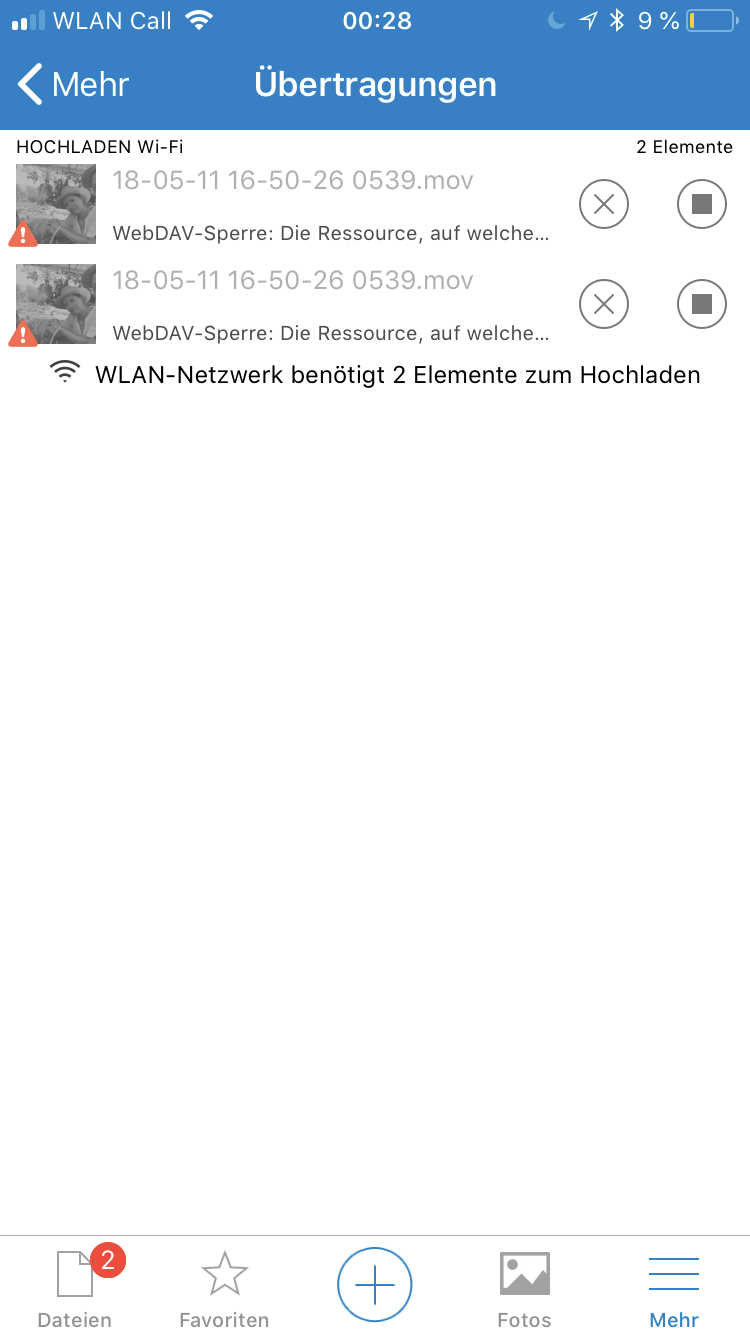
@marinofaggiana Could you check why some files are queued twice? This is quite critical, because this is the main reason I need to go into the app to check if the upload worked and fix the problem manually.
MorrisJobke
on 14 May 2018
Yes @MorrisJobke I know this issue, is in ToDo the remake of queue.
marinofaggiana
on 16 May 2018
Yes @MorrisJobke I know this issue, is in ToDo the remake of queue.
Is there any ETA when this will make it into the app?
MorrisJobke
on 16 May 2018
Sure next month after the File Provider Extension
marinofaggiana
on 16 May 2018
@marinofaggiana Any updates on this?
MorrisJobke
on 23 Nov 2018
yes, I have correct several month ago :-)
marinofaggiana
on 23 Nov 2018
yes, I have correct several month ago :-)
Then close the ticket if this is solved :)
MorrisJobke
on 23 Nov 2018
Related issues
 jancborchardt
·
5Comments
MorrisJobke
·
5Comments
MorrisJobke
·
4Comments
jancborchardt
·
5Comments
MorrisJobke
·
5Comments
MorrisJobke
·
4Comments
 oxivanisher
·
4Comments
oxivanisher
·
4Comments
 sakthi-d
·
4Comments
sakthi-d
·
4Comments