Ionide-vscode-fsharp: [Backer] Suddenly, Ionide stopped showing me compilation errors
Describe the bug**
In the last day or two Ionide stopped showing me compilation errors in projects. It does show types and it does show errors when I open fsx files. Even if I add total junk (e.g. 'as;lkdfja;slkdjf') in the middle of a function, I only get spell check errors, no compilation errors.
Steps to reproduce
For me it's just opening any F# project.
Expected behaviour
Show compilation/syntax errors 😄
Screenshots
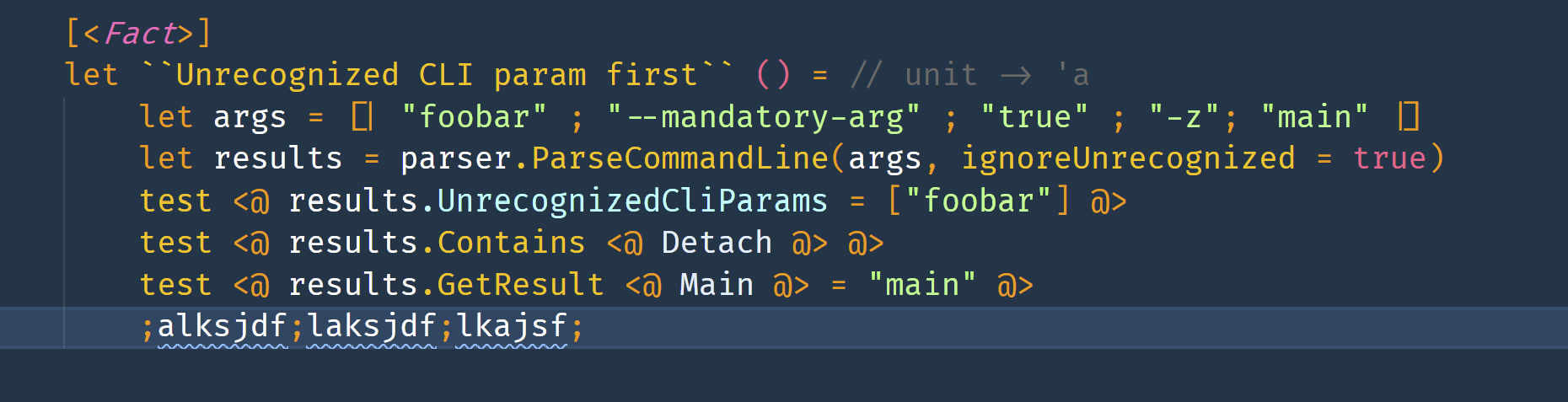
Machine info
- OS: Windows 10 fully updated
- .NET SDK version:5.0.201
- Ionide version: v5.4.1
Additional context
I'm also attaching two log files: the F# log and window log:
Please let me know if you need any further information.
Thanks in advance
Haim
 babysnakes
All 14 comments
Hey @babysnakes :wave:,
Thank you for opening an issue. We will get back to you as
soon as we can. Also, check out our OpenCollective and consider
backing us.
https://opencollective.com/ionide
PS.: We offer
backersupport for all backers. Don't forget to addbackerlabel when you start backing us :smile:
![open-collective-bot[bot] picture](https://avatars.githubusercontent.com/in/23739?v=4&s=40) open-collective-bot[bot]
on 24 Mar 2021
open-collective-bot[bot]
on 24 Mar 2021
Started backing you (but I have no idea how to add backer label 🙂)
babysnakes
on 24 Mar 2021
The bot is a bad bot and removes the label, so I updated the title
 cartermp
on 24 Mar 2021
cartermp
on 24 Mar 2021
@babysnakes can you resubmit a log, but this time with the FSharp.verboseLogging flag set to 'true'?
 baronfel
on 24 Mar 2021
baronfel
on 24 Mar 2021
@babysnakes can you resubmit a log, but this time with the
FSharp.verboseLoggingflag set to 'true'?
Sure, attaching the F# log with verbose logging (the window log seems to be the same length as the original - do you need it also?).
babysnakes
on 24 Mar 2021
Update, this is really strange behavior. Today, when trying to make types show again (sometimes they disappear - I reload the window to make them show again) I closed and opened a file. Suddenly, not only the types began to show but show but also errors. Maybe some kind of weird caching thing. I'll continue working and update.
babysnakes
on 25 Mar 2021
- This sounds like https://github.com/ionide/ionide-vscode-fsharp/issues/1500. The fix that @babysnakes describes sounds like the workaround that I document at the bottom of my issue. @babysnakes , does this sound right?
- If you close the folder while the file is still open, the next time you open the folder/file type checking will not work.
- But, if you close the file and then close the folder, then the next time you open the folder and file then type checking will work properly.
- For the backer label, you need to add your github name to your open collective profile. Additionally the open collective bot seems to be case sensitive, so make sure it is exactly "babysnakes" and not "Babysnakes" in your opencollective profile.
 nhirschey
on 25 Mar 2021
nhirschey
on 25 Mar 2021
Hi @nhirschey
- This sounds right. I closed vscode (or just the folder) and reopened multiple times and it didn't help. Once I closed the file and re-opened it (even without closing and opening the folder) it started working. It now seems to work without a problem for a couple of hours.
- Do you mean add the github URL in the settings page (that's the only place I saw a reference to github)? I did now. Will the label appear automatically?
Thanks
babysnakes
on 25 Mar 2021
If you didn't have to close the folder, then it's a different issue I think. I could close the file and reopen it, but nothing changed. I specifically had to close the file and then close the folder or exit vscode.
@babysnakes yeah in settings, where it shows the github URL. But beware capitalization (I recently discovered that's why my issues never got the backer label).
The open collective label won't work retrospectively, but it should work on your next issue submission.
nhirschey
on 25 Mar 2021
@nhirschey thanks, I'll keep the ticket open for a couple of days and see how it goes.
Also, thanks for the info regarding open collective 🙂.
babysnakes
on 25 Mar 2021
@nhirschey, it seems that you are right and I didn't reproduce my steps correctly. You do have to also close the folder and reopen before it shows compilation errors again.
@baronfel, @nhirschey should I close this ticket in favor in #1500 ?
Thanks.
babysnakes
on 26 Mar 2021
To my observation, this happens
a) for new files that you add to the project
b) for the file that was open (visible) when you last closed VS Code.
 Martin521
on 7 Jun 2021
Martin521
on 7 Jun 2021
@Martin521, I'll try to see if it matches what happens to me.
babysnakes
on 7 Jun 2021
@Martin521, sorry, it took some time for me to go back to the F# project I was working on to test it. Reading your message again, you are surely correct even without testing as both cases are the cases that are not covered by the work around suggested above 😄 .
babysnakes
on 29 Jun 2021
Related issues
 isaacabraham
·
5Comments
isaacabraham
·
5Comments
 dustinmoris
·
3Comments
dustinmoris
·
3Comments
 sergey-tihon
·
6Comments
sergey-tihon
·
6Comments
 gsomix
·
6Comments
isaacabraham
·
4Comments
gsomix
·
6Comments
isaacabraham
·
4Comments