Ionide-vscode-fsharp: Problem with project references on .NET Core 2.0
Ionide doesn't see library reference on .NET Core 2.0 solution with two projects.
Repro steps
- Create solution with two projects: classlib and console
mkdir netcore2-vscode
cd  .\netcore2-vscode\
dotnet new sln
dotnet new classlib -lang f# -o .\lib\
dotnet new console -lang f# -o .\app\
dotnet add .\app\app.fsproj reference .\lib\lib.fsproj
dotnet sln add .\app\app.fsproj
dotnet sln add .\lib\lib.fsproj
dotnet restore
- Put following code into
.\app\Program.fs
open System
open lib

[<EntryPoint>]
let main argv =
    Say.hello "World"
    0 // return an integer exit code
- Build and check that's everything is OK
dotnet build
dotnet run --project .\app\app.fsproj
- Open solution in VSCode
Expected behavior
Everything is fine. No errors in VSCode.
Actual behavior
Errors in VSCode:
- Problem reading assembly 'c:\Users\m1k3y\Documents\netcore2-vscode\lib\bin\Debug\netstandard2.0\lib.dll': Build was not evaluated, expected the results to be ready after 'Eval'.'
- The namespace or module 'lib' is not defined.
- The value, namespace, type or module 'Say' is not defined.
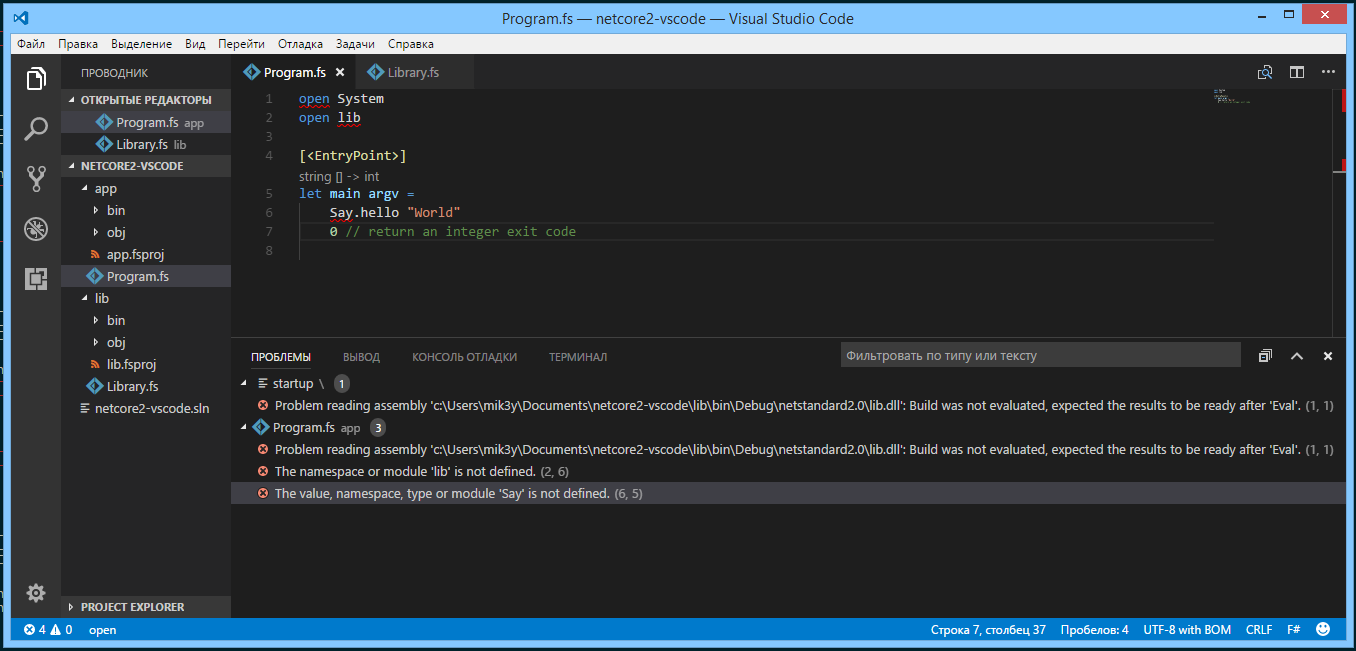
Sorry for translated version of VSCode.
Related information
- Operating system: Windows 8.1
- .NET Core 2.0
- Visual Studio Code 1.15.0, Ionide 2.32.2
Please find attached repro: netcore2-vscode.zip
Thanks!
 gsomix
👍1
All 6 comments
CC: @enricosada
 Krzysztof-Cieslak
on 15 Aug 2017
Krzysztof-Cieslak
on 15 Aug 2017
Issue is netstandard2.0 intellisense doesnt work atm, netcoreapp2.0 works.
We need to upgrade FSC used by FSAC. ref https://github.com/fsharp/FsAutoComplete/issues/180
 enricosada
on 16 Aug 2017
enricosada
on 16 Aug 2017
Closing this one since it's tracked on FSAC repo.
Krzysztof-Cieslak
on 16 Aug 2017
OK, thanks a lot!
gsomix
on 16 Aug 2017
I'm getting this issue on netcoreapp2.1 had to downgrade to netcoreapp2.0.
 leocavalcante
on 29 Oct 2018
leocavalcante
on 29 Oct 2018
👍4
I had this issue just now after changing one project from netstandard to netcoreapp.
Doing a git clean -xdf and a full rebuild seems to have sorted it.
 xdaDaveShaw
on 3 Dec 2018
xdaDaveShaw
on 3 Dec 2018
Was this page helpful?
0 / 5 - 0 ratings
Related issues
 cloudRoutine
·
5Comments
cloudRoutine
·
5Comments
 isaacabraham
·
4Comments
isaacabraham
·
4Comments
 bruno-cadorette
·
4Comments
bruno-cadorette
·
4Comments
 cartermp
·
4Comments
cartermp
·
4Comments
 landy
·
5Comments
landy
·
5Comments
Most helpful comment
I'm getting this issue on
netcoreapp2.1had to downgrade tonetcoreapp2.0.