Ionide-vscode-fsharp: Code formatting doesn't work in projects
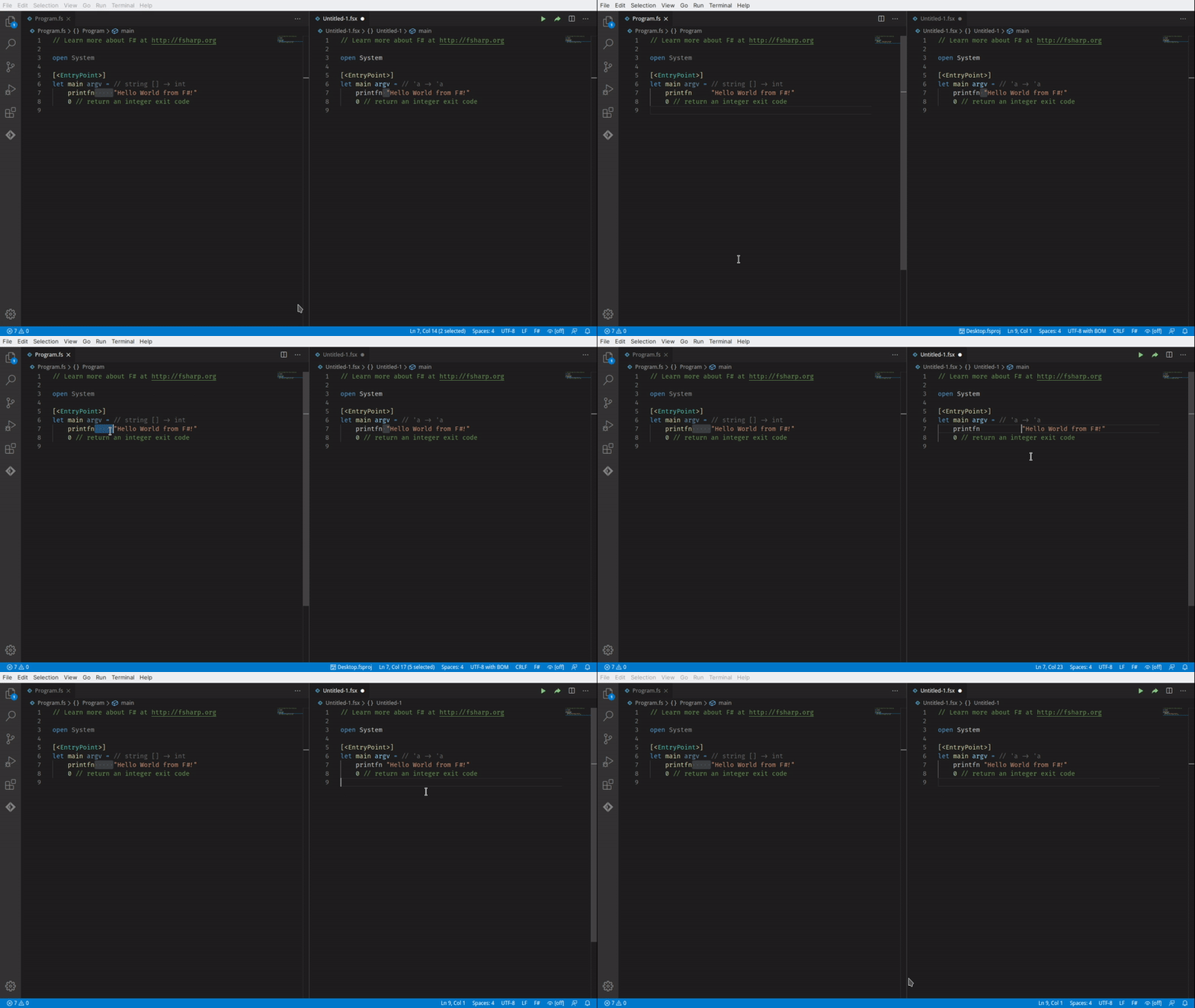
Doing Ctrl+Shift+P and selecting Format Document does nothing when the file I'm editing is part of a project. If the file is a .fsx script it does work but then there are other issues such as #1351.
Environment (please complete the following information):
- OS: Windows 10 1803
- Ionide version: 4.9.0
- VSCode version: 1.44.2
- dotnet SDK version: 3.1.201
 drguildo
All 13 comments
The more I use it the more broken code formatting seems. With "Format On Save" enabled I was just having it insert new lines at the point the cursor was located. 🤦♂️
drguildo
on 29 Apr 2020
I am experiencing the same behavior. How can we help in providing a reproduction scenario?
Attached a quick screen grab
 nicola-zanardi
on 15 May 2020
nicola-zanardi
on 15 May 2020
Hi.
I was hit by the same issue, and my attempt at debugging it indicates that it caused by a lack of module/namespace in the Program.fs-file
I got an error like this:
Fantomas.FormatConfig+FormatException: Parsing failed with errors: [|/home/user/Projects/FSharp/Demo/Program.fs (2,1)-(3,1) parse error Files in libraries or multiple-file applications must begin with a namespace or module declaration, e.g. 'namespace SomeNamespace.SubNamespace' or 'module SomeNamespace.SomeModule'. Only the last source file of an application may omit such a declaration.|]
Adding a module to the file fixed it for me. Do note that in my case, Program.fs was in fact the last source file of the application.
 SorrowAureus
on 6 Jun 2020
SorrowAureus
on 6 Jun 2020
CC: @nojaf any suggestions what may cause it?
 Krzysztof-Cieslak
on 6 Jun 2020
Krzysztof-Cieslak
on 6 Jun 2020
This does ring a bell when we parse the code to get the AST.
If the name of the file is Program.fs, it is not considered to be a script file I think and then you get that error.
In the Fantomas CLI tool, we actually renamed the file name to something like tmp.fsx when we pass it to the FSharpChecker.
The main reason we don't do this all the time is that I think the internally compiler caching would not work anymore. Maybe we need an exception of Program.fs file names.
Does it make sense what I'm saying here @Krzysztof-Cieslak?
 nojaf
on 7 Jun 2020
nojaf
on 7 Jun 2020
Have the same issue for Program.fs in my project. Does any workaround exist for this?
 neptunao
on 6 Dec 2020
neptunao
on 6 Dec 2020
Just start to learn F# and be stumped by this format issue too. Format only work on .fsx file and not .fs
@neptunao Currently add a module declaration to the file should fix it.
 Fubuchi
on 23 Dec 2020
Fubuchi
on 23 Dec 2020
I could relate to this partially. Formatting works nice for all files except for the Program.fs.
Ionide version is 5.0.3
OS: Windows 10
Dotnet: 5.0.101
Vs code: 1.52.1
Most likely the same error in the F# output log as the one mentioned above
[Error - 14:04:23] Request textDocument/formatting failed.
  Message: Fantomas.FormatConfig+FormatException: Parsing failed with errors: [|d:\dev\bootcamp\src\Program.fs (1,1)-(2,1) parse error Files in libraries or multiple-file applications must begin with a namespace or module declaration, e.g. 'namespace SomeNamespace.SubNamespace' or 'module SomeNamespace.SomeModule'. Only the last source file of an application may omit such a declaration.|]
And options: { SourceFiles =
               [|"d:\dev\bootcamp\src\Main.fs";
                 "d:\dev\bootcamp\src\Program.fs"|]
  ConditionalCompilationDefines = []
  ErrorSeverityOptions = { WarnLevel = 3
                           GlobalWarnAsError = false
                           WarnOff = []
                           WarnOn = []
                           WarnAsError = []
                           WarnAsWarn = [] }
  IsInteractive = false
  LightSyntax = None
  CompilingFsLib = false
  IsExe = false }
   at [email protected](FSharpParseFileResults _arg2)
   at Microsoft.FSharp.Control.AsyncPrimitives.CallThenInvokeNoHijackCheck[a,b](AsyncActivation`1 ctxt, FSharpFunc`2 userCode, b result1) in F:\workspace\_work\1\s\src\fsharp\FSharp.Core\async.fs:line 404
   at <StartupCode$FSharp-Compiler-Service>[email protected](AsyncActivation`1 ctxt) in F:\workspace\_work\1\s\src\fsharp\service\service.fs:line 449
   at Microsoft.FSharp.Control.Trampoline.Execute(FSharpFunc`2 firstAction) in F:\workspace\_work\1\s\src\fsharp\FSharp.Core\async.fs:line 104
  Code: -32603
  ```

`Program.fs` content is
open System
open Poker.Main
[
let main _ =
processInput Console.In Console.Out
0
```
Hope this helps! Thanks for the amazing project.
 v-zubritsky
on 25 Dec 2020
v-zubritsky
on 25 Dec 2020
Ah, something comes to mind. Let me check in the next couple of days.
nojaf
on 25 Dec 2020
Ok, I believe I have a fix for this in 4.4.0-alpha-007.
It worked on my machine 🙈.
You can download the NuGet package, unzip it and copy the Fantomas.dll file to your install location of the Ionide extension.
(For me this was at C:\Users\nojaf\.vscode\extensions\ionide.ionide-fsharp-5.0.3\bin).
nojaf
on 26 Dec 2020
Confirm worked on my machine without the need of a module declaration in Program.fs
Fubuchi
on 26 Dec 2020
@nojaf worked for me as well
v-zubritsky
on 28 Dec 2020
5.1 includes a prerelease version of Fantomas 4.4. so it should work out of the box now.
Krzysztof-Cieslak
on 28 Dec 2020
Related issues
 draganjovanovic1
·
3Comments
draganjovanovic1
·
3Comments
 vasily-kirichenko
·
6Comments
vasily-kirichenko
·
6Comments
 gsomix
·
6Comments
gsomix
·
6Comments
 isaacabraham
·
5Comments
isaacabraham
·
5Comments
 cloudRoutine
·
5Comments
cloudRoutine
·
5Comments
Most helpful comment
Ok, I believe I have a fix for this in 4.4.0-alpha-007.
It worked on my machine 🙈.
You can download the NuGet package, unzip it and copy the
Fantomas.dllfile to your install location of the Ionide extension.(For me this was at
C:\Users\nojaf\.vscode\extensions\ionide.ionide-fsharp-5.0.3\bin).