Ionide-vscode-fsharp: FSAC error message. Must add a reference to assembly 'netstandard'
Describe the bug
Unexpected FSAC error
To Reproduce
- Add
Python.Runtime.NETStandardpackage to Paket - Create
Repro\test.fsxfile with content
#load @"../.paket\load\net472\Python.Runtime.NETStandard.fsx"
#r "netstandard"

open System
open Python.Runtime

let gil = Py.GIL()
- See error
FSAC Message
>> The type 'Object' is required here and is unavailable. You must add a reference to assembly 'netstandard, Version=2.0.0.0, Culture=neutral, PublicKeyToken=cc7b13ffcd2ddd51'.F# Compiler(1108)
Expected behaviour
No error
Screenshots

Environment (please complete the following information):
- OS: Windows 10
- Ionide version: 4.0.6
- VSCode version: 1.38.0
- dotnet SDK version: .NET Core SDK (3.0.100-preview9-014004)
- mono / .Net Framework version: F# Interactive version 10.5.0.0 for F# 4.6
Additional context
There is no error during script execution, FSAC error only
Knows Workaround
Add
#r "facades/netstandard"
This fix FSAC, but break interactive
 IvanAntipov
All 9 comments
Hey @IvanAntipov :wave:,
Thank you for opening an issue. We will get back to you as
soon as we can. Also, check out our OpenCollective and consider
backing us.
https://opencollective.com/ionide
PS.: We offer
backersupport for all backers. Don't forget to addbackerlabel when you start backing us :smile:
![open-collective-bot[bot] picture](https://avatars.githubusercontent.com/in/23739?v=4&s=40) open-collective-bot[bot]
on 11 Sep 2019
open-collective-bot[bot]
on 11 Sep 2019
Can confirm. Also happens to me only with newly released version 4.1.0.

For me version 4.0.6 still works. (select "Install another version...")
If it's a different bug, I can open a new issue :)
 JanWosnitza
on 18 Sep 2019
JanWosnitza
on 18 Sep 2019
This is probably to do with how we resolve 'project options' and references for scripts. Right now this does not handle .net core scenarios well at all, and work needs to be done in FSAutoComplete/dotnet-proj-info to provide a more complete set of those references.
In the meantime there should be a workaround: provide a path to a known-good netstandard.dll.
There are a few places this can be found:
- if you're running on .net core, you can find netstandard.dll in
<dotnet sdk root>/shared/Microsoft.NETCore.App/<dotnet sdk version>/netstandard.dll - if you're not, you can try adding a package reference to the
Netstandard.Librarypackage and adding a reference to thenetstandard.dllfound in<nuget cache root>/packages/netstandard.library/2.0.3/build/netstandard2.0/ref/netstandard.dll
Either one of those should correct your experience, and in fact a lot of the work we have to do is in automatically locating those and adding the correct ones for you.
 baronfel
on 18 Sep 2019
baronfel
on 18 Sep 2019
I added #r @"C:\Program Files\dotnet\shared\Microsoft.NETCore.App\2.2.7\netstandard.dll" at the top of my script. I still see lots of issues like "type string is not defined" when defining a record.
FYI, I know lots of work here and I appreciate it all.
To clarify further: I'm on ionide 4.1, using netcore fsac. It worked before upgrading (I'd spent much of Monday figuring out how to get my setup working again after a prior update changed things).
 nhirschey
on 19 Sep 2019
nhirschey
on 19 Sep 2019
It's not only .fsx I upgraded today to Ionide 4.1.0 and my .fs files are full of errors, too.
Build with dotnet build: everything's fine. But the linter is saying I have to add 'netstandard' to my references.
 CaptnCodr
on 20 Sep 2019
CaptnCodr
on 20 Sep 2019
I have the same issue as @CapnCodr, interestingly only in one .fs file of my project.
 alfert
on 24 Sep 2019
alfert
on 24 Sep 2019
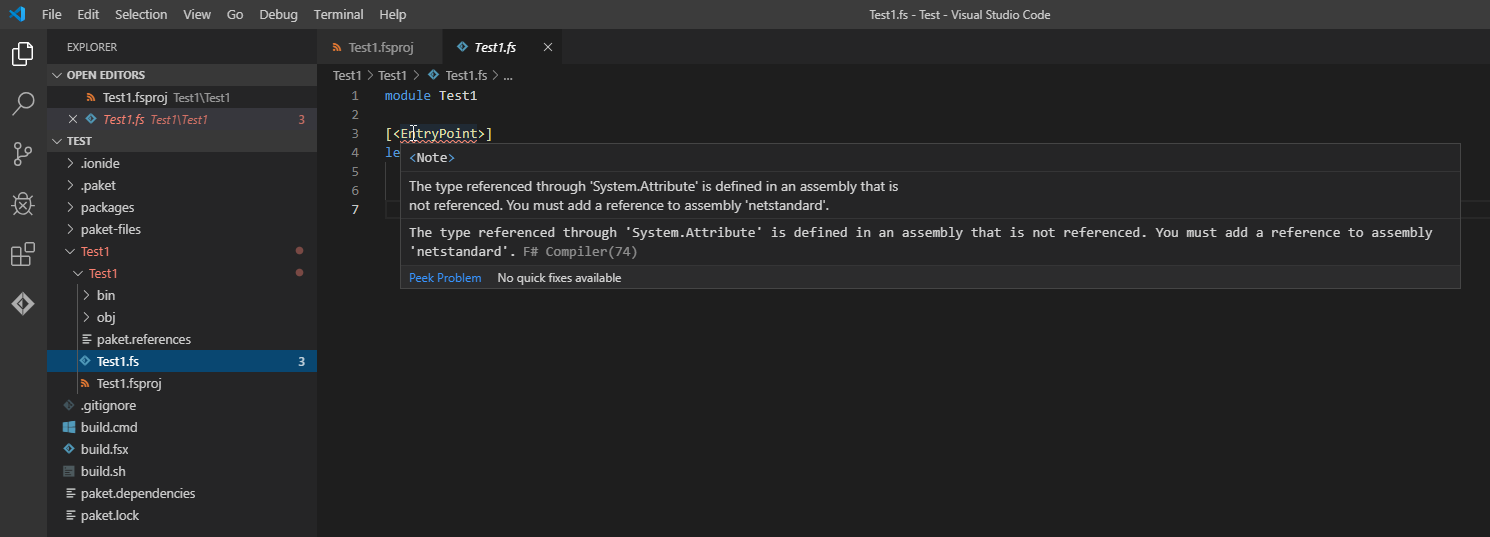
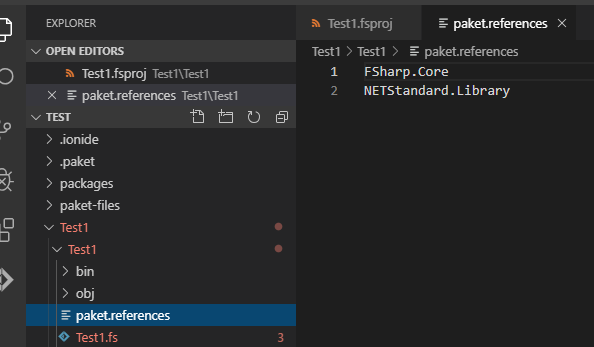
A workaround for a regular project if working with paket: add NETStandard.Library to the references in paket.references. It is like the linter said, but I did not grasp what to do until a few minutes ago ...
alfert
on 6 Oct 2019
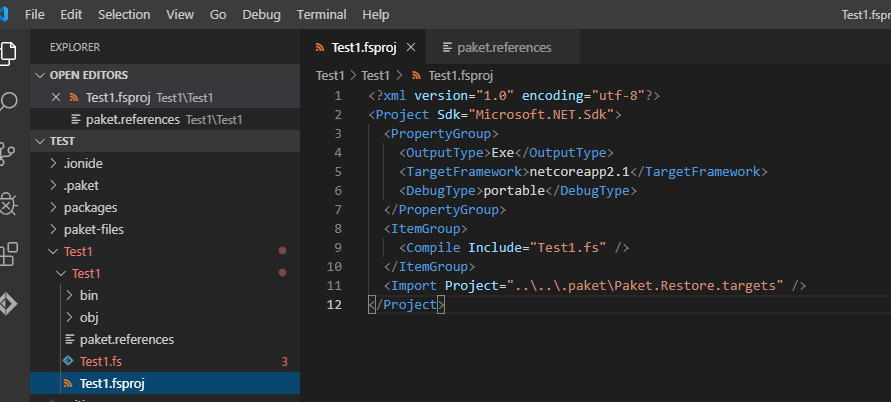
Adding the paket NETStandard.Library doesn't solve the problem for me.
 KingKnecht
on 7 Oct 2019
KingKnecht
on 7 Oct 2019
We're tracking problems with .fsx files in #1220
 Krzysztof-Cieslak
on 8 Oct 2019
Krzysztof-Cieslak
on 8 Oct 2019
Related issues
 bruno-cadorette
·
4Comments
bruno-cadorette
·
4Comments
 cloudRoutine
·
5Comments
cloudRoutine
·
5Comments
 draganjovanovic1
·
3Comments
draganjovanovic1
·
3Comments
 cartermp
·
4Comments
cartermp
·
4Comments
 gsomix
·
6Comments
gsomix
·
6Comments
Most helpful comment
I added
#r @"C:\Program Files\dotnet\shared\Microsoft.NETCore.App\2.2.7\netstandard.dll"at the top of my script. I still see lots of issues like "type string is not defined" when defining a record.FYI, I know lots of work here and I appreciate it all.
To clarify further: I'm on ionide 4.1, using netcore fsac. It worked before upgrading (I'd spent much of Monday figuring out how to get my setup working again after a prior update changed things).