Ionide-vscode-fsharp: F# Code Viewer VS Code Activity Bar panel is default selected panel on VS Code restart, even if hidden
So, whenever I start VS Code, the F# Code Viewer activity panel would become the active panel, despite the fact that by default, VS Code should be displaying the Explorer activity panel.
So, getting fed up with this, I decided since the project I'm working on in VS Code is not an F# project at the moment, to Hide this activity bar entry. However, upon restarting VS Code, the F# Code Viewer activity panel still became the active panel, even though there was no icon entry for it in the VS Code activity bar.
Then, when I went to re-show the F# Code Viewer activity bar panel, selecting it (from the Activity Bar context menu) did not result in the icon being added to the Activity Bar nor was the panel even displaying .(though, I was not currently in an F# project--but still, it shows up every other time, even when I don't want it to!)
Please do not assume that the F# Code Viewer activity bar panel is the active panel _every time_ VS Code starts.
 fourpastmidnight
All 7 comments
BTW you can disable this option by setting FSharp.showExplorerOnStartup to false (I always do as I find it annoying especially as ionide trigger on C# projects)
The fact that it trigger when the activity is hidden might be a bug.
 vbfox
on 11 Jan 2019
vbfox
on 11 Jan 2019
Thanks for that. I didn’t expect there would be such an option as that. And, why the default is true is beyond me (I’m pretty sure I didn’t change it…).
If, in fact, that option’s default value is true, it may be better to set it to false.
Sent from my Windows 10 phone
From: Julien Roncaglia
Sent: Friday, January 11, 2019 14:39
To: ionide/ionide-vscode-fsharp
Cc: Craig E. Shea; Author
Subject: Re: [ionide/ionide-vscode-fsharp] F# Code Viewer VS Code Activity Barpanel is default selected panel on VS Code restart, even if hidden (#990)
BTW you can disable this option by setting FSharp.showExplorerOnStartup to false (I always do as I find it annoying especially as ionide trigger on C# projects)
The fact that it trigger when the activity is hidden might be a bug.
—
You are receiving this because you authored the thread.
Reply to this email directly, view it on GitHub, or mute the thread.
fourpastmidnight
on 11 Jan 2019
Well the problem is that most of the time, if we set option to "don't use the feature" by default then people will never know it's here.
After, I agree there is room for improvements (if VSCode API allow it) on when and how we activate/show the activity bar.
 MangelMaxime
on 11 Jan 2019
MangelMaxime
on 11 Jan 2019
FSharp.showExplorerOnStartup set to true by default is by-design. We had way too many people not knowing about Solution Explorer.
But yes, I’d be happy to see improvements, however from top of my head I’m not sure if there is API that will let us detect if the activity bar icon is hidden
 Krzysztof-Cieslak
on 12 Jan 2019
Krzysztof-Cieslak
on 12 Jan 2019
FSharp.showExplorerOnStartupset totrueby default is by-design. We had way too many people not knowing about Solution Explorer.But yes, I’d be happy to see improvements, however from top of my head I’m not sure if there is API that will let us detect if the activity bar icon is hidden
Actually this feature is greatly visible and people definitely know about it (We can see it's icon in the side bar). There is no reason to focus on it every application startup.
One more point. Most of the time VSCode focuses on its own "Explorer". People definitely know about VSCode Explorer. I found that VSCode focuses on "F# Solution Explorer" only after I opened folder with *.sln files. By now looks like this feature doesn't work properly.
 Agaspher20
on 14 Feb 2019
Agaspher20
on 14 Feb 2019
I thought that was a bug in VS Code until I saw #1018.
 inosik
on 18 Feb 2019
inosik
on 18 Feb 2019
Imagine if other extensions did the same behaviour? Who would win this focus war?
I think this behaviour is very user hostile.
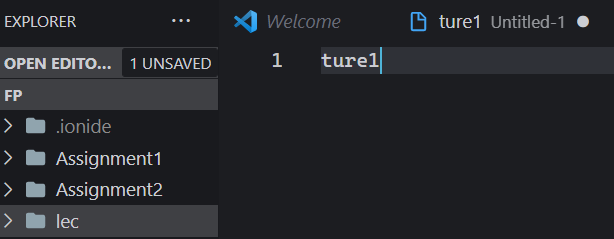
I just had the following experience:
I opened my repository with my f# projects. I then started to create a new folder called "lecture1", but in between typing the name of the folder, this plugin stole the attention and the result was that I created a folder called "lec" and an empty file with "ture1" in it. This is a really poor user experience, which is why I would suggest having this setting off by default, or at least changed, so it does not interrupt another user process. A non-interupting notification asking whether the user wants to open the solution explorer, would be an improvement. This notification could then also have a Don't show again-button for example.
 joglr
on 17 Feb 2021
joglr
on 17 Feb 2021
Related issues
MangelMaxime
·
4Comments
 vasily-kirichenko
·
6Comments
vasily-kirichenko
·
6Comments
 isaacabraham
·
3Comments
Agaspher20
·
4Comments
isaacabraham
·
3Comments
Agaspher20
·
4Comments
 draganjovanovic1
·
3Comments
draganjovanovic1
·
3Comments
Most helpful comment
Actually this feature is greatly visible and people definitely know about it (We can see it's icon in the side bar). There is no reason to focus on it every application startup.
One more point. Most of the time VSCode focuses on its own "Explorer". People definitely know about VSCode Explorer. I found that VSCode focuses on "F# Solution Explorer" only after I opened folder with *.sln files. By now looks like this feature doesn't work properly.