Ionide-vscode-fsharp: "Problem reading assembly" after `dotnet build` succeeds
Ionide is still showing some red squiggles after a successful dotnet build. Hovering over one of the errors shows a "Problem reading assembly" exception.
Screenshot attached.
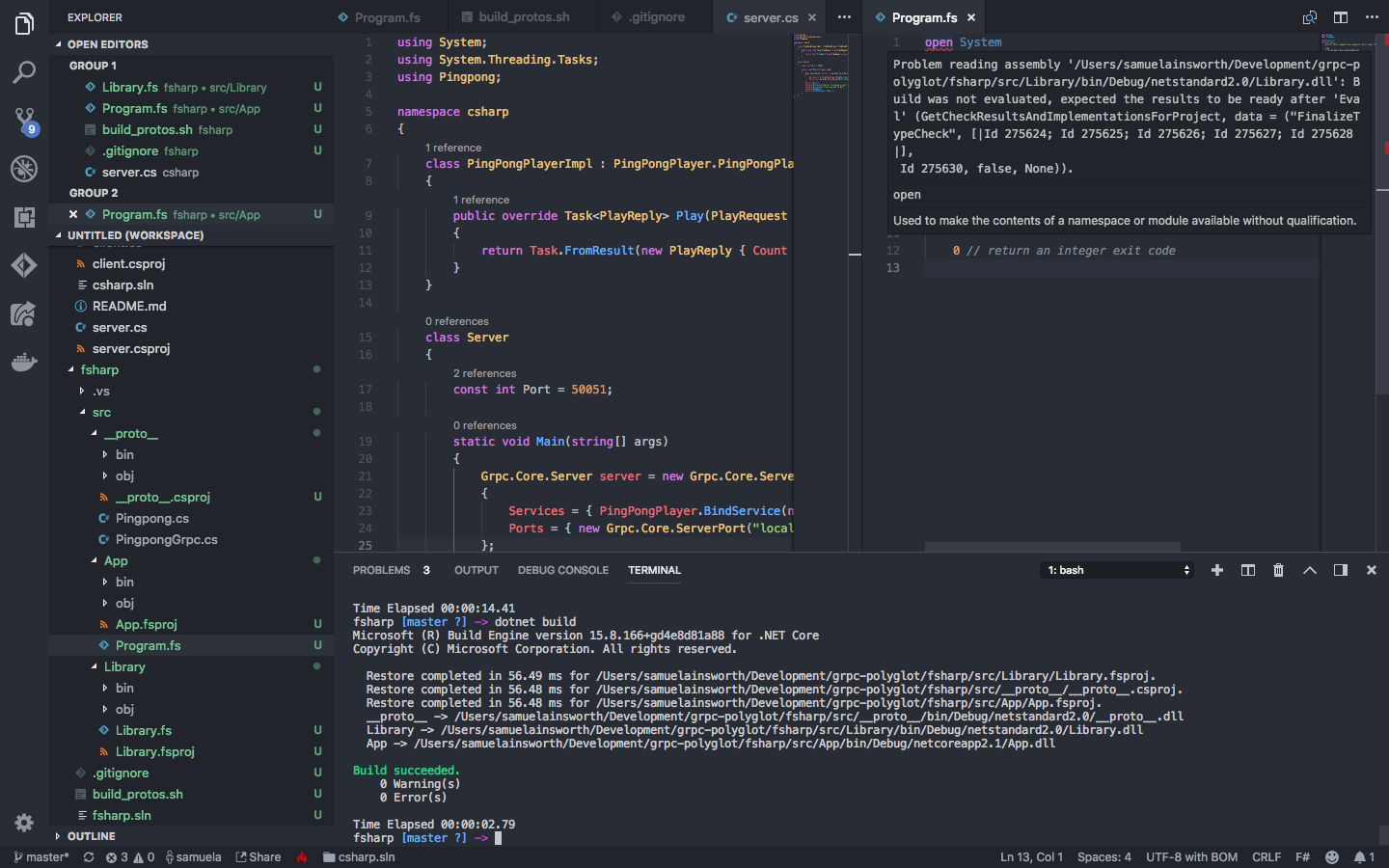
 samuela
All 41 comments
Is the project OSSed or can you provide some minimal reproduction of the problem?
 Krzysztof-Cieslak
on 12 Oct 2018
Krzysztof-Cieslak
on 12 Oct 2018
@Krzysztof-Cieslak Project is OSSed here: https://github.com/samuela/grpc-polyglot!
samuela
on 12 Oct 2018
Here is another version of the problem.
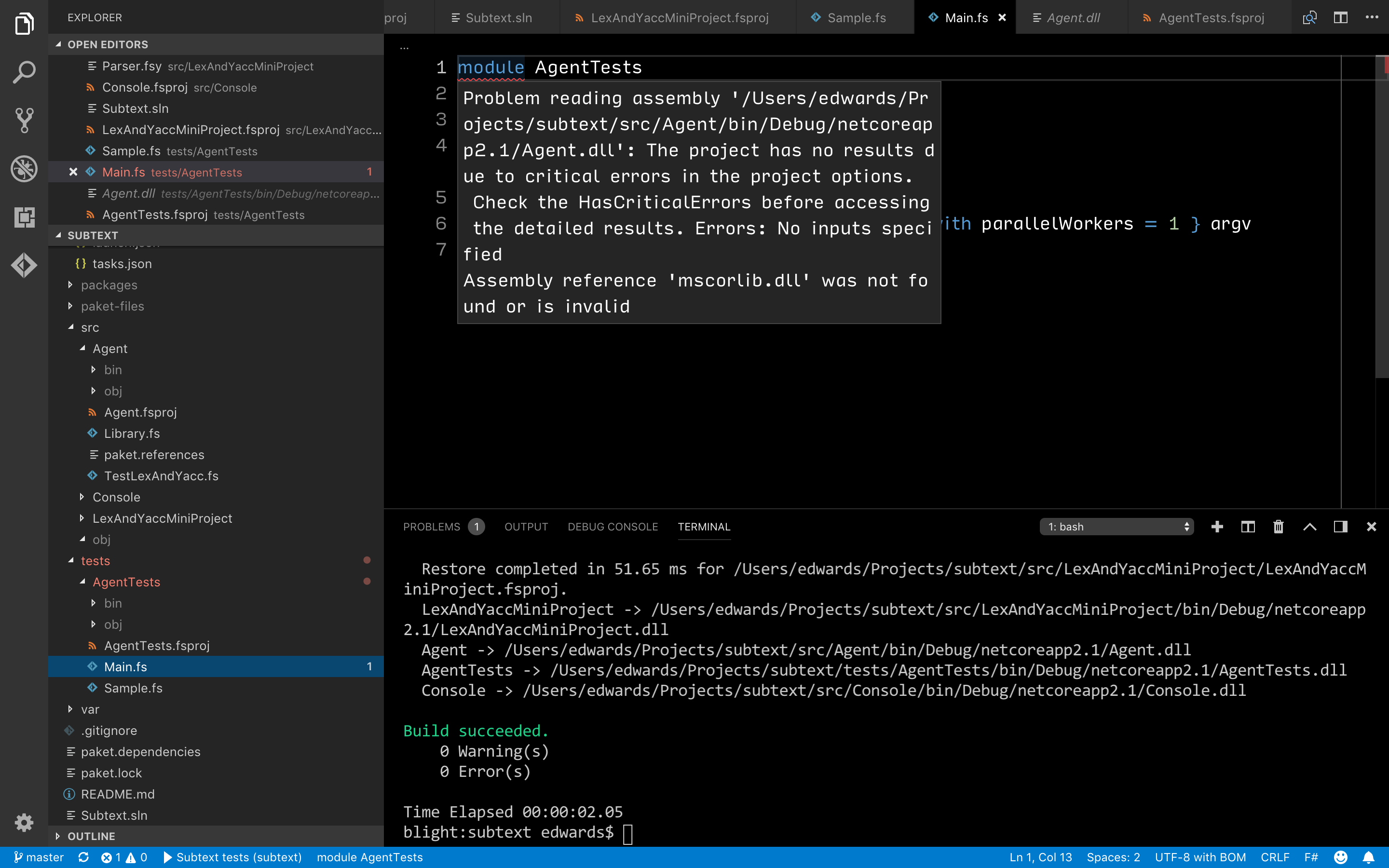
Repo: https://github.com/JonathanMEdwards/subtext
Machine infos
- Operating system: Darwin
- Arch: x64
- VSCode: 1.28.1
- Runtime: netcore
- Dotnet version: 2.1.403
- Runtime: .Net
- Mono version:
Mono JIT compiler version 5.16.0.179 (2018-06/6e48ad4f7b1 Wed Oct 3 14:05:19 EDT 2018)
Copyright (C) 2002-2014 Novell, Inc, Xamarin Inc and Contributors. www.mono-project.com
TLS: normal
SIGSEGV: altstack
Notification: kqueue
Architecture: amd64
Disabled: none
Misc: softdebug
Interpreter: yes
LLVM: yes(3.6.0svn-mono-master/0b3cb8ac12c)
GC: sgen (concurrent by default)
- MSBuild version:
Microsoft (R) Build Engine version 16.0.40-preview+ge6c3a1f9e4 for Mono
Copyright (C) Microsoft Corporation. All rights reserved.
 JonathanMEdwards
on 15 Oct 2018
JonathanMEdwards
on 15 Oct 2018
@samuela are you on Windows?
JonathanMEdwards
on 15 Oct 2018
I have the same issue in a project which has a dependency on another project. It happens when I add new file to the project. Sometimes rebuild helps.
 mvsmal
on 15 Oct 2018
mvsmal
on 15 Oct 2018
@JonathanMEdwards I'm on macOS 10.14.
samuela
on 15 Oct 2018
I also have two projects with one referencing the other, though I'm not sure exactly how to reproduce.
samuela
on 15 Oct 2018
So the common thread is inter-project dependencies on Mac? @mvsmal are you on Mac too?
After struggling for days to get a working Mac configuration I am starting to think I need to be on Windows to do F# dev.
JonathanMEdwards
on 15 Oct 2018
I had this issue today. I was trying to add a new file to an F# project but even building successfully VSCode (Ionide) just marked my new file red along with all the files in my project.
Tried: rebuild, clean, git clean -xfd (cleaning .ionide folder), closing VSCode, restarting machine, nothing.
Not sure it's the exact solution, but did the trick for me.
Set the "FSharp.fsacRuntime": "net", settings in my workspace to use "netcore"
 Binjaaa
on 15 Oct 2018
Binjaaa
on 15 Oct 2018
I already have fsacRuntime set to netcore, so sounds like a different issue
On Mon, Oct 15, 2018 at 4:01 PM imre.turi notifications@github.com wrote:
I had this issue today. I was trying to add a new file to an F# project
but even building successfully VSCode (Ionide) just marked my new file red
along with all the files in my project.
Tried, rebuild, clean, git clean -xfd, closing VSCode, restarting machine,
nothing.
Not sure it's the exact solution to this, but did the trick for me.Set the "FSharp.fsacRuntime": "net", settings in my workspace to use
"netcore"—
You are receiving this because you were mentioned.
Reply to this email directly, view it on GitHub
https://github.com/ionide/ionide-vscode-fsharp/issues/924#issuecomment-429992732,
or mute the thread
https://github.com/notifications/unsubscribe-auth/ACIi7eTiqulJQIqt49AeO53M2OZ5TGW5ks5ulOmggaJpZM4W3pZl
.
JonathanMEdwards
on 15 Oct 2018
@Binjaaa I've also had that issue, but I don't think I've bothered to report it before. Definitely very annoying. Cleaning and rebuilding always does it for me. I also have FSharp.fsacRuntime set to netcore, but I've still seen it.
samuela
on 15 Oct 2018
Having the same issue with Debian.
Minimal repro: https://github.com/cannorin/misc/tree/master/ionide-projectreference-fail-repro
~ $ uname -a
Linux liddell 4.18.0-1-amd64 #1 SMP Debian 4.18.6-1 (2018-09-06) x86_64 GNU/Linux
~ $ mono --version
Mono JIT compiler version 5.16.0.179 (tarball Thu Oct 4 10:24:32 UTC 2018)
Copyright (C) 2002-2014 Novell, Inc, Xamarin Inc and Contributors. www.mono-project.com
TLS: __thread
SIGSEGV: altstack
Notifications: epoll
Architecture: amd64
Disabled: none
Misc: softdebug
Interpreter: yes
LLVM: yes(3.6.0svn-mono-/)
GC: sgen (concurrent by default)
~ $ dotnet --version
2.1.403
~ $ msbuild /version
Microsoft (R) Build Engine version 15.1.8.0 ( Wed Sep 5 19:32:44 UTC 2018) for Mono
Copyright (C) Microsoft Corporation. All rights reserved.
15.1.8.0%
~ $ code --version
1.28.1
3368db6750222d319c851f6d90eb619d886e08f5
x64
~ $ cat .config/Code/User/settings.json | grep FSharp
"FSharp.enableBackgroundSymbolCache": true,
"FSharp.lineLens.enabled": "replaceCodeLens",
"FSharp.minimizeBackgroundParsing": true,
"FSharp.enableAnalyzers": true,
"FSharp.msbuildAutoshow": true,
"FSharp.msbuildHost": ".net core",
"FSharp.resolveNamespaces": false,
"FSharp.workspaceLoader": "projects",
"FSharp.fsacRuntime": "netcore",
"FSharp.showProjectExplorerIn": "explorer",
"FSharp.showCodeOutlineIn": "explorer"
~ $
 cannorin
on 16 Oct 2018
cannorin
on 16 Oct 2018
Sorry, it became unreproducible just after submitting the above comment.. :thinking:
cannorin
on 16 Oct 2018
@Krzysztof-Cieslak : Made a minimal repro on this.
Repro steps:
- Created 2 F# projects Main and Sub
- Set Sub as a reference to Main
- Added a new file via the context menu in Main
- Referenced the new file manually in the MainProject.fsproj
- Saved the .fsproj modifications
- There we go!
Here is my basic repro, hopefully going to give you the same behavior:
https://github.com/Binjaaa/ionide-dll-read-error-repo
uname -a && mono --version && dotnet --version && msbuild /version && code --version
Darwin TMMAC004.local 17.5.0 Darwin Kernel Version 17.5.0: Mon Mar 5 22:24:32 PST 2018; root:xnu-4570.51.1~1/RELEASE_X86_64 x86_64
Mono JIT compiler version 5.12.0.226 (2018-02/9824e260f56 Mon Apr 30 18:45:52 EDT 2018)
Copyright (C) 2002-2014 Novell, Inc, Xamarin Inc and Contributors. www.mono-project.com
TLS: normal
SIGSEGV: altstack
Notification: kqueue
Architecture: amd64
Disabled: none
Misc: softdebug
Interpreter: yes
LLVM: yes(3.6.0svn-mono-master/8b1520c8aae)
GC: sgen (concurrent by default)
2.1.301
Microsoft (R) Build Engine version 15.7.0.0 (xplat-master/402b4b23 Wed Mar 28 23:51:55 EDT 2018) for Mono
Copyright (C) Microsoft Corporation. All rights reserved.
15.7.0.0%
Collapsing two of my projects into one seems to have fixed the problem for me. Now the project graph is only 2 deep. Also seems to have fixed the problem of mono-sgen64 spinning at 200% CPU.
JonathanMEdwards
on 18 Oct 2018
@Binjaaa Can't reproduce the problem.
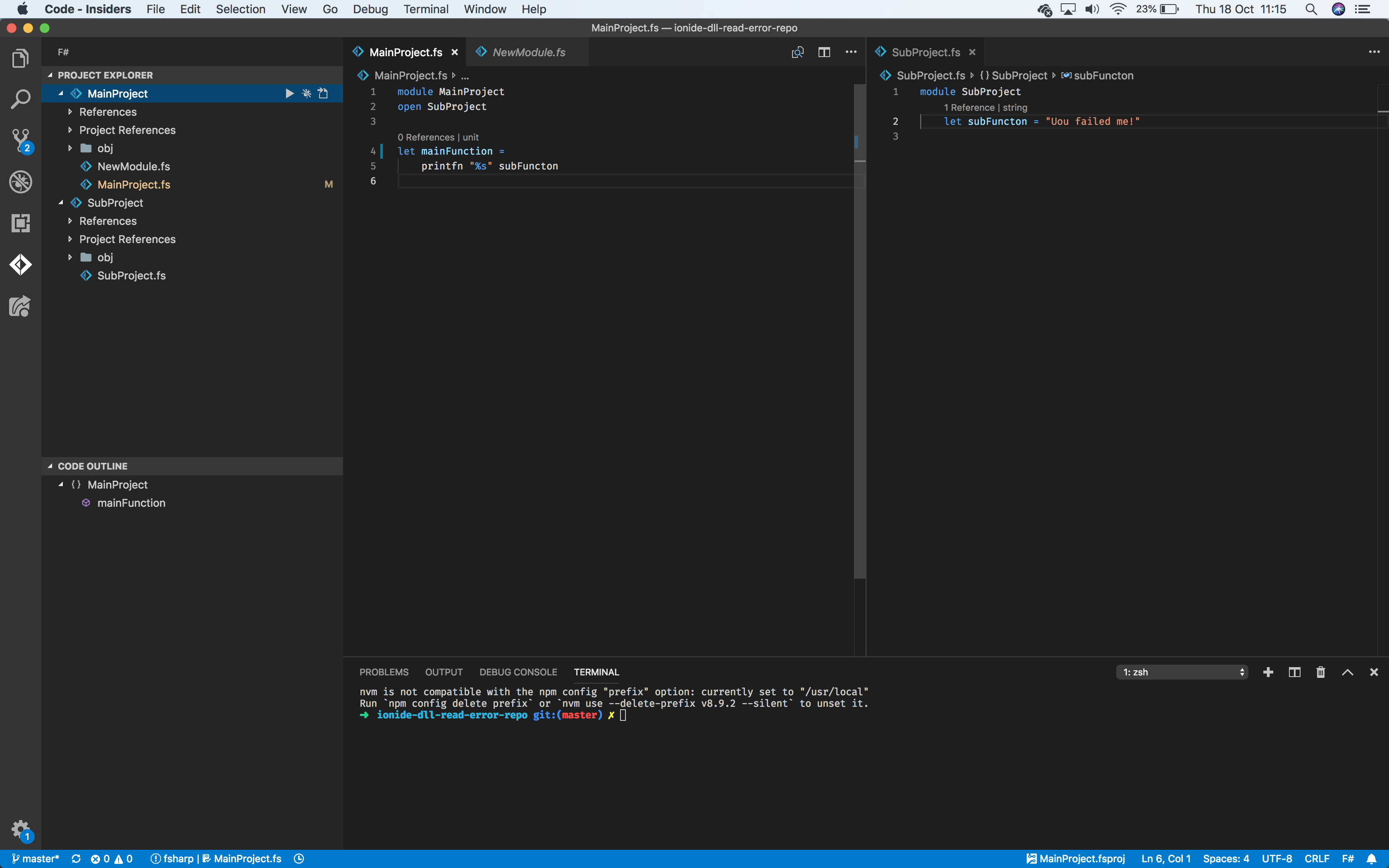
Krzysztof-Cieslak
on 18 Oct 2018
@Krzysztof-Cieslak Did you use FSharp Project explorer or Files Explorer for adding NewModule? I have this issue when adding the file in Files Explorer and manually adding it to the .fsproj file.
mvsmal
on 18 Oct 2018
In my real project, it happens when (and it's still happening) I open the folder in VS (code .), wait until all the project load finish and hit enter in one of the files what are in the project what is referencing another one.
In my repo this file can be the NewModule.fs.
Binjaaa
on 18 Oct 2018
UPDATE: Seems like the new version 3.29.0 fixes this problem. @mvsmal can you please check it?
Binjaaa
on 22 Oct 2018
o_O
Krzysztof-Cieslak
on 22 Oct 2018
It looks so :) I will keep on eye on it for some time.
Thanks
mvsmal
on 22 Oct 2018
Well, every miracle lasts 2 days. 😢Same error again.
Binjaaa
on 24 Oct 2018
I cloned https://github.com/Binjaaa/ionide-dll-read-error-repo and build it then opened and I didnt have the errors.
I then added another subproject and referenced it from MainProject, and the error didnt occur.
Then, I did this:
src/$ mkdir SubProject3 && cd SubProject3
src/$ dotnet new classlib
src/$ code ../
And the error occurred. Note that I didn't even add SubProject3 as a project reference to MainProject.
I then deleted the folder SubProject3, and any bin/obj dirs with find . | grep "obj|bin" | xargs rm -rf from the root, and rebuilt the main project, then reloaded vscode, and the error was still present. I then cleared the F# cache, and reloaded, and the error went away, which doesnt make sense at all because the fsac.cache is in the obj/ directories.
I am struggling to find the cause of this one.
Edit: Forgot to mention, the error manifests as this for me (squiggly red line under namespace):
The project has no results due to critical errors in the project options. Check the HasCriticalErrors before accessing the detailed results. Errors: No inputs specified
Assembly reference 'mscorlib.dll' was not found or is invalid
 ghost
on 30 Oct 2018
ghost
on 30 Oct 2018
I get this error too anytime a file or package reference is added to the fsproj file. Like @abk-x said, deleting the obj bin and rebuilding just the dependent package doesn't fix it. But I did find a reliabile fix: delete all obj and bin folders, then run dotnet build one by one in each project in order. If you run dotnet build from just the final project the error still shows up, you must run it one-by-one in each project in order.
Thus I created a shell script with the following
#!/bin/sh
DIRS="proj1 proj2 proj3 proj4"
for dir in $DIRS; do
    rm -rf $dir/bin $dir/obj
done
for dir in $DIRS; do
    dotnet build $dir
done
Make sure the DIRS variable contains the project directories in the ascending order of dependencies! That is, proj2 can depend only on projects earlier in the list. By exiting vscode, building in ascending order, and then opening vscode, I can reliably get the error to disappear.
 wuzzeb
on 30 Nov 2018
wuzzeb
on 30 Nov 2018
I'm also getting this error and can confirm that @wuzzeb's solution worked great for me. My fsac runtime is also netcore.
 guiri14
on 4 Dec 2018
guiri14
on 4 Dec 2018
Getting the DIRS variable sucks for large solutions, perhaps you can try this to help:
$ dotnet build mysln.sln /v:diag > /tmp/build
$ grep sproj...default /tmp/build | grep "Building Project" | awk '{print $5}' | awk '!x[$0]++'
Which should hopefully give the dependency order.
ghost
on 4 Dec 2018
Set the "FSharp.fsacRuntime": "net", settings in my workspace to use "netcore"
This worked for me in a workspace targetting .net core.
 normanhh3
on 19 Dec 2018
normanhh3
on 19 Dec 2018
Am seeing this problem on an Ubuntu 16.04 distro, with Ionide 3.30.0.
Only occurs in projects that reference another project.
Editing the .fsproj file triggers the problem, e.g. adding a new .fs file to the project.
@wuzzeb's workaround is working for me - thanks!
Sometimes I get away with leaving VSCode open while executing the workaround. Other times it requires a restart.
 phillipbaird
on 20 Dec 2018
phillipbaird
on 20 Dec 2018
I don't know why but when I removed <?xml version="1.0" encoding="utf-8"?> from my fsproj the error went away. Probably some parsing issue.
ghost
on 29 Dec 2018
Confirmed, @wuzzeb's solution of a complete clean out and rebuilding in dependency order worked for me.
 joelvandiver
on 10 Jan 2019
joelvandiver
on 10 Jan 2019
Finally time to debug this a bit (holidays). I set up a debug version of FsAutoComplete and printed the project options in full for a working version of my code, and then a non working version, and diffed the output.
When the issue occurs, it appears that the FSharpProjectOptions that FsAutoComplete provides is not populating the 'OtherOptions' field.
On a working project this field should contain the framework references and some other info for FSC:
ReferencedProjects =
     [|("/home/user/projects/res/backend/src/Analysis/Model/bin/Debug/netstandard2.0/Analysis.Model.dll",
        {ProjectFileName =
          "/home/user/projects/res/backend/src/Analysis/Model/Analysis.Model.fsproj";
         ProjectId =
          Some
            "/home/user/projects/res/backend/src/Analysis/Model/Analysis.Model.fsproj";
         SourceFiles = [||];
         OtherOptions =
          [|"-o:/home/user/projects/res/backend/src/Analysis/Model/obj/Debug/netstandard2.0/Analysis.Model.dll";
            "-g"; "--debug:portable"; "--noframework"; "--define:TRACE";
            "--define:DEBUG"; "--define:NETSTANDARD"; "--define:NETSTANDARD2_0";
            "--optimize-"; "--tailcalls-";
            "-r:/home/user/.nuget/packages/fsharp.core/4.5.4/lib/netstandard1.6/FSharp.Core.dll";
            "-r:/home/user/.nuget/packages/netstandard.library/2.0.3/build/netstandard2.0/ref/Microsoft.Win32.Primitives.dll";
            "-r:/home/user/.nuget/packages/netstandard.library/2.0.3/build/netstandard2.0/ref/mscorlib.dll";
            "-r:/home/user/.nuget/packages/netstandard.library/2.0.3/build/netstandard2.0/ref/netstandard.dll";
...
On a project that causes the error on this issue, we get this instead:
 ReferencedProjects =
     [|("/home/user/projects/res/backend/src/Analysis/Model/bin/Debug/netstandard2.0/Analysis.Model.dll",
        {ProjectFileName =
          "/home/user/projects/res/backend/src/Analysis/Model/Analysis.Model.fsproj";
         ProjectId =
          Some
            "/home/user/projects/res/backend/src/Analysis/Model/Analysis.Model.fsproj";
         SourceFiles = [||];
         OtherOptions = [||];
         ReferencedProjects = [||];
         IsIncompleteTypeCheckEnvironment = false;
         UseScriptResolutionRules = false;
         LoadTime = 1/16/19 8:22:34 PM;
         UnresolvedReferences = None;
         OriginalLoadReferences = [];
I think commands should recompile projects on the fly (then cache them) that have missing references, something like this:
                let! checkOptions =
                    match state.GetCheckerOptions(file, lines) with
                    | Some c when Array.isEmpty c.ReferencedProjects ->
                        do printfn "checker options for %s already existed %A" file c
                        async.Return c
                    // sometimes we get a cached referenceProject that does not have
                    // the correct 'OtherOptions' framework details
                    | Some c ->
                        if not(Array.isEmpty c.ReferencedProjects) then
                            let missingOpts =
                                c.ReferencedProjects
                                |> Array.filter (fun (_,x) -> Array.isEmpty x.OtherOptions)
                            if Array.isEmpty missingOpts then
                                do printfn "checker options for %s already existed %A" file c
                                async.Return c
                            else
                                for _,prj in missingOpts do
                                    do printfn "Missing opts! %A" prj.ProjectFileName
                                    let sts = x.Compile prj.ProjectFileName |> Async.RunSynchronously
                                    printfn "Compiled project %A" sts

                                async {
                                    let! checkOptions = checker.GetProjectOptionsFromScript(file, text)
                                    state.AddFileTextAndCheckerOptions(file, lines, normalizeOptions checkOptions)
                                    return checkOptions
                                }
                        else
                            do printfn "checker options for %s already existed %A" file c
                            async.Return c
                    | None ->
                        do printfn "No checker options returned, adding"
                        async {
                            let! checkOptions = checker.GetProjectOptionsFromScript(file, text)
                            state.AddFileTextAndCheckerOptions(file, lines, normalizeOptions checkOptions)
                            return checkOptions
                        }
It also seems that this might need updating to use dotnet msbuild instead of msbuild:
...
            let msbuildPath =
            #if NETCOREAPP || NETSTANDARD
                Dotnet.ProjInfo.Inspect.MSBuildExePath.DotnetMsbuild "dotnet"
            #else
                Dotnet.ProjInfo.Inspect.MSBuildExePath.Path "msbuild"
            #endif
...
@enricosada am I on the right track here, I am trying to use:
Dotnet.ProjInfo.Inspect.getProjectInfo with the above msbuildPath, but it returns a strange error that suggests something with path concatenation is going odd:
Request cancelled (exn was System.IO.DirectoryNotFoundException: Could not find a part of the path '/tmp/tmpHYk1pa.tmp/obj/EnvironmentInfo.proj.proj-info.targets'
I will keep trying to debug this soon. My next step is to update the version of dotnet-proj-info that is used in FsAutoComplete (currently its 0.11.0 I think).
Edit: cleaned up
ghost
on 17 Jan 2019
@abk-x good investigation, let's continue in FSAC repo
 enricosada
on 17 Jan 2019
enricosada
on 17 Jan 2019
Thanks @wuzzeb, reordering my .sln file has fixed it 🙃
 JonCanning
on 21 Jan 2019
JonCanning
on 21 Jan 2019
I have the same issue and @wuzzeb's idea works for me as well on a Mac!
 lenadroid
on 12 Feb 2019
lenadroid
on 12 Feb 2019
Is that still happening? I'm hoping we may have accidentally fixed it while fixing some other things in the latest release.
Krzysztof-Cieslak
on 15 Mar 2019
I got this issue just now, trying to add an xUnit test project to a solution.
Deleting bin and obj folders and rebuilding projects one by one in order doesn't seem to work for me worked, but not from the first try.
 KillyMXI
on 30 Apr 2019
KillyMXI
on 30 Apr 2019
@Krzysztof-Cieslak I get the issue on a project on Windows. After removing bin/obj folders I only get issues around type provider usage... Could that be related?
 wallymathieu
on 5 Aug 2019
wallymathieu
on 5 Aug 2019
I haven't seen this in a while. And known workaround to any such problems in .Net is cleaning obj folders.
Closing.
Krzysztof-Cieslak
on 17 Jan 2020
Well, the issue popped up again for me.
What I noticed is that the project files that gave me problems contained multiple project references. The path separators of the Include attribute values were mixed: one reference had forward slashes the other one backward slashes. If I make all slashes in one fsproj file consistent and rebuild the the issue is gone.
This is probably because I used dotnet on the cmd-line (which produces back slashes) to add a reference and then added a second reference with the ionide plugin in vscode (which produces forward slashes). So I guess the fix is to make sure that tools/plugins consistently use the path separator that fits best with the OS.
OS: Linux x64 5.3.0-42-generic
vscode: Version: 1.43.0, Commit: 78a4c91400152c0f27ba4d363eb56d2835f9903a
ionide-fsharp: Version: 4.7.0
 meggermo
on 22 Mar 2020
meggermo
on 22 Mar 2020
Hmm, maybe not the root cause after all. I now have a project with mixed slashes in the references and all is fine. Still, path separator consistency in tools would be nice though!
meggermo
on 22 Mar 2020
Got this problem today. Looks like the problem was the latest ionide (4.17.0 at the time of writing this) and not latest .net core SDK (3.1.401). An install of latest SDK (3.1.403) sorted out all problems
OS : MacOS 10.15
vscode : 1.50.1
 romanprocopie
on 1 Nov 2020
romanprocopie
on 1 Nov 2020
Related issues
 dustinmoris
·
3Comments
dustinmoris
·
3Comments
 bruno-cadorette
·
4Comments
bruno-cadorette
·
4Comments
 isaacabraham
·
5Comments
isaacabraham
·
5Comments
 alfonsogarciacaro
·
5Comments
alfonsogarciacaro
·
5Comments
 MikaelUmaN
·
5Comments
MikaelUmaN
·
5Comments
Most helpful comment
I cloned https://github.com/Binjaaa/ionide-dll-read-error-repo and build it then opened and I didnt have the errors.
I then added another subproject and referenced it from MainProject, and the error didnt occur.
Then, I did this:
And the error occurred. Note that I didn't even add SubProject3 as a project reference to MainProject.
I then deleted the folder SubProject3, and any bin/obj dirs with
find . | grep "obj|bin" | xargs rm -rffrom the root, and rebuilt the main project, then reloaded vscode, and the error was still present. I then cleared the F# cache, and reloaded, and the error went away, which doesnt make sense at all because the fsac.cache is in the obj/ directories.I am struggling to find the cause of this one.
Edit: Forgot to mention, the error manifests as this for me (squiggly red line under
namespace):