Ionide-vscode-fsharp: After restore, project info are not updated
I have a .NET Core F# project for ASP.NET MVC. In the project root directory I have Program.fs and Startup.fs and both files contain open Microsoft.AspNetCore.<...> instructions, and ionide does not show an error at these after doing dotnet restore. I have a Controllers directory in the project root directory, which has a HomeController.fs file containing a open Microsoft.AspNetCore.Mvc instruction. Here, I _do_ get an error: The namespace AspNetCore is not defined. I don't understand why it gives an error here, because the AspNetCore package does exist and it does not give this error in files in the parent directory. (And compilation with dotnet build works just fine.)
My .fsproj looks like this:
<Project Sdk="FSharp.NET.Sdk;Microsoft.NET.Sdk.Web">

  <PropertyGroup>
    <TargetFramework>netcoreapp1.1</TargetFramework>
  </PropertyGroup>

  <ItemGroup>
    <Compile Include="Controllers/*.fs" />
    <Compile Include="Startup.fs" />
    <Compile Include="Program.fs" />

    <None Remove="**/*.fs" />
  </ItemGroup>

  <ItemGroup>
    <PackageReference Include="FSharp.Core" Version="4.1.*" />
    <PackageReference Include="FSharp.NET.Sdk" Version="1.0.*" PrivateAssets="All" />
    <PackageReference Include="Microsoft.AspNetCore" Version="1.1.1" />
    <PackageReference Include="Microsoft.AspNetCore.Mvc" Version="1.1.2" />
    <PackageReference Include="Microsoft.AspNetCore.StaticFiles" Version="1.1.1" />
    <PackageReference Include="Microsoft.Extensions.Logging.Debug" Version="1.1.1" />
    <PackageReference Include="Microsoft.VisualStudio.Web.BrowserLink" Version="1.1.0" />
  </ItemGroup>

</Project>
 thomas-daniels
All 11 comments
Uh, it just stopped showing the error there. Nevermind, I guess.
thomas-daniels
on 5 Jun 2017
Well... nevermind the closure (sorry for all confusion), but the only reason that the error ceased to show up, was that there was another (actual) error which seemed to take precedence. Reopening this.
thomas-daniels
on 5 Jun 2017
CC: @enricosada
 Krzysztof-Cieslak
on 15 Jun 2017
Krzysztof-Cieslak
on 15 Jun 2017
i'll check
 enricosada
on 15 Jun 2017
enricosada
on 15 Jun 2017
As an additional note: when closing VSCode and opening the directory later, it seems to work for existing files in subdirectories. But when I add a new one, it doesn't recognize the packages in that new file.
thomas-daniels
on 15 Jun 2017
I also am experiencing something that seems related: I create a new console project with dotnet new console -lang F#, add PackageReference items to the .fsproj, and then do a dotnet restore, which succeeds. I'm also able to build and run the new project, which just prints "Hello World from F#!". However, in VSCode, there are still red squiggles under the open statements:
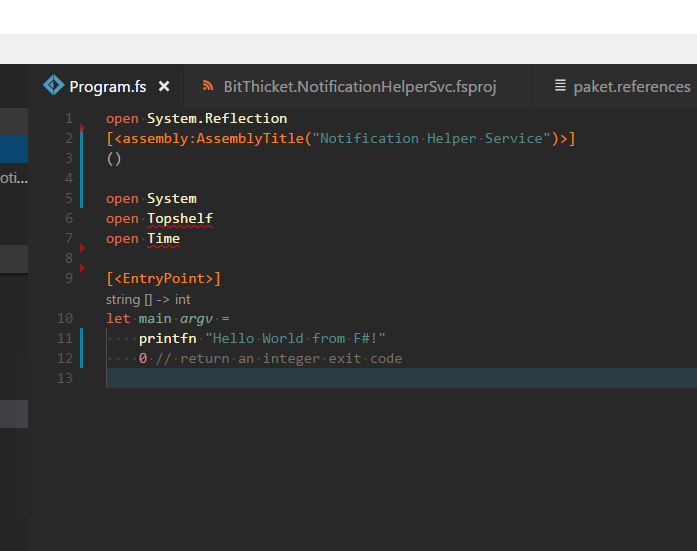
I have tried creating MSBuild14-style projects using VS, MSBuild15-style with dotnet, and I have tried reloading projects after restoring packages (both with nuget and paket), and they all end up like this.
 aggieben
on 22 Jul 2017
aggieben
on 22 Jul 2017
@aggieben Try modifying the .fsproj file (add a space) and saving it. That seems to trigger ionide to re-read the references. Same thing with nuget, but you have to do a restore first (to update the project assets?), before touching the .fsproj. In my case, I am using a solution with projects in sub folders and keep running into this. It only seems to work if modify the .fsproj in VS Code. (Pain to emulate touch in Windows.)
 kspeakman
on 9 Aug 2017
kspeakman
on 9 Aug 2017
@kspeakman thanks for the tip. I think the issue turned out to be one of having the right versions of prerequisites installed, although out of 4 environments I have, 2 are still broken, even with the prerequisites, so I'm not sure what else is going on. See #453 for more context.
aggieben
on 17 Aug 2017
Yes, can repro.
ionide for now (better in FSAC) should reload the project after the restore, after the project.assets.json is changed
enricosada
on 3 Oct 2017
Fixed by 3.14
Krzysztof-Cieslak
on 27 Nov 2017
fwiw I have Ionide-fsharp 3.29 running on macOS. @kspeakman's tip of adding a space to the .fsproj resolved the references correctly.
 deecewan
on 27 Oct 2018
deecewan
on 27 Oct 2018
Related issues
 isaacabraham
·
5Comments
isaacabraham
·
5Comments
 dustinmoris
·
3Comments
isaacabraham
·
5Comments
dustinmoris
·
3Comments
isaacabraham
·
5Comments
 gsomix
·
6Comments
isaacabraham
·
4Comments
gsomix
·
6Comments
isaacabraham
·
4Comments
Most helpful comment
@aggieben Try modifying the .fsproj file (add a space) and saving it. That seems to trigger ionide to re-read the references. Same thing with nuget, but you have to do a restore first (to update the project assets?), before touching the .fsproj. In my case, I am using a solution with projects in sub folders and keep running into this.
It only seems to work if modify the .fsproj in VS Code.(Pain to emulatetouchin Windows.)