Ionic-framework: bug: scroll assist on ion-input and ion-textarea not (always) working
Bug Report
Ionic version:
[x] 5.1.0
Current behavior:
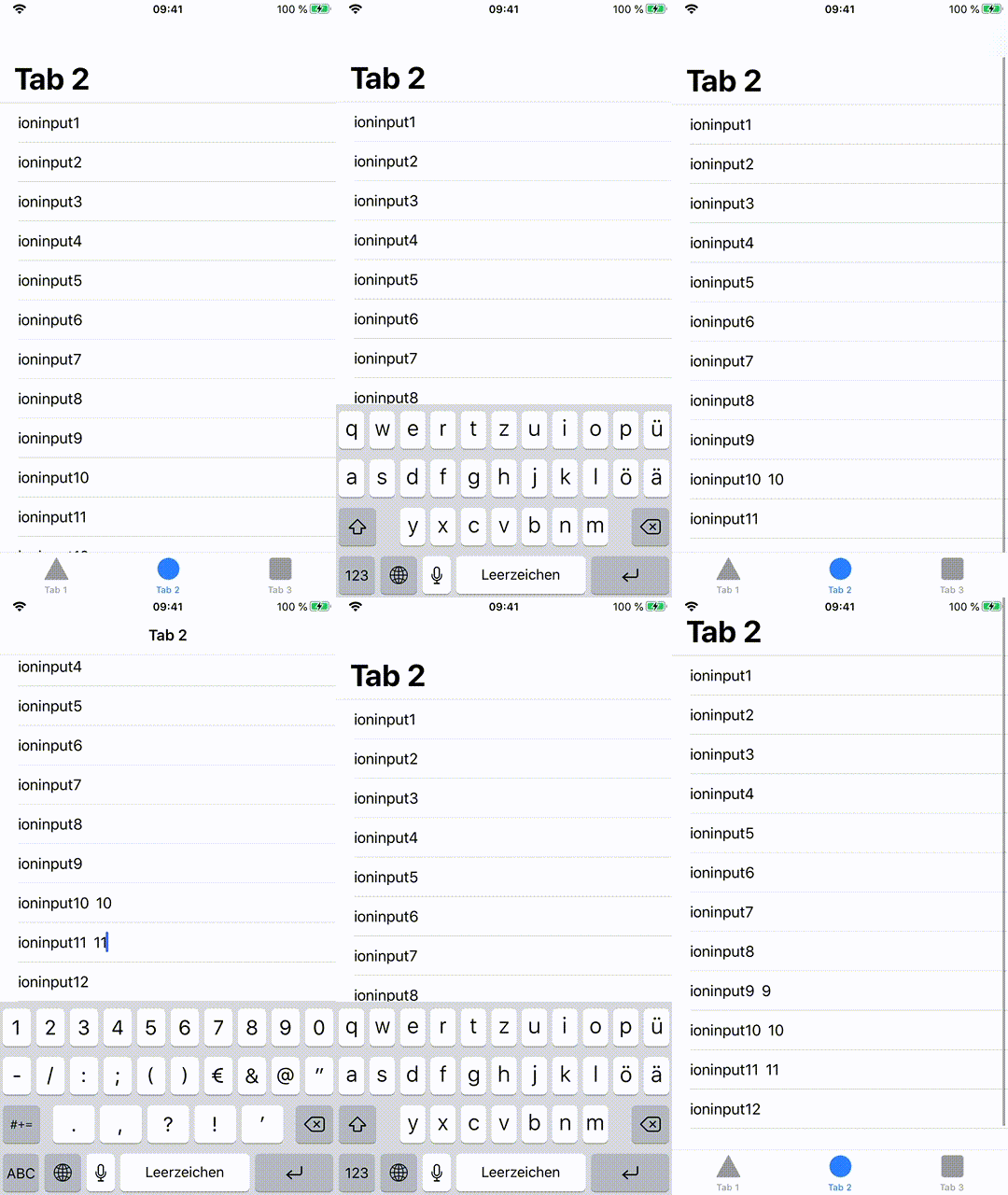
Clicking inside an input field does not scroll the page up so that the input field becomes visible.
Expected behavior:
Page should be scrolled up until input is visible
Steps to reproduce:
Related code:
https://github.com/capc0/ion-textarea-scroll-assist
Other information:
Unfortunatly it is not always reproduceable.
Here is an example with <ion-input> when inputing in items 10 and 11 the view is only scrolled after typing. should be scrolled after the click into the input instead.

and another one with <ion-textarea> when inputing in items 10 and 11,

Ionic info:
Ionic:

   Ionic CLI                     : 6.2.1 (/usr/local/lib/node_modules/@ionic/cli)
   Ionic Framework               : @ionic/angular 5.1.0
   @angular-devkit/build-angular : 0.803.26
   @angular-devkit/schematics    : 8.3.26
   @angular/cli                  : 8.3.26
   @ionic/angular-toolkit        : 2.2.0

Cordova:

   Cordova CLI       : 9.0.0 ([email protected])
   Cordova Platforms : ios 5.1.1
   Cordova Plugins   : cordova-plugin-ionic-keyboard 2.2.0, cordova-plugin-ionic-webview 4.2.1, (and 4 other plugins)

Utility:

   cordova-res (update available: 0.14.0) : 0.11.0
   native-run (update available: 1.0.0)   : 0.2.9

System:

   ios-deploy : 1.9.4
   ios-sim    : 8.0.2
   NodeJS     : v10.16.3 (/usr/local/bin/node)
   npm        : 6.14.2
   OS         : macOS Catalina
   Xcode      : Xcode 11.4 Build version 11E146
I have found many other issues regarding scroll assist, but they were all closed so I thought it would be better to open a new one instead of re-opening one of the old issues.
 capc0
capc0
All 11 comments
I have the same issue, occurs since update from 5.0.7 to 5.1.0
 Spinnenzunge
on 2 May 2020
Spinnenzunge
on 2 May 2020
Thanks for the issue. Can you try the following dev build and let me know if it resolves the issue?
npm i @ionic/[email protected]
 liamdebeasi
on 4 May 2020
liamdebeasi
on 4 May 2020
For textareas it works in 90% of cases.
For <ion-input> the fix did not work.
capc0
on 5 May 2020
@capc0 Can you provide some step to reproduce the ion-input behavior?
liamdebeasi
on 6 May 2020
@liamdebeasi I just use the repo I linked above, navigate to Tab 2 and focus the inputs at the bottom of the screen. Serving on a iPhone device. Is that not reproduceable for you in that way?
capc0
on 6 May 2020
What version of iOS are you testing on?
liamdebeasi
on 6 May 2020
13.4.1 (17E262)
edit: I just noticed the repo did not have the changed ionic version pushed. Just pushed it again with @ionic/[email protected]installed
edit2: on an iPhone 6s it is always reproduceable for me. Did not check a larger device like Xs yet. Maybe you have to add more inputs on devices with a larger screen (so that you have to scroll down to see all) to reproduce the issue.
capc0
on 6 May 2020
Thanks! Can you try this dev build:
npm i @ionic/[email protected]
liamdebeasi
on 6 May 2020
That version works great :) Thanks.
capc0
on 7 May 2020
Thanks for the issue. This has been resolved via https://github.com/ionic-team/ionic/pull/21206, and a fix will be available in an upcoming release of Ionic Framework.
liamdebeasi
on 11 May 2020
Thanks for the issue! This issue is being locked to prevent comments that are not relevant to the original issue. If this is still an issue with the latest version of Ionic, please create a new issue and ensure the template is fully filled out.
![ionitron-bot[bot] picture](https://avatars1.githubusercontent.com/in/8640?v=4&s=40) ionitron-bot[bot]
on 10 Jun 2020
ionitron-bot[bot]
on 10 Jun 2020
Related issues
 BilelKrichen
·
3Comments
BilelKrichen
·
3Comments
 fdnhkj
·
3Comments
fdnhkj
·
3Comments
 alan-agius4
·
3Comments
alan-agius4
·
3Comments
 vswarte
·
3Comments
vswarte
·
3Comments
 manucorporat
·
3Comments
manucorporat
·
3Comments