Ionic-framework: bug: menu animation is not rtl-aware
Bug Report
Ionic version:
5.4.1
Current behavior:
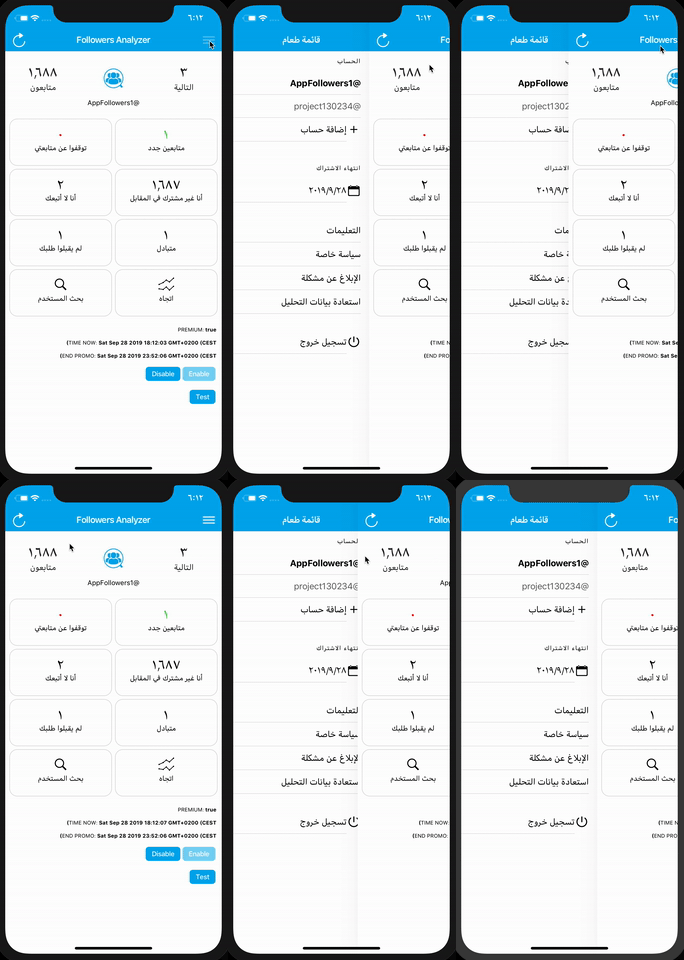
Setting the RTL dynamically (document.dir = "rtl"), the menu is opened from the wrong side, it works instead if you set dir = "rtl" statically in the main HTML tag of the index.html
Ionic info:
Ionic:
Ionic CLI : 5.4.1 (/usr/local/lib/node_modules/ionic)
Ionic Framework : @ionic/angular 4.10.0
@angular-devkit/build-angular : 0.13.9
@angular-devkit/schematics : 7.3.9
@angular/cli : 7.3.9
@ionic/angular-toolkit : 1.5.1
Capacitor:
Capacitor CLI : 1.0.0
@capacitor/core : 1.0.0
Cordova:
Cordova CLI : 9.0.0 ([email protected])
Cordova Platforms : android 8.1.0, ios 5.0.1
Cordova Plugins : cordova-plugin-ionic-keyboard 2.1.3, cordova-plugin-ionic-webview 4.0.1, (and 20 other plugins)
Utility:
cordova-res : 0.3.0 (update available: 0.6.0)
native-run : 0.2.8
System:
ios-sim : 8.0.2
NodeJS : v10.15.0 (/usr/local/bin/node)
npm : 6.11.2
OS : macOS Mojave
Xcode : Xcode 10.3 Build version 10G8
 LiveXenon
All 5 comments
Hello @LiveXenon,
Thanks for the issue. Have you found a solution for that I have the same problem?
 saoud77
on 10 Apr 2020
saoud77
on 10 Apr 2020
I also have the same problem, in this case I had to set manually the "side" attribute of the menu to "start", however if you are changing from translation dynamically, that might become a problem
 beckmx
on 13 Jul 2020
beckmx
on 13 Jul 2020
Thanks for the issue. The problem here is that the animation that shows/hides the menu is a) not RTL-aware and b) not reactive, so changing LTR/RTL modes on the fly will not update the animation.
 liamdebeasi
on 2 Nov 2020
liamdebeasi
on 2 Nov 2020
Just in case if this could help, forcing the ion-menu to be destroyed and re-created when changing the direction seems to be a valid workaround for now.
Please take a look at this StackBlitz demo: https://stackblitz.com/edit/workaround-ionic-issue-19489

In that demo, I'm creating two side menus but only one of them is rendered based on the value of platform.isRTL. Both ion-menu are identical – the *ngIf is actually the workaround for the issue since it destroys and re-creates the ion-menu.
<ion-app>
  <!--
    We can declare the content of the side menu like this
    so we can reuse it for both ion-menu without duplicating
    the code.
  -->
  <ng-template #sideMenuTemplate>
    <ion-header>
      <ion-toolbar>
        <ion-title>Side Menu</ion-title>
      </ion-toolbar>
    </ion-header>
    <ion-content>
      <ion-list>
        <ion-item>Menu Item 1</ion-item>
        <ion-item>Menu Item 2</ion-item>
        <ion-item>Menu Item 3</ion-item>
        <ion-item>Menu Item 4</ion-item>
        <ion-item>Menu Item 5</ion-item>
      </ion-list>
    </ion-content>
  </ng-template>

  <ion-menu *ngIf="platform.isRTL" contentId="main" side="start">
    <ng-container *ngTemplateOutlet="sideMenuTemplate"></ng-container>
  </ion-menu>

  <ion-menu *ngIf="!platform.isRTL" contentId="main" side="start">
    <ng-container *ngTemplateOutlet="sideMenuTemplate"></ng-container>
  </ion-menu>

  <ion-router-outlet id="main"></ion-router-outlet>
</ion-app>
 sebaferreras
on 11 Nov 2020
sebaferreras
on 11 Nov 2020
Just in case if this could help, forcing the
ion-menuto be destroyed and re-created when changing the direction seems to be a valid workaround for now.Please take a look at this StackBlitz demo: https://stackblitz.com/edit/workaround-ionic-issue-19489
In that demo, I'm creating two side menus but only one of them is rendered based on the value of
platform.isRTL. Bothion-menuare identical – the*ngIfis actually the workaround for the issue since it destroys and re-creates theion-menu.<ion-app> <!-- We can declare the content of the side menu like this so we can reuse it for both ion-menu without duplicating the code. --> <ng-template #sideMenuTemplate> <ion-header> <ion-toolbar> <ion-title>Side Menu</ion-title> </ion-toolbar> </ion-header> <ion-content> <ion-list> <ion-item>Menu Item 1</ion-item> <ion-item>Menu Item 2</ion-item> <ion-item>Menu Item 3</ion-item> <ion-item>Menu Item 4</ion-item> <ion-item>Menu Item 5</ion-item> </ion-list> </ion-content> </ng-template> <ion-menu *ngIf="platform.isRTL" contentId="main" side="start"> <ng-container *ngTemplateOutlet="sideMenuTemplate"></ng-container> </ion-menu> <ion-menu *ngIf="!platform.isRTL" contentId="main" side="start"> <ng-container *ngTemplateOutlet="sideMenuTemplate"></ng-container> </ion-menu> <ion-router-outlet id="main"></ion-router-outlet> </ion-app>
Thank you @sebaferreras Ya, I did that. And it worked.
saoud77
on 11 Nov 2020
Related issues
 vswarte
·
3Comments
vswarte
·
3Comments
 aslamj
·
3Comments
aslamj
·
3Comments
 giammaleoni
·
3Comments
giammaleoni
·
3Comments
 Nick-The-Uncharted
·
3Comments
Nick-The-Uncharted
·
3Comments
 SebastianGiro
·
3Comments
SebastianGiro
·
3Comments