Ionic-framework: ion-item-sliding: options of the opposite direction of sliding is shown too
Bug Report
Ionic version:
[x] 4.0.2
Current behavior:
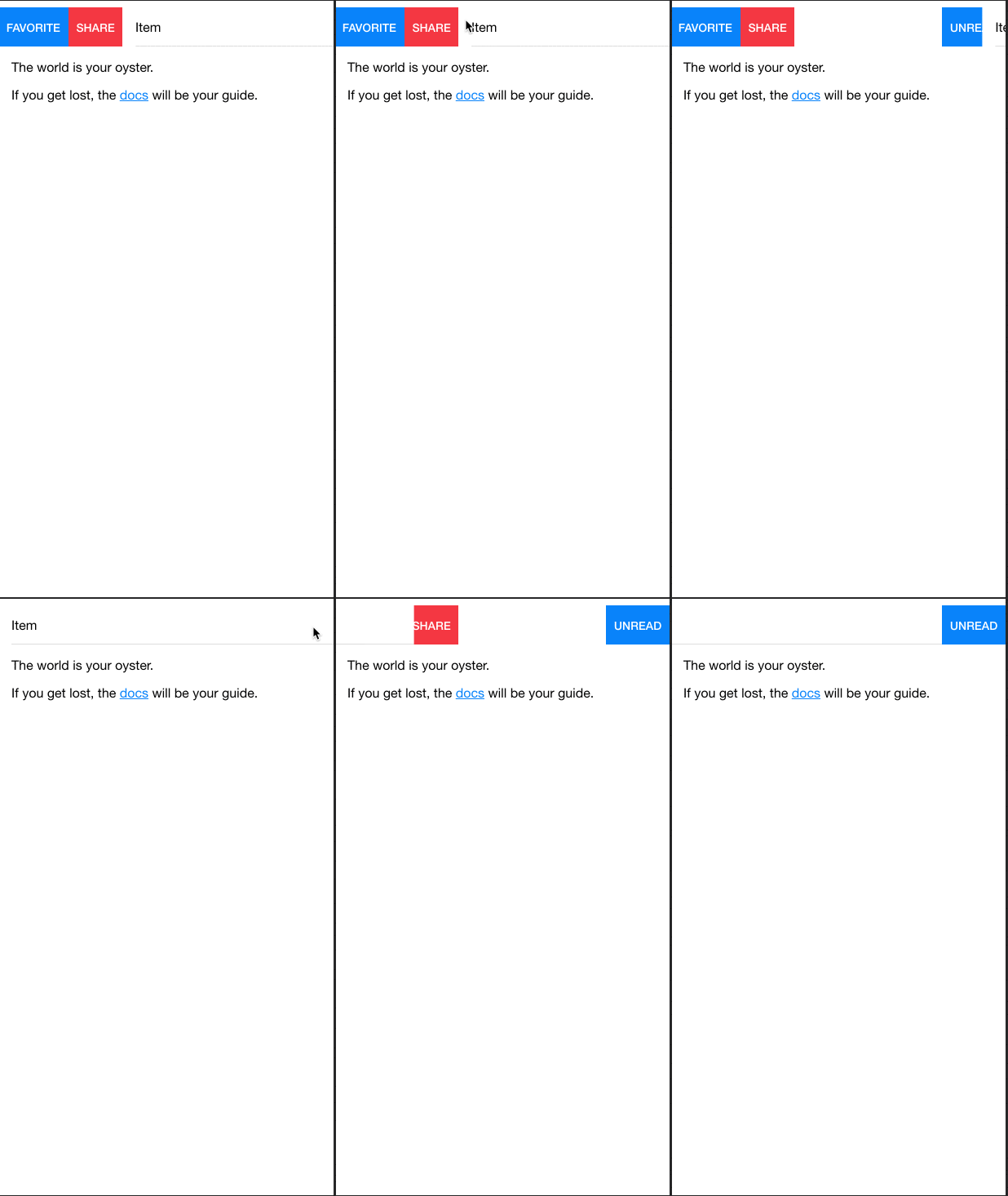
adding an ion-item-sliding to an ion-item with ion-item-options both sides, when sliding the item from left to right (or vise versa) to the end of the item, the right icons shown up while it should not.
so now both options from both sides will be shown in any swiping direction
Expected behavior:
when swiping from left to right or vise versa, only icons from the side i`m sliding should be shown
Steps to reproduce:
- create new project with version 4.0.2.
in app.component.html add the sample example found in ionic documentation regards ion-item-sliding
swipe from left to right or vise versa, issue will be generated.
Other information:
the issue was not presented in version 4 beta 7
Ionic info:
Ionic:

   ionic (Ionic CLI)             : 4.10.3 (C:\Users\sshalaby\AppData\Roaming\npm\node_modules\ionic)
   Ionic Framework               : @ionic/angular 4.0.2
   @angular-devkit/build-angular : 0.12.4
   @angular-devkit/schematics    : 7.3.2
   @angular/cli                  : 7.3.1
   @ionic/angular-toolkit        : 1.4.0

Cordova:

   cordova (Cordova CLI) : 8.1.2 ([email protected])
   Cordova Platforms     : not available
   Cordova Plugins       : not available

System:

   NodeJS : v10.15.2 (C:\Program Files\nodejs\node.exe)
   npm    : 6.9.0
   OS     : Windows 10
 SherifMoShalaby
All 7 comments
Hi there,
Thanks for the issue. Is this the behavior you are describing?
 liamdebeasi
on 20 Mar 2019
liamdebeasi
on 20 Mar 2019
Hi there,
Thanks for the issue. Is this the behavior you are describing?
Yes.
SherifMoShalaby
on 20 Mar 2019
This issue has been labeled as help wanted. This label is added to issues that we believe would be good for contributors.
If you'd like to work on this issue, please comment here letting us know that you would like to submit a pull request for it. This helps us to keep track of the pull request and make sure there isn't duplicated effort.
For a guide on how to create a pull request and test this project locally to see your changes, see our contributing documentation.
Thank you!
![ionitron-bot[bot] picture](https://avatars1.githubusercontent.com/in/8640?v=4&s=40) ionitron-bot[bot]
on 2 Apr 2019
ionitron-bot[bot]
on 2 Apr 2019
The issue is most likely somewhere in this:
.item-sliding-active-slide {
@include rtl() {
&.item-sliding-active-options-start ion-item-options:not(.item-options-end) {
width: 100%;
visibility: visible;
}
}
ion-item-options {
display: flex;
}
&.item-sliding-active-options-start .item-options-start,
&.item-sliding-active-options-end ion-item-options:not(.item-options-start) {
width: 100%;
visibility: visible;
}
}
 brandyscarney
on 2 Apr 2019
brandyscarney
on 2 Apr 2019
The issue is that the opposite item-options are not hidden so both are displayed. I just opened PR #17986 that remedies that by hiding the opposite sides item-options
  &.item-sliding-active-options-end .item-options-start,
  &.item-sliding-active-options-start .item-options-end {
    display: none;
  }
I initially had added the fix in item-sliding.scss but I think @brandyscarney suggestion of the item-options.scss file is much better.
 masimplo
on 6 Apr 2019
masimplo
on 6 Apr 2019
Merged in and fixed by https://github.com/ionic-team/ionic/commit/f13722cc206ce7f9661647c710fdc21e7c96eb72. This will be in the 4.3.0 release, thank you!
brandyscarney
on 16 Apr 2019
Thanks for the issue! This issue is being locked to prevent comments that are not relevant to the original issue. If this is still an issue with the latest version of Ionic, please create a new issue and ensure the template is fully filled out.
ionitron-bot[bot]
on 16 May 2019
Related issues
 fdnhkj
·
3Comments
fdnhkj
·
3Comments
 danbucholtz
·
3Comments
brandyscarney
·
3Comments
danbucholtz
·
3Comments
brandyscarney
·
3Comments
 gio82
·
3Comments
gio82
·
3Comments
 BilelKrichen
·
3Comments
BilelKrichen
·
3Comments
Most helpful comment
The issue is that the opposite item-options are not hidden so both are displayed. I just opened PR #17986 that remedies that by hiding the opposite sides item-options
I initially had added the fix in
item-sliding.scssbut I think @brandyscarney suggestion of theitem-options.scssfile is much better.