Ionic-framework: ion-fab in tab bar 'edge' position incorrect REDUX
Bug Report
This is a repost of https://github.com/ionic-team/ionic/issues/17130 as suggested by @brandyscarney
It was closed as dupe of https://github.com/ionic-team/ionic/issues/16780 but is in fact not fixed.
Ionic version:
[x] 4.0.2
Current behavior:
The fab button sits between the footer and the bottom of the screen
Expected behavior:
The fab button should sit between footer and content, like it used to.
This used to work with beta13 and earlier.
Steps to reproduce:
Create fresh ionic tabs project $ ionic start myApp tabs
Related code:
Add FAB to tabs.page.html as illustrated in doc https://ionicframework.com/docs/api/fab/
<ion-fab vertical="bottom" horizontal="end" edge slot="fixed">
    <ion-fab-button>
      <ion-icon name="add">
      </ion-icon>
    </ion-fab-button>
  </ion-fab>

Ionic info:
Ionic:

   ionic (Ionic CLI)             : 4.10.3 (/Users/run-e/.npm-global/lib/node_modules/ionic)
   Ionic Framework               : @ionic/angular 4.0.2
   @angular-devkit/build-angular : 0.12.4
   @angular-devkit/schematics    : 7.2.4
   @angular/cli                  : 7.2.4
   @ionic/angular-toolkit        : 1.4.0

System:

   NodeJS : v8.11.2 (/usr/local/bin/node)
   npm    : 6.7.0
   OS     : macOS Mojave
 Frotty
All 11 comments
Thanks for creating a new issue! So I am able to reproduce this but I have a bit different results than you do with the fab being behind the tab-bar:

However, this is the expected behavior as the "edge" should only apply to a fab when they are used next to a header or footer. If there is no header or footer it has nothing to attach to. Also, this doesn't seem like a great UX practice for us to support out of the box. If we place a fab on top of a tab-bar, how will the user press the tab button? The fab button will be blocking most of it. I can't find any examples in the spec of where this is used. I'm curious why you don't want the following, with the fab on top of the tab-bar (no edge):

Please let me know, thanks!
 brandyscarney
on 6 Mar 2019
brandyscarney
on 6 Mar 2019
Thanks for creating a new issue! So I am able to reproduce this but I have a bit different results than you do with the fab being behind the tab-bar:
Thanks for your response.
I think your screenshot only happens if you add the FAB to the tab page, and not the tab bar. is that the case?
I posted similar results in the old ticket:
I want to add the FAB to the tabbar, i.e. tabs.page.html like so:
<ion-tabs>
  <ion-fab vertical="bottom" horizontal="end" edge slot="fixed">
    <ion-fab-button>
      <ion-icon name="add">
      </ion-icon>
    </ion-fab-button>
  </ion-fab>
  <ion-tab-bar slot="bottom">
    <ion-tab-button tab="tab1">
      <ion-icon name="flash"></ion-icon>
      <ion-label>Tab One</ion-label>
    </ion-tab-button>

    <ion-tab-button tab="tab2">
      <ion-icon name="apps"></ion-icon>
      <ion-label>Tab Two</ion-label>
    </ion-tab-button>

    <ion-tab-button tab="tab3">
      <ion-icon name="send"></ion-icon>
      <ion-label>Tab Three</ion-label>
    </ion-tab-button>
  </ion-tab-bar>
</ion-tabs>
Which makes it look like so

As you can see from the old screenshot, we want to replace 1 tab with the FAB, having it available on all pages and having enough space above to fade in a sub menu.
If we have no other option we will make it hover above the tab bar, but as mentioned this used to work perfectly with beta13 and earlier 😿
Frotty
on 6 Mar 2019
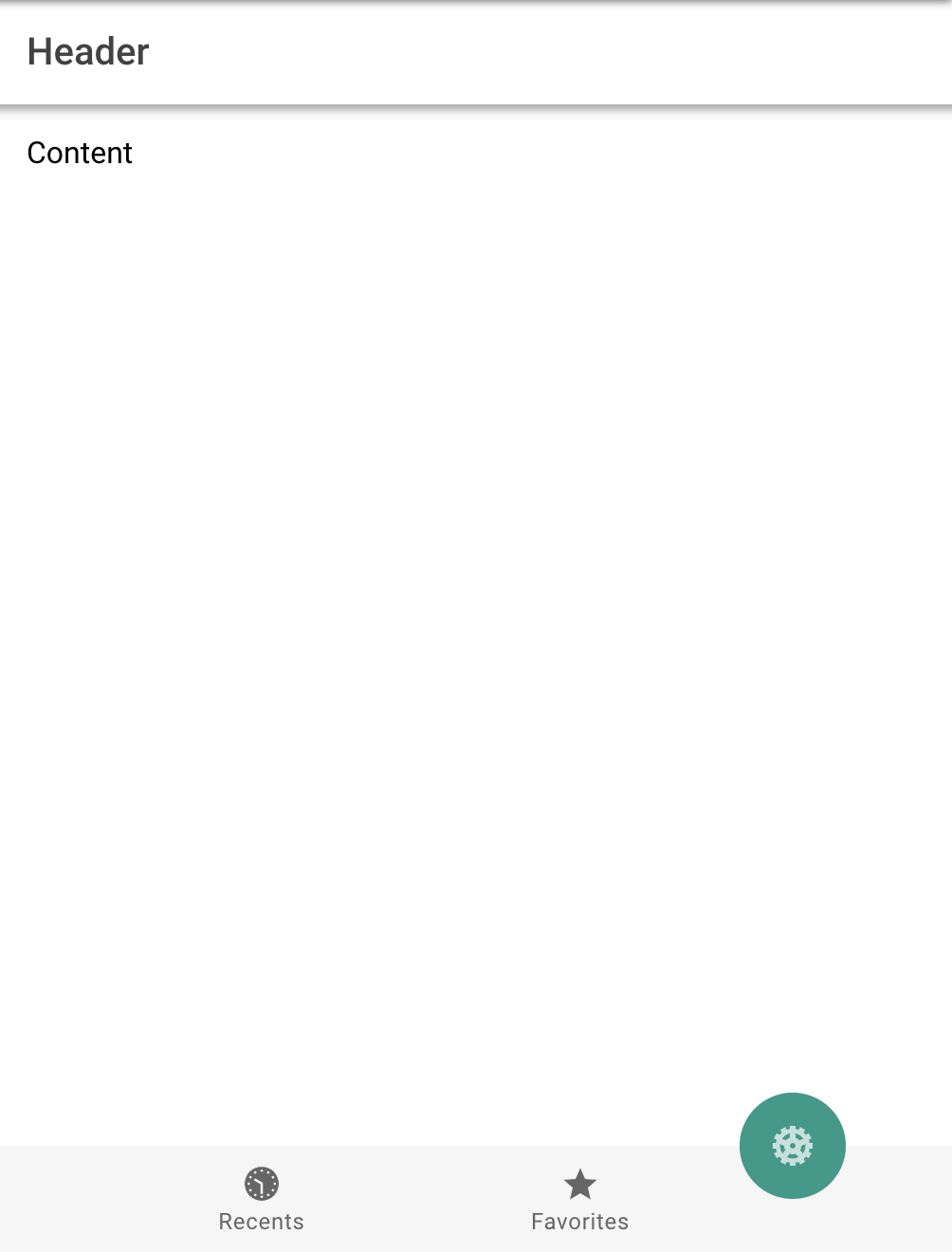
Ohhh I see! I think instead of using a fab button in this case, you could just customize the tab button. Would that work? Something like the following as an example:
<ion-tab-bar slot="bottom" selected-tab="tab-three" class="custom-all">
  <ion-tab-button tab="tab-one">
    <ion-icon name="clock"></ion-icon>
    <ion-label>Recents</ion-label>
  </ion-tab-button>

  <ion-tab-button tab="tab-two">
    <ion-icon name="star" class="custom-icon"></ion-icon>
    <ion-label>Favorites</ion-label>
  </ion-tab-button>

  <ion-tab-button tab="tab-three">
    <ion-icon name="cog"></ion-icon>
  </ion-tab-button>
</ion-tab-bar>
.custom-all {
  margin-top: 30px;
  contain: none;

  --background: #f6f6f6;
  --color-selected: #1b8472;

  --border: none;
}

.custom-all ion-tab-button:nth-child(3) {
  --background: #1b8472;
  --color: rgba(255, 255, 255, 0.7);
  --color-selected: #ffffff;

  border-radius: 50%;
  max-width: 56px;
  height: 56px;
  margin-bottom: 56px;
}
brandyscarney
on 6 Mar 2019
@brandyscarney thanks for your response.
I guess it would be an option, but it's a bunch of more work since I'm using an <ion-fab-list> to display the sub menu entries.
Your version lacks all the FAB things, like animation, list, etc. which would have to be added manually (?).
e: Also it will throw a routing error every time the tab is clicked since it has no route.
Frotty
on 8 Mar 2019
Ahh okay! So the problem with the code you provided is the fixed slot only exists on the ion-content element, see the source code here: https://github.com/ionic-team/ionic/blob/master/core/src/components/content/content.tsx#L324
Simplified version:
render() {
  return [
    <div class={{ 'inner-scroll': true }}>
      <slot></slot>
    </div>,
    <slot name="fixed"></slot>
  ];
}
Here is the documentation on the content slots: https://ionicframework.com/docs/api/content#slots
The slot="fixed" will have no effect inside of an ion-tabs because it doesn't contain a slot named fixed. Instead, it will go in the default slot for the ion-tabs component, which is inside of the .tabs-inner div and does not overlay the tab-bar:
<slot name="top"></slot>,
<div class="tabs-inner">
  <slot></slot>
</div>,
<slot name="bottom"></slot>
Tab slots: https://ionicframework.com/docs/api/tabs#slots
You could place the ion-fab in the bottom slot to put it with the tab-bar, but the edge property won't work because it pushes it further down (where it expects a footer to be) which is the opposite of what you want. However, this is something that could be accomplished with a bit of custom CSS:
<ion-tabs>
    <ion-fab slot="bottom" class="custom-fab">
      <ion-fab-button>Share</ion-fab-button>

      <ion-fab-list side="top">
        <ion-fab-button><ion-icon name="logo-facebook"></ion-icon></ion-fab-button>
        <ion-fab-button><ion-icon name="logo-twitter"></ion-icon></ion-fab-button>
        <ion-fab-button><ion-icon name="logo-youtube"></ion-icon></ion-fab-button>
      </ion-fab-list>
    </ion-fab>

    ...
</ion-tabs>
.custom-fab {
  bottom: 28px;
  right: 28px;
}
Here's a Codepen example: https://codepen.io/brandyscarney/pen/qvmvNK?editors=1100
brandyscarney
on 8 Mar 2019
Ahh okay! So the problem with the code you provided is the fixed slot only exists on the ion-content element, see the source code here
Back when it used to work I didn't use the 'fixed' slot. I only did because docs here say "Should be used with a fixed slot." in edge doc.
You could place the ion-fab in the bottom slot to put it with the tab-bar, but the edge property won't work because it pushes it further down (where it expects a footer to be) which is the opposite of what you want. However, this is something that could be accomplished with a bit of custom CSS:
This is my workaround right now. However that custom CSS does not work correctly on the new iphones:
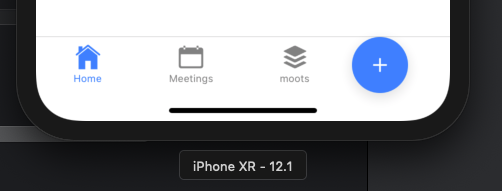
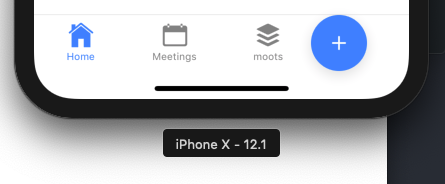
I didn't find a way to make the CSS properly work on iphone X and higher.
Frotty
on 11 Mar 2019
@brandyscarney any update on this?
Frotty
on 18 Mar 2019
I did like this....
I left an empty tab button to take up space and outside the

Result:

 pedroleao87
on 16 Sep 2019
pedroleao87
on 16 Sep 2019
Yea there are workarounds, but this used to work perfectly out of the box, as it should.
@brandyscarney stopped responding so I suppose this is a "won't fix".
Frotty
on 18 Sep 2019
Oh. We so much need this functionality without having to come up with custom CSS.
 zulkarnainshah
on 24 Apr 2020
zulkarnainshah
on 24 Apr 2020
The workaround suggested has its own issues. I am not able to scroll the ion-content after implementing the suggested workaround
zulkarnainshah
on 24 Apr 2020
Related issues
 fdnhkj
·
3Comments
fdnhkj
·
3Comments
 aslamj
·
3Comments
aslamj
·
3Comments
 giammaleoni
·
3Comments
giammaleoni
·
3Comments
 Macstyg
·
3Comments
Macstyg
·
3Comments
 SebastianGiro
·
3Comments
SebastianGiro
·
3Comments