Ionic-framework: ion-label does not float properly with ion-textarea
Bug Report
Ionic version:
[x] 4.x
Current behavior:
When a default value is present for an ion-textarea, the ion-label does not float properly. Ion-item css styles shows the css class item-input instead of item-has-value. This behavior is observed using latest beta.16 of ionic/angular

The behavior corrects when focus has been applied to the ion-textarea.

Expected behavior:
When an ion-textarea has a value, the label should float properly.
Steps to reproduce:
Related code:
<ion-list inset>
            <ion-item no-padding>
                <ion-label position="floating">Status</ion-label>
                <ion-select formControlName="status">
                    <ion-select-option value="New">New</ion-select-option>
                    <ion-select-option value="Processing">Processing</ion-select-option>
                    <ion-select-option value="Accepted">Accepted</ion-select-option>
                    <ion-select-option value="Rejected">Rejected</ion-select-option>
                    <ion-select-option value="Cancelled">Cancelled</ion-select-option>
                </ion-select>
            </ion-item>
            <ion-item no-padding>
                <ion-label position="floating">Incident Date</ion-label>
                <ion-datetime formControlName="incidentDate" displayFormat="DD MMM YYYY"></ion-datetime>
            </ion-item>
            <ion-item no-padding>
                <ion-label position="floating">Description</ion-label>
                <ion-textarea formControlName="description" type="text" rows="5" required="true"></ion-textarea>
            </ion-item>
</ion-list>
Other information:
Ionic info:
Ionic:

   ionic (Ionic CLI)             : 4.4.0
   Ionic Framework               : @ionic/angular 4.0.0-beta.16
   @angular-devkit/build-angular : 0.12.3
   @angular-devkit/schematics    : 7.0.7
   @angular/cli                  : 7.0.7
   @ionic/angular-toolkit        : 1.2.0

System:

   NodeJS : v8.12.0 (C:\Program Files\nodejs\node.exe)
   npm    : 6.4.1
   OS     : Windows 10
 rianne-pagtalunan
All 11 comments
Hi @rianne-pagtalunan, facing the same problem. Got any solution?
 akki-jat
on 2 Mar 2019
akki-jat
on 2 Mar 2019
hi @akki-jat, still nothing. I've switched to using fixed/stacked labels when text-area has a value as a temporary workaround.
rianne-pagtalunan
on 5 Mar 2019
@rianne-pagtalunan I am using a hack. Just disable then set value and enable the textarea JS/TS code.
akki-jat
on 7 Mar 2019
Same problem
 MaxiAringoli
on 27 Mar 2019
MaxiAringoli
on 27 Mar 2019
Thanks for the issue! I believe this is related to Angular forms. Could you test to see if it works setting the value with ngModel?
 brandyscarney
on 11 Apr 2019
brandyscarney
on 11 Apr 2019
We did this
<ion-list>
    <ion-item>
        <ion-label position="floating">Test 1</ion-label>
        <ion-textarea clearInput></ion-textarea>
    </ion-item>
    <ion-item>
        <ion-label position="floating">Test 2</ion-label>
        <ion-textarea clearInput value="YES"></ion-textarea>
    </ion-item>
    <ion-item>
        <ion-label position="floating">Test 3</ion-label>
        <ion-textarea clearInput [value]="angular"></ion-textarea>
    </ion-item>
    <ion-item>
        <ion-label position="floating">Test 4</ion-label>
        <ion-textarea clearInput [value]="angularAsync"></ion-textarea>
    </ion-item>
    <ion-item>
        <ion-label position="floating">Test 5</ion-label>
        <ion-textarea clearInput [(ngModel)]="angularNgModel"></ion-textarea>
    </ion-item>
    <ion-item>
        <ion-label position="floating">Test 6</ion-label>
        <ion-textarea clearInput [(ngModel)]="angularAsyncNgModel"></ion-textarea>
    </ion-item>
</ion-list>
And this is the result:
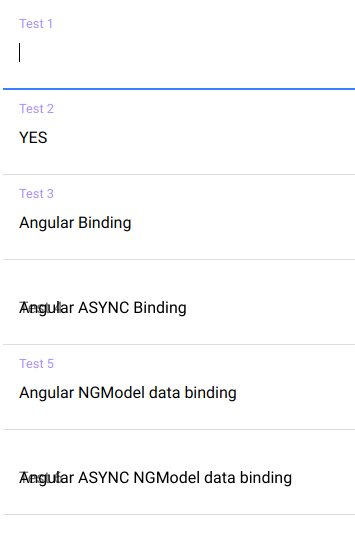
As you can see if using angular or ngmodel binding which is async the floating label is not working. All the other use cases are working
 mburger81
on 12 Apr 2019
mburger81
on 12 Apr 2019
Thanks so much @mburger81! That helps a lot. I confirmed that this happens to textarea with a setTimeout on it in core, without Angular. It does not happen to the ion-input. Here's a Codepen reproducing it: https://codepen.io/brandyscarney/pen/XQgwJM
I'll add it to the project. I think the problem is as simple as this.emitStyle() not being called on value change:
  @Watch('value')
  protected valueChanged() {
    const nativeInput = this.nativeInput;
    const value = this.getValue();
    if (nativeInput && nativeInput.value !== value) {
      nativeInput.value = value;
    }
    this.ionChange.emit({ value });
  }
I'll take a quick look at this.
brandyscarney
on 12 Apr 2019
That was definitely the problem, submitted a pull request with the fix: https://github.com/ionic-team/ionic/pull/18024
brandyscarney
on 12 Apr 2019
Try with value=" ". It should be working.
 gisngocthach
on 18 Apr 2019
gisngocthach
on 18 Apr 2019
version 4.3.0 definitely resolves the issue for us
mburger81
on 18 Apr 2019
Thanks for the issue! This issue is being locked to prevent comments that are not relevant to the original issue. If this is still an issue with the latest version of Ionic, please create a new issue and ensure the template is fully filled out.
![ionitron-bot[bot] picture](https://avatars1.githubusercontent.com/in/8640?v=4&s=40) ionitron-bot[bot]
on 18 May 2019
ionitron-bot[bot]
on 18 May 2019
Related issues
 RobFerguson
·
3Comments
RobFerguson
·
3Comments
 giammaleoni
·
3Comments
giammaleoni
·
3Comments
 Macstyg
·
3Comments
Macstyg
·
3Comments
 BilelKrichen
·
3Comments
BilelKrichen
·
3Comments
 vswarte
·
3Comments
vswarte
·
3Comments