Ionic-framework: ion-back-button goes to wrong route for tabs
Bug Report
Ionic version:
[x] 4.0.0
Current behavior:
How you can see below it goes to wrong tab. I've tried to figure it out with outlet and later with child routes but I failed twice.

Expected behavior:
Back button should redirects me to "profile2".
Steps to reproduce:
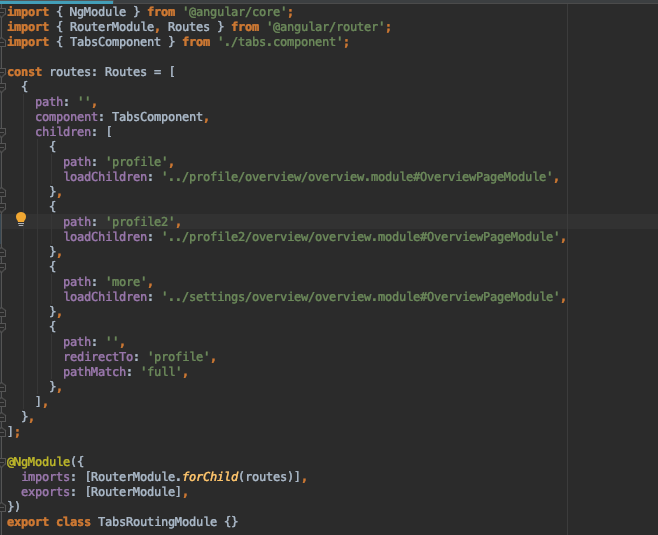
Related code:
Nothing special:
- at least two tabs
- another page in app route
Ionic info:
Ionic:

   ionic (Ionic CLI)             : 4.9.0 (/usr/local/lib/node_modules/ionic)
   Ionic Framework               : @ionic/angular 4.0.0
   @angular-devkit/build-angular : 0.12.3
   @angular-devkit/schematics    : 7.2.3
   @angular/cli                  : 7.2.3
   @ionic/angular-toolkit        : 1.2.2

Cordova:

   cordova (Cordova CLI) : 8.1.2 ([email protected])
   Cordova Platforms     : none
   Cordova Plugins       : cordova-plugin-ionic-keyboard 2.1.3, (and 2 other plugins)

System:

   NodeJS : v10.15.0 (/usr/local/bin/node)
   npm    : 6.4.1
   OS     : macOS Mojave
 rafalschmidt97
All 11 comments
This is indeed an issue and needs to be addressed.
At the moment I am working around it by adding/removing a subscription to the tabs change event on ionic view enter/leave, saving the last known tab and navigating to it when the view enters again.
Ionic does try to enforce the selection to the first tab so you see a small flicker while this happens. This can be solved by also attaching a subscription to the tabs change through the view template and if this event fires while the 1st subscription is closed then force selection to the last known tab instead. Jeez....
 georgechr
on 6 Feb 2019
georgechr
on 6 Feb 2019
Same problem here!
 victorcarvalhosp
on 12 Feb 2019
victorcarvalhosp
on 12 Feb 2019
I have the same problem. Can we expect a solution in the next release?
 juanmigonzalez
on 18 Feb 2019
juanmigonzalez
on 18 Feb 2019
I temporarily solved this with specific routerLink on ion-back-button - to force opening needed tab.
 EugeneNews
on 21 Feb 2019
EugeneNews
on 21 Feb 2019
duplicate of #15216
 thenaim
on 15 Mar 2019
thenaim
on 15 Mar 2019
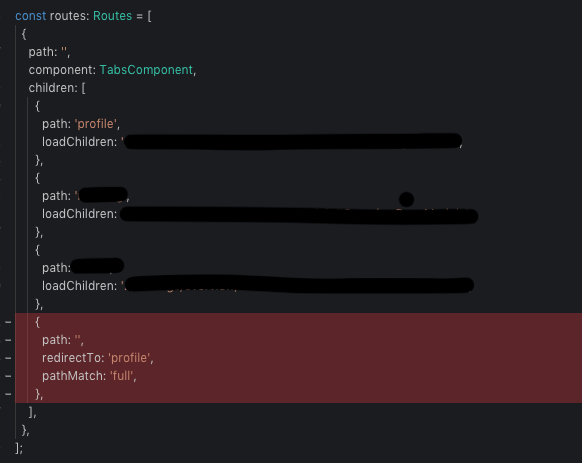
Solved by removing default route. Quite weird but it must be connected somehow with outlet maybe. Dunno 🤷♂️
rafalschmidt97
on 22 Mar 2019
Have same problem when using <ion-back-button></ion-back-button>
 JustasKuizinas
on 31 Mar 2019
JustasKuizinas
on 31 Mar 2019
Solved by removing default route. Quite weird but it must be connected somehow with outlet maybe. Dunno 🤷♂️
Thanks it work for me
 manojpatel0217
on 3 Apr 2019
manojpatel0217
on 3 Apr 2019
Hi everyone,
I have opened a PR that should resolve this issue: https://github.com/ionic-team/ionic/pull/18005
One of my colleagues will be reviewing it soon, but in the meantime if anyone would like to take a look and provide feedback, that would be great!
We appreciate your patience as we work to resolve this issue 🙂
 liamdebeasi
on 9 Apr 2019
liamdebeasi
on 9 Apr 2019
Hi there,
This issue has been resolved, and I have published a nightly build of Ionic with the fix. You can install it with npm i @ionic/angular@dev.
Please let me know if you are still running into any issues with this.
Thanks!
liamdebeasi
on 10 Apr 2019
Thanks for the issue! This issue is being locked to prevent comments that are not relevant to the original issue. If this is still an issue with the latest version of Ionic, please create a new issue and ensure the template is fully filled out.
![ionitron-bot[bot] picture](https://avatars1.githubusercontent.com/in/8640?v=4&s=40) ionitron-bot[bot]
on 10 May 2019
ionitron-bot[bot]
on 10 May 2019
Related issues
 Macstyg
·
3Comments
Macstyg
·
3Comments
 Nick-The-Uncharted
·
3Comments
Nick-The-Uncharted
·
3Comments
 brandyscarney
·
3Comments
brandyscarney
·
3Comments
 MrBokeh
·
3Comments
MrBokeh
·
3Comments
 aslamj
·
3Comments
aslamj
·
3Comments
Most helpful comment
Hi there,
This issue has been resolved, and I have published a nightly build of Ionic with the fix. You can install it with
npm i @ionic/angular@dev.Please let me know if you are still running into any issues with this.
Thanks!