Ionic-framework: [4.0.0-beta.16] ion-chip-button is not a known element
Bug Report
Ionic Info
Run ionic info from a terminal/cmd prompt and paste the output below.
Ionic:

   ionic (Ionic CLI)             : 4.3.1 (/usr/local/lib/node_modules/ionic)
   Ionic Framework               : @ionic/angular 4.0.0-beta.16
   @angular-devkit/build-angular : 0.10.6
   @angular-devkit/schematics    : 7.0.6
   @angular/cli                  : 7.0.6
   @ionic/angular-toolkit        : 1.2.0

Cordova:

   cordova (Cordova CLI) : 8.1.2 ([email protected])
   Cordova Platforms     : android 7.1.1, browser 5.0.4, ios 4.5.5
   Cordova Plugins       : cordova-plugin-ionic-keyboard 2.1.2, cordova-plugin-ionic-webview 2.0.3, (and 18 other plugins)

System:

   Android SDK Tools : 26.1.1 (/Users/heb/Library/Android/sdk)
   ios-deploy        : 1.9.4
   NodeJS            : v11.1.0 (/usr/local/Cellar/node/11.1.0/bin/node)
   npm               : 6.4.1
   OS                : macOS
   Xcode             : Xcode 10.1 Build version 10B61
Describe the Bug
With the beta.16 update the element ion-chip-button is suddenly unkonwn. ion-chip itself works, and with beta.15 or earlier the ion-chip-button also works.
Steps to Reproduce
Steps to reproduce the behavior:
- In a template file add an ion-chip with an ion-chip-button inside like this:
            <ion-chip>
                <ion-label>Chips</ion-label>
                <ion-chip-button>
                    <ion-icon name="close-circle"></ion-icon>
                </ion-chip-button>
            </ion-chip>
- Load the template in a browser
- Loading fails to the reported issuse, when downgrading to beta.15 it works
Expected Behavior
As nothing related to ion-chip was mentioned in the beta.16 release notes I assume that this should still work as before.
 hebra
hebra
All 8 comments
Same issue here too.
 devsaran
on 17 Nov 2018
devsaran
on 17 Nov 2018
You are right, it was not mentioned in changelog. They refactored ion-chip, see this commit: #16264
ion-chip-button and ion-chip-icon are removed, just use ion-button and ion-icon
 paulstelzer
on 18 Nov 2018
paulstelzer
on 18 Nov 2018
I am sorry for the inconvenience, we will update the CHANGELOG asap, leaving open until it's updated.
 manucorporat
on 18 Nov 2018
manucorporat
on 18 Nov 2018
ion-chip-button and ion-chip-icon are removed, just use ion-button and ion-icon
Using ion-button and ion-icon, will not create a round button, but a rectangular one.
<ion-chip *ngFor="let group of implementer.filterGroups">
<ion-label>
<ion-badge class="space-right">5</ion-badge>{{group.name}}
</ion-label>
<ion-button fill="solid" (click)="onRemoveGroupClick(group)">
<ion-icon color="light" name="close"></ion-icon>
</ion-button>
</ion-chip>

It will also not produce a click event. It seems, that the click event is consumed from the parent ion-chip element. When I click on it a ripple effect is shown.
 redwolf2
on 21 Nov 2018
redwolf2
on 21 Nov 2018
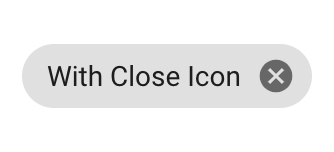
@redwolf2 We've removed that round chip-button style because it is no longer in the Material Design spec. You can see the web implementation of the new chip spec here.
I would recommend nesting an icon directly in the chip. You could use the close-circle icon for a similarly rounded icon.
<ion-chip>
  <ion-label>With Close Icon</ion-label>
  <ion-icon name="close-circle"></ion-icon>
</ion-chip>
 camwiegert
on 21 Nov 2018
camwiegert
on 21 Nov 2018
@camwiegert Ok, thx for the suggestion.
redwolf2
on 21 Nov 2018
@camwiegert I have issues with the chip when wrapping it inside an ion-item:
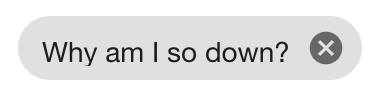
It happens because the ion-label gets a margin when inside an item:
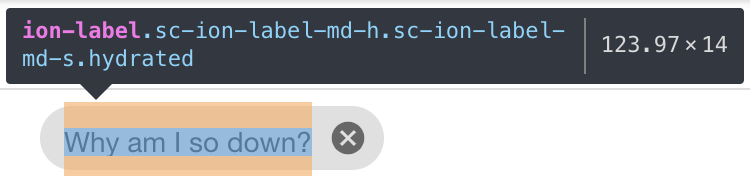
<ion-label no-margin> doesn't fix it, it has to be <ion-label style={{ margin: '0' }}>.
Edit: That doesn't actually fix it completely:
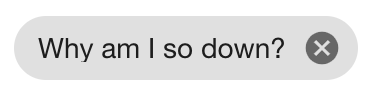
Somehow the "y" gets cut off as well... had to either add some vertical padding, or increase the line-height of the ion-label, or remove the overflow: hidden of the ion-label.
I opened #16422 for this.
Thanks for updating the changelog (we really rely on that while developing a production app on a beta version).
 simonhaenisch
on 22 Nov 2018
simonhaenisch
on 22 Nov 2018
Thanks for the issue! This issue is being locked to prevent comments that are not relevant to the original issue. If this is still an issue with the latest version of Ionic, please create a new issue and ensure the template is fully filled out.
![ionitron-bot[bot] picture](https://avatars1.githubusercontent.com/in/8640?v=4&s=40) ionitron-bot[bot]
on 22 Dec 2018
ionitron-bot[bot]
on 22 Dec 2018
Related issues
 danbucholtz
·
3Comments
danbucholtz
·
3Comments
 aslamj
·
3Comments
aslamj
·
3Comments
 fdnhkj
·
3Comments
manucorporat
·
3Comments
fdnhkj
·
3Comments
manucorporat
·
3Comments
 MrBokeh
·
3Comments
MrBokeh
·
3Comments
Most helpful comment
@redwolf2 We've removed that round chip-button style because it is no longer in the Material Design spec. You can see the web implementation of the new chip spec here.
I would recommend nesting an icon directly in the chip. You could use the
close-circleicon for a similarly rounded icon.