Ionic-framework: Native APIs not working in ionic4/Angular
Bug Report
Ionic Info
ionic (Ionic CLI) : 4.0.0-rc.11 (C:Users\alex.auyong\AppData\Roamingnpmnode_modules\ionic)
Ionic Framework : @ionic/angular 4.0.0-alpha.9
@angular-devkit/core : 0.7.0-rc.1
@angular-devkit/schematics : 0.7.0-rc.1
@angular/cli : 6.0.8
@ionic/ng-toolkit : 1.0.0-rc.10
@ionic/schematics-angular : 1.0.0-rc.10
Cordova:
cordova (Cordova CLI) : 8.0.0
Cordova Platforms : android 7.0.0
System:
NodeJS : v8.11.2 (C:\Program Filesnodejsnode.exe)
npm : 6.2.0
OS : Windows 10
Environment:
ANDROID_HOME : C:Users\alex.auyong\Tools\androidSDK;
Describe the Bug
I'm getting a unexpected error when I try to use the Native Plugin
(1-GooglePlus)
(2-BarcodeScanner)
Steps to Reproduce
Steps to reproduce the behavior:
1-Create template by CLI
2-Install the plugin from https://beta.ionicframework.com/docs/native/barcode-scanner
4-Add dependancy injection to the constructor
3-Lanuch on device:ionic cordova run android -l
Related Code
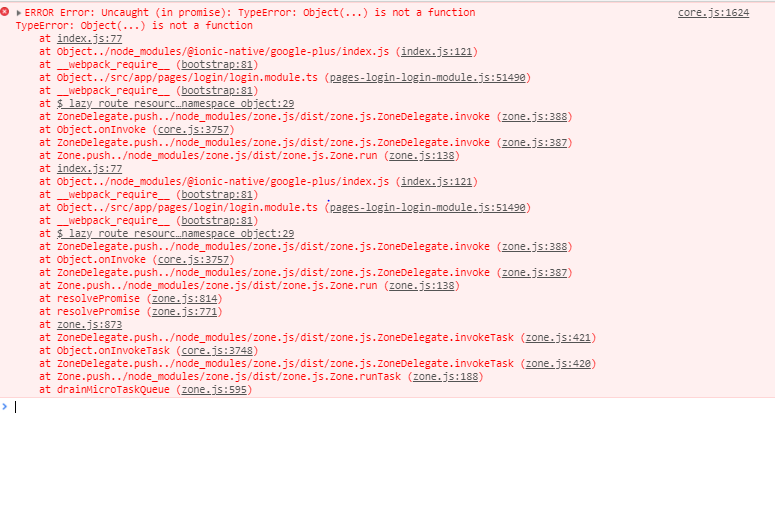
Github:https://github.com/Alex1000A/ionic_Alpha
Expected Behavior
The App should launch properly
 Alex1000A
All 2 comments
Hi there! So a few things that are needed.
- Update Ionic native to V5 beta
npm i @ionic-native/barcode-scanner@beta --save
npm i @ionic-native/core@beta --save
- Update the imports to the newer paths.
import { BarcodeScanner } from "@ionic-native/barcode-scanner";
Becomes
import { BarcodeScanner } from "@ionic-native/barcode-scanner/ngx";
This should resolve the issue.
With V4 of the framework, we've upgraded to RXJS V6. So Ionic-Native needed a new release to account for that as well.
 mhartington
on 24 Jul 2018
mhartington
on 24 Jul 2018
Thanks for the issue! This issue is being locked to prevent comments that are not relevant to the original issue. If this is still an issue with the latest version of Ionic, please create a new issue and ensure the template is fully filled out.
![ionitron-bot[bot] picture](https://avatars1.githubusercontent.com/in/8640?v=4&s=40) ionitron-bot[bot]
on 1 Sep 2018
ionitron-bot[bot]
on 1 Sep 2018
Related issues
 giammaleoni
·
3Comments
giammaleoni
·
3Comments
 brandyscarney
·
3Comments
brandyscarney
·
3Comments
 GeorgeAnanthSoosai
·
3Comments
GeorgeAnanthSoosai
·
3Comments
 daveshirman
·
3Comments
daveshirman
·
3Comments
 danbucholtz
·
3Comments
danbucholtz
·
3Comments
Most helpful comment
Hi there! So a few things that are needed.
Becomes
This should resolve the issue.
With V4 of the framework, we've upgraded to RXJS V6. So Ionic-Native needed a new release to account for that as well.