Ionic-framework: Ionic 3 app showing additional area below status bar iOS 11.0 beta
Ionic version: (check one with "x")
[ ] 1.x (For Ionic 1.x issues, please use https://github.com/ionic-team/ionic-v1)
[ ] 2.x
[ x] 3.x
I'm submitting a ... (check one with "x")
[x ] bug report
[ ] feature request
[ ] support request => Please do not submit support requests here, use one of these channels: https://forum.ionicframework.com/ or http://ionicworldwide.herokuapp.com/
Current behavior:
Ionic 3 App on iOS 11.0 beta (version 15A5278f) (simulator) shows additional unneccesary white area under status bar:
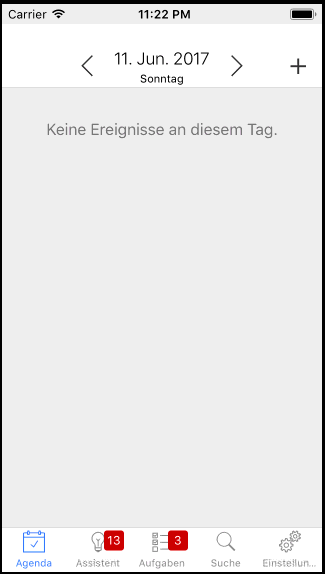
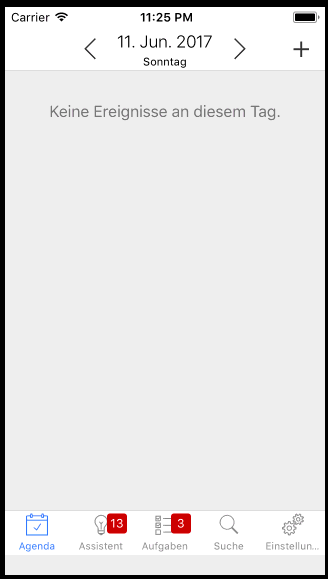
This can be fixed by adding "viewport-fit=cover" to the viewport meta tag, but introduces new problem at bottom of screen:
Expected behavior:
Look the same as in iOS 9 and iOS 10
Steps to reproduce:
Run Ionic 3 app in iOS 11 simulator using xCode 9 beta
 hofimax
All 23 comments
Hey there! So we're going to keep all the ios 11 issues in a related issue (#12020) in order to better track any issue that comes up during the betas. I've added your issue and information there. Please follow #12020 for any updates.
 mhartington
on 12 Jun 2017
mhartington
on 12 Jun 2017
this issue has been resolved as of ios 11 beta 5
hofimax
on 9 Aug 2017
@hofimax I’m using iOS 11 beta 9 but this problem still appear
 oneclickwebstudio
on 7 Sep 2017
oneclickwebstudio
on 7 Sep 2017
@abbazer not for me, but we are using the WKWebView
hofimax
on 7 Sep 2017
Solved by adding
oneclickwebstudio
on 7 Sep 2017
I’m on beta 10, using WKWebView, and I still have the same problem.
A fix for this has been added by Apple since beta 4, and that is to add “viewport-fit=cover” to your index.html meta tag. I can confirm that it does work, but not all the time. It’s very random.
 ahmadtawakol
on 7 Sep 2017
ahmadtawakol
on 7 Sep 2017
Just tested on iOS 11 beta 10 with WKWebView and it works reliably. We are NOT using viewport-fit=cover
hofimax
on 7 Sep 2017
If I don't add viewport-fit=cover then the header doesn't go under the status bar and the status bar just has a white background. If I add viewport-fit=cover then the header goes under the status bar like it should, but it's as if the whole app moves up, instead of stretching to fill the screen, and the white background that was under the status bar is now under the footer of the app.
I'm not sure if I'm explaining it clearly, let me know if you need me to clarify anything.
Edit: I just looked at the screenshots you posted above, this is exactly what it is happening with me.
ahmadtawakol
on 9 Sep 2017
Problem still exists in iOS 11 Golden Master. This is NOT a beta only problem and will NOT go away when iOS 11 is released in the next few days.
 tobiasmuecksch
on 18 Sep 2017
tobiasmuecksch
on 18 Sep 2017
We're working with the cordova team to address this. Please keep an eye out on this.
mhartington
on 18 Sep 2017
For what it's worth I see it as well in ionic1, assuming because it's related to cordova-plugin-statusbar.
 jacquesdev
on 21 Sep 2017
jacquesdev
on 21 Sep 2017
In my case, when I added viewport-fit=cover my whole app just shows a blank white screen and nothing else. So it makes things every worse for me. I'm using iOS11, Xcode9 on iPhone 7 Plus. Anyone experiencing similar behaviour?
 dimitri320
on 11 Oct 2017
dimitri320
on 11 Oct 2017
@dimitri320 can you open a new issue instead and provide a minimal demo in a github repo? Have not seen that before
mhartington
on 19 Oct 2017
@mhartington I've started a new issue at https://github.com/ionic-team/ionic/issues/13208. I've setup a brand new project, and it works just fine, so couldn't really replicate a new github repo as an example, as a new project works ok, but my old one (I started it about 7-8 months ago with Ionic 2) doesn't. Anything else I can provide to help the search?
Many thanks!
dimitri320
on 21 Oct 2017
Any news here ?
 glemiere
on 5 Nov 2017
glemiere
on 5 Nov 2017
@glemiere the issue has been solved. Please review the thread and make any updates. If there’s is still an issue after that, please open a new issue.
mhartington
on 5 Nov 2017
@mhartington adding "viewport-fit=cover" to my index.html worked for me ;-)
glemiere
on 8 Nov 2017
White bottom bar only appears on ios11 when using cordova-plugin-wkwebview-engine and latest cordova-plugin-statusbar and LaunchScreen storyboard
 lovelyelfpop
on 13 Nov 2017
lovelyelfpop
on 13 Nov 2017
@lovelyelfpop did you try using adding this to your index.html ?
<meta name="viewport" content="viewport-fit=cover, width=device-width, initial-scale=1.0, minimum-scale=1.0, maximum-scale=1.0, user-scalable=no">
glemiere
on 13 Nov 2017
@glemiere viewport-fit=cover is the default behavior for cordova-plugin-wkwebview-engine,
so it can be omitted
Sorry, I am wrong about this, it's not the default behavior
lovelyelfpop
on 13 Nov 2017
About the bottom space when using wkwebview, here is a workaround:
Add some code in cordova-plugin-wkwebview-engine\src\ios\CDVWKWebViewEngine.m between line 99-100,
// re-create WKWebView, since we need to update configuration
WKWebView* wkWebView = [[WKWebView alloc] initWithFrame:self.engineWebView.frame configuration:configuration];
//add begin
#if __IPHONE_OS_VERSION_MAX_ALLOWED >= 110000
if (@available(iOS 11.0, *)) {
  [wkWebView.scrollView setContentInsetAdjustmentBehavior:UIScrollViewContentInsetAdjustmentNever];
}
#endif
//add end
wkWebView.UIDelegate = self.uiDelegate;
self.engineWebView = wkWebView;
The code above came from cordova-plugin-ionic-webview
lovelyelfpop
on 14 Nov 2017
simply adding the cordova-plugin-ionic-webview solved it for me!
 laberg
on 16 Mar 2018
laberg
on 16 Mar 2018
Thanks for the issue! This issue is being locked to prevent comments that are not relevant to the original issue. If this is still an issue with the latest version of Ionic, please create a new issue and ensure the template is fully filled out.
![ionitron-bot[bot] picture](https://avatars1.githubusercontent.com/in/8640?v=4&s=40) ionitron-bot[bot]
on 1 Sep 2018
ionitron-bot[bot]
on 1 Sep 2018
Related issues
 Nick-The-Uncharted
·
3Comments
Nick-The-Uncharted
·
3Comments
 RobFerguson
·
3Comments
RobFerguson
·
3Comments
 brandyscarney
·
3Comments
brandyscarney
·
3Comments
 vswarte
·
3Comments
vswarte
·
3Comments
 alexbainbridge
·
3Comments
alexbainbridge
·
3Comments
Most helpful comment
We're working with the cordova team to address this. Please keep an eye out on this.
https://github.com/apache/cordova-plugin-statusbar/pull/85