Ionic-framework: two or more ion-input inside ion-item get wrong focus
Ionic version: (check one with "x")
[ ] 1.x
[x ] 2.x
I'm submitting a ... (check one with "x")
[x ] bug report
[ ] feature request
[ ] support request => Please do not submit support requests here, use one of these channels: https://forum.ionicframework.com/ or http://ionicworldwide.herokuapp.com/
Current behavior:
it happens on iOS devices or Simulator
it works in browsers
didn't test on Android
if I use more then one 'ion-input' inside a 'ion-item', it dosen't matter which one I click, the focus always get on the last one.
So if I want to edit the first one I have to click it twice.
Expected behavior:
The input clicked get the focus and keyboard.
Steps to reproduce:
Related code:
<ion-list>
        <ion-item>
            <ion-input type="text" value="hi"></ion-input>
            <ion-input type="number" value="44"></ion-input>
        </ion-item>

        <ion-item>
            <ion-label floating>Floating Label</ion-label>
            <ion-input type="text" value="hi"></ion-input>
            <ion-input type="number" value="44"></ion-input>
        </ion-item>

        <ion-item>
            <ion-label fixed>Fixed Label</ion-label>
            <ion-input type="text" value="hi"></ion-input>
            <ion-input type="number" value="44"></ion-input>
        </ion-item>
    </ion-list>
Other information:
Ionic info: (run ionic info from a terminal/cmd prompt and paste output below):
insert the output from ionic info here
 violabg
All 9 comments
Hello, thanks for using Ionic! This is happening because each ion-input should be wrapped inside its own ion-item. You can see examples of this here in our docs. Hope this helps, thanks again!
 jgw96
on 11 Jan 2017
jgw96
on 11 Jan 2017
I know that this is how it is usually used, one input per item.
But I need to implement a row with 2 input, and I see a lot of use cases and app using this approach.
I still fill the frame work should allow it.
the main reason I want to use it on a ion-item, and not using a grid or table is because I need the item-slide functionality.
violabg
on 11 Jan 2017
@jgw96 it might pay to document this in the docs, I also hit this same issue and thought it was a bug with the framework. If your using a datepicker and something else like a textbox the behavior is even worse.
 BenHerron
on 26 Jan 2017
BenHerron
on 26 Jan 2017
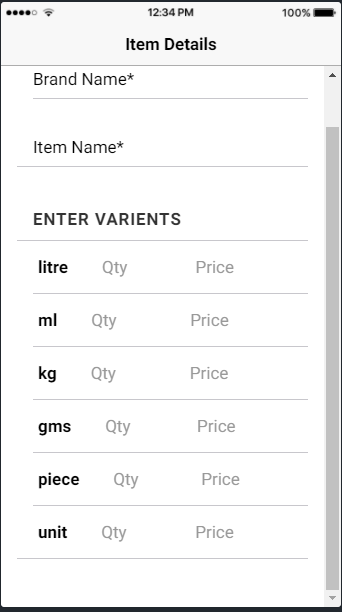
I am facing the same issue, I want to use 1 label and 2 inputs in slider list and facing exact same problem. focus goes on 2nd input first. another problem is if I use col-4, col-4, col-4 to label and 2 inputs.
still it doesn't look properly.
 swaroopbhave
on 6 Aug 2017
swaroopbhave
on 6 Aug 2017
@violabg and @swaroopbhave - I have fixed it by writing the following style in my .scss file:
.input-cover{
        display: none;
    }
Now i could able to focus on the first input field without any issue.
 abcdurga
on 1 Nov 2017
abcdurga
on 1 Nov 2017
Same for me! Fixed with @abcdurga solution. Thanks!
 mtshare
on 15 Nov 2017
mtshare
on 15 Nov 2017
Same for me! Fixed with @abcdurga solution. Thanks!
 CompRider
on 28 Nov 2017
CompRider
on 28 Nov 2017
@abcdurga You saved a lot of time for me, thank you very much!
 agrippa1994
on 5 Mar 2018
agrippa1994
on 5 Mar 2018
Thanks for the issue! This issue is being locked to prevent comments that are not relevant to the original issue. If this is still an issue with the latest version of Ionic, please create a new issue and ensure the template is fully filled out.
![ionitron-bot[bot] picture](https://avatars1.githubusercontent.com/in/8640?v=4&s=40) ionitron-bot[bot]
on 1 Sep 2018
ionitron-bot[bot]
on 1 Sep 2018
Related issues
 fdnhkj
·
3Comments
fdnhkj
·
3Comments
 daveshirman
·
3Comments
daveshirman
·
3Comments
 RobFerguson
·
3Comments
RobFerguson
·
3Comments
 manucorporat
·
3Comments
manucorporat
·
3Comments
 BilelKrichen
·
3Comments
BilelKrichen
·
3Comments
Most helpful comment
@violabg and @swaroopbhave - I have fixed it by writing the following style in my .scss file:
Now i could able to focus on the first input field without any issue.