Ionic-cli: Devapp not connecting since Ionic CLI 4.10.0
Bug Report
Ionic version:
4.10.0 and 4.10.1
Current behavior:
Devapp is unable to connect
Expected behavior:
should connect
Steps to reproduce:
upgrade ionic to 4.10.0 or 4.10.1
downgrading to 4.0.9 will resolve the issue, and Devapp will connect just fine
Ionic info:
Devapp not connecting
Ionic:

   ionic (Ionic CLI)             : 4.10.1 (/usr/local/lib/node_modules/ionic)
   Ionic Framework               : @ionic/angular 4.0.0
   @angular-devkit/build-angular : 0.12.3
   @angular-devkit/schematics    : 7.2.3
   @angular/cli                  : 7.2.3
   @ionic/angular-toolkit        : 1.3.0

Cordova:

   cordova (Cordova CLI) : 8.0.0
   Cordova Platforms     : android 7.0.0, ios 4.5.5
   Cordova Plugins       : cordova-plugin-ionic-keyboard 2.1.3, cordova-plugin-ionic-webview 2.3.2, (and 6 other plugins)

System:

   ios-deploy : 2.0.0
   ios-sim    : 7.0.0
   NodeJS     : v8.11.4 (/usr/local/bin/node)
   npm        : 6.7.0
   OS         : macOS High Sierra
   Xcode      : Xcode 10.1 Build version 10B61
Devapp not connecting
Ionic:

   ionic (Ionic CLI)             : 4.10.0
   Ionic Framework               : @ionic/angular 4.0.0
   @angular-devkit/build-angular : 0.12.3
   @angular-devkit/schematics    : 7.2.3
   @angular/cli                  : 7.2.3
   @ionic/angular-toolkit        : 1.3.0

Cordova:

   cordova (Cordova CLI) : 8.0.0
   Cordova Platforms     : android 7.0.0, ios 4.5.5
   Cordova Plugins       : cordova-plugin-ionic-keyboard 2.1.3, cordova-plugin-ionic-webview 2.3.2, (and 4 other plugins)

System:

   ios-deploy : 2.0.0
   ios-sim    : 7.0.0
   NodeJS     : v8.11.4 (/usr/local/bin/node)
   npm        : 6.7.0
   OS         : macOS High Sierra
   Xcode      : Xcode 10.1 Build version 10B61
Devapp working properly and connecting
Ionic:

   ionic (Ionic CLI)             : 4.9.0
   Ionic Framework               : @ionic/angular 4.0.0
   @angular-devkit/build-angular : 0.12.3
   @angular-devkit/schematics    : 7.2.3
   @angular/cli                  : 7.2.3
   @ionic/angular-toolkit        : 1.3.0

Cordova:

   cordova (Cordova CLI) : 8.0.0
   Cordova Platforms     : android 7.0.0, ios 4.5.5
   Cordova Plugins       : cordova-plugin-ionic-keyboard 2.1.3, cordova-plugin-ionic-webview 2.3.2, (and 4 other plugins)

System:

   ios-deploy : 2.0.0
   ios-sim    : 7.0.0
   NodeJS     : v8.11.4 (/usr/local/bin/node)
   npm        : 6.7.0
   OS         : macOS High Sierra
   Xcode      : Xcode 10.1 Build version 10B61
 szmolnar
All 21 comments
Thanks for reporting @szmolnar, we are looking into possible issues with the 4.10 release and would suggest staying on 4.9 for DevApp work for the time being.
 elylucas
on 31 Jan 2019
elylucas
on 31 Jan 2019
@szmolnar can you try serving with ionic serve --devapp? We just added support for DevApp in v4 projects, but --devapp is false by default.
 tlancina
on 31 Jan 2019
tlancina
on 31 Jan 2019
@tlancina
Thanks, sharing this info!
I can confirm that ionic serve --devapp is working on ionic (Ionic CLI): 4.10.1
(As for your earlier question before editing your post please check my ionic info. I'm using @ionic/angular-toolkit: 1.3.0)
Is there any added support for capturing console log messages?
szmolnar
on 31 Jan 2019
@szmolnar yeah I edited my post after realizing I hadn't looked at your ionic info 😄.
For anyone else who ends up here 👋and --devapp isn't working in a v4 project, you might need to update @ionic/angular-toolkit to version 1.3.0 (I believe the error is something along the lines of unknown option cordova-mock).
As far as console logs go, I believe it's something that would have to be supported by the Angular CLI because that's what is running the serve under the hood.
tlancina
on 31 Jan 2019
@dwieeb just informed me that we _can_ support console logs for v4 using angular-toolkit to inject a script, and searching just now I found an open issue for it: https://github.com/ionic-team/ionic-cli/issues/3169.
PR's welcome! I also may take a stab at it if I get some free time next week.
@szmolnar going to close as the original issue is intended behavior, feel free to comment/re-open if you're still having issues. Thanks!
tlancina
on 1 Feb 2019
@tlancina are there any progress regarding console logs for v4 by using angular-toolkit ?
Thanks!
szmolnar
on 15 Feb 2019
I have error like
> ng run app:ionic-cordova-serve --host=0.0.0.0 --port=8100 --cordova-mock
[ng] Unknown option: '--cordova-mock'
[ERROR] ng has unexpectedly closed (exit code 1).
Ionic:
ionic (Ionic CLI) : 4.10.3 (C:Users\user\AppData\Roaming\npmnode_modules\ionic)
Ionic Framework : @ionic/angular 4.0.0-rc.1
@angular-devkit/build-angular : 0.13.3
@angular-devkit/schematics : 7.1.4
@angular/cli : 7.1.4
@ionic/angular-toolkit : 1.2.2
Cordova:
cordova (Cordova CLI) : 8.1.2 ([email protected])
Cordova Platforms : not available
Cordova Plugins : cordova-plugin-ionic-keyboard 2.1.3, cordova-plugin-ionic-webview 2.4.0, (and 5 other plugins)
System:
NodeJS : v9.2.0 (C:\Program Files\nodejs\node.exe)
npm : 6.6.0
OS : Windows 10
 arulmani33
on 25 Feb 2019
arulmani33
on 25 Feb 2019
@jerrymani33 You must update @ionic/angular-toolkit: https://github.com/ionic-team/angular-toolkit/blob/master/CHANGELOG.md
 imhoffd
on 25 Feb 2019
imhoffd
on 25 Feb 2019
@jerrymani33 You must update
@ionic/angular-toolkit: https://github.com/ionic-team/angular-toolkit/blob/master/CHANGELOG.md
Solved thanks guys.
arulmani33
on 4 Mar 2019
Hi guys!! I updated @ionic/angular-toolkit to "^1.4.0", But this did not work when I did "ionic serve -c". Do you know a solution for this?
 wilfredonoyola
on 12 Mar 2019
wilfredonoyola
on 12 Mar 2019
@wilfredonoyola @szmolnar you guys can track https://github.com/ionic-team/ionic-cli/issues/3169 for updates on printing console logs for v4 apps to the terminal (it should land pretty soon).
tlancina
on 12 Mar 2019
I had the same problem and I founded this solution:
1) Install globally ionic without Cordova: npm install -g ionic
This installed in my case the version of ionic: 4.11.0
2) Create your project. ionic start yourProjectName sidemenu
3) Install the free Ionic Appflow SDK and conect your App? NO
4) Once the project is created you integrate Cordova: Go in the CLI to the directory of your project.
Write in the CLI the following commands in this order:
a) ionic cordova platform rm android
   *If you get error the first time, dont worry, try again the same command.
    Never fails in the second time to me.

b) ionic cordova platform rm android

c)  ionic cordova platform add android

d) ionic serve --devapp

e) Open devApp in your movile and it will see your app without problems.
And this is all. I hope this can help
 Michu1
on 12 Mar 2019
Michu1
on 12 Mar 2019
@Michu1
This solution works for me.
 kedarjangir
on 15 Mar 2019
kedarjangir
on 15 Mar 2019
And for capacitor?
 victorfrl
on 26 May 2019
victorfrl
on 26 May 2019
Now, Is DevApp working with Ionic 4?
wilfredonoyola
on 26 May 2019
Now, Is DevApp working with Ionic 4?
YES it does !
 ran07
on 5 Aug 2019
ran07
on 5 Aug 2019
This is still broken.
 senseijames
on 7 Sep 2019
senseijames
on 7 Sep 2019
I was not able to get DevApp working with Angular 7; I had to upgrade to Angular 8, which itself (code-wise) was not very time consuming; what took MUCH longer was updating all the Angular and Ionic dependencies (including having to upgrade nodejs and npm) and build settings and whatnot.
I recommend upgrading the latest version of the Ionic CLI globally, as well as npm, nodejs and Angular CLI globally, then generating a new Ionic project. Test if that works in DevApp (it should), then look at its package.json and tsconfig.json/tsconfig.app.json for the dependencies (and devDependencies) you'll need in your older Ionic project.
ionic info
Ionic:
Ionic CLI : 5.2.7 (/Users/admin/.nvm/versions/node/v10.16.0/lib/node_modules/ionic)
Ionic Framework : @ionic/angular 4.9.0
@angular-devkit/build-angular : 0.801.3
@angular-devkit/schematics : 8.1.3
@angular/cli : 8.1.3
@ionic/angular-toolkit : 2.0.0Cordova:
Cordova CLI : 9.0.0 ([email protected])
Cordova Platforms : browser 5.0.4, ios 4.5.5
Cordova Plugins : cordova-plugin-ionic-keyboard 2.1.3, cordova-plugin-ionic-webview 2.2.5, (and 5 other plugins)Utility:
cordova-res : not installed
native-run : not installedSystem:
ios-deploy : 1.9.4
NodeJS : v10.16.0
npm : 6.9.0
OS : macOS High Sierra
Xcode : Xcode 9.3 Build version 9E145
senseijames
on 7 Sep 2019
Its quite simple to solve this.
On terminal:
npm uninstall @ionic/angular-toolkit --save
npm install @ionic/[email protected]
ionic serve --devapp
Thats it.
 gypmo
on 18 Sep 2019
gypmo
on 18 Sep 2019
For what it's worth,
I played around with a few different versions of @ionic/angular-toolkit. I was unable to successfully run ionic serve --devapp with any of those changes.
I tried running ng run app:serve --host=0.0.0.0 --port=8100, which is a command that allows Angular applications to be accessed on a device from the local network (the --host=0.0.0.0 is the magic part). After that in devapp I manually entered the local IP of my computer running the dev server and I was able to connect.
This is a bit hacky and I'm sure there's a better solution out there.
 Pfuufy
on 22 Nov 2019
Pfuufy
on 22 Nov 2019
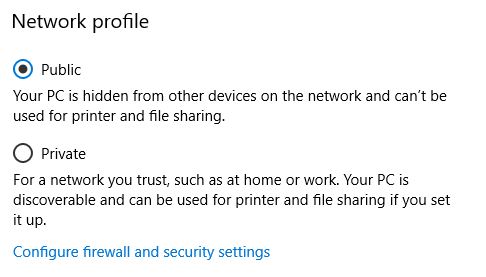
In my case ionic serve --devapp stopped working when I changed my network profile from Public to Private (what is kind of strange because in private PC is becoming discoverable etc.).
When I changed back to Public it began working again.
 DmitriyBobrovskiy
on 7 Dec 2019
DmitriyBobrovskiy
on 7 Dec 2019
Related issues
 jsayol
·
3Comments
jsayol
·
3Comments
 chsakell
·
3Comments
chsakell
·
3Comments
![ionitron-bot[bot] picture](https://avatars.githubusercontent.com/in/8640?v=4&s=40) ionitron-bot[bot]
·
3Comments
ionitron-bot[bot]
·
3Comments
 bazigatabassum
·
3Comments
bazigatabassum
·
3Comments
 jgw96
·
3Comments
jgw96
·
3Comments
Most helpful comment
I had the same problem and I founded this solution:
1) Install globally ionic without Cordova: npm install -g ionic
This installed in my case the version of ionic: 4.11.0
2) Create your project. ionic start yourProjectName sidemenu
3) Install the free Ionic Appflow SDK and conect your App? NO
4) Once the project is created you integrate Cordova: Go in the CLI to the directory of your project.
Write in the CLI the following commands in this order:
And this is all. I hope this can help