Ionic-cli: ionic serve says okay but not working ! ==?


as you can see it says okay but not working. please help me . my ionic CLI 3.18.0 and npm and everyting is lastest version. but its not working .
and ı am not using daemon something. ı just want to when ı am write ionic serve its open my project. but for now its now working be hurry . please !
 Ejdersoy
All 23 comments
@Ejdersoy Are you using git bash?
 imhoffd
on 14 Nov 2017
imhoffd
on 14 Nov 2017
@dwieeb no ı am not. node js.
Ejdersoy
on 15 Nov 2017
@Ejdersoy I meant what terminal are you using? cmd.exe? git bash? hyper terminal?
imhoffd
on 15 Nov 2017
@dwieeb ı am using cmd.exe
Ejdersoy
on 16 Nov 2017
Same happens to me. At the moment i'm able to work by executing npm run ionic:serve instead. @dwieeb youcould try it meanwhile.

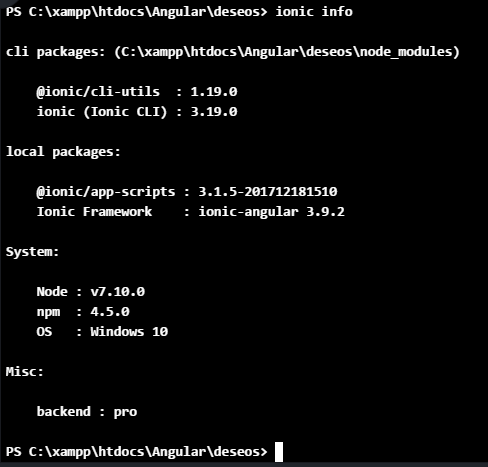
Any ideas?
 atomicnation
on 18 Dec 2017
atomicnation
on 18 Dec 2017
No ideas immediately... it just seems to be outright failing silently on Windows.
After running ionic serve, can you run echo %errorlevel% and tell me what number it is?
imhoffd
on 8 Jan 2018
Hi dwieeb when i use to run this command echo %errorlevel% it gives me 1 as output.

 ParagPallav
on 10 Jan 2018
ParagPallav
on 10 Jan 2018
@ParagPallav @gregduffield Do you see this behavior on other terminals, such as Git Bash or hyper? What about other NodeJS versions?
imhoffd
on 17 Jan 2018
I have now tried various other versions of node but see the same thing.
I have tried powershell, cmd and the same thing.
I have not tried Bash as I am not willing to change my command toolset for somehting that should work. I am paying for a Pro license at the moment, but it looks like we will not be progressing as we are not able to get past this issue.
I will of course provide any help/information that I can to address this issue, as it would have been good to be able to use the Ionic Framework as designed.
 gregduffield
on 19 Jan 2018
gregduffield
on 19 Jan 2018
@gregduffield I understand. I'm not asking you to change your toolset, I'm trying to narrow down the issue so I can address it. I've asked several coworkers and they're not able to reproduce the issue either. Thank you for trying different ideas with me while we debug this.
Can you try ionic serve --local? This should bind the servers to localhost instead of all network interfaces. Are you connected to a network that might kill the connections? Firewall, etc?
imhoffd
on 19 Jan 2018
I have tried the -local option and this made no difference.
I have tried turning off the windows firewall and this made no difference ( there are no other firewalls running)
basically the same thing happens,, we get the OK message then the local, external and DevApp urls and then get shown the prompt. I can see that this works momentarily because if I am running the DevApp My Application gets listed very briefly. for some reason the dev server process is just quitting instead of continuing to run.
gregduffield
on 20 Jan 2018
--local will also disable the DevApp, so it doesn't appear to be anything related to the multicast code.
Can I have you try ionic@canary? In this alpha-version CLI, I have changed how ionic serve works, shelling out to @ionic/app-scripts instead of importing and running it. I just want to see if that will fix it for you. If it does, I will backport the code to CLI v3, because CLI v4 has not gone through any beta testing.
Install CLI v4 canary:
npm uninstall -g ionic
npm install -g ionic@canary
Back to CLI v3:
npm uninstall -g ionic
npm install -g ionic@latest
Ok i have just tried this and updated to canary
@ionic/cli-utils  : 2.0.0-alpha.273c8f1c
   ionic (Ionic CLI) : 4.0.0-alpha.273c8f1c
but sorry to say the same thing still happens. Starts and stops
gregduffield
on 20 Jan 2018
Yet npm run ionic:serve works?
Do you have Cordova setup? If so, can you also try ionic cordova run android -l?
imhoffd
on 20 Jan 2018
yes npm run ionic:serve does work
I have tried adding the android platform but get another error (this has been reported by others as well)
PS C:\Users\g.duffield\source\repos\EventManager> cordova platform add android
Using cordova-fetch for cordova-android@~7.0.0
(node:24084) UnhandledPromiseRejectionWarning: Unhandled promise rejection (rejection id: 1): CordovaError: Failed to fetch platform cordova-android@~7.0.0
Probably this is either a connection problem, or platform spec is incorrect.
Check your connection and platform name/version/URL.
Error: cmd: Command failed with exit code ENOENT
(node:24084) [DEP0018] DeprecationWarning: Unhandled promise rejections are deprecated. In the future, promise rejections that are not handled will terminate the Node.js process with a non-zero exit code.
SOLVED....
In order to solve the error with cordova trying to get the android platform, I stumbled on a related issue to do with adding plugins. The solution is add c:\windows\system32 to the PATH environment variables. This has ultimately solved the issue of ionic serve starting and stopping as well
Thanks for sticking with me on this, we got there in the end.
gregduffield
on 21 Jan 2018
@dwieeb @gregduffield npm run ionic:serve this command worked for me . and i am able to run my app in my local.
Thanks
ParagPallav
on 21 Jan 2018
@gregduffield I'm confused.. is ionic serve working for you now?
imhoffd
on 21 Jan 2018
@dwieeb yes. after updating the path environment variable ionic serve is working for me thanks
gregduffield
on 21 Jan 2018
@gregduffield thanks! I can confirm: this works for me, too.
 jonathanwerle
on 9 Feb 2018
jonathanwerle
on 9 Feb 2018
@gregduffield Thanks...
Adding c:windowssystem32 to the PATH environment variables solved the issue...
 ozcanavtat
on 15 Feb 2018
ozcanavtat
on 15 Feb 2018
@gregduffield Thank you for the solution. I was facing the same issue, adding windows/system32 in environment variable resolved the issue.
 shayanshakil
on 18 Apr 2018
shayanshakil
on 18 Apr 2018
@gregduffield Also worked for me! Thanks!!!
 EddieTheOG
on 25 May 2018
EddieTheOG
on 25 May 2018
Related issues
 mpaland
·
3Comments
mpaland
·
3Comments
 chsakell
·
3Comments
chsakell
·
3Comments
 zoinkydoink
·
3Comments
zoinkydoink
·
3Comments
 richardshergold
·
3Comments
richardshergold
·
3Comments
 petermetz
·
3Comments
petermetz
·
3Comments
Most helpful comment
SOLVED....
In order to solve the error with cordova trying to get the android platform, I stumbled on a related issue to do with adding plugins. The solution is add
c:\windows\system32to thePATHenvironment variables. This has ultimately solved the issue ofionic servestarting and stopping as wellThanks for sticking with me on this, we got there in the end.