Ionic-cli: Roboto Font not loaded with --prod build
Description:
Roboto Font is not loaded when building with --prod flag.
Steps to Reproduce:
build app with ionic cordova run android --prod
(I don't know if it's the same with iOS)
Output:
Error messages:
Failed to load resource: net::ERR_FILE_NOT_FOUND
file:///android_asset/www/assets/fonts/roboto-regular.woff Failed to load resource: net::ERR_FILE_NOT_FOUND
file:///android_asset/www/assets/fonts/roboto-regular.ttf Failed to load resource: net::ERR_FILE_NOT_FOUND
file:///android_asset/www/assets/fonts/roboto-medium.woff2 Failed to load resource: net::ERR_FILE_NOT_FOUND
file:///android_asset/www/assets/fonts/roboto-bold.woff2 Failed to load resource: net::ERR_FILE_NOT_FOUND
file:///android_asset/www/assets/fonts/roboto-medium.woff Failed to load resource: net::ERR_FILE_NOT_FOUND
file:///android_asset/www/assets/fonts/roboto-bold.woff Failed to load resource: net::ERR_FILE_NOT_FOUND
file:///android_asset/www/assets/fonts/roboto-medium.ttf Failed to load resource: net::ERR_FILE_NOT_FOUND
file:///android_asset/www/assets/fonts/roboto-bold.ttf Failed to load resource: net::ERR_FILE_NOT_FOUND
My ionic info:
cli packages:
    @ionic/cli-utils  : 1.13.1
    ionic (Ionic CLI) : 3.13.2

global packages:
    cordova (Cordova CLI) : 7.0.1

local packages:
    @ionic/app-scripts : 3.0.1
    Cordova Platforms  : android 6.2.3 ios 4.4.0
    Ionic Framework    : ionic-angular 3.7.1

System:
    Android SDK Tools : 25.2.5
    Node              : v8.2.1
    npm               : 5.4.2
    OS                : Windows 10

Misc:
    backend : legacy
 JaneDawson
All 4 comments
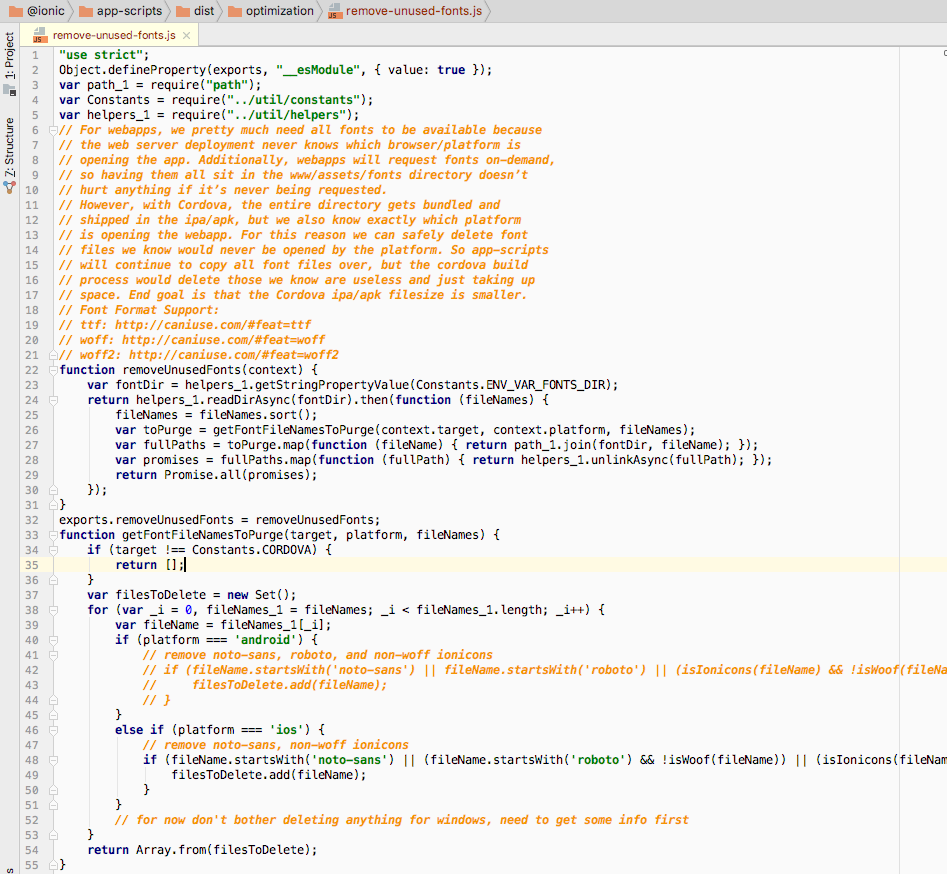
I have a temporary fix that worked for me while this is being looked at. I commented out the part in app-scripts where the fonts were being deleted. I know that this is not the best the solution but it did fix the issue temporarily. One small warning when doing this, your app size will be a little larger. When I built my app with the --prod flag before commenting out the delete portion my app was roughly 5mb. After I commented out the portion that deletes the fonts for android my app was 6.4mb but all the errors are gone.
I understand that this is not the best solution but I am no longer seeing all the errors when debugging. I'm sure once this issue is addressed, my app will be able to be built closer to the 5mb size. I have attached a screenshot showing the code that I commented out and in the top left corner you can see where the file is located.
 justinblake
on 26 Oct 2017
justinblake
on 26 Oct 2017
Temporary work around for now is to add
  "config": {
    "ionic_purge_unused_fonts": false
  },
to your package.json.
We'll fix this in app-scripts since this is where the actual process is run.
 mhartington
on 27 Oct 2017
mhartington
on 27 Oct 2017
@mhartington you made my day !
It solved my problem with roboto fonts, thanks !
 RibesAlexandre
on 5 Nov 2017
RibesAlexandre
on 5 Nov 2017
Well, it will cause this problem in some android devices which doesn't come with roboto font by default.
@ionic/app-scripts/dist/optimization/remove-unused-fonts.js has the following comments and code
// Remove all Roboto fonts. Android already comes with Roboto system
// fonts so shipping our own is unnecessary. Including roboto fonts
// is only useful for PWAs and during development.
fontsRemoved.push('roboto*');
by commenting out fontsRemoved.push('roboto*'); does solve my problem, however I noticed a slight increase in .apk size just as stated by @justinblake
 MaxusDev
on 18 Jan 2018
MaxusDev
on 18 Jan 2018
Related issues
 okonon
·
3Comments
okonon
·
3Comments
 ayush987goyal
·
3Comments
ayush987goyal
·
3Comments
 secret4info
·
3Comments
secret4info
·
3Comments
 zarko-tg
·
3Comments
zarko-tg
·
3Comments
 bazigatabassum
·
3Comments
bazigatabassum
·
3Comments
Most helpful comment
Temporary work around for now is to add
to your package.json.
We'll fix this in app-scripts since this is where the actual process is run.