Ionic-cli: Cordova not available when using livereload on CLI 3.8.0
After updating to CLI 3.8.0, running in Android device using the command ionic cordova run android -lcs, Cordova plugins does not work. The log shows the following message:
console.warn: Native: tried calling Camera.getPicture, but Cordova is not available. Make sure to include
            cordova.js or run in a device/simulator
Seems like the issue is when you are trying to run with the livereaload flag. I've tried the following commands:
- ionic cordova run android --livereload
- ionic cordova run android -lcs
Only command working is ionic cordova run android.
Plugins tested:
- Ionic native camera
- Ionic native geolocation
Steps to reproduce:
- Update to CLI 3.8.0
- Run your application on Android by using livereload flag
- Test Cordova function on device.
Ionic info
@ionic/cli-utils  : 1.8.0
ionic (Ionic CLI) : 3.8.0

global packages:

Cordova CLI : 7.0.1

local packages:

@ionic/app-scripts : 2.1.3
Cordova Platforms  : android 6.2.3
Ionic Framework    : ionic-angular 3.6.0

System:

Node : v8.2.1
npm  : 5.3.0
OS   : macOS Sierra
 jayserdny
All 24 comments
Thanks for the thorough bug report, @jayserdny! This one snuck in, unfortunately.
I've published 3.8.1 to fix this issue.
 imhoffd
on 15 Aug 2017
imhoffd
on 15 Aug 2017
@dwieeb Fast and nice work by the way ;) Updating and testing now.
jayserdny
on 15 Aug 2017
Hi,
What's the command so that I get the consoles on the cli?
 RakeshKB
on 23 Aug 2017
RakeshKB
on 23 Aug 2017
@RakeshKB What do you mean? To update the CLI?
jayserdny
on 5 Sep 2017
@jayserdny
Was curious to know if there is a similar command like in ionic v1.x 'ionic run android -lcs' that we can use in ionic 3.x to get the consoles displayed?
However, I downgraded ionic to 1.7.6 and the issue was fixed for me.
RakeshKB
on 5 Sep 2017
@RakeshKB It does not worth downgrading from 3.x to 1.7.6. Do you want to get console messages running on device or on local system?
jayserdny
on 5 Sep 2017
@jayserdny
My app is a 1.x one. However, I migrated to 3.x and was facing few issues of which one was the console messages. I would wan't the consoles to be printed on the terminal so that I can check for issues while the app runs on a real device.
RakeshKB
on 5 Sep 2017
@RakeshKB so, you can run your app, ionic run android -l -c -s , then in chrome you can inspect this device to get the logs: chrome://inspect/#devices. Then, select your device and you can see all the logs coming from this device
jayserdny
on 5 Sep 2017
@jayserdny sure, will do that. Thank you for the quick response :)
RakeshKB
on 5 Sep 2017
@RakeshKB The workaround that @jayserdny mentioned works, but the consolelogs bug for Ionic 1 can be tracked here: https://github.com/ionic-team/ionic-cli/issues/2548
imhoffd
on 5 Sep 2017
The workaround that @jayserdny mentioned does not work for me.
cli packages: (/usr/local/lib/node_modules)

    @ionic/cli-utils  : 1.19.0
    ionic (Ionic CLI) : 3.19.0

global packages:

    cordova (Cordova CLI) : 8.0.0

local packages:

    @ionic/app-scripts : 3.1.7
    Cordova Platforms  : android 7.0.0
    Ionic Framework    : ionic-angular 3.9.2

System:

    Android SDK Tools : 26.1.1
    Node              : v9.3.0
    npm               : 5.6.0
    OS                : macOS High Sierra
    Xcode             : Xcode 9.2 Build version 9C40b

Environment Variables:

    ANDROID_HOME : /Users/dragon/asdk

Misc:

    backend : pro
Still says cordova not available:
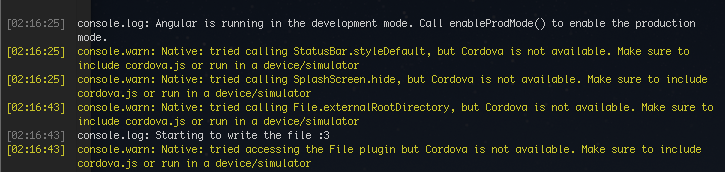
I'm trying to use the Ionic Native File API. Also happens with the Social Sharing Cordova plugin.
 darkguy2008
on 7 Jan 2018
darkguy2008
on 7 Jan 2018
@darkguy2008 are you debugging in the browser on in a real device?
jayserdny
on 7 Jan 2018
@jayserdny on a real device of course, I wouldn't expect Cordova to work in the browser :P. Without --livereload it works, but there's no livereload. If I enable it, there's livereload but no cordova :(
darkguy2008
on 7 Jan 2018
@darkguy2008 hahaha just in case. But, have you ever tried reinstalling Cordova, Ionic, and maybe the platform you are trying to run on?
jayserdny
on 7 Jan 2018
I'm getting the same issue with ionic cordova run ios -lcs
cli packages: (/usr/local/lib/node_modules)

    @ionic/cli-utils  : 1.19.0
    ionic (Ionic CLI) : 3.19.0

global packages:

    cordova (Cordova CLI) : 7.1.0

local packages:

    @ionic/app-scripts : 3.1.4
    Cordova Platforms  : android 6.3.0 ios 4.5.4
    Ionic Framework    : ionic-angular 3.9.2

System:

    Android SDK Tools : 26.1.1
    ios-deploy        : 1.9.2
    ios-sim           : 6.1.2
    Node              : v8.9.1
    npm               : 5.5.1
    OS                : macOS High Sierra
    Xcode             : Xcode 9.2 Build version 9C40b

Environment Variables:

    ANDROID_HOME : /Users/ben/Library/Android/sdk

Misc:

    backend : pro
 BenHarris
on 18 Jan 2018
BenHarris
on 18 Jan 2018
cli packages: (/usr/lib/node_modules)
@ionic/cli-utils  : 1.19.1
ionic (Ionic CLI) : 3.19.1
global packages:
cordova (Cordova CLI) : 8.0.0
local packages:
@ionic/app-scripts : 3.1.8
Cordova Platforms  : android 7.0.0 browser 5.0.3
Ionic Framework    : ionic-angular 3.9.2
System:
Android SDK Tools : 26.1.1
Node              : v8.9.4
npm               : 5.6.0
OS                : Linux 4.13
The same problem here with android and ionic cordova run android --device -lcs
 DanielBaron86
on 27 Jan 2018
DanielBaron86
on 27 Jan 2018
cli packages: (/Users/annetomassoni/Documents/project/node_modules)

    @ionic/cli-utils  : 1.19.1
    ionic (Ionic CLI) : 3.19.1

global packages:

    cordova (Cordova CLI) : 8.0.0

local packages:

    @ionic/app-scripts : 3.1.8
    Cordova Platforms  : android 7.0.0
    Ionic Framework    : ionic-angular 3.9.2

System:

    Android SDK Tools : 26.1.1
    ios-deploy        : 1.9.2
    ios-sim           : 5.0.13
    Node              : v8.9.4
    npm               : 5.6.0
    OS                : macOS High Sierra
    Xcode             : Xcode 9.2 Build version 9C40b

Environment Variables:

    ANDROID_HOME : /Users/annetomassoni/Library/Android/sdk

Misc:

    backend : legacy
Also having the same problem with ionic cordova run android -lc
 atomassoni
on 31 Jan 2018
atomassoni
on 31 Jan 2018
The original bug has been fixed for months. I'm guessing people who are coming here from google are missing the <script src="cordova.js" ... include in their index.html. Let me know if this is not the case.
imhoffd
on 31 Jan 2018
Try this
ionic serve --l --c --s
Regards,
RakeshKB
On 31-Jan-2018 22:47, "dwieeb" notifications@github.com wrote:
The original bug has been fixed for months. I'm guessing people who are
coming here from google are missing the include in their index.html. Let me know if this is not the case.—
You are receiving this because you were mentioned.
Reply to this email directly, view it on GitHub
https://github.com/ionic-team/ionic-cli/issues/2634#issuecomment-362004236,
or mute the thread
https://github.com/notifications/unsubscribe-auth/AEykPCM4d7zemaLsHJx2-_Srol6JL18qks5tQKAxgaJpZM4O3Hky
.
RakeshKB
on 31 Jan 2018
@dwieeb That's in there. I even tried reinstalling ionic and cordova.
atomassoni
on 31 Jan 2018
@atomassoni Is window.cordova defined if you type that in your debugger console?
imhoffd
on 31 Jan 2018
nope, not with --livereload
window.cordova
undefined
To be clear, everything works perfectly when not using --livereload, and I was using live reload on this project successfully previously.
atomassoni
on 1 Feb 2018
I'm able to use live reload when I do this:
BritoMatheus commented 17 days ago

FIX: You need go to [/node_modules/@ionic/app-scripts/dist/dev-server/serve-config.js (edit for my path)] and replace:

exports.ANDROID_PLATFORM_PATH = path.join('platforms', 'android', 'assets', 'www');

to

exports.ANDROID_PLATFORM_PATH = path.join('platforms', 'android', 'app', 'src', 'main', 'assets', 'www')

;I found it here [(https://stackoverflow.com/a/48266685)]. And for me it worked !!
--
from here https://github.com/ionic-team/ionic-app-scripts/issues/467
atomassoni
on 1 Feb 2018
@atomassoni Thanks for making me aware of the issue! 🙌 I made a new issue for app-scripts: https://github.com/ionic-team/ionic-app-scripts/issues/1380
Locking this as the new issue is not the original issue.
imhoffd
on 2 Feb 2018
Related issues
 mpaland
·
3Comments
mpaland
·
3Comments
 ayush987goyal
·
3Comments
ayush987goyal
·
3Comments
 richardshergold
·
3Comments
richardshergold
·
3Comments
 phyr0s
·
3Comments
phyr0s
·
3Comments
 YaoaY
·
3Comments
YaoaY
·
3Comments
Most helpful comment
Thanks for the thorough bug report, @jayserdny! This one snuck in, unfortunately.
I've published 3.8.1 to fix this issue.