Inter: `STAT` has an empty DesignAxisRecord
The current STAT table contain an empty <DesignAxisRecord>, however according to the OT spec, implementations may not derive named instances from the rest of the STAT table, since they may think this font is static.
 be5invis
All 17 comments
Do you have an example of where/how I test the effects of this?
 rsms
on 18 Aug 2020
rsms
on 18 Aug 2020
@be5invis You can start a windows vm, open your Inter V.otf and see whether the previewer shows "previous / next" buttons at top right corner.
be5invis
on 18 Aug 2020
Thanks @be5invis! That helped. I've revised the patch, now using fonttools instead of a patch file with ttx. Opening the output VF font file in Windows 10 now shows all 18 named instances correctly.
rsms
on 19 Aug 2020
@rsms You could also test on Adobe software (should have VF sliders and 18 named instances) and office softwares (should have 18 named instanced, may be distributed into various derived families if it uses RBIBI family model) to see whether it is correctly recognized.
be5invis
on 19 Aug 2020
It seemed to work fine in Adobe software (and macOS software like Sketch) before, without the AxisValueArray data, so I'm not sure how reliable testing there is. Anyhow, I've got a Windows 10 machine here in my office that I tested on :-)
Here's a build with the changes from d76268cf8d778c709ce2e714a36e17d0d23effa9 which includes an updated STAT table patch:
Inter.var.ttf.zip
@be5invis Would you mind confirming if this fixes the issue?
rsms
on 19 Aug 2020
@rsms The OS could recognize your fonts, but a problem is that: style linking (the b and I buttons) is broken.
Fixing Regular-Bold linking is relatively simple: you could just use AxisValue format 1 for non-regular weights and AxisValue format 3 for Regular with LinkedValue set to 700.
But for Regular-Italics, implementing it is much harder, since your font doesn’t have an ital axis. Software like Word may not associate derived italics from uprights and use faux italics when I is used. This is a well-known problem.
be5invis
on 19 Aug 2020
I think for the italics problem the currently best solution is to use single-axis fonts for desktop, and follow the STAT table in Source Sans Pro’s variable fonts, which correctly implemented style linking.
be5invis
on 19 Aug 2020
And for two axes, well, you can use ... Oblique instead of Italics if you continue using slnt for axis tag, or switch slnt to ital and re-arrange the design space, since ital varies from 0 to 1.
be5invis
on 19 Aug 2020
With ddb81e26463c533443128ab7a98aba708e58bd1f these are the results in practice:
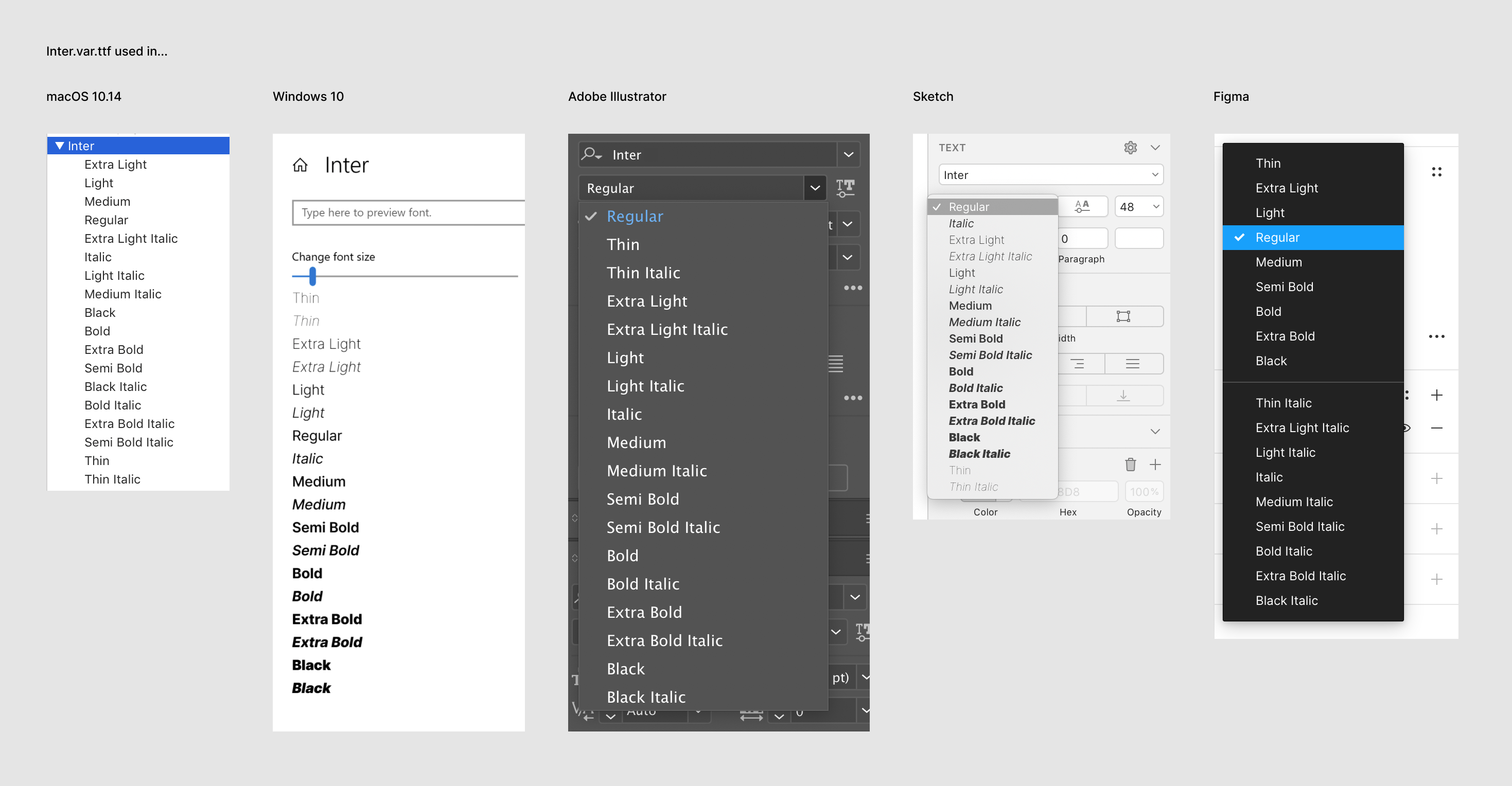
This is what TTX reports for the STAT table:
<STAT>
  <Version value="0x00010002"/>
  <DesignAxisRecordSize value="8"/>
  <!-- DesignAxisCount=2 -->
  <DesignAxisRecord>
    <Axis index="0">
      <AxisTag value="wght"/>
      <AxisNameID value="271"/>  <!-- Weight -->
      <AxisOrdering value="0"/>
    </Axis>
    <Axis index="1">
      <AxisTag value="slnt"/>
      <AxisNameID value="272"/>  <!-- Slant -->
      <AxisOrdering value="1"/>
    </Axis>
  </DesignAxisRecord>
  <!-- AxisValueCount=11 -->
  <AxisValueArray>
    <AxisValue index="0" Format="4">
      <!-- AxisCount=2 -->
      <Flags value="2"/>
      <ValueNameID value="279"/>  <!-- Regular -->
      <AxisValueRecord index="0">
        <AxisIndex value="0"/>
        <Value value="400.0"/>
      </AxisValueRecord>
      <AxisValueRecord index="1">
        <AxisIndex value="1"/>
        <Value value="0.0"/>
      </AxisValueRecord>
    </AxisValue>
    <AxisValue index="1" Format="4">
      <!-- AxisCount=2 -->
      <Flags value="0"/>
      <ValueNameID value="280"/>  <!-- Italic -->
      <AxisValueRecord index="0">
        <AxisIndex value="0"/>
        <Value value="400.0"/>
      </AxisValueRecord>
      <AxisValueRecord index="1">
        <AxisIndex value="1"/>
        <Value value="-10.0"/>
      </AxisValueRecord>
    </AxisValue>
    <AxisValue index="2" Format="1">
      <AxisIndex value="0"/>
      <Flags value="0"/>
      <ValueNameID value="273"/>  <!-- Thin -->
      <Value value="100.0"/>
    </AxisValue>
    <AxisValue index="3" Format="1">
      <AxisIndex value="0"/>
      <Flags value="0"/>
      <ValueNameID value="275"/>  <!-- Extra Light -->
      <Value value="200.0"/>
    </AxisValue>
    <AxisValue index="4" Format="1">
      <AxisIndex value="0"/>
      <Flags value="0"/>
      <ValueNameID value="277"/>  <!-- Light -->
      <Value value="300.0"/>
    </AxisValue>
    <AxisValue index="5" Format="1">
      <AxisIndex value="0"/>
      <Flags value="2"/>
      <ValueNameID value="279"/>  <!-- Regular -->
      <Value value="400.0"/>
    </AxisValue>
    <AxisValue index="6" Format="1">
      <AxisIndex value="0"/>
      <Flags value="0"/>
      <ValueNameID value="281"/>  <!-- Medium -->
      <Value value="500.0"/>
    </AxisValue>
    <AxisValue index="7" Format="1">
      <AxisIndex value="0"/>
      <Flags value="0"/>
      <ValueNameID value="283"/>  <!-- Semi Bold -->
      <Value value="600.0"/>
    </AxisValue>
    <AxisValue index="8" Format="1">
      <AxisIndex value="0"/>
      <Flags value="0"/>
      <ValueNameID value="285"/>  <!-- Bold -->
      <Value value="700.0"/>
    </AxisValue>
    <AxisValue index="9" Format="1">
      <AxisIndex value="0"/>
      <Flags value="0"/>
      <ValueNameID value="287"/>  <!-- Extra Bold -->
      <Value value="800.0"/>
    </AxisValue>
    <AxisValue index="10" Format="1">
      <AxisIndex value="0"/>
      <Flags value="0"/>
      <ValueNameID value="289"/>  <!-- Black -->
      <Value value="900.0"/>
    </AxisValue>
  </AxisValueArray>
  <ElidedFallbackNameID value="2"/>  <!-- Regular -->
</STAT>
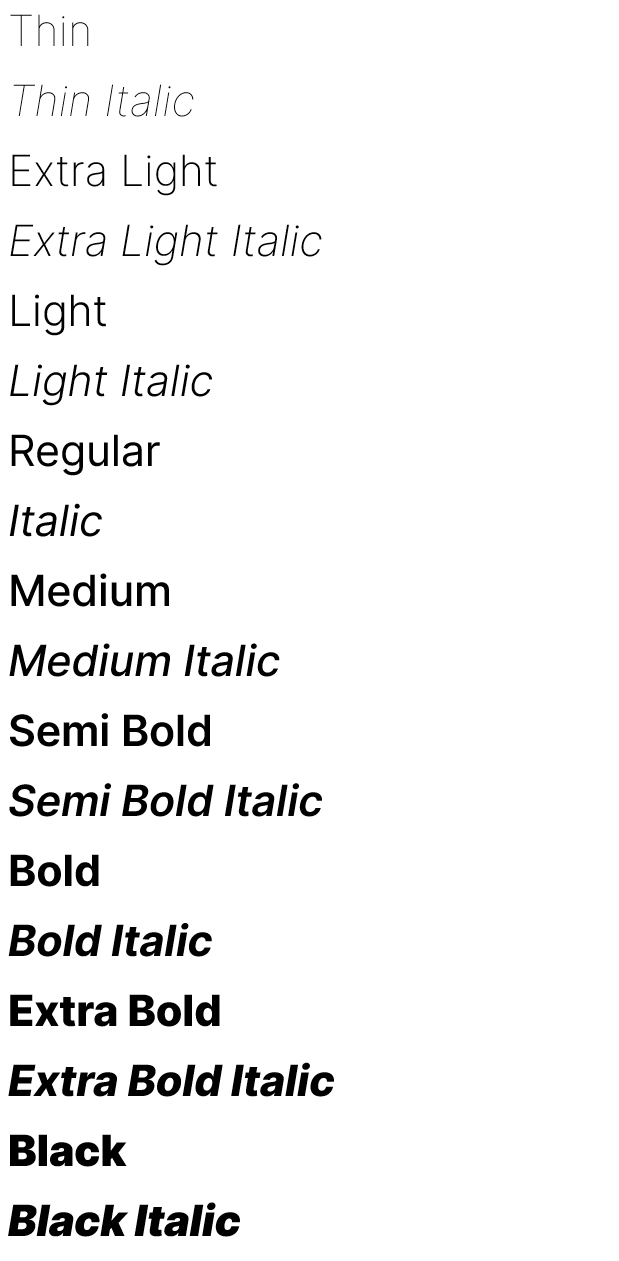
@rsms The settings image is actually wrong: items are duplicating.
The following STAT will create a proper list.
<STAT>
  <Version value="0x00010002"/>
  <DesignAxisRecordSize value="8"/>
  <!-- DesignAxisCount=2 -->
  <DesignAxisRecord>
    <Axis index="0">
      <AxisTag value="wght"/>
      <AxisNameID value="271"/>  <!-- Weight -->
      <AxisOrdering value="0"/>
    </Axis>
    <Axis index="1">
      <AxisTag value="slnt"/>
      <AxisNameID value="272"/>  <!-- Slant -->
      <AxisOrdering value="1"/>
    </Axis>
  </DesignAxisRecord>
  <!-- AxisValueCount=11 -->
  <AxisValueArray>
    <AxisValue index="0" Format="3">
     <AxisIndex value="1"/>
      <Flags value="2"/>
      <ValueNameID value="279"/>  <!-- Regular -->
      <Value value="0.0"/>
      <LinkedValue value="-10.0"/>
    </AxisValue>
    <AxisValue index="1" Format="1">
      <AxisIndex value="1"/>
      <Flags value="0"/>
      <ValueNameID value="280"/>  <!-- Italic -->
      <Value value="-10.0"/>
    </AxisValue>
    <AxisValue index="2" Format="1">
      <AxisIndex value="0"/>
      <Flags value="0"/>
      <ValueNameID value="273"/>  <!-- Thin -->
      <Value value="100.0"/>
    </AxisValue>
    <AxisValue index="3" Format="1">
      <AxisIndex value="0"/>
      <Flags value="0"/>
      <ValueNameID value="275"/>  <!-- Extra Light -->
      <Value value="200.0"/>
    </AxisValue>
    <AxisValue index="4" Format="1">
      <AxisIndex value="0"/>
      <Flags value="0"/>
      <ValueNameID value="277"/>  <!-- Light -->
      <Value value="300.0"/>
    </AxisValue>
    <AxisValue index="5" Format="1">
      <AxisIndex value="0"/>
      <Flags value="2"/>
      <ValueNameID value="279"/>  <!-- Regular -->
      <Value value="400.0"/>
    </AxisValue>
    <AxisValue index="6" Format="1">
      <AxisIndex value="0"/>
      <Flags value="0"/>
      <ValueNameID value="281"/>  <!-- Medium -->
      <Value value="500.0"/>
    </AxisValue>
    <AxisValue index="7" Format="1">
      <AxisIndex value="0"/>
      <Flags value="0"/>
      <ValueNameID value="283"/>  <!-- Semi Bold -->
      <Value value="600.0"/>
    </AxisValue>
    <AxisValue index="8" Format="1">
      <AxisIndex value="0"/>
      <Flags value="0"/>
      <ValueNameID value="285"/>  <!-- Bold -->
      <Value value="700.0"/>
    </AxisValue>
    <AxisValue index="9" Format="1">
      <AxisIndex value="0"/>
      <Flags value="0"/>
      <ValueNameID value="287"/>  <!-- Extra Bold -->
      <Value value="800.0"/>
    </AxisValue>
    <AxisValue index="10" Format="1">
      <AxisIndex value="0"/>
      <Flags value="0"/>
      <ValueNameID value="289"/>  <!-- Black -->
      <Value value="900.0"/>
    </AxisValue>
  </AxisValueArray>
  <ElidedFallbackNameID value="2"/>  <!-- Regular -->
</STAT>
be5invis
on 20 Aug 2020
@rsms
The weight 400 could also use format 3 value to get linked with Bold.
<STAT>
  <Version value="0x00010002"/>
  <DesignAxisRecordSize value="8"/>
  <!-- DesignAxisCount=2 -->
  <DesignAxisRecord>
    <Axis index="0">
      <AxisTag value="wght"/>
      <AxisNameID value="271"/>  <!-- Weight -->
      <AxisOrdering value="0"/>
    </Axis>
    <Axis index="1">
      <AxisTag value="slnt"/>
      <AxisNameID value="272"/>  <!-- Slant -->
      <AxisOrdering value="1"/>
    </Axis>
  </DesignAxisRecord>
  <!-- AxisValueCount=11 -->
  <AxisValueArray>
    <AxisValue index="0" Format="3">
     <AxisIndex value="1"/>
      <Flags value="2"/>
      <ValueNameID value="279"/>  <!-- Regular -->
      <Value value="0.0"/>
      <LinkedValue value="-10.0"/>
    </AxisValue>
    <AxisValue index="1" Format="1">
      <AxisIndex value="1"/>
      <Flags value="0"/>
      <ValueNameID value="280"/>  <!-- Italic -->
      <Value value="-10.0"/>
    </AxisValue>
    <AxisValue index="2" Format="1">
      <AxisIndex value="0"/>
      <Flags value="0"/>
      <ValueNameID value="273"/>  <!-- Thin -->
      <Value value="100.0"/>
    </AxisValue>
    <AxisValue index="3" Format="1">
      <AxisIndex value="0"/>
      <Flags value="0"/>
      <ValueNameID value="275"/>  <!-- Extra Light -->
      <Value value="200.0"/>
    </AxisValue>
    <AxisValue index="4" Format="1">
      <AxisIndex value="0"/>
      <Flags value="0"/>
      <ValueNameID value="277"/>  <!-- Light -->
      <Value value="300.0"/>
    </AxisValue>
    <AxisValue index="5" Format="3">
      <AxisIndex value="0"/>
      <Flags value="2"/>
      <ValueNameID value="279"/>  <!-- Regular -->
      <Value value="400.0"/>
      <LinkedValue value="700.0"/>
    </AxisValue>
    <AxisValue index="6" Format="1">
      <AxisIndex value="0"/>
      <Flags value="0"/>
      <ValueNameID value="281"/>  <!-- Medium -->
      <Value value="500.0"/>
    </AxisValue>
    <AxisValue index="7" Format="1">
      <AxisIndex value="0"/>
      <Flags value="0"/>
      <ValueNameID value="283"/>  <!-- Semi Bold -->
      <Value value="600.0"/>
    </AxisValue>
    <AxisValue index="8" Format="1">
      <AxisIndex value="0"/>
      <Flags value="0"/>
      <ValueNameID value="285"/>  <!-- Bold -->
      <Value value="700.0"/>
    </AxisValue>
    <AxisValue index="9" Format="1">
      <AxisIndex value="0"/>
      <Flags value="0"/>
      <ValueNameID value="287"/>  <!-- Extra Bold -->
      <Value value="800.0"/>
    </AxisValue>
    <AxisValue index="10" Format="1">
      <AxisIndex value="0"/>
      <Flags value="0"/>
      <ValueNameID value="289"/>  <!-- Black -->
      <Value value="900.0"/>
    </AxisValue>
  </AxisValueArray>
  <ElidedFallbackNameID value="2"/>  <!-- Regular -->
</STAT>
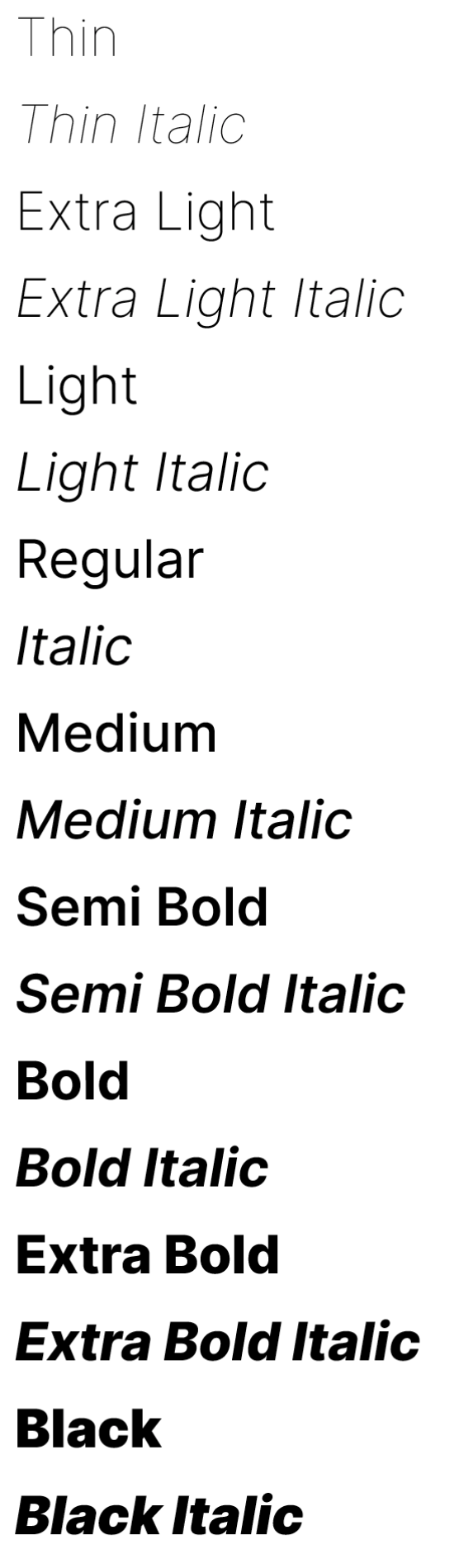
Updated the patching code to create a table like that @be5invis with linking (nice!) and it seems to work well.
Windows seems to be the only app affected by these changes, by the way.
rsms
on 20 Aug 2020
Here's a build of master (f7924a233e82f71872c31eaa2093401a74f35460):
Inter-3.15-text-f7924a233e.zip
rsms
on 20 Aug 2020
@rsms This one worked well. Closing :)
be5invis
on 20 Aug 2020
Thank you @be5invis for all your help on this!
rsms
on 20 Aug 2020
This has now been released as part of version 3.15 🎉
Try it out here: https://rsms.me/inter/lab/
rsms
on 20 Aug 2020
Looks good :)
 Lorp
on 21 Aug 2020
Lorp
on 21 Aug 2020
Related issues
 dom1n1k
·
3Comments
dom1n1k
·
3Comments
 ivan-kleshnin
·
6Comments
ivan-kleshnin
·
6Comments
 vilav
·
5Comments
vilav
·
5Comments
 den32ds
·
6Comments
den32ds
·
6Comments
 cssobral2013
·
3Comments
cssobral2013
·
3Comments