Inter: Issue with contextual "r" ligature on Windows 10 (ClearType)
Describe the bug
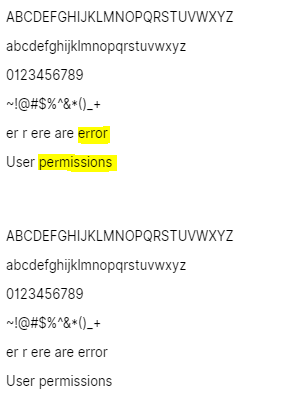
I'm running into a hinting issue using the latest 3.3 web hinted version. The letter 'r' seems to be inconsistent. The 3.2 version does not have this same issue.
To Reproduce
Steps to reproduce the behavior:
- Be on Windows 10 (I have not tested other versions of Windows)
- https://jsfiddle.net/718ohg2p/9/
Screenshots
Top is 3.3, bottom is 3.2
Environment
- OS: Windows 10
- Chrome / Firefox
- Inter-3.3 - any weight (example uses regular)
Additional context
Does not appear to be an issue in Edge.
 dylanjmcdonald
All 11 comments
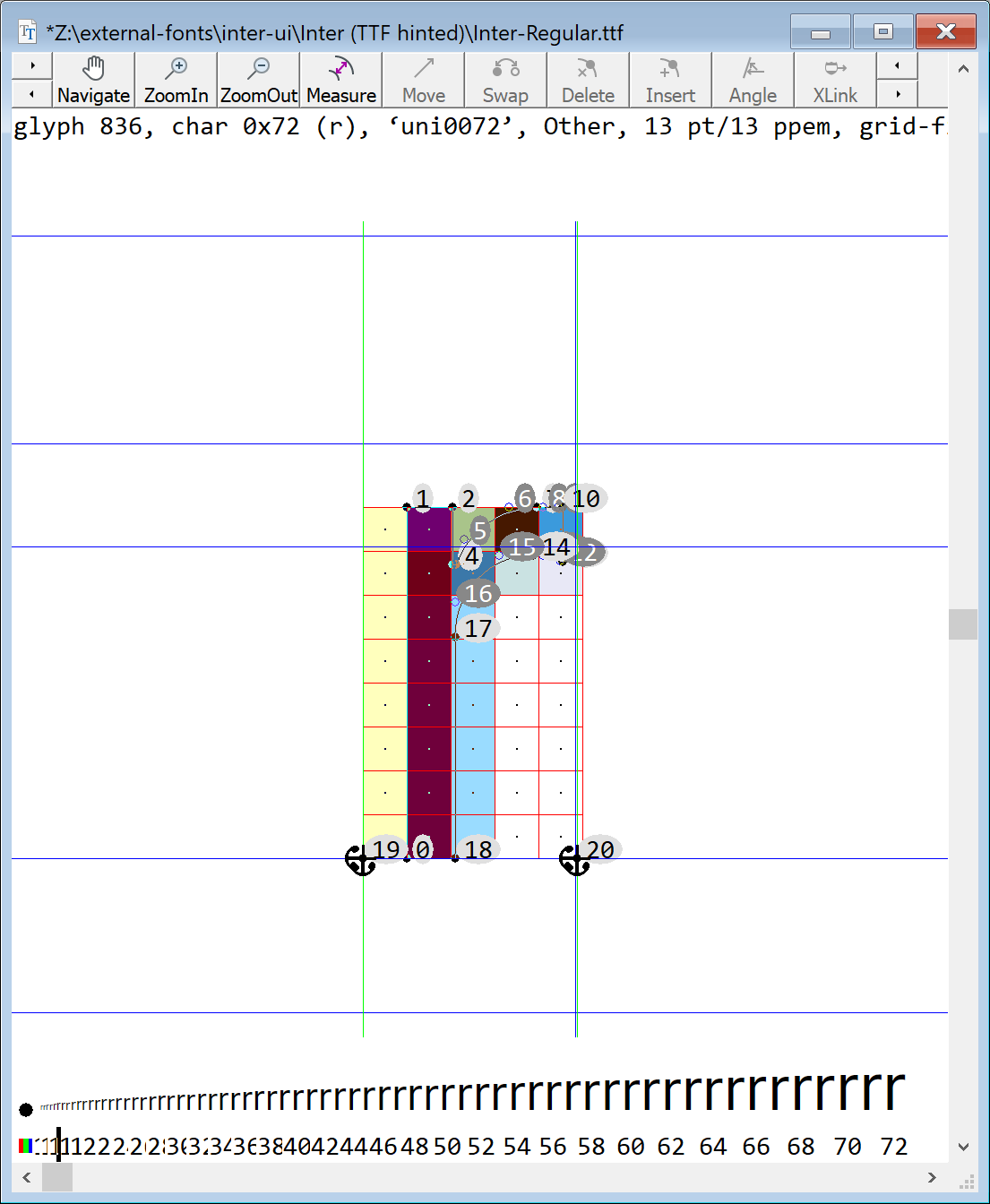
This is GID#836 (r) at 13ppem
This is GID#853 (uni0072.1) at 13ppem
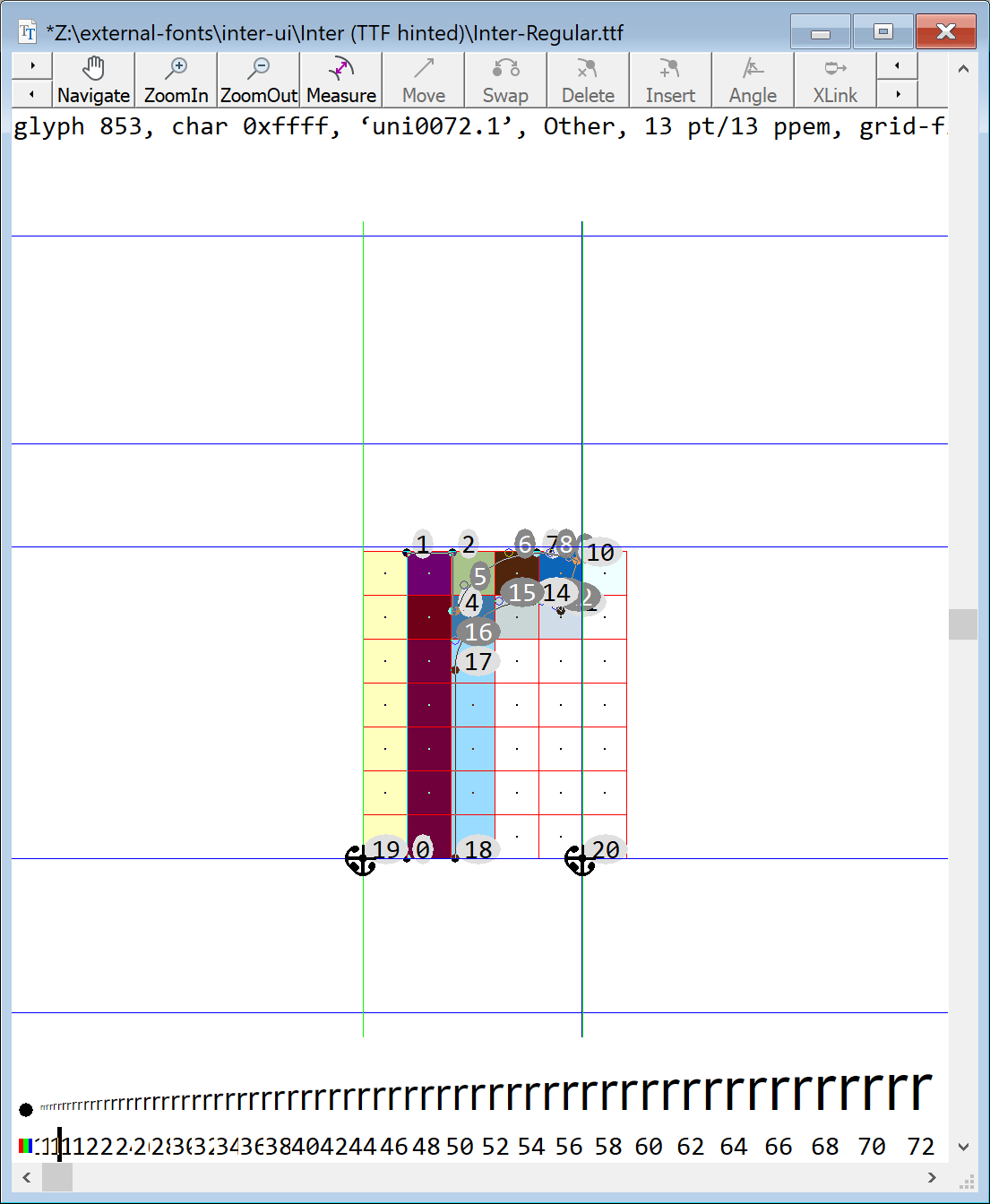
The reason that caused this may be that TTFAutohint does not think GID#853 is an alternative of GID#836? @lemzwerg
 be5invis
on 19 Apr 2019
be5invis
on 19 Apr 2019
Yes, something along this direction. Version 3.3 of the font contains a DFLT language tag for the hebr (!) script in the GSUB table that uses feature 0 (aalt), which in turn uses lookup 1, which in turn contains glyph uni0072.1. ttfautohint thus constructs a hebr_dflt 'style' that contains this glyph (among others). Since the font doesn't contain a single Hebrew glyph ttfautohint can't derive any blue zones, causing bad hinting.
Note that hebr gets sorted before latn; you would have got a correct result if ttfautohint handled the Latin script before Hebrew (because a glyph internally gets only assigned to a single 'style'). However, you can't influence this order; this means that errors as the above can have a big impact.
The obvious solution is to remove any references to Hebrew in both the GSUB and GPOS tables.
BTW, if you call ttfautohint with
ttfautohint --debug -l 15 -r 15 Inter-Regular.ttf /dev/null &> Inter-Regular.ttf.log
you get a log file that shows up how ttfautohint constructs 'styles' (options -l 15 -r 15 restrict the hinting to a single size to reduce the logging output).
 lemzwerg
on 20 Apr 2019
lemzwerg
on 20 Apr 2019
Interesting! Thank you for investigating this.
I'm using Glyphs.app's automatic languagesystem feature where the app generates the language tags automatically. Perhaps a bug in Glyphs.
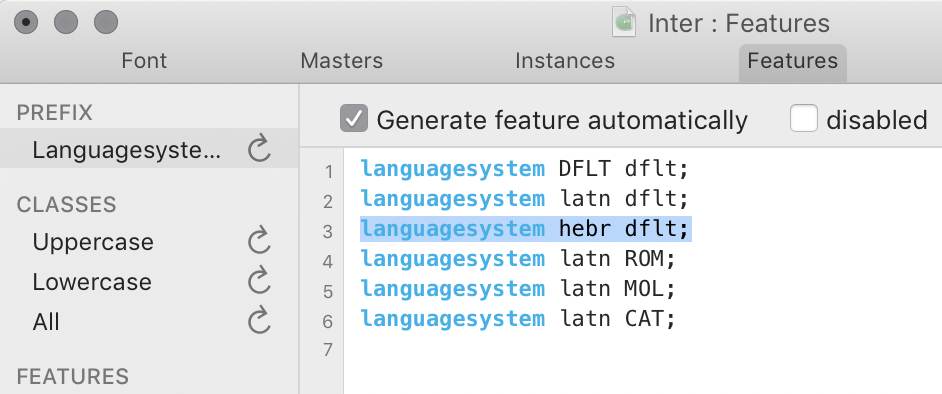
Here's a build without the hebr language tag:
Inter-3.6-24839de654.zip
 rsms
on 24 Apr 2019
rsms
on 24 Apr 2019
@schriftgestalt Georg, please comment!
lemzwerg
on 24 Apr 2019
The font has some glyph names that resemble hebrew glyph names. e.g.: finalkaf for LATIN SMALL LETTER LS DIGRAPH. I would suggest to rename those glyphs (finalkaf, finalmem, finaltsadi, qofdagesh).
 schriftgestalt
on 24 Apr 2019
schriftgestalt
on 24 Apr 2019
@lemzwerg So when you decide the script of a glyph, if it is mentioned by a GSUB lookup tagged with script S, then you will think its script would be S? In many fonts, lookups will be shared across scripts, so this method would lead to many mistakes.
I think we can have better heuristics, like, since GSUB defines how we transform glyphs, then when deciding a “destination” glyph’s script, we can take the source glyph into consideration too.
be5invis
on 24 Apr 2019
The languages system definition is not only for GSUB but also for GPOS. And as the GPOS features are not there when the LanguageSystem code is generated, it needs to be a bit more greedy than needed. This is only a problem with fonts like this where a few glyphs are flagged with the wrong script. So the LanguageSystem code generator is not the problem here (it still could be better, I know).
schriftgestalt
on 24 Apr 2019
Thank you for chiming in @schriftgestalt!
For now I simply disabled automatic language tag generation as this font won’t be growing in language support/coverage anytime soon. Renaming the glyphs sounds like a good idea nonetheless.
I’d be interested to hear from the reporter @dylanjmcdonald if the hinted font files in the zip attached to the above comment resolves this issue. It’s a build without any Hebrew language tag.
rsms
on 24 Apr 2019
@be5invis I don't think that the current system used by ttfautohint leads to many errors. Please bear in mind that the assignment to a script has a single purpose, namely to find blue zones. Assuming that glyph X should be usable with both scripts A and B, it is a safe assumption IMHO that X fits into the blue zones of both A and B. Since a single glyph can only have a single set of hinting (and hinting instructions are completely agnostic of scripts), it thus doesn't matter which script it gets assigned to.
The font in question had assignments to the Hebrew script in both the GSUB and GPOS tables, however, it has zero Hebrew glyphs. In other words, the font was lying to ttfautohint, which (normally) doesn't work.
lemzwerg
on 24 Apr 2019
@rsms The issue is resolved with the fonts in the attached zip file. (REF: https://jsfiddle.net/4d9acn50/1/)
dylanjmcdonald
on 24 Apr 2019
Shipped with release 3.6
rsms
on 27 May 2019
Related issues
 jenil
·
7Comments
jenil
·
7Comments
 csampersand
·
3Comments
csampersand
·
3Comments
 sk1nzz
·
4Comments
sk1nzz
·
4Comments
 PolMrt
·
5Comments
PolMrt
·
5Comments
 chrisdrackett
·
6Comments
chrisdrackett
·
6Comments