Inter: Unable to embed font in LibreOffice when exporting as ODT and DOCX
Describe the bug
A clear and concise description of what the bug is.
To Reproduce
Steps to reproduce the behavior:
- Create new text document in LibreOffice Writer
- Go to
File > Properties... - Go to
Fonttab and checkEmbed fonts in the document. Note that this option may not be present for macOS. - Set document font to "Inter UI" and save
- Transfer the document to other devices without "Inter UI" installed
Expected behavior
The embedded font should appear
Actual behavior
The text uses a fallback Arial font (as in Microsoft Office 2010, Windows 7 Ultimate)
Environment
- OS: Linux Mint 18 (Ubuntu 18.04)
- LibreOffice 6.0.6.2
- Inter UI Regular 3.0 (Stable release), OpenType version
Additional context
- I think this might be related with font license / permission settings on the font file's metadata. As of now I am unable to find the requirements from LibreOffice for fonts to be embedded.
- This embedding capability is tested against Montserrat.
- Fonts still can be embedded in PDF, but not in the ODT / DOCX file.
 reinhart1010
All 9 comments
I really have no idea how to debug this. There have been other reports of issues specifically with LibreOffice and my guess is that there are some bugs in that software. I.e. if it succeeds with embedding the font when it compiles a PDF but fails when compiling a different format, that indicates there's at least an issue with their ODT / DOCX compiler.
Since you have the nice OTF files (with CFF-outlines) installed, it's very possible that the bug is related to CFF outlines and that simply removing the OTF files and installing the TTF files will fix it.
The only difference between the OTF files and the TTF files is that TTF has slightly less precise outlines (the TTF font files uses quadratic bezier curves while the OTF fonts uses cubic bezier curves.) It really shouldn't matter in most cases, so I'd recommend trying to remove the OTF files and installing the TTF files.
 rsms
on 24 Nov 2018
rsms
on 24 Nov 2018
@reinhart1010 Would you mind trying out Inter UI release v3.2 to see if this is still an issue? v3.2 was compiled with an updated toolchain that addresses a bug in fonttools which might have caused issues before.
rsms
on 6 Jan 2019
Unfortunately, this issue still exists (Left: actual results, Right: PDF file created on Windows)
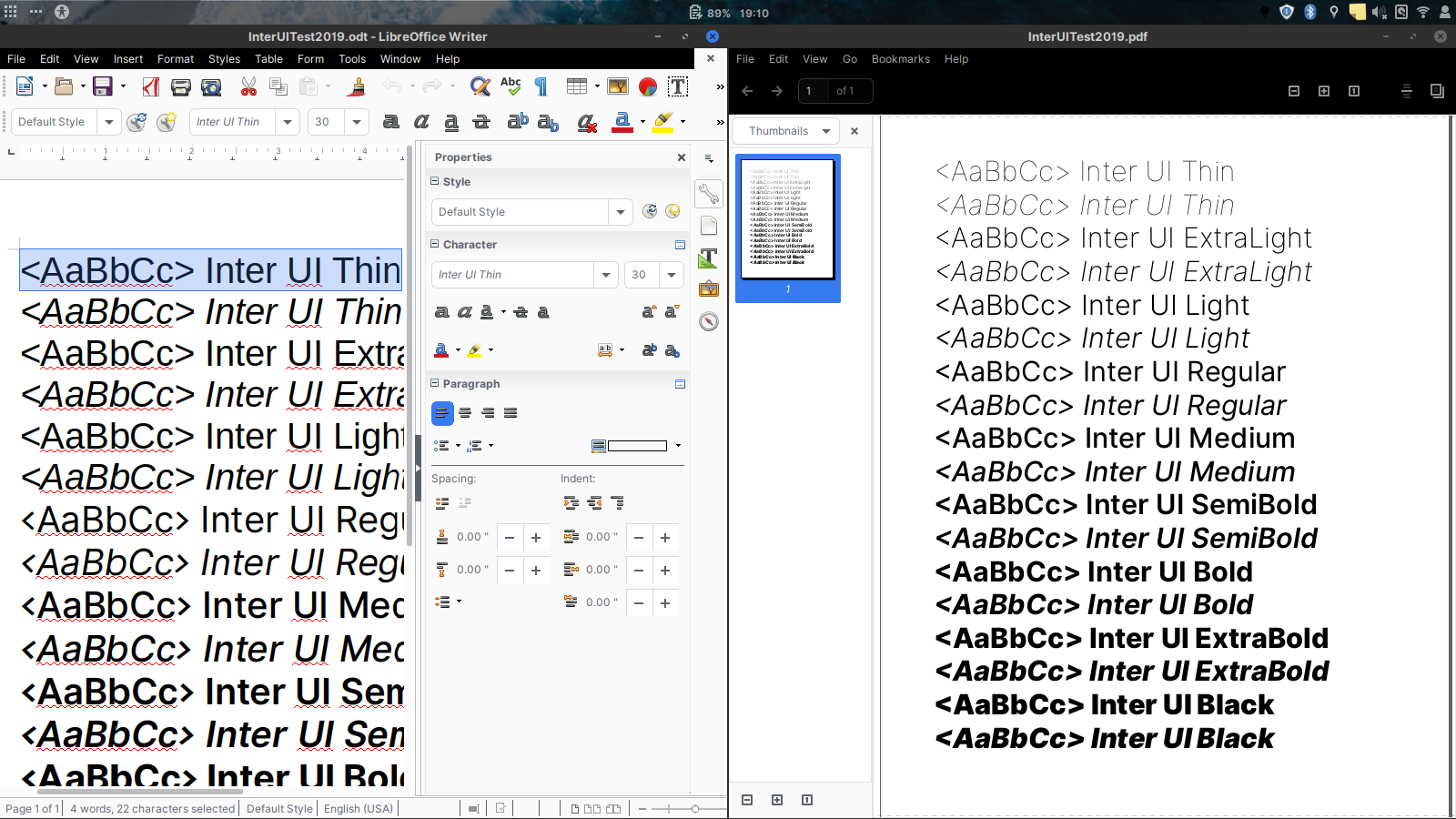
Tested in LibreOffice 6.1 in Windows 10 (where file is created), and LibreOffice 6.0 in Ubuntu 18.04 LTS (where screenshot is taken). In Ubuntu the older font version (3.0.0) is installed.
reinhart1010
on 6 Jan 2019
The PDF does look correct though. I thought the issue was that the font would not be embedded in the PDF..?
Did you try installing the TTF files instead of the OTF files?
rsms
on 27 Jan 2019
The PDF was generated on Windows, which the newer font is installed. I use OTF version for both OSes.
reinhart1010
on 28 Jan 2019
So, if I understand the issue correctly:
- Use Linux Mint 18
- Have _either_ OTF _or_ TTF files for Inter UI locally installed
- Use LibreOffice Writer 6.0
- Create a new text document, using Inter UI in the document
- Enable the "Embed fonts in the document" option in "File" > "Properties..."
- Save the document to file
- Switch to Windows 10, but make sure that Inter UI font files are NOT installed on that machine
- Open the previously exported file in LibreOffice Writer 6.0 on Windows 10
Expected: LibreOffice to include the font files inside the office file
Actual: The font is replaced by some other locally-available font (it appears that the font was not embedded in the office file)
If these assumptions are correct, what you want to do is this:
- Make sure this is actually what is supposed to happen. I'm not familiar with LibreOffice but embedding entire fonts into source documents seems like a strange feature. Is it possible this option does something different? (like including fonts when you export a PDF, rather than saving the LibreOffice file)
- Inspect the saved LibreOffice file (e.g. with a capable text/data editor) and see if the font data is embedded. A quick hint to yes/no would be to look at the file size. It should be fairly large if the font files are embedded.
- See if this is an issue previously reported with LibreOffice
rsms
on 28 Jan 2019
Yes, this one is correct.
reinhart1010
on 28 Jan 2019
The problem is LibreOffice not these fonts.
LibreOffice is only embedding the four R/I/B/BI weights for almost all fonts tested.
This includes FOSS and commercial fonts.
You can test with the Source Sans Pro family which is included with LibreOffice.
Create a document which includes all 12 styles, and save it, extract the ODT (ZIP), looks in Fonts folder.
For Source Sans Pro you will only find Regular, Italic, Bold, and Bold Italic (stupidly numbered).
Note I tested on Windows; it may be different on Linux or Mac.
Regarding LibreOffice embedding fonts in PDFs, it _always_ embeds a subset of fonts.
The "Embed Fonts" setting has no effect on this at all.
That setting only affects putting the fonts in the ODT (or DOCX).
The Inter fonts did all embed in the PDF correctly until the BETA fonts were added.
The BETA style group names are so wacko that LibreOffice cannot figure-out what to do.
I renamed the fonts properly so I could test the whole family (as Inter LO).
Now it all works.
Soooo ... this issue is not an Inter fonts issue and can be closed.
 kenmcd
on 16 Apr 2019
kenmcd
on 16 Apr 2019
Thank you for investigating and explaining @kenmcd
rsms
on 30 Apr 2019
Related issues
 pakastin
·
8Comments
pakastin
·
8Comments
 anthrotype
·
4Comments
anthrotype
·
4Comments
 jenil
·
7Comments
jenil
·
7Comments
 bhellman1
·
3Comments
bhellman1
·
3Comments
 itsnwa
·
4Comments
itsnwa
·
4Comments