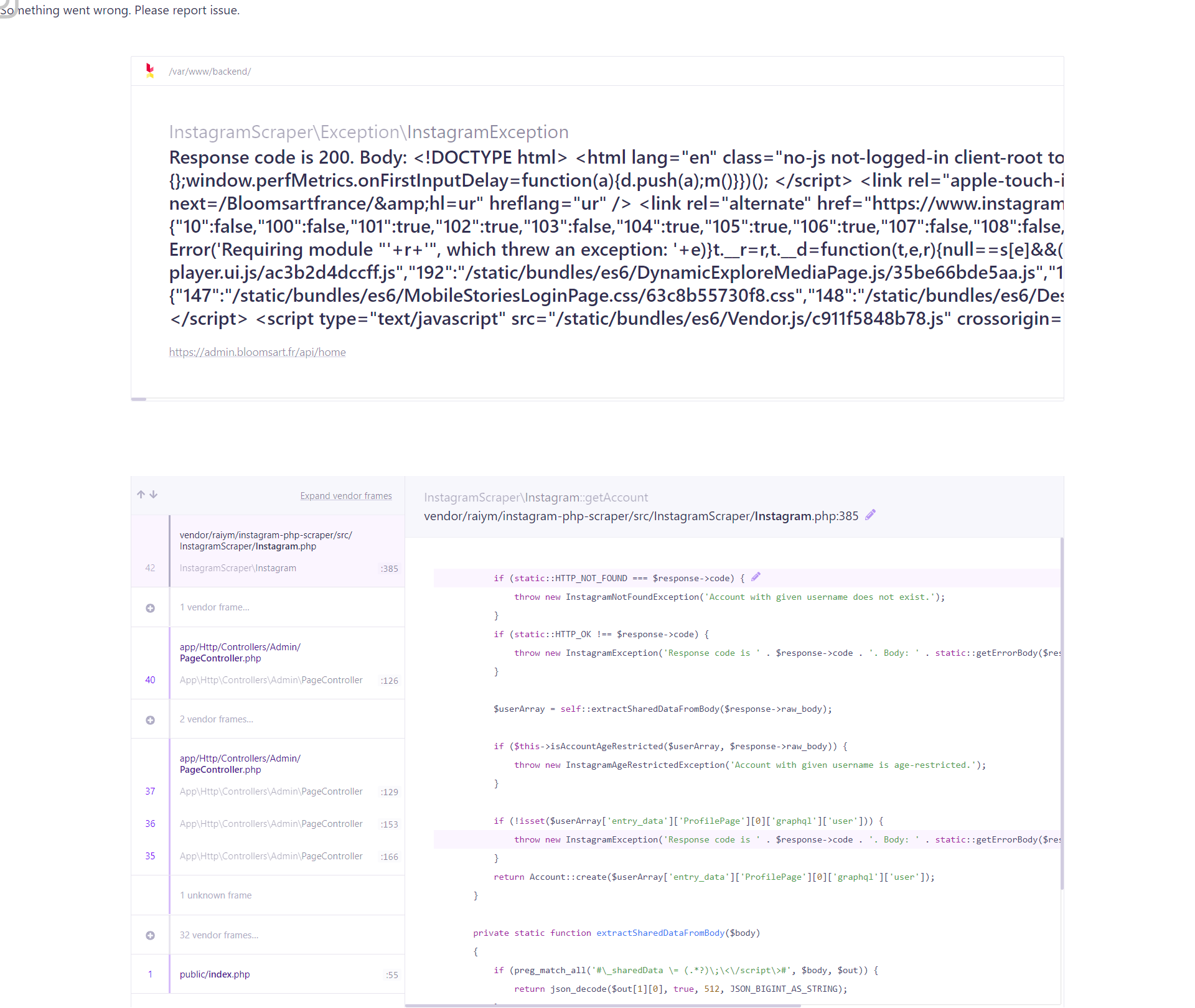
Instagram-php-scraper: Fatal error: Uncaught InstagramScraper\Exception\InstagramException: Response code is 200.
Hello , how can I fix ?
Fatal error: Uncaught InstagramScraper\Exception\InstagramException: Response code is 200. Body: ...
master\examples\panel\src\InstagramScraper\Instagram.php on line 358
An obstacle error and how to fix it all the time
 rucesocial
All 29 comments
Have the sne error with proxy or not
userArray:
{"config":{"csrf_token":"060f0105a98a5fad3f212f444706ef42","viewer":null,"viewerId":null},"country_code":"MX","language_code":"en","locale":"en_US","entry_data":{"LoginAndSignupPage":[{"captcha":{"enabled":false,"key":""},"gdpr_required":false,"tos_version":"row","username_hint":""}]},"hostname":"www.instagram.com","is_whitelisted_crawl_bot":false,"deployment_stage":"c2","platform":"web","nonce":"J4SQKK6oGi\/z+GBTrIvwxA==","mid_pct":13.54084,"zero_data":[],"cache_schema_version":3,"server_checks":[],"knobx":{"4":false,"17":false,"20":true,"22":true,"23":true,"24":true,"25":true,"26":true},"to_cache":{"gatekeepers":{"4":true,"5":false,"6":false,"7":false,"8":false,"9":false,"10":false,"11":false,"12":false,"13":true,"14":true,"15":true,"16":true,"18":true,"19":false,"23":false,"24":false,"26":true,"27":false,"28":false,"29":true,"31":false,"32":true,"34":false,"35":false,"38":true,"40":true,"41":false,"43":true,"59":true,"61":false,"62":false,"63":false,"64":false,"65":false,"67":true,"68":false,"69":true,"71":false,"72":true,"73":false,"74":false,"75":true,"77":false,"78":true,"79":false,"81":false,"82":true,"84":false,"86":false,"88":true,"91":false,"95":true,"97":false,"99":false,"100":false,"101":true,"102":true,"103":false,"104":false,"105":true,"106":false,"107":false,"108":false},"qe":{"app_upsell":{"g":"","p":[]},"igl_app_upsell":{"g":"","p":[]},"notif":{"g":"","p":[]},"onetaplogin":{"g":"","p":[]},"multireg_iter":{"g":"control_11_30","p":{"has_back_removed":"false"}},"felix_clear_fb_cookie":{"g":"","p":[]},"felix_creation_duration_limits":{"g":"","p":[]},"felix_creation_fb_crossposting":{"g":"","p":[]},"felix_creation_fb_crossposting_v2":{"g":"","p":[]},"felix_creation_validation":{"g":"","p":[]},"mweb_topical_explore":{"g":"","p":[]},"post_options":{"g":"","p":[]},"iglscioi":{"g":"","p":[]},"sticker_tray":{"g":"","p":[]},"web_sentry":{"g":"","p":[]},"0":{"p":{"4":true,"7":true,"8":true,"9":false},"qex":true},"2":{"p":[true],"qex":true},"4":{"p":[true],"qex":true},"5":{"p":{"1":false},"qex":true},"6":{"p":{"1":true,"5":false,"6":false,"7":false,"9":false,"10":false},"qex":true},"10":{"p":{"2":false},"qex":true},"12":{"p":[5],"qex":true},"13":{"p":[true],"qex":true},"16":{"p":[false],"qex":true},"17":{"p":{"1":true},"qex":true},"19":{"p":[true],"qex":true},"21":{"p":{"2":false},"qex":true},"22":{"p":{"1":false,"2":8,"3":0.85,"4":0.95,"10":0,"11":15,"12":3,"13":false},"qex":true},"23":{"p":[false,false],"qex":true},"25":{"p":[],"qex":true},"26":{"p":[""],"qex":true},"28":{"p":[false],"qex":true},"29":{"p":[],"qex":true},"30":{"p":[true],"qex":true},"31":{"p":[],"qex":true},"33":{"p":[],"qex":true},"34":{"p":[false],"qex":true},"35":{"p":[false],"qex":true},"36":{"p":[true,true,false,false,false],"qex":true},"37":{"p":[false],"qex":true},"39":{"p":{"0":false,"6":false,"7":false,"8":false,"14":false},"qex":true},"41":{"p":{"3":true},"qex":true},"42":{"p":[true],"qex":true},"43":{"p":[false,false,false],"qex":true},"44":{"p":{"1":"inside_media","2":0.2},"qex":true},"45":{"p":{"12":false,"13":false,"17":0,"18":false,"19":2,"22":true,"23":"ver_1","24":false,"25":"control","26":"control","32":false},"qex":true},"46":{"p":[false],"qex":true},"47":{"p":{"0":true,"1":true,"2":false,"3":false,"4":false,"6":false,"8":false,"9":false,"10":false,"11":false},"qex":true},"49":{"p":[false],"qex":true},"50":{"p":[false],"qex":true},"53":{"p":[5],"qex":true},"54":{"p":[false],"qex":true},"55":{"p":[false],"qex":true},"56":{"p":{"1":true,"2":true},"qex":true},"58":{"p":[0,false],"qex":true},"59":{"p":[true],"qex":true},"62":{"p":[false],"qex":true},"64":{"p":[false],"qex":true},"65":{"p":[],"qex":true},"66":{"p":[false],"qex":true},"67":{"p":[true,true,true,true,false,false],"qex":true},"68":{"p":[false],"qex":true},"69":{"p":[true],"qex":true},"70":{"p":{"1":"Instagramu306fu30a2u30d7u30eau3067u3088u308au5febu9069u306bu3054u5229u7528u306bu306au308cu307eu3059","2":"u30a2u30d7u30eau306bu306fu3088u308au591au304fu306eu30abu30e1u30e9u30a8u30d5u30a7u30afu30c8u3084u30b9u30bfu30f3u30d7u304cu3042u308au307eu3059u3002u30e1u30c3u30bbu30fcu30b8u3092u9001u4fe1u3059u308bu65b9u6cd5u3082u3088u308au591au304fu3042u308au307eu3059u3002","3":"u30a2u30d7u30eau3092u5229u7528"},"qex":true},"71":{"p":{"1":"^\/explore\/.*|^\/accounts\/activity\/$"},"qex":true},"72":{"p":[false,true,true,false,false],"qex":true},"73":{"p":[false],"qex":true},"74":{"p":{"1":false,"2":false,"3":false,"4":false,"5":false,"6":false,"7":false,"8":false,"9":false,"10":false},"qex":true},"75":{"p":[true],"qex":true},"76":{"p":[true,false],"qex":true},"77":{"p":[true,false],"qex":true},"78":{"p":[true,false],"qex":true},"80":{"p":{"3":false},"qex":true},"81":{"p":[false],"qex":true},"82":{"p":[false,false],"qex":true},"84":{"p":{"0":true,"1":true,"2":true,"3":false,"4":true,"5":true,"6":false,"8":false},"qex":true},"85":{"p":[false,"Pictures and Videos"],"qex":true},"87":{"p":[true],"qex":true},"89":{"p":[false],"qex":true},"91":{"p":[false],"qex":true},"92":{"p":[36],"qex":true},"93":{"p":[true],"qex":true},"95":{"p":[false,false],"qex":true},"96":{"p":[false],"qex":true},"97":{"p":[],"qex":true},"98":{"p":[false,false],"qex":true},"99":{"p":[false],"qex":true},"100":{"p":[],"qex":true},"101":{"p":[false,false],"qex":true},"102":{"p":[true],"qex":true},"103":{"p":[true,false],"qex":true},"104":{"p":[true],"qex":true},"105":{"p":["control"],"qex":true},"106":{"p":[],"qex":true},"107":{"p":[],"qex":true},"108":{"p":[false,false],"qex":true}},"probably_has_app":false,"cb":false},"device_id":"D911E479-1602-43AF-8AD2-B2D74AD503AD","encryption":{"key_id":"25","public_key":"33cc4b54b0cabea938083f59a6f6930507e364c846c672614790d7bbe87a8e24"},"rollout_hash":"7e00d83c1b4e","bundle_variant":"metro","is_canary":false}
Something went wrong. Please report issue.
Filename: vendor/raiym/instagram-php-scraper/src/InstagramScraper/Instagram.php
There is no "ProfilePage" in "entry_data"
Does it means proxy and local ip has banned?
 dlyakin
on 30 Mar 2020
dlyakin
on 30 Mar 2020
i have same problem bro
 alihuc
on 30 Mar 2020
alihuc
on 30 Mar 2020
Same here. This happened when switched on php 7.4
 rikless
on 10 Apr 2020
rikless
on 10 Apr 2020
I've instantiated this way :
$instagram = InstagramScrapper::withCredentials(env('INSTA_USER'), env('INSTA_PASS'), new PSRCacheInterface());
And now it works. In the body, you can see : is_whitelisted_crawl_bot":false, so it looks like instagram flagged the way its scrapped, and require login.
If you copy past the body response, you can see it's redirected to instagram login page.
rikless
on 10 Apr 2020
I've instantiated this way :
$instagram = InstagramScrapper::withCredentials(env('INSTA_USER'), env('INSTA_PASS'), new PSRCacheInterface());And now it works. In the body, you can see :
is_whitelisted_crawl_bot":false,so it looks like instagram flagged the way its scrapped, and require login.
If you copy past the body response, you can see it's redirected to instagram login page.
I did not understand. How do I instantiate "PSRCacheInterface"?
 recoverjp
on 16 Apr 2020
recoverjp
on 16 Apr 2020
$instagram = \InstagramScraper\Instagram::withCredentials(
    $username,
    $password,
    new Phpfastcache\Helper\Psr16Adapter('Files',
        new Phpfastcache\Config\ConfigurationOption(['defaultTtl' => 43200]) // Auth cache 1 day
    )
);
$instagram->login();
$instagram->saveSession();
 ig0r74
on 16 Apr 2020
ig0r74
on 16 Apr 2020
composer.json
{
"require": {
"raiym/instagram-php-scraper": "^0.9.2",
"phpfastcache/phpfastcache": "^7.1"
}
}
@recoverjp I've used this : https://gist.github.com/leo108/bd7559654c52000cc9774a80b072c629
I'm on a Laravel app in my case.
rikless
on 17 Apr 2020
@recoverjp I've used this : https://gist.github.com/leo108/bd7559654c52000cc9774a80b072c629
I'm on a Laravel app in my case.
In my case it didn't work. After a few requests, I start receiving code 200. Do you make a lot of requests in your application? Because in my case, there are many requests. But that doesn't happen when I use another API. Can you tell me if it's a configuration?
recoverjp
on 19 Apr 2020
Not so much. I have around 40 websites, and each makes 1 request every 4 hours because it's cached in redis
rikless
on 20 Apr 2020
So that must be it. My website has many requests per minute, where users can download the stories.
recoverjp
on 20 Apr 2020
I have the error again, on a website where there is only one or 2 visits per day. I don't understand why at this point.
rikless
on 24 Apr 2020
Hi @recoverjp ,
While using phpfastcache , error is occurring. {. Fatal error: Uncaught Error: Call to undefined method Phpfastcache\Helper\Psr16Adapter::getItem() in /home/xxxx/xxxx/vendor/raiym/instagram-php-scraper/src/InstagramScraper/Instagram.php:1346 Stack trace: #0 }
Please help me
Thank you,
 zubairsultan786
on 24 Apr 2020
zubairsultan786
on 24 Apr 2020
You should create another issue. It's not related to this issue.
rikless
on 24 Apr 2020
@rikless Very strange. I use another API on a website that makes thousands of requests per day and works normally.
recoverjp
on 24 Apr 2020
@recverjp which api you are referring to? and how you are using?
On Fri, Apr 24, 2020 at 7:04 PM recoverjp notifications@github.com wrote:
@rikless https://github.com/rikless Very strange. I use another API on
a website that makes thousands of requests per day and works normally.—
You are receiving this because you commented.
Reply to this email directly, view it on GitHub
https://github.com/postaddictme/instagram-php-scraper/issues/632#issuecomment-619101686,
or unsubscribe
https://github.com/notifications/unsubscribe-auth/AIHRSC3UXMKS6GQWESXWFHTROG2BJANCNFSM4LTSM3GA
.
--
Zubair Sultan Skyward Manager
https://www.google.com/url?q=https%3A%2F%2Fwww.aisr.org&sa=D&sntz=1&usg=AFQjCNFdGgwUctCn41yHhAu9Bwvk_-UTiw
[email protected] asultan@aisr.org
American International School - Riyadh
https://www.google.com/url?q=https%3A%2F%2Fwww.aisr.org&sa=D&sntz=1&usg=AFQjCNFdGgwUctCn41yHhAu9Bwvk_-UTiw
Box 990, Riyadh 11421, KSA
Tel: +966-11-459-7500 ext: 337
zubairsultan786
on 25 Apr 2020
$instagram = \InstagramScraper\Instagram::withCredentials(
    $username,
    $password,
    new Phpfastcache\Helper\Psr16Adapter('Files',
        new Phpfastcache\Config\ConfigurationOption(['defaultTtl' => 43200]) // Auth cache 1 day
    )
);
$instagram->login();
$instagram->saveSession();
Pity. Instagram always blocks my login and asks me if that was me when I open the app.
 Muetze42
on 27 Apr 2020
Muetze42
on 27 Apr 2020
which api you are referring to? and how you are using?
I'm talking about mgp2 /instagram-api, but it was removed from github
recoverjp
on 27 Apr 2020
$instagram = \InstagramScraper\Instagram::withCredentials(
    $username,
    $password,
    new Phpfastcache\Helper\Psr16Adapter('Files',
        new Phpfastcache\Config\ConfigurationOption(['defaultTtl' => 43200]) // Auth cache 1 day
    )
);
$instagram->login();
$instagram->saveSession();
Pity. Instagram always blocks my login and asks me if that was me when I open the app.
It is exactly this error that is happening to me.
recoverjp
on 27 Apr 2020
@recoverjp
I have now created a new account to do this. Laravel Schedule now runs hourly. Let's see if that does any good. Maybe my "normal" account has some sort of security setting or something....
Muetze42
on 29 Apr 2020
@NormanHuth Can be. I still haven't figured out what it can be.
recoverjp
on 30 Apr 2020
@recoverjp So far it works with a different account. I just made some adjustments. If the login doesn't work, my script tries it as a guest.
try {
$instagram = Instagram::withCredentials(
env('INSTAGRAM_LOGIN'),
env('INSTAGRAM_PASSWORD'),
new Psr16Adapter('Files', new ConfigurationOption(['defaultTtl' => 86400]))
);
$instagram->login();
$instagram->saveSession();
Log::info('Connect on instagram as user');
} catch (\Exception $exception) {
Log::warning($exception);
$instagram = new Instagram();
Log::info('Connect on instagram as guest');
}
 asolopovas
on 2 Jun 2020
asolopovas
on 2 Jun 2020
$instagram = \InstagramScraper\Instagram::withCredentials(
    $username,
    $password,
    new Phpfastcache\Helper\Psr16Adapter('Files',
        new Phpfastcache\Config\ConfigurationOption(['defaultTtl' => 43200]) // Auth cache 1 day
    )
);
$instagram->login();
$instagram->saveSession();
Here what is "Files"? Is this path of cache? Please confirm. Thanks.
 kamleshwebtech
on 21 Jun 2020
kamleshwebtech
on 21 Jun 2020
This issue has been automatically marked as stale because it has not had recent activity. It will be closed if no further activity occurs. Thank you for your contributions.
![stale[bot] picture](https://avatars.githubusercontent.com/in/1724?v=4&s=40) stale[bot]
on 21 Aug 2020
stale[bot]
on 21 Aug 2020
$instagram = \InstagramScraper\Instagram::withCredentials( $username, $password, new Phpfastcache\Helper\Psr16Adapter('Files', new Phpfastcache\Config\ConfigurationOption(['defaultTtl' => 43200]) // Auth cache 1 day ) ); $instagram->login(); $instagram->saveSession();
The problem has not been fixed even when I do the same code.
PHP Fatal error: Uncaught InstagramScraper\Exception\InstagramException: Response code is 200. Body: <!DOCTYPE html>
<html lang="en" class="no-js not-logged-in client-root">
<head>
<meta charset="utf-8">
<meta http-equiv="X-UA-Compatible" content="IE=edge">
<title>
Login • Instagram
</title>
<meta name="robots" content="noimageindex, noarchive">
<meta name="apple-mobile-web-app-status-bar-style" content="default">
<meta name="mobile-web-app-capable" content="yes">
<meta name="theme-color" content="#ffffff">
<meta id="viewport" name="viewport" content="width=device-width, initial-scale=1, minimum-scale=1, maximum-scale=1, viewport-fit=cover">
<link rel="manifest" href="/data/manifest.json">
<link rel="preload" href="/static/bundles/es6/ConsumerUICommons.css/49ce3ec39fe1.css" as="style" type="text/css" crossorigin="anonymous" />
<link rel="preload" href="/static/bundles/es6/Consumer.css/0732f0d98130.css" as="style" type="text/css"
 fmchan
on 20 Sep 2020
fmchan
on 20 Sep 2020
@recoverjp So far it works with a different account. I just made some adjustments. If the login doesn't work, my script tries it as a guest.
        try {
            $instagram = Instagram::withCredentials(
                env('INSTAGRAM_LOGIN'),
                env('INSTAGRAM_PASSWORD'),
                new Psr16Adapter('Files', new ConfigurationOption(['defaultTtl' => 86400]))
            );
            $instagram->login();
            $instagram->saveSession();
            Log::info('Connect on instagram as user');
        } catch (\Exception $exception) {
            Log::warning($exception);
            $instagram = new Instagram();
            Log::info('Connect on instagram as guest');
        }
The problem has not been fixed even when I do the same code.
fmchan
on 20 Sep 2020
I have same problem! Is there any solution?
 amirsarhang
on 23 Nov 2020
amirsarhang
on 23 Nov 2020
I still haven't got it. Unfortunately I had to remove this functionality from my system.
recoverjp
on 23 Nov 2020
Related issues
 joty0
·
3Comments
joty0
·
3Comments
 JOniiX
·
6Comments
JOniiX
·
6Comments
 waffle9012
·
6Comments
waffle9012
·
6Comments
 limminho
·
8Comments
limminho
·
8Comments
 eelcol
·
5Comments
eelcol
·
5Comments
Most helpful comment