Insomnia: Environment color selection on MacOS
Describe the bug
This bug is two-fold:
- When trying to set an environment color on an environment with no color set, the only option for picking a color is RGB. This was not the case on earlier releases, where you could use the "pencil picker" (sorry, I don't know what this is actually called!!) or any of the usual MacOS options to pick.
- For environments where you want to change the color, you have to unset, then you're back to the previous issue. Trying to change without brings the menu up for a second, then it disappears.
I am able to work around this for now by reverting back to 2020.3.0
To Reproduce
Steps to reproduce the behavior:
- Go to manage environments
- Pick an environment with a color
- Go to change color on the environment
- Note no color panel comes up
For the second issue:
Perform steps 1-3
- Note that the color pane that comes up is not the one that is the normal / native MacOS panel for color things; it's a whole other thing that only allows for RGB selection.
Expected behavior
I expect to see the color options as captured under screenshots!!
Screenshots
This is missing:
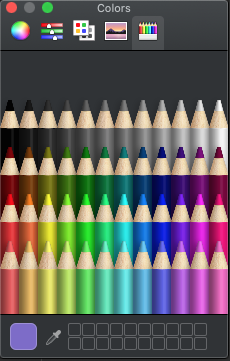
Desktop (please complete the following information):
Version: Insomnia Core 2020.4.0
OS: Darwin x64 19.6.0
Electron: 9.1.1
Node: 12.14.1
Installed either from brew or downloading direct from the website
 stvkpln
All 4 comments
I can take this
 Netoun
on 1 Oct 2020
Netoun
on 1 Oct 2020
For the first issue
When trying to set an environment color on an environment with no color set, the only option for picking a color is RGB. This was not the case on earlier releases, where you could use the "pencil picker" (sorry, I don't know what this is actually called!!) or any of the usual MacOS options to pick.
It is related to the Electron upgrade (see https://github.com/electron/electron/issues/24830#issuecomment-695369844).
This is now the default behavior for Electron and it could be disabled. IMHO we should keep the default behavior. What do you think about it?
 jgiovaresco
on 11 Oct 2020
jgiovaresco
on 11 Oct 2020
This is now the default behavior for Electron and it could be disabled. IMHO we should keep the default behavior. What do you think about it?
I agree to keeping default behavior. If it needs to be changed, can become a custom setting in the future.
 develohpanda
on 19 Oct 2020
develohpanda
on 19 Oct 2020
Just wanted to leave a comment to say thank you for solving -- I get this is a pretty corner case thing for people with Mac's who make use of multiple environments and use colors to differentiate them, so to see this resolved quickly is a big part of why I continue to support Insomnia. You folks are awesome!
stvkpln
on 28 Oct 2020
Related issues
 gschier
·
42Comments
gschier
·
42Comments
 multirealm
·
22Comments
multirealm
·
22Comments
 lillesvin
·
31Comments
lillesvin
·
31Comments
 luispabon
·
21Comments
luispabon
·
21Comments
 Moeriki
·
25Comments
Moeriki
·
25Comments
Most helpful comment
Just wanted to leave a comment to say thank you for solving -- I get this is a pretty corner case thing for people with Mac's who make use of multiple environments and use colors to differentiate them, so to see this resolved quickly is a big part of why I continue to support Insomnia. You folks are awesome!