Hello!
Thank you very much for the cool product!
I'm having trouble syncing. I have one account and several machines. Both machines operate on a MacOS system. Almost every time I synchronize one of my workspaces, I get the following result: my folder that I created is synchronized, but there are no requests inside it! When I create requests on one machine and sort them into directories, only directories reach the other machine. And this problem is observed in several of my workspaces.
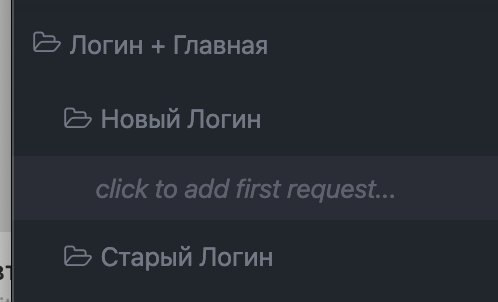
The screenshot shows the folder inside which there should be requests! And they are in one of my cars. But when I came to my other machine, and started synchronization, I got the result as in the screenshot.
I used synchronization in both automatic and manual mode (in manual mode I hoped it would be "more stable").
- OS: 1) macOS 10.15.3. 2) macOS 10.14.6.
- App Version: 7.1.1 (7.1.1.3350)
Thank you!
 tercteberc
All 6 comments
Have you, by any chance, ever moved a request from one workspace to another?
One thing to try is to duplicate the workspace and sync the duplicated one, which will generate new IDs for all local resources. Insomnia can sometimes get into a weird state if, for example, you were manually sharing workspaces via import/export before signing up for sync.
 gschier
on 17 Mar 2020
gschier
on 17 Mar 2020
Yes, that’s exactly what happened!
Request files are sent to me, I import them to myself, but they appear in the workspace that I was thrown off. Because of what I have to move these requests to my space.
Probably duplication will solve my problem, but what about next?)) Do I have to duplicate my workspace every time in my situation?
tercteberc
on 18 Mar 2020
i have the same issue, sync is not fully functioning
- i created a new workspace
- added 1 requests
- invite 2 colleagues to the workspace
- added 1 requests
- added subenvironments & added vars (also to base)
all was good so far.
next day: - my colleague changed 1 var in a subenvironment
- all of my environments were empty for over 10 minutes
- the subenvironments were eventually synced to me, although way to slow
- except for base environment.
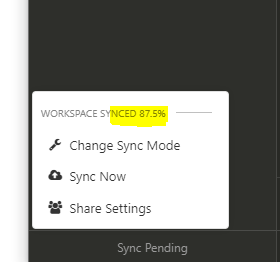
- the sync on my side and his, stops at 87% and never finishes
i did not change anything while sync was busy.
what i've tried
i now manually edited the base env to be identitcal, but no change to sync
we restarted insomnia on both sides
 m-v-k
on 19 Mar 2020
m-v-k
on 19 Mar 2020
so, it's now november and the issues remain.
we pay for insomnia teams, and collaborate with 25+ devs on multiple workspaces.
i hear a lot of complaints from my devs on the syncing issues, some have it set to manual sync, some automatic.
one complaint i hear a lot:
make changes, hit the sync button, and then they are gone (overwritten from server), while there are no changes on the server (the state is now the same as before my local changes).
please prioritize these syncing issues.
m-v-k
on 20 Nov 2020
Hi
I work in a team of 2-3 devs and also have been encountering sync issues. I imported a Swagger config for a third party API. Edited and improved the end results. Then shared to my team, when they load up the folders they are empty just like the above.
Please can you resolve this issue?
 optimus-code
on 1 Dec 2020
optimus-code
on 1 Dec 2020
@m-v-k @optimus-code Hi there,
Could you please try enabling the Version Control beta? It is much more reliable for teams, and will become the primary means of syncing in the near future.
You can do so by following the instructions on https://support.insomnia.rest/article/67-version-control#getting-started.
Do note that all users in a workspace needs to have enabled the Version Control beta in order for sync to work correctly.
If you run into any further issues with sync, please drop an email to [email protected] so that we can better help you.
 DMarby
on 4 Dec 2020
DMarby
on 4 Dec 2020
Related issues
 Natfan
·
3Comments
Natfan
·
3Comments
 sapeish
·
4Comments
sapeish
·
4Comments
 artoodeeto
·
4Comments
artoodeeto
·
4Comments
 tmaiaroto
·
4Comments
tmaiaroto
·
4Comments
 slashsbin
·
4Comments
slashsbin
·
4Comments
Most helpful comment
so, it's now november and the issues remain.
we pay for insomnia teams, and collaborate with 25+ devs on multiple workspaces.
i hear a lot of complaints from my devs on the syncing issues, some have it set to manual sync, some automatic.
one complaint i hear a lot:
make changes, hit the sync button, and then they are gone (overwritten from server), while there are no changes on the server (the state is now the same as before my local changes).
please prioritize these syncing issues.